
Many would agree that you can watch Paramount+ in Australia without issues. However, there’s a problem with the library discrepancy. The US version is superior in content variety, quantity, and quality, which will bother many Australians. If you’re in this country, you might consider watching Paramount+ US.
But then, you’re not in the USA, and you give up. Today is your lucky day. What if we told you that you could watch Paramount+ in Australia and enjoy the entire US library? This means accessing all sports, movies, series, and live TV channels. Don’t pay for the subscription yet.
Read this in-depth guide and learn how to get more content on Paramount+ and pay less for the US version.
Unblock Paramount+ US in Australia: 5 Steps
- Subscribe to NordVPN. You can do so below to get a discount and save money on the 2-year plan.
- Purchase a Paramount+ US gift card through this site (or any other).
- Install NordVPN and connect to the US server.
- Sign up for Paramount+ with your gift card.
- Go ahead and watch exquisite series and movies.
Paramount Plus in Australia vs the United States
Living in Australia means you can access SBS and watch the Australian Open effortlessly. However, if you think about doing that on Paramount+, chances are you won’t be successful. People want to unblock Paramount Plus US in Australia because of more content. The Australian catalog lacks sports; the majority of them.
For instance, NFL matches (including the Super Bowl) aren’t available, and Australians don’t get access to the UEFA Europa League, golf tournaments, and so forth. Another problem is missing shows and movies. The US library generally has a larger spectrum of content, be it movies or series.
You might find that a movie you want to watch is in the US but not in Australia. While the US library also lacks some content compared to the Australian version, this rarely happens.
| Australia | United States | |
| Paramount+ Basic (ads) | AU$9 per month | $5.99 per month |
| Paramount+ Premium (no ads) | AU$13.99 per month | $11.99 per month + Showtime for free |
Price-wise, these two are quite different. Watching Paramount+ in Australia is possible once you pay for either the Basic plan with ads or the Premium plan without ads. You can’t buy the plan with Showtime, which would offer content and hours of entertainment. The Basic plan is AU$9, while the Premium plan is AU$13.99.
When converted to USD, the American version is ever so slightly cheaper. It also lets you buy the Showtime add-on, whereas this library’s Premium plan offers 4K UHD streaming, Dolby Vision, and other tidbits. By the way, these are accessible on the US version too. The US Paramount+ seems to be a lot better and a tad cheaper.
How do I watch Paramount Plus in Australia and enjoy this American luxury? With a VPN. If you’re unsure what we’re aiming for, stick around and find out.
How to Watch Paramount+ in Australia (US Version)
The main condition to access Paramount+ US in Australia is to have a US IP address. Altering your IP to another country is easy. Travel abroad, and you’re done. Or you can get NordVPN, pay around $3.09 a month, and change your IP to up to 130 countries. The latter is more sensible for unblocking Paramount+ in Australia.
A VPN allows you to connect to a remote server, hide your original IP, and take on another. You’ll need a connection to the US server, which will provide access to Paramount Plus US. Not all VPNs work with this streaming platform. For this reason, our team chose NordVPN.
It works without problems and unblocks the platform in Australia and worldwide. Later on, we’ll go over a few more providers you can use. For now, let us focus on the task at hand and see how NordVPN can help you unblock Paramount Plus in Australia.
1. Get NordVPN
The first step is to subscribe to NordVPN. This is a paid provider, which makes you wonder if watching US Paramount+ in Australia is worth it. But wait a second. NordVPN is very affordable, and its cheapest 2-year plan is about $3.09 per month. Consider Paramount+’s price and add $3 or so on top.
This gives you roughly the same price as you’d pay for the Australian version. However, you get more content, sports live streams, and all the VPN benefits. To subscribe to NordVPN, use the button below.
It’ll take you to the site where you can claim a special discount. Additionally, your purchase will be backed up by a 30-day money-back guarantee, allowing you to get a refund at any time during this period.

Once the subscription is in place, download and install NordVPN from the official site. We recommend using your computer, as it’ll make the latter steps simpler. But if you prefer, you can use other devices.
2. Purchase a Paramount+ US Gift Card
Before you connect to NordVPN and watch Paramount+ in Australia, it’s time to get a gift card. Paramount requires a payment method from the region you’re trying to access. If you want to access the US version, you’ve got to be in the US, and conversely, have a US payment method.
To circumvent that, we’ll go with the Paramount Plus US gift card. You can obtain one here. This is a $25 gift card, but you can get $50 and $100 variants. Best of all, they cost as much as they’re worth, so the $25 gift card is $25. Once you buy the gift card, the site will send you the gift card PIN to your email.
Write it down on paper or simply keep your email browser tab open.
3. Connect to the US Server
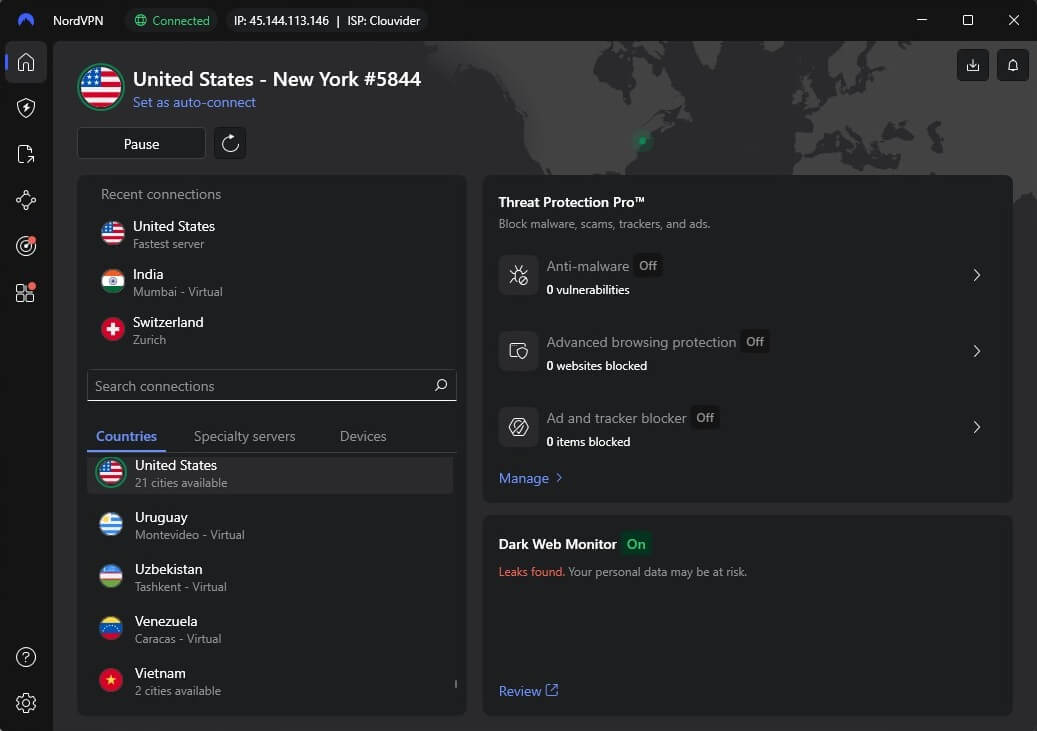
VPNs work by allowing you to connect to a remote server. This time, we’re shooting for the USA. Open NordVPN and click the United States on the server list. You can use the search bar for easier navigation and type the name of the country. Regardless, after clicking, NordVPN should connect in roughly three seconds.
4. Sign Up for Paramount+ in Australia and Start Watching
It’s time to go to Paramount+ and sign up. On the home page, click on “Sign Up,” and you’ll get the option to enter your email and name and choose the plan. Enter the required data and pay for the subscription using your gift card from before. Provide your gift card PIN, and that’s out of the way.
With the money from the gift card in your account, you can select the plan, subscribe to it, and start watching Paramount+ US in Australia. One more thing. If you sign up for the US version of Paramount+, that’s the only version you’ll be able to use. Signing in with your email and password with another IP address won’t work
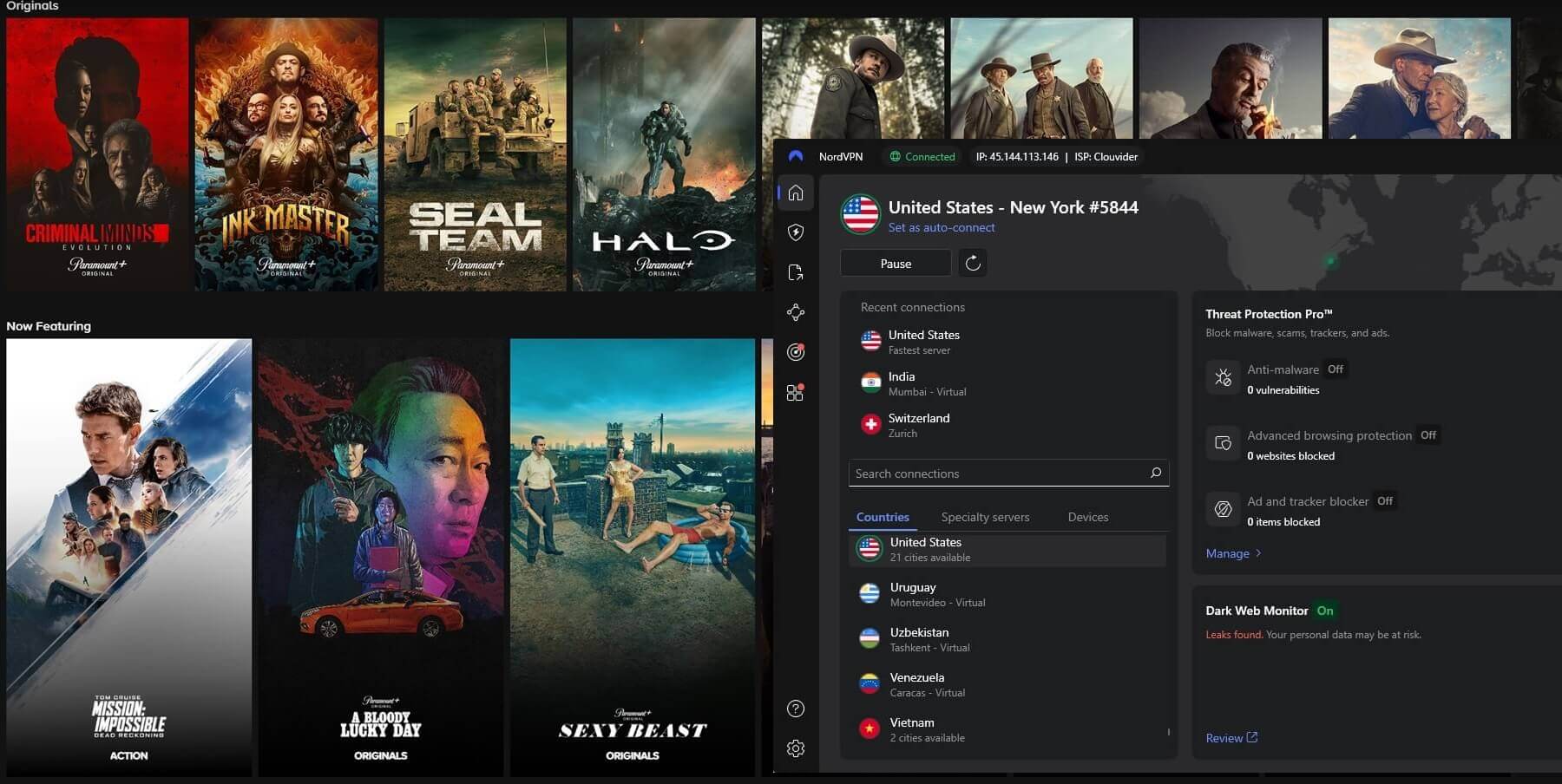
You have to get a US IP address first. This might be a way to counter VPN use and prevent people from watching several Paramount libraries with one subscription… but we might be wrong.
The Vest VPN Services for Paramount+ in Australia
The workaround we displayed is rather simple. However, we also promised to discuss and sift through a few VPNs that will work on Paramount Plus. Let us not break our promise and immediately get on with it.
1. NordVPN
Pros
- 3,000+ US-based servers
- Optimized for streaming/unblocking
- Ad-blocker with tracker protection
- Smart DNS for streaming on all devices
- Fast speeds thanks to the NordLynx protocol
- Easy-to-use apps for all platforms
Con
- Renewals cost more
- Seldom connection issues
We mentioned NordVPN in this guide, but so far, you only know it works with Paramount+ in Australia. And now, you just found out that it offers 8,600+ servers, out of which 3,000+ are in the United States. The provider is much more than that and is known as incredibly fast thanks to the NordLynx protocol.
Furthermore, NordVPN takes pride in offering streaming-optimized servers coupled with special P2P servers for downloading torrents. Another benefit is unlimited data, which comes in handy when binge-watching shows on ABC or Paramount+. NordVPN has impeccable security, one of its trademarks.
There’s 256-bit encryption with an automatic kill switch and IP leak prevention. All this is backed by RAM servers, which lose all data after each restart, making your private data 100% secure. Now that we’re at that, NordVPN keeps no logs, as proven in several audits by third-party companies.
Its premium features, like Double VPN, malware blocking, and tracker protection, make the experience premium. NordVPN lets you protect ten devices simultaneously. It’s more than enough to watch Paramount+ US in Australia on multiple devices. NordVPN’s greatness continues with round-the-clock 24/7 support.
Again, the VPN is very affordable and offers the best user experience. Test it risk-free and get its discount below. At any moment, you can request a refund if you no longer need it or can’t afford it.
2. ExpressVPN
Pros
- Fast 10 Gbps servers in the USA
- Bulletproof AES-256 encryption
- User-friendly VPN apps
- Unlimited data, great for streaming
- Up to 14 simultaneous connections
Cons
- Slightly expensive
- Light on advanced features
ExpressVPN works with Paramount+ in Australia wonderfully. It has servers in 105 countries, and out of 3,000 or so, at least a third are in the US. ExpressVPN is a speed champ, with 10 Gbps servers and unlimited data. The VPN uses RAM servers, but Lightway Turbo, an in-house protocol, makes it a well-oiled machine.
ExpressVPN is confident in streaming and torrenting, being one of the top P2P VPNs we used in 2026. Security is its forte, as expected. This provider comes with rock-solid 256-bit encryption with Forward Secrecy to prevent encryption keys from getting compromised.
The addition of split tunneling is welcome, and there’s a kill switch to prevent data leaks. ExpressVPN is universally acclaimed, with more than twenty third-party audits. It’s great not only for 4K streaming but for gaming and going on the darknet. Streaming Paramount+ in Australia is a joy, with undeniable smoothness.
The final addition is Threat Manager, which made the VPN even better. It can now block ads and trackers, and with parental control, you can block porn sites. Simultaneous connections are generous, with 10 to 14, depending on the plan. ExpressVPN is more expensive than NordVPN, even when talking about its cheapest plan.
Luckily, the difference isn’t that big, and a 73% discount and four free months for the Basic biennial plan make up for it. For this reason, it’s our #2 VPN for watching Paramount+ US in Australia.
3. CyberGhost
Pros
- Cheap biennial plan
- Dedicated streaming servers
- Smart DNS in every plan
- Strong privacy and security
Cons
- It lacks obfuscation
- Limited to 7 simultaneous connections
Finally, we have CyberGhost, with 12,000+ fast servers. It’s ideal for streaming Paramount+ live in Australia, with servers optimized for this platform. Furthermore, the VPN includes apps for all platforms, which makes life simpler. With seven simultaneous connections, streaming on multiple devices is possible.
Another option you’ll like is the WireGuard protocol for faster speeds than OpenVPN. CyberGhost includes AES-256 encryption, the best encryption standard. We love its NoSpy servers in Romania, which help to boost privacy and provide stronger security. CyberGhost is intuitive if we exclude a slightly confusing Windows app.
The silver lining is a polished iPhone VPN app downloadable for free. CyberGhost offers P2P servers, and we should mention its Romanian jurisdiction, which plays into the privacy game. It keeps no logs and even has a third-party audit from Deloitte to back up its claims. What are the downsides?
CyberGhost has no obfuscation of any sort. Because of this, you can’t use the VPN in China and other censored countries. For comparison, NordVPN and ExpressVPN have built-in obfuscation, allowing you to use them even in countries like Iran and the UAE. Apart from that, we found nothing.
However, there’s one more advantage: a 45-day refund policy and a cheap 2-year plan with two or four free months, at about $2.19 monthly, which officially makes it the cheapest VPN on this list.
Should I Use a Free VPN for Paramount Plus?
Will a free VPN work, perhaps? According to our tests, no, it won’t.
Free VPNs can’t unblock Paramount+ in Australia, at least not effectively. PrivadoVPN is a good VPN service for streaming, but it limits you to 10 GB of monthly data. We then have Windscribe with 10 GB, which also works for streaming. Both are slow, and their limited data allows watching content for merely a few hours a month.
If you couple that with other online activities, you get a recipe for disaster. Free VPNs limit you to a few server locations, and many aren’t properly secured. Hola VPN, a popular choice, lacks a no-logging policy. It’s the opposite. It keeps logs and sells your private data to third parties.
An essential thing is their lack of streaming ability. Non-paid providers intentionally limit you to force you to buy their premium plans. In these plans, they’ll gladly offer streaming servers. Proton VPN, for example, prohibits P2P traffic unless you pay for it, so torrenting is right away out of the game.
We’d much rather use a premium VPN for free, with a free trial or a money-back guarantee. NordVPN seems to be the best in this regard. It has a 30-day non-conditional refund policy plus a 7-day free trial on iOS/Android. It’s hard to recommend a free VPN at this point, at least for streaming.
The Bottom Line
Watching Paramount+ US in Australia turned out to be easy. It’s the same as accessing Paramount Plus worldwide. Get a gift card for Paramount+, subscribe to NordVPN, and connect to a US server. Subscribe to the streaming service with your gift card and start watching your favorite content.
If you don’t like NordVPN, using ExpressVPN or CyberGhost is possible. It doesn’t matter how you reach your destination, as long as you reach it. We presented three VPNs that make the path easier and risk-free. Click below to start with NordVPN risk-free or explore its two alternatives. Your call.
Frequently Asked Questions
Is it legal to use a VPN on Paramount+?
Yes, it’s legal, but it may go against its terms of service due to regional restrictions on specific content. The good news is, you can use a VPN to access Paramount+ in Australia without legal consequences.
What’s the fastest VPN for Paramount+ in Australia?
The fastest VPN for Paramount+ in Australia is NordVPN. It has the fastest NordLynx protocol and 10 Gbps servers built for speed. On top of that, users get unlimited data, perfect for late-night streaming sessions.
Is Paramount+ better than Netflix?
Paramount+ isn’t better than Netflix for content quantity. However, some shows available on this platform aren’t on Netflix and vice versa. Whichever you prefer, you can access it by using a VPN and connecting to an adequate server. With a US server, you can watch Netflix and Paramount+ anywhere.
