After thorough testing, we can only conclude this Surfshark VPN 2026 review with this: It’s one of the top low-cost VPN services around. At under $2 per month, often way less, you’ll hardly find a better value proposition. However, our Surfshark review wasn’t always a bed of roses; this is a must-know.
We put Surfshark through a series of rigorous tests. Speed, security, privacy, compatibility, and everything else. The goal? See how good and safe Surfshark is in 2026. If you’ve been eyeballing this VPN for a while, now is the make-or-break moment. Here’s all you must know before spending your money.
Surfshark Review 2026: A Quick Look
| 📋 Overall Ranking | #5 |
| 💸 Starting Price | $1.78-$1.99 per month |
| 🧑⚖️ Money-Back Guarantee | 30 days |
| 🥷 No-Logging Policy | Yes (multiple third-party audits) |
| ⚙️ Protocols | WireGuard, OpenVPN, IKEv2 |
| 🌎 Server Locations | 100 |
| 🛑 Ad Blocker | Yes (with parental control) |
| 📺 Does it Work With Netflix? | Yes (with over 30 catalogs) |
| ♻️ Does it Allow Torrenting? | Yes (on all servers) |
| 📱 Supported Platforms | Windows, macOS, Linux, Android, iOS, routers, web browsers, streaming devices |
| 🏚️ Simultaneous Connections | Unlimited |
| ☎️ Customer Support | Tickets, Help Center, Live Chat |
Surfshark VPN Pros and Cons
Pros
- Unlimited simultaneous connections
- One of the best VPNs for Netflix
- Advanced security features
- Robust server fleet in 100 countries
- Multi-hop servers for privacy
- Inexpensive subscription plans
Cons
- Middling speeds
- Occasional connection issues
- Expensive 1-month plans
Surfshark User Experience and Device Support
After subscribing, your first impression of a VPN will come from its application— be it on mobile, desktop, or TV. In this Surfshark review and test, we begin by discussing the user experience and device support.
📱 Desktop and Mobile Apps: Our Experience
Surfshark VPN works on all systems, including Windows (it’s one of the top VPNs for Windows, Linux, macOS, iOS, and Android. The VPN also supports web browsers like Chrome, Firefox, and Brave. Unlike its pricier rivals, Surfshark supports unlimited simultaneous connections.
Once you install Surfshark, you’ll see how easy it is. A modern app sprawling with features and one-click connections is never bad. The Quick-Connect button makes connections swift, while its server list on the home screen offers easy selection. Mobile users get pretty much the same treatment.
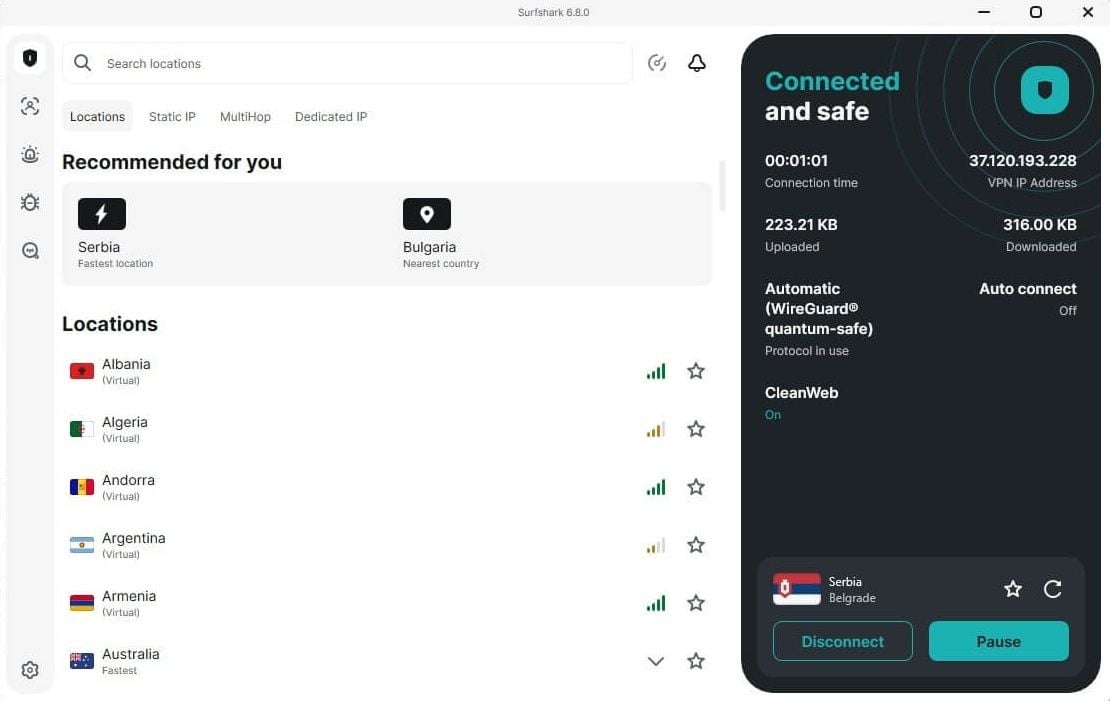
In the center is a connection button, and below are your quickly accessible menus. Once you tap Locations, the server list will appear. Surfshark features are also easy to access in VPN Settings and App Settings. They include protocols, a kill switch, and other options we’ll discuss in this Surfshark review.
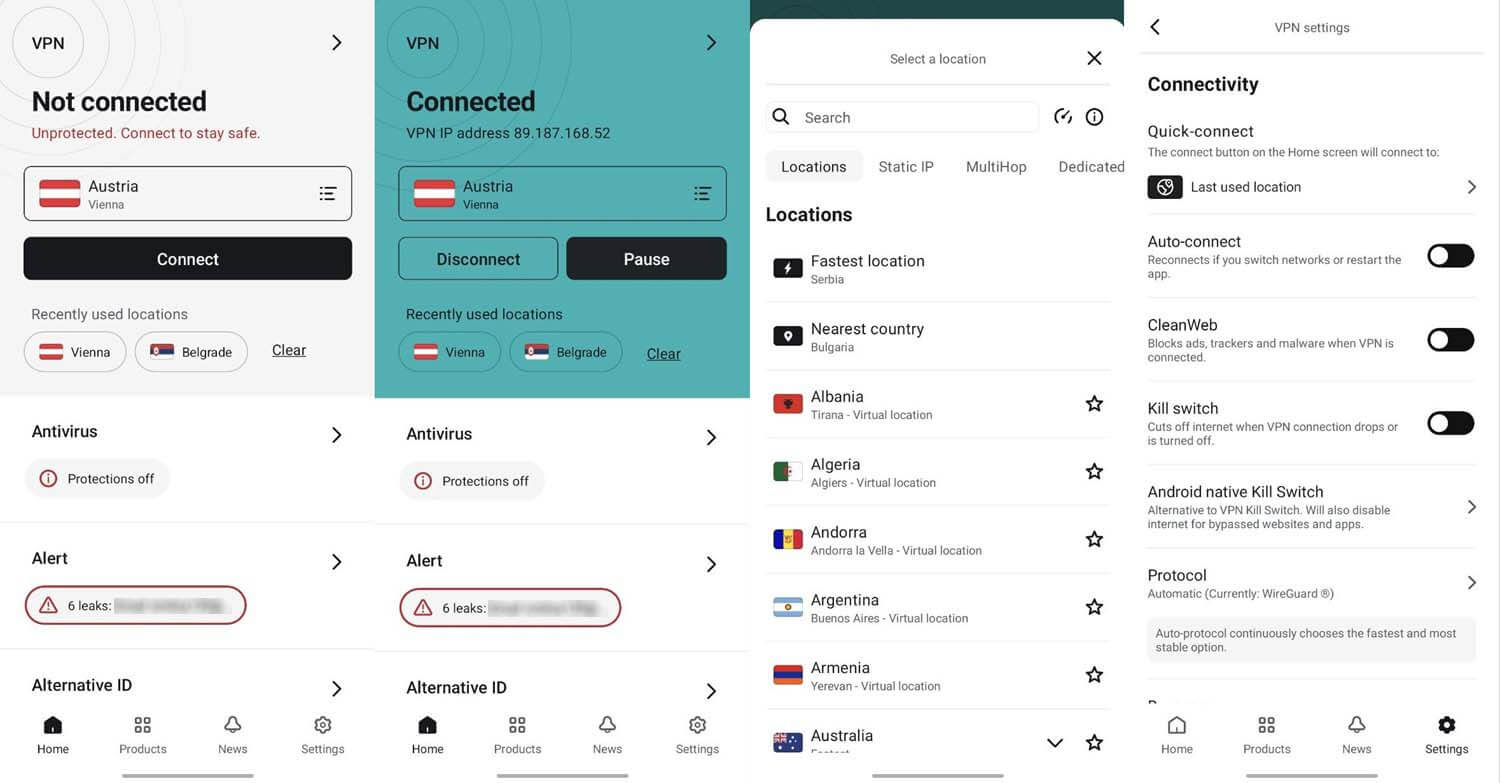
During this Surfshark VPN review for 2026, its mobile apps were also enjoyable. We also noticed that mobile and desktop apps were updated and improved. All in all, we found Surfshark extremely pleasant to use, one of the reasons it’s one of our favorite VPNs.
📺 Using Surfshark VPN on a TV and Streaming Devices
If you’re a streamer, you’ll want to install your VPN on a TV. Well, you’re lucky because Surfshark supports everything that has the word TV in it. This includes Smart TV, Android TV, Apple TV, Fire TV Stick, and others. Furthermore, it offers a native client for Android TV, Fire OS, and tvOS.
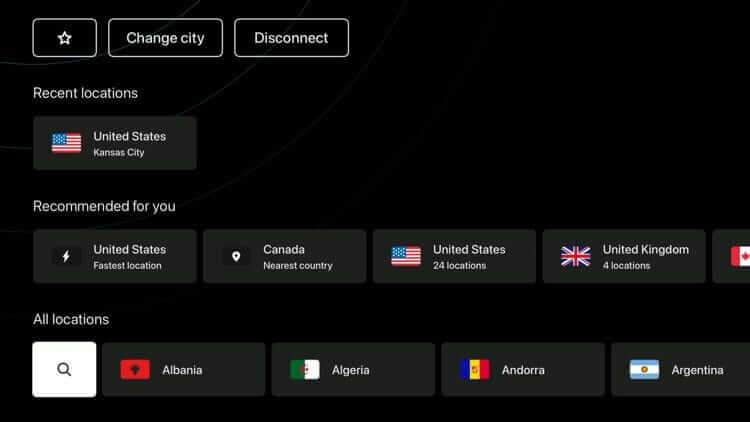
By the way, Surfshark will work with Chromecast and even Nvidia Shield TV, as these are Android-based streaming devices. That said, no matter the streaming device, Surfshark helps you navigate geo-blocks.
🎮 Surfshark Support for Gaming Consoles
You can play games with Surfshark on all gaming consoles. Console support is facilitated through routers, in which case, Surfshark works on the Holy Trinity, i.e., Sony PlayStation, Microsoft Xbox, and Nintendo Switch. Apart from a router, you can use your PC to share the VPN connection with a LAN cable.
If you don’t want any of that, there’s SmartDNS, which functions well for streaming and isn’t too complicated to set up. However, it lacks the essential security and privacy of a VPN (see our SmartDNS definition).
🛜 Router Support
In this Surfshark VPN review, we noticed excellent router support. On the site, you’ll find in-depth tutorials for various router models and firmware, including Asus, GLiNet, Tomato, WRT, Sabai, and plenty more. To be clear, these are natively supported without flashing firmware, making the setup that much simpler.
Surfshark works on non-supported models, too. However, you must flash your firmware and potentially void your warranty. The VPN doesn’t recommend it, and we agree, unless you’re tech-savvy and know your stuff.
Surfshark Pricing Review: Is It Affordable in 2026?
One of Surfshark’s highlights is its pricing. At the start of the review, we mentioned that it’s affordable. Let’s quantify our claims. The VPN offers 9 plans: 2-year, 1-year, and monthly, each with 3 tiers: Starter, One, and One+. The Starter plan costs only $1.78 per month for two years, with 3 free months.
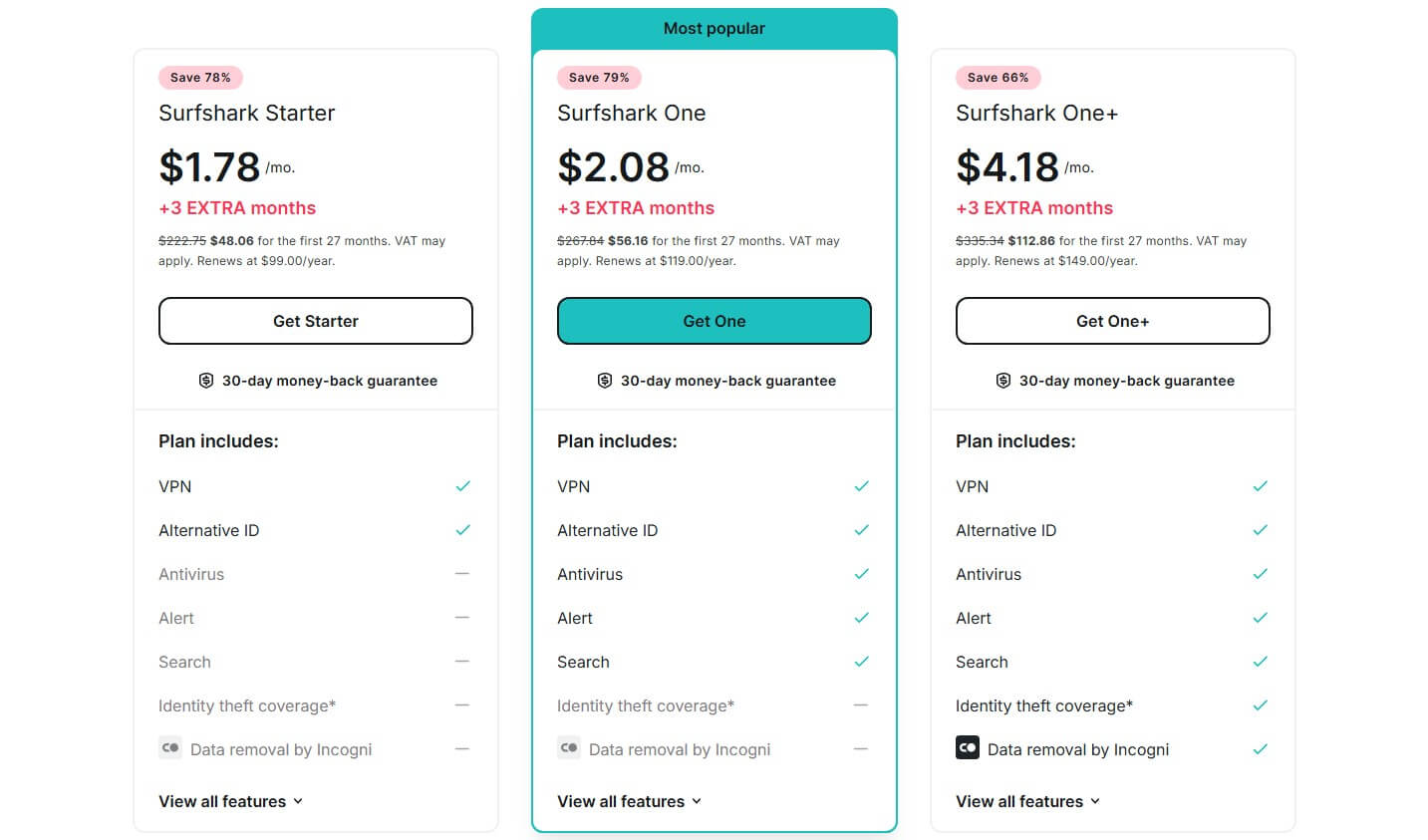
This is way below the typical VPN price. The next tier is only a fraction more expensive, sitting at $2.09 per month, with antivirus software, Alternative ID, and other quirks. The One+ tier at $4.18 includes Incogni for ID theft protection and more privacy. Surfshark also has affordable annual plans with discounts.
Get the Cheapest Price on Surfshark VPN
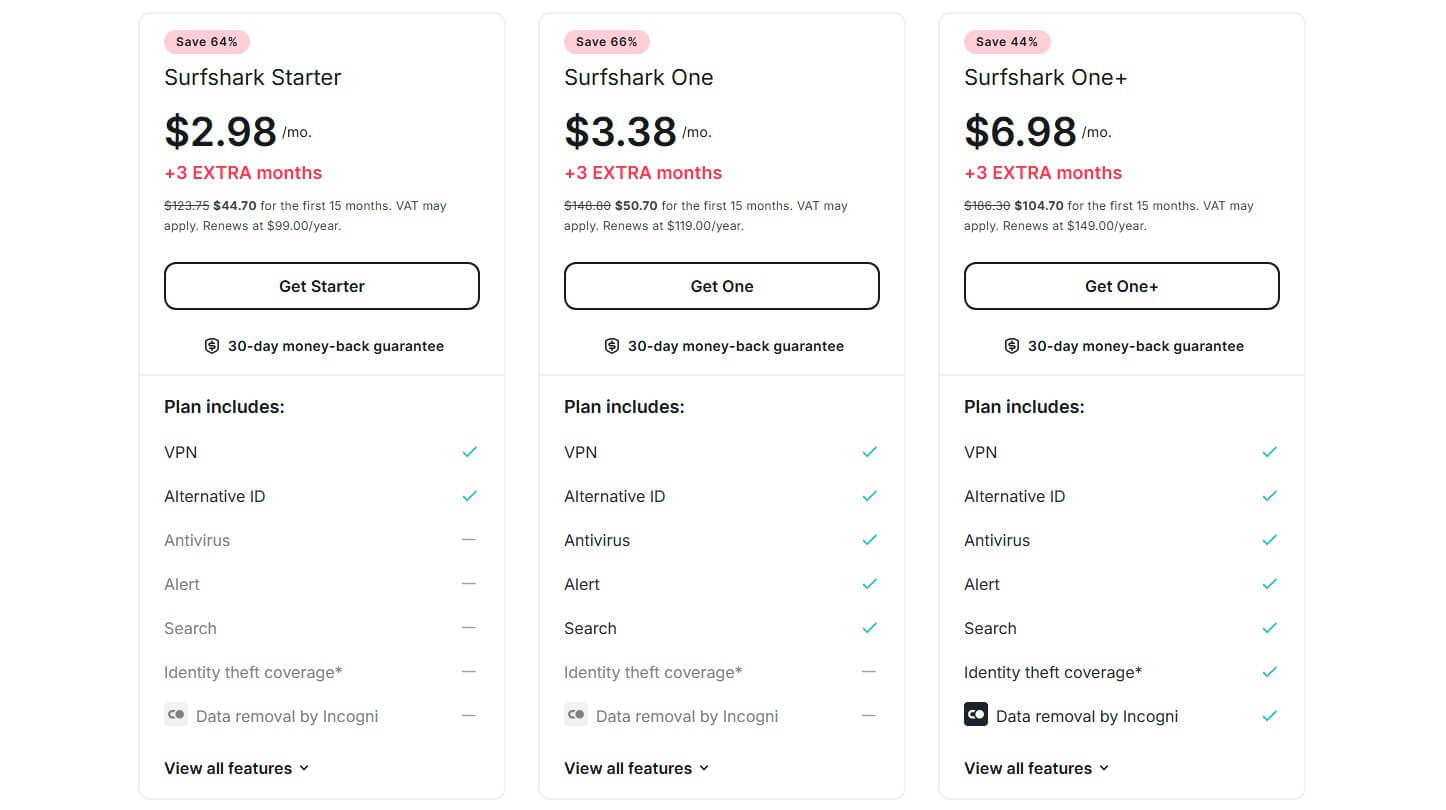
The Starter plan is now $2.98; still less than NordVPN’s 2-year equivalent. Its price tops at $6.98 per month for the One+ plan. Still, prices are completely fair, as in some plans, the VPN is combined with an antivirus. Finally, there are monthly plans, and might we add, they’re very expensive ($15+).
⭐ Quick Disclaimer: Prices are accurate at the time of writing. Surfshark’s prices change over the year, but they never fluctuate dramatically. That said, Surfshark is always affordable. We’ll do our best to update its prices regularly to keep you in the loop.
🔄 How to Get a Refund from Surfshark?
If you don’t like it or no longer need it, there’s a 30-day money-back guarantee, which also covers the monthly plan. When we tested IPVanish, one of its alternatives, its money-back guarantee excluded the monthly plan. To get a refund, contact Surfshark, ask for it, and it’ll issue a refund the same day.
You’ll get your money either in a few hours or a few business days. That depends on which payment vendor you’ve chosen. Crypto payments take longer to refund, while PayPal ones are instantaneous.
Is Surfshark VPN Safe? Security Features Examined
At the start of our Surfshark review, we mentioned its robust privacy. Surfshark may be affordable, but its feature roster is wider than a ten-ton truck. Interested in what this Virtual Private Network offers for the price? Get ready because we have plenty to discuss in this part of the review.
🧬 Post-Quantum Encryption
It doesn’t only rely on standard 256-bit encryption. When you use WireGuard, Surfshark employs post-quantum encryption that shields you from quantum computer attacks. What does this mean? In simple words, it means nothing works to breach it. Not even fierce brute force attacks.
🔀 MultiHop Servers
Another similar feature of Surfshark is called MultiHop. MultiHop servers are server pairs that the VPN uses for routing your traffic. There are pre-built pairs, but you can also make yours. For instance, if a pair is Paris via London, it means you first get a French IP address and then the British one for a second encryption layer.
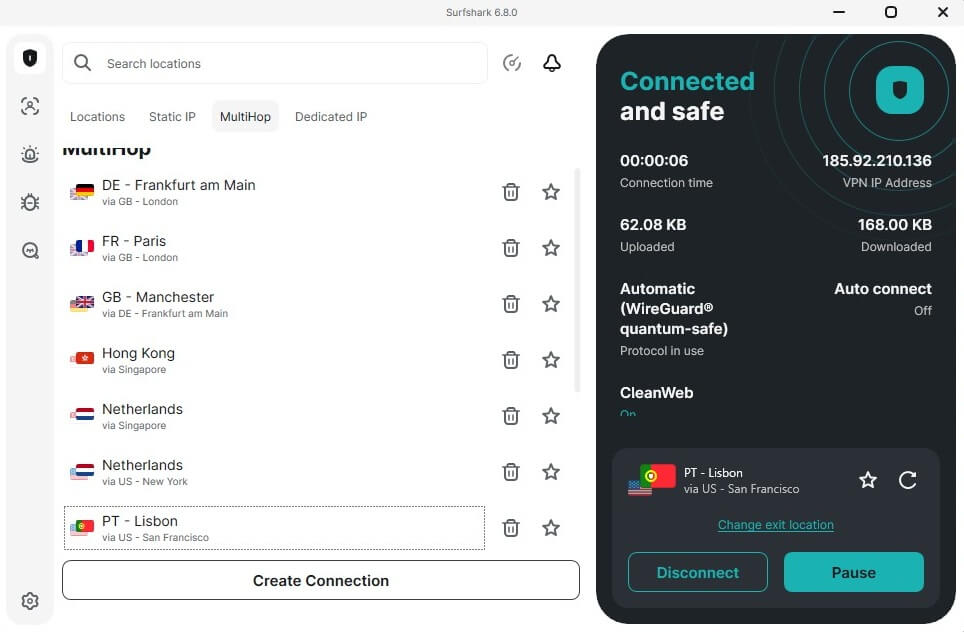
This can negatively influence your connection speed and isn’t for bypassing geo-restrictions, given the two different servers that you’ll use. However, it does a lot for security and privacy when that matters.
🔁 Rotating IP
At the time of writing this Surfshark VPN review, Rotating IP is free, and that’s terrific, as it’s one of the most unique features. It rotates your IP every 5-10 minutes, while keeping your VPN location the same. It’s better than simply masking your IP. Since you change your IP every few minutes, you’re untraceable.
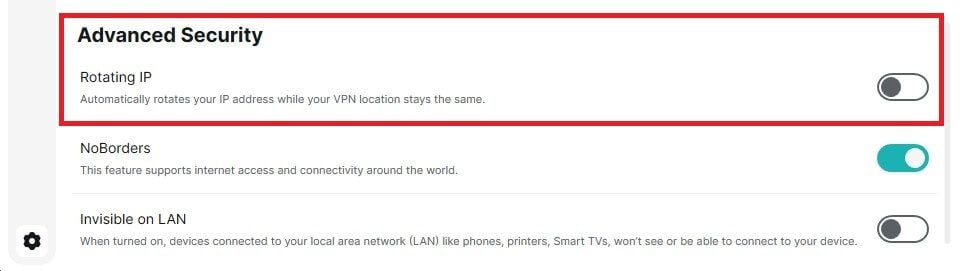
Pair this with Surfshark’s strong encryption and a kill switch, and you’re pretty much a ghost to anyone watching. How to use it? Enable it with one click in Settings and watch the magic before your eyes.
🌐 WireGuard and OpenVPN Protocols (With Everlink Technology)
This Surfshark review wouldn’t be complete without discussing protocols. It supports many secure tunneling protocols, including OpenVPN, IKEv2, and WireGuard. As you likely know, WireGuard is the best with its fast speeds, brief connection times, and reliability. Its level of complexity is lower, so it’s easier to maintain.
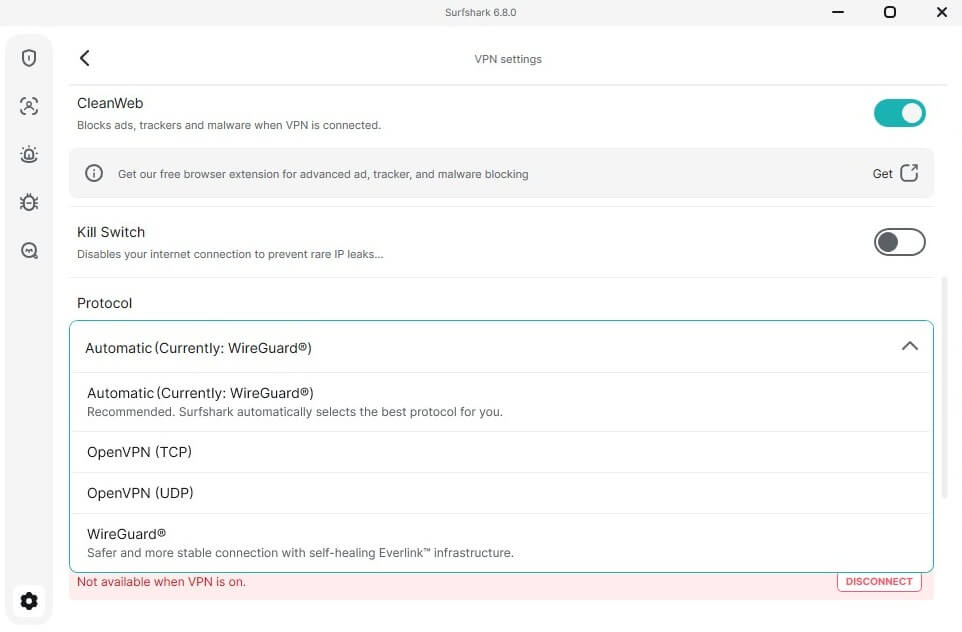
You can set this protocol and use it always, but we recommend keeping the protocol choice on Automatic. This way, Surfshark VPN will decide what’s best for you to give you the best possible experience. For WireGuard, Surfshark has specifically invented the Everlink technology.
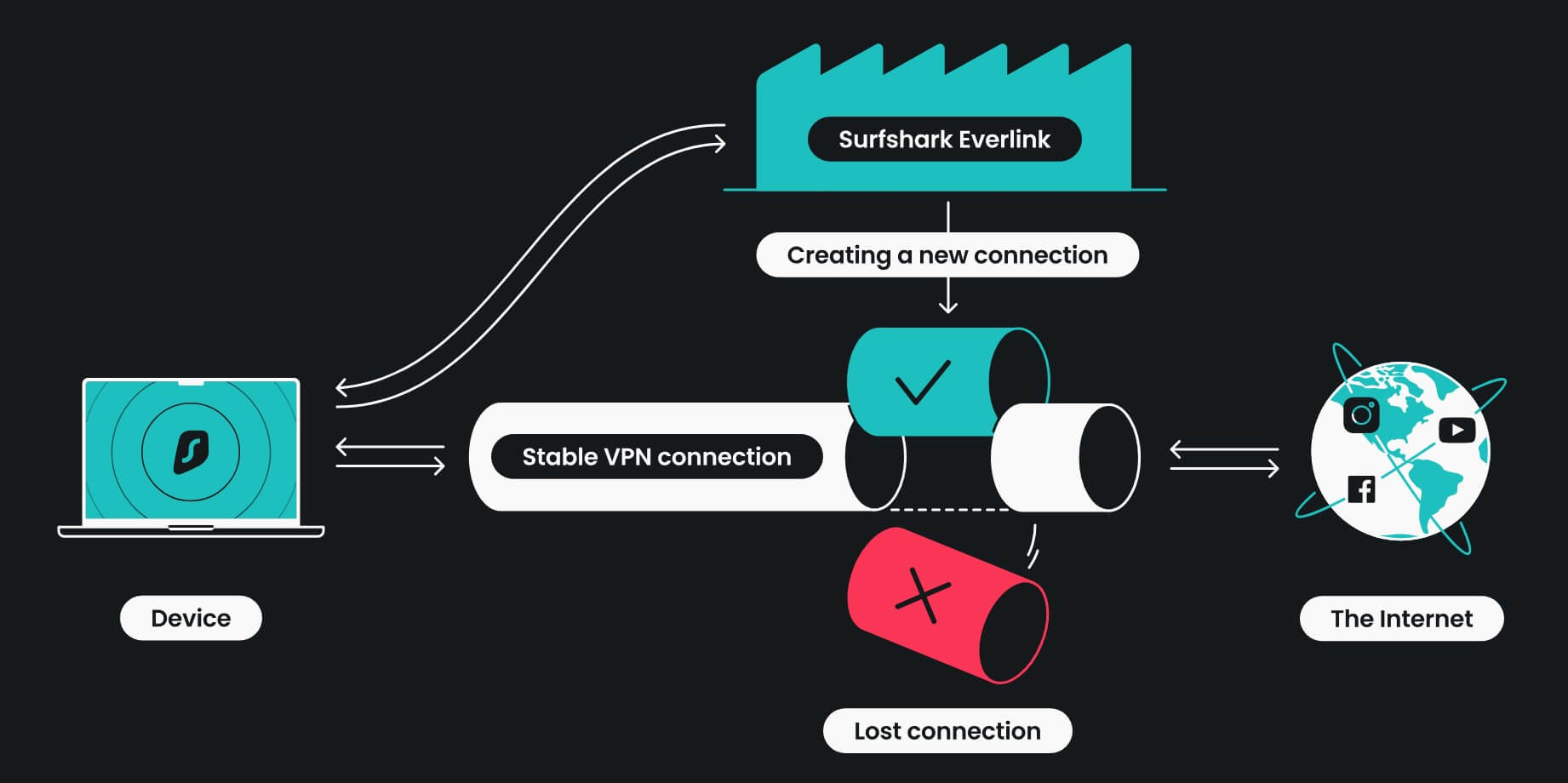
It sounds crazy, but when Surfshark performs server maintenance, your connection is still active and uninterrupted. It uses a self-healing mechanism, which reconfigures the VPN connection without disconnecting you. That means no data leaks, and that would compromise your privacy.
🛡️ CleanWeb + Web Content Blocker + Email Scam Checker
CleanWeb is another fancy name for an ad-blocker. Once connected to the VPN, it blocks ads, trackers, and malicious sites. Moreover, it’s not taxing on your resources and won’t slow down your internet connection. In fact, it will accelerate it, as eliminating ads from web pages speeds up loading times.
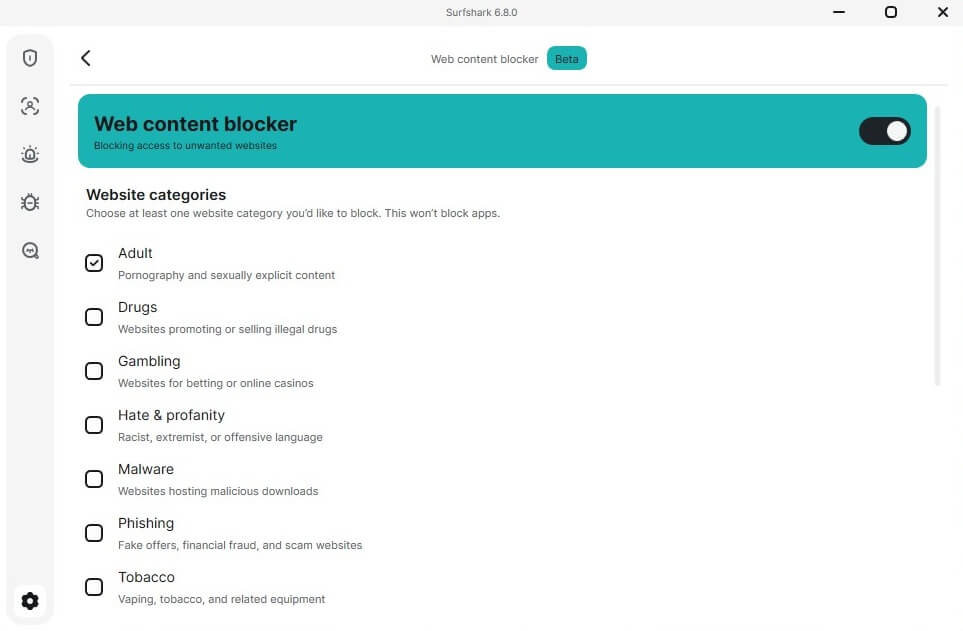
Since we’re at blocking, in our Surfshark test, we extensively used its Web Content Blocker. It offers an easy way to enforce parental control and block different types of content, such as gambling, phishing, adult, drugs, tobacco, and others. All you must do is check the boxes, and Surfshark will do its job fine.
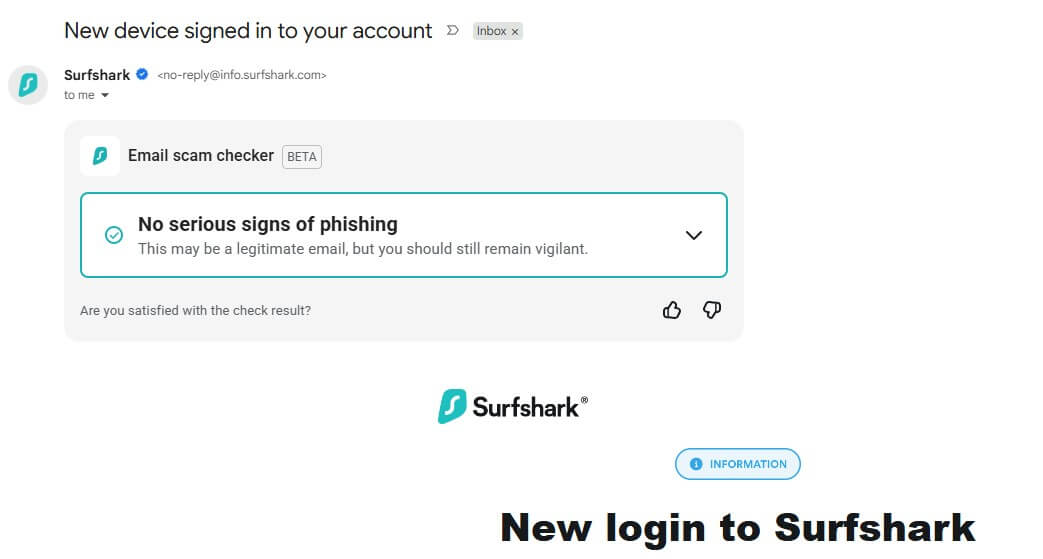
Finally, there’s Email Scam Checker, which accesses your email and… of course, checks for spam emails. It’s a bit of a hit and miss, but generally, it worked well and detected a few emails we indeed found spammy. This feature is separate from the VPN app and is used via its Chrome/Firefox/Brave extension.
🕹️ Internet Kill Switch
Encryption without a kill switch makes no sense. During our Surfshark review for 2026, we confirmed that Surfshark’s automatic kill switch is one of the best. As always, we forcefully shut down our VPN and waited for the kill switch to react. We said we waited, but it was really a fraction. So, that’s a job well done.
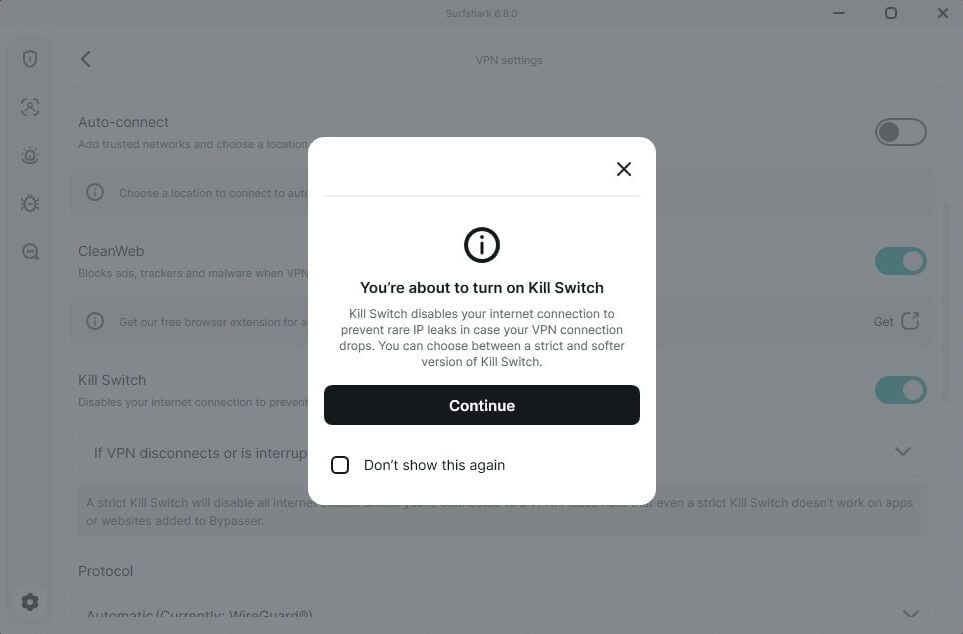
A kill switch shuts down your internet connection if you lose a connection to the VPN. This way, it prevents accidental IP leaks that occur. This makes losing a VPN connection trivial, as you preserve your privacy. This is one of the most important features for privacy-aware users, so it’s another box ticked.
✂️ Bypasser (Split Tunneling)
Surfshark loves to throw in some fancy names, and so we have Bypasser or split tunneling. This feature allows you to choose which websites and apps you want or don’t want to route via a VPN. You can then exclude or include websites and apps from using a VPN. For example, this can be a local shopping site.
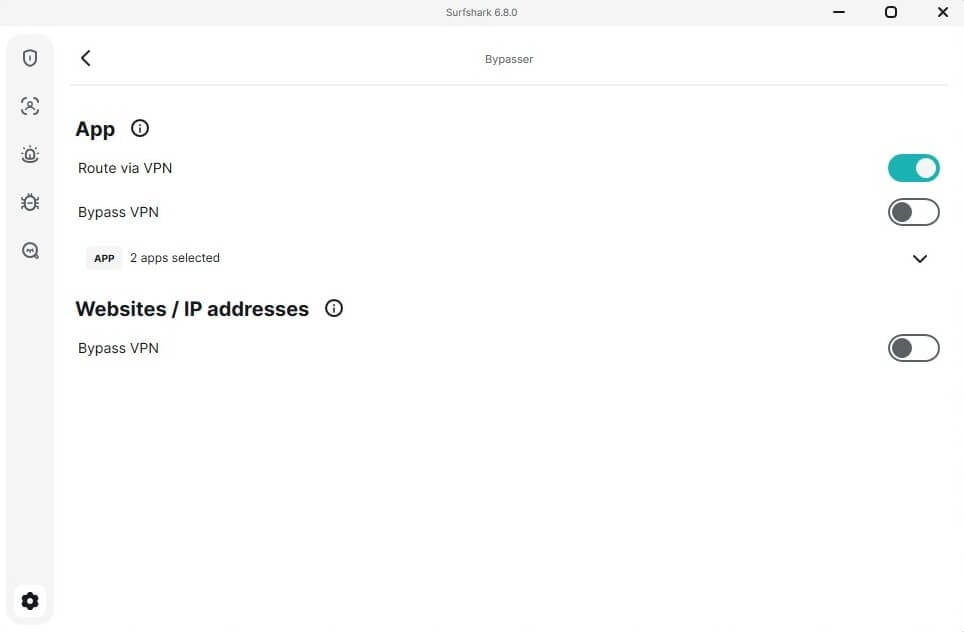
Or perhaps you can exclude your bank’s website to avoid having trouble logging in to your account from a different online location. Either way, it works well and is useful for specific scenarios.
🧱 NoBorders Mode
NoBorders makes Surfshark usable in censored countries. We’ll explain that later, but for now, you need to know that it’s great for bypassing deep-packet inspection in China, Iran, Turkey, and the UAE. Once you enable it, your traffic looks like regular traffic, making it impossible for firewalls to notice a VPN. Later in this Surfshark review, we’ll discuss it more and see if it’s really functional.
💾 RAM-Only Servers
The great thing about Surfshark is that its servers are based on RAM. This is good to know because servers like this boost not only the performance but also your privacy and security. RAM servers lose their data with each restart, which prevents unwanted logging and accumulation of personal data.
Surfshark stores no logs either way, but RAM servers never hurt. Compared to HDD servers, they’re more capable and less prone to compromise. HDD servers are slower and harder to update, making them a thing of the past. With RAM-only servers, it can apply updates, fix problems, and ensure smooth operation.
🎁 Surfshark One Features
Surfshark One is a mid-tier plan with many extras. There’s an antivirus that works on all devices, supports real-time scanning, and is effective. Another feature, Alert, is your dark web monitoring (seen in NordVPN), informing you of data breaches. Finally, there’s Search, an anonymous web browser with zero tracking.
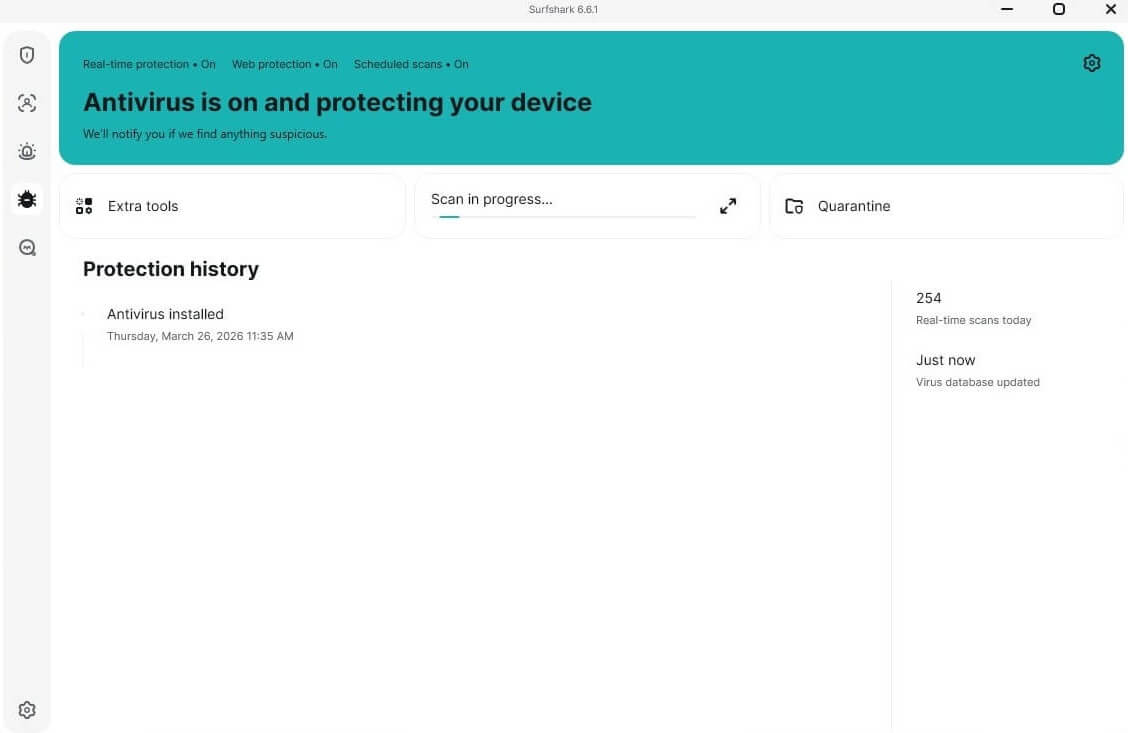
Finally, there’s Alternative ID, our favorite. Although it’s in the cheapest plan as well, it’s one of the most interesting additions. It basically creates a new identity for you, with the name, address, email, and everything else. Now, you can conceal your whereabouts and register new accounts anonymously.
Surfshark Review: IP and DNS Leak Test (Good Results)
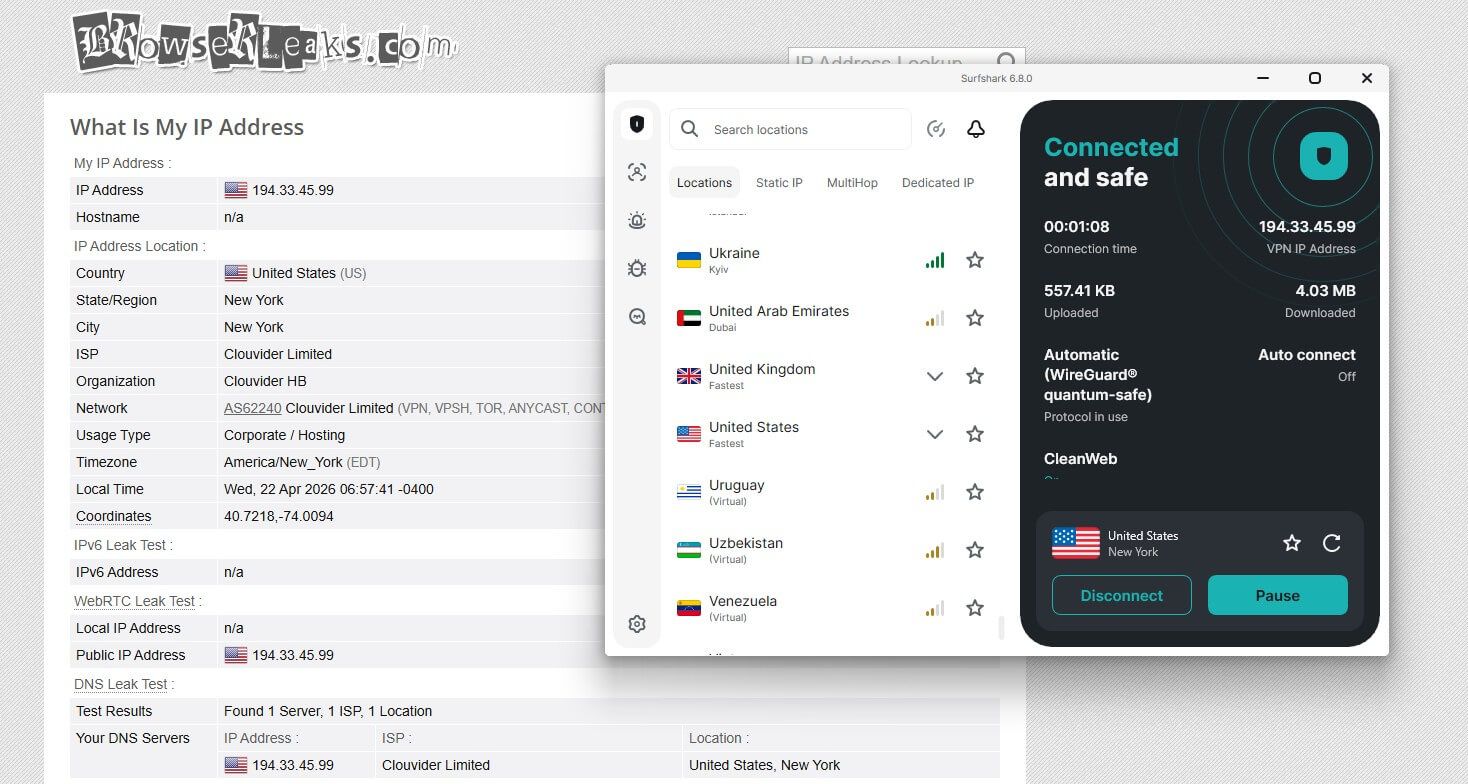
With so many security features, you shouldn’t expect any IP or DNS leaks. However, to put these features to the test, we probed Surfshark for signs of data leaking. After connecting to a US server, we went to ipleak.net and checked the results. As you can notice, our European IP and DNS addresses haven’t leaked.
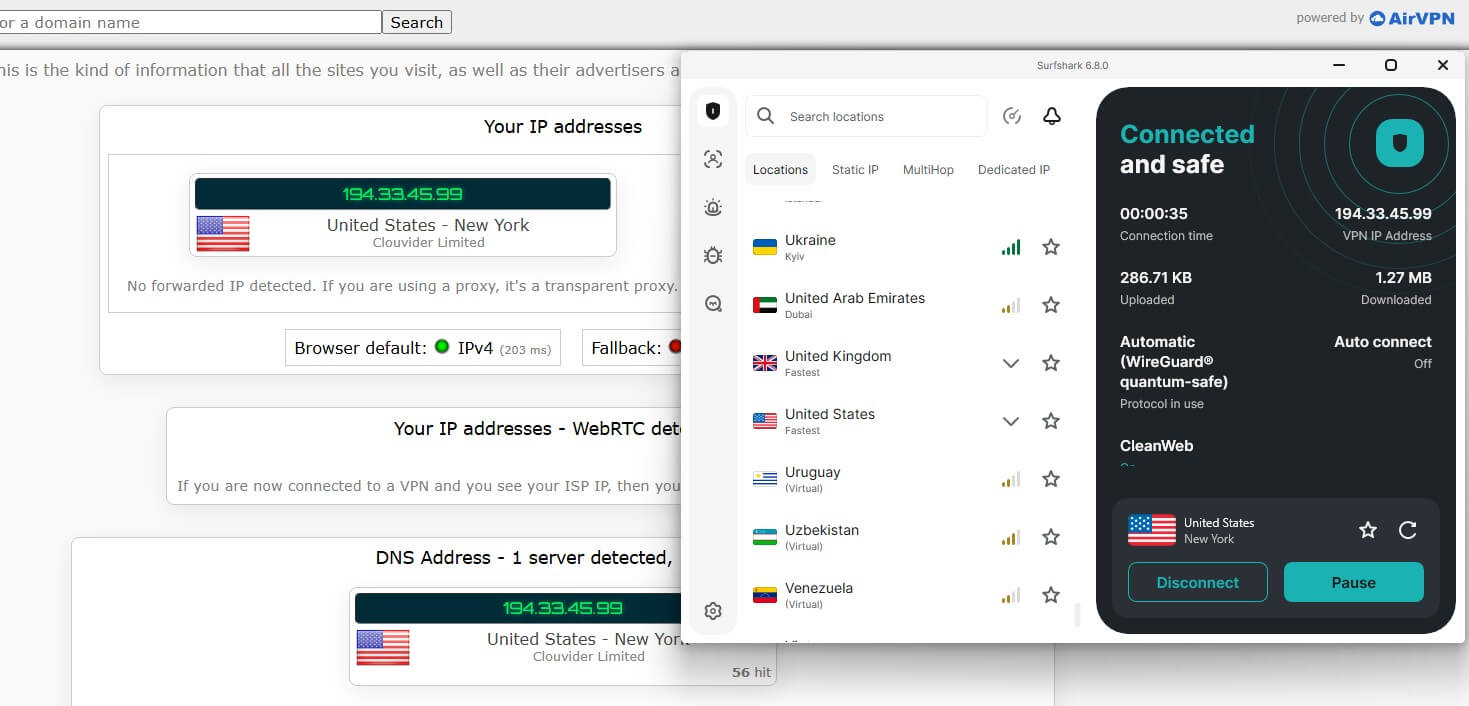
We repeated the test on browserleaks.com and got the same results. It’s clear as day that Surfshark has no IP and DNS leaks and fully protects your data. This doesn’t apply only to the US server. After testing all server locations, we got the same results repeatedly, proving that this VPN is safe and secure.
Does It Have a No-Logging Policy?
To make things better, the provider has a no-logs policy. In this Surfshark VPN review, we must mention its jurisdiction—the Netherlands. Surfshark’s jurisdiction helps this VPN a lot. Without data retention laws and surveillance, it maintains a strict no-logs policy without interference from the authorities.
🚫 Which Information isn’t Stored?
To make it clear, there’s no such thing as a 100% no-log VPN. However, when we say a zero-logging policy, we think about several bits of information that can compromise your online privacy. These include your IP address, browsing activity, precise timestamps, DNS queries, real name, and traffic patterns, etc.
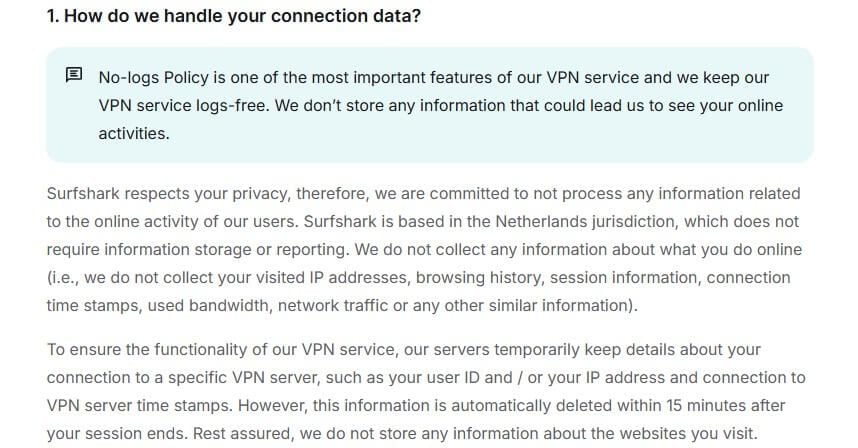
As you expected, Surfshark will not store any of this information. Without this data, it can’t see what you’re doing online or find your location. If it can’t track any of these aspects, it can’t submit anything to the authorities. In the Netherlands, it’s very unlikely that anyone would do something like that, either way.
📜 Which Information is Stored?
Surfshark stores only a fraction of the information required for managing subscriptions and functioning. It must store your email address and billing information for obvious reasons. A few more bits of information are stored for the app to run smoothly. These include a specific VPN server you used and a user ID.
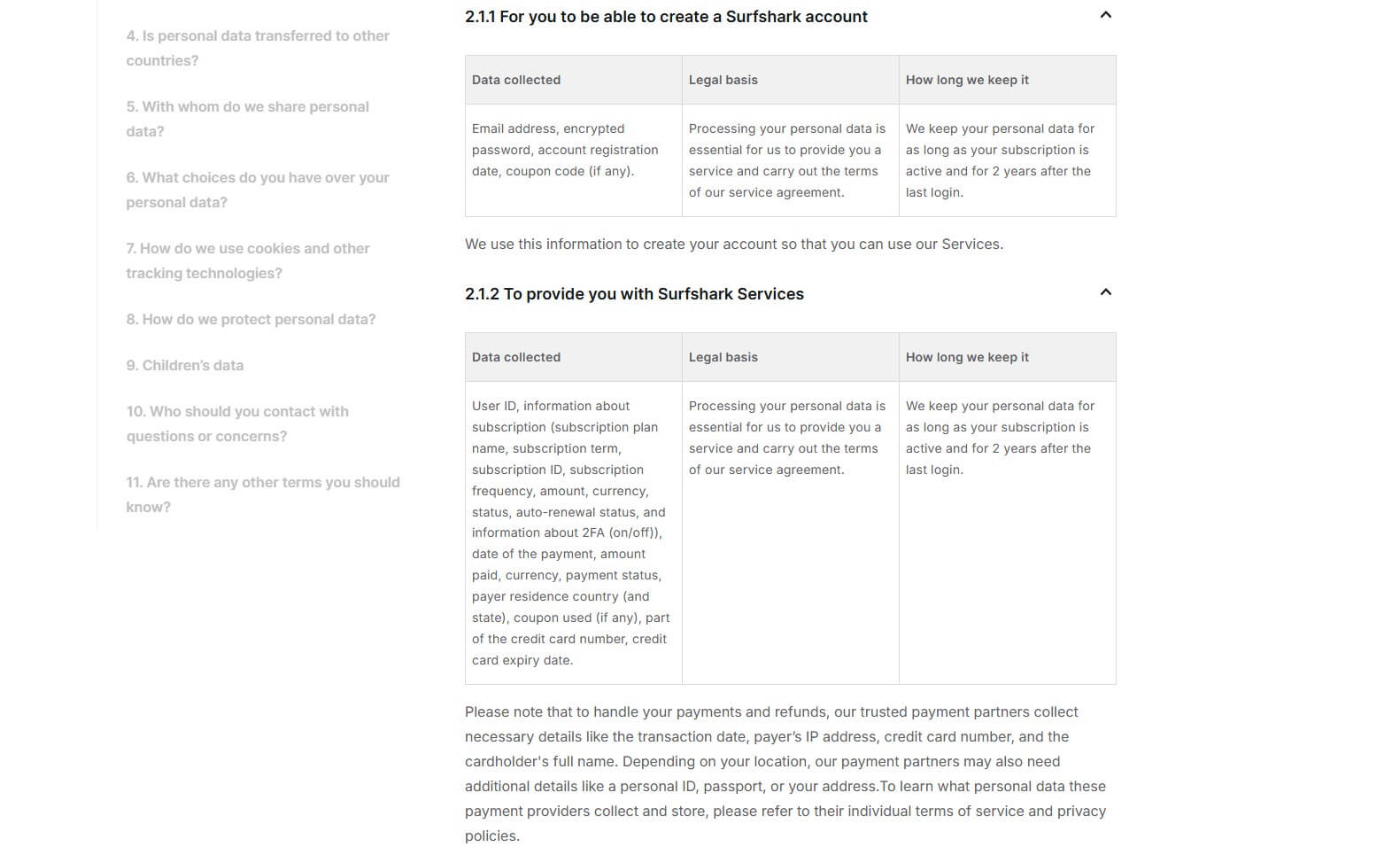
While this may sound concerning, this information is necessary for service provision. Plus, unlike many VPNs that keep this data for a year, Surfshark deletes it 15 minutes after your session ends. That said, this is still a no-log VPN, as proven in its many third-party audits in which Surfshark performed like a champ.
✅ Third-Party Audits
To back up its no-logging claims, the VPN underwent a third-party audit from Cure53. In this in-depth Surfshark review, it’s vital to mention that these were performed on its Chrome and Firefox extensions. However, Surfshark’s extensions are full VPNs. Therefore, this Cure53 audit is still relevant.
In this article on the VPN’s site, you can see how it proved that Surfshark is a no-logging provider. Another company proved the same in 2025, Deloitte. It examined its no-logging policy and learned that the VPN behaves according to its promises (storing zero logs and offering the highest level of privacy).
The final audit was in January 2026, where SecuRing evaluated Surfshark’s infrastructure with excellent results. Third-party audit helps establish trust among users, and whether they are related to a privacy policy or not, they’re important for success. This VPN isn’t afraid to take them.
Surfshark Review: Streaming and Netflix Tests
Now that we have determined its security and privacy, in this Surfshark review for 2026, let’s stream. Cheap VPNs are not known for being great for streaming, but hey, we think that this one will surprise you.
| Netflix | ✅ Works (US, UK, Canada, Japan, Germany, France, Singapore, Argentina, Turkey, Brazil, Iceland, Hungary, Australia, etc.) |
| Hulu | ✅ Works |
| Disney+ | ✅ Works |
| Amazon Prime Video | ✅ Works (unblocks multiple catalogs) |
| BBC iPlayer | ✅ Works |
| DAZN | ✅ Works (unblocks multiple catalogs) |
| Sky Sports | ✅ Works |
| YouTube TV | ✅ Works |
| Sling TV | ✅ Works |
🍿 Does Surfshark Work on Netflix? Yes, It Does
Yes, and it works better than pricier VPNs. We tested Surfshark on all major catalogs and had zero issues unblocking Netflix US, UK, Australia, Japan, Canada, and others. However, we went a step ahead and tested less popular catalogs, like Turkey, Singapore, Greece, Brazil, and at least twenty more. The result?
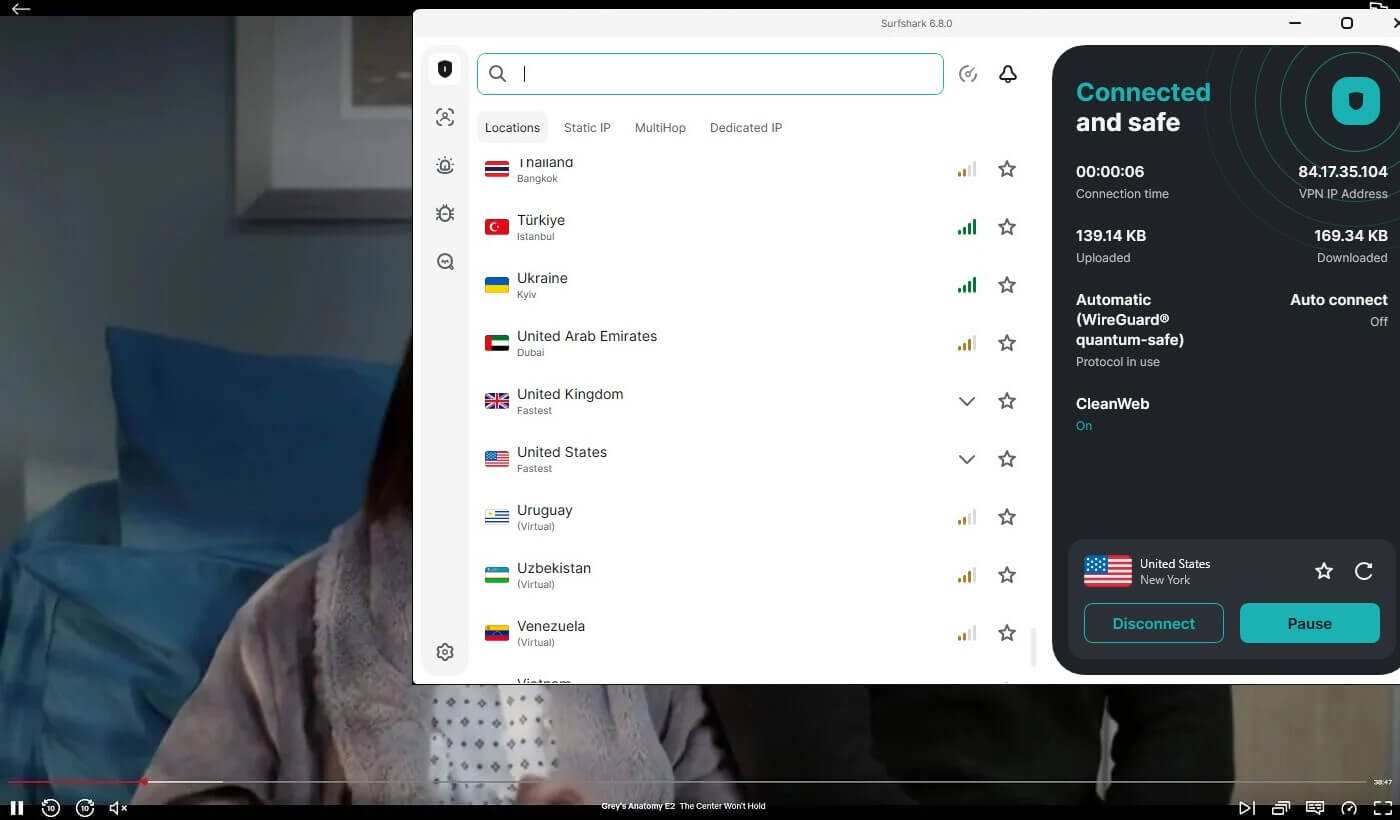
Surfshark unblocked all without a hitch. Its performance and speed were stable and consistent, so we had no buffering or infinite loading incidents. However, when we used a Canadian VPN server, there was a bit of buffering on Netflix, but that may be due to external factors, such as overcrowding.
After performing this critical Surfshark test, we responsibly confirm that it’s one of the best VPN services you can use with Netflix. Yes, it’s better than NordVPN, ExpressVPN, and other more expensive picks.
▶️ Surfshark Review on Other Streaming Platforms
If you’re against recent Netflix price increases and you want to watch on other platforms, will Surfshark suffice? Yes, it will. We tested it on BBC iPlayer, 9Now, Disney+, Hulu, Pluto TV, and at least 15 other platforms. Again, the results were terrific, especially when watching Hulu abroad without slight buffering.
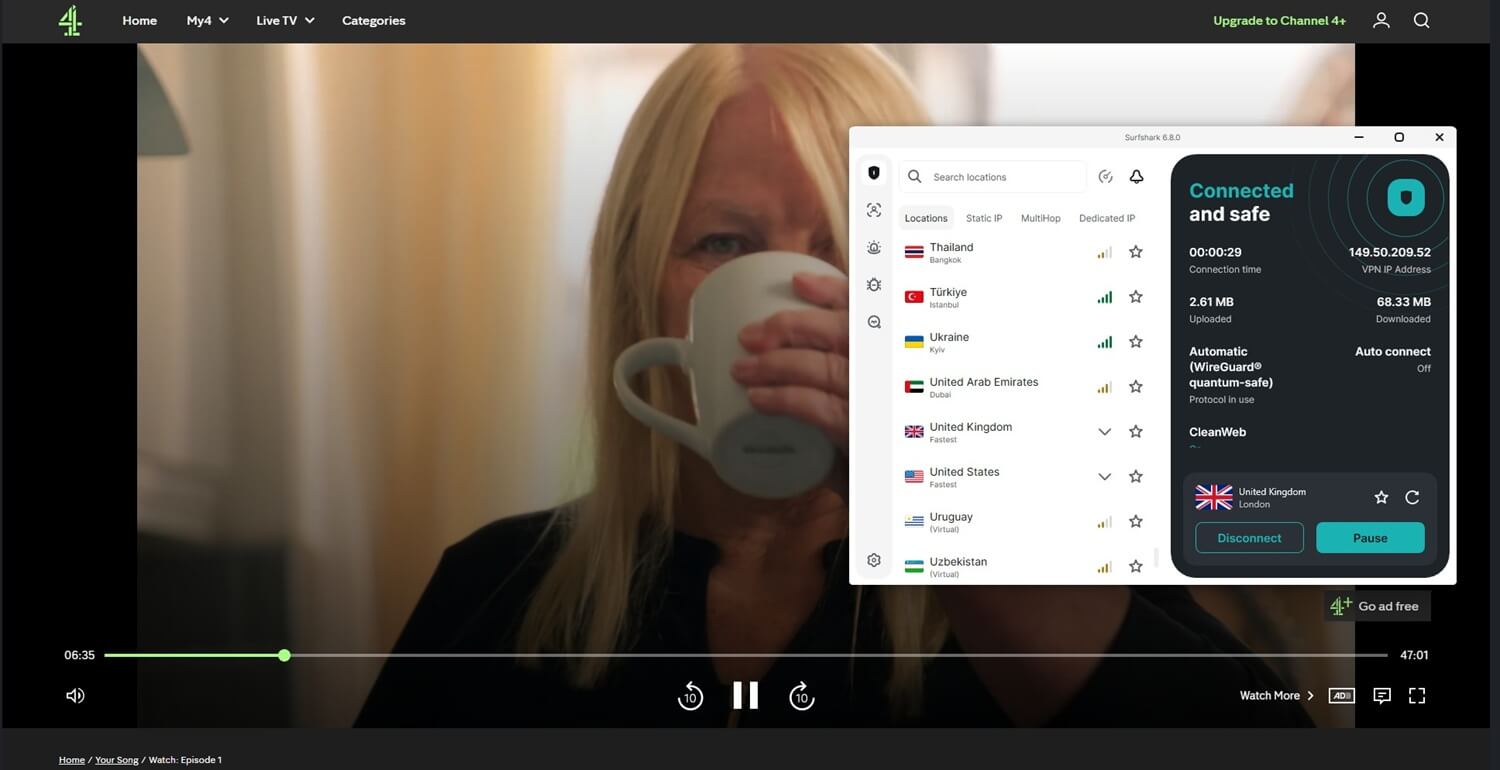
Since Surfshark offers Indian servers, we also tested them on Hotstar. They’re virtual servers, so they’re not there. Well, that made no difference, and in our Surfshark review, it was easy to access Hotstar. You have over 30 accessible Netflix catalogs and other streaming services. What more could you want?
Surfshark Speed Test: Is Surfshark Fast in 2026?
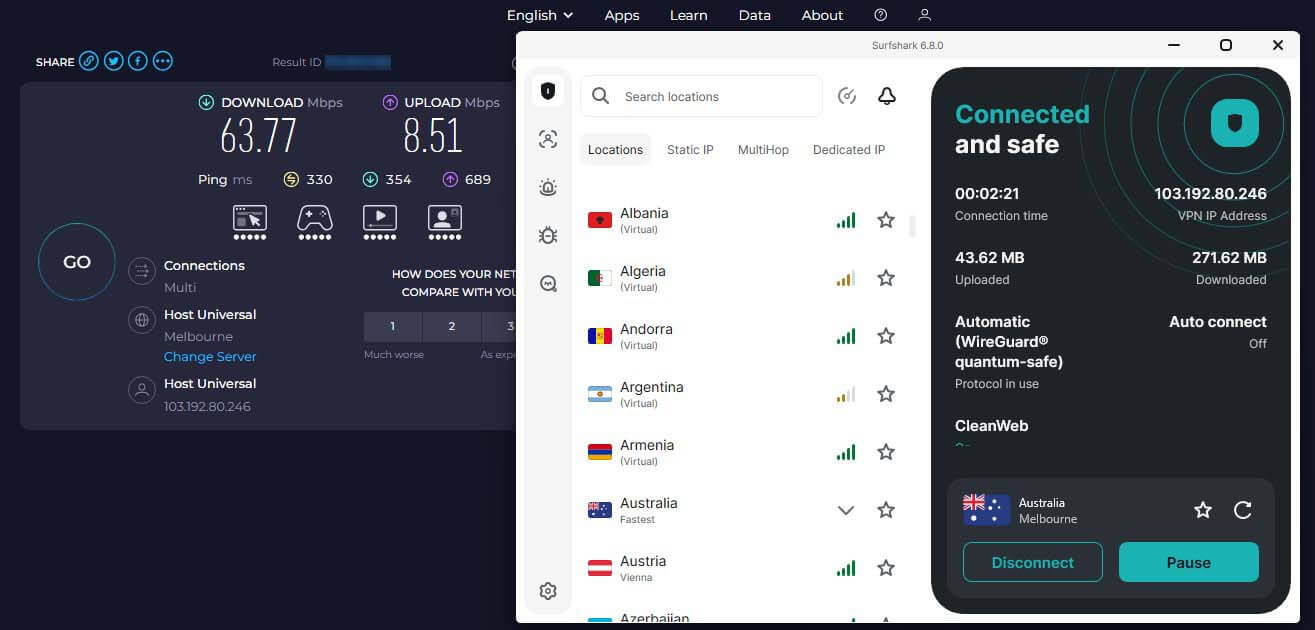
One area where Surfshark lags behind its costlier competition is speed and performance. Is it that slow? This is by no means a slow VPN, but the speed reduction is noticeable in the speed test results. For this Surfshark test and review, we tested it for three days, three times a day, using UK, US, Japanese, and Australian servers. Once again, we were in Eastern Europe, so here are our native internet speeds:
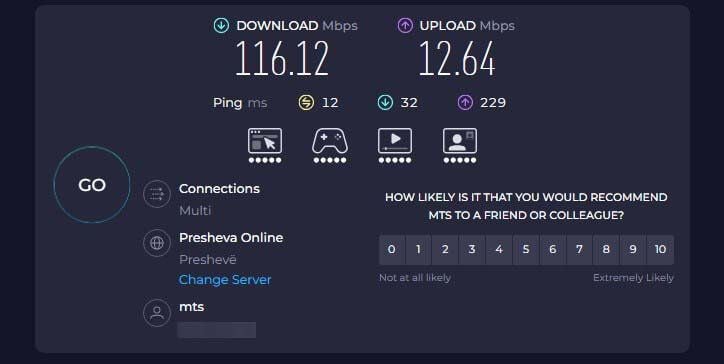
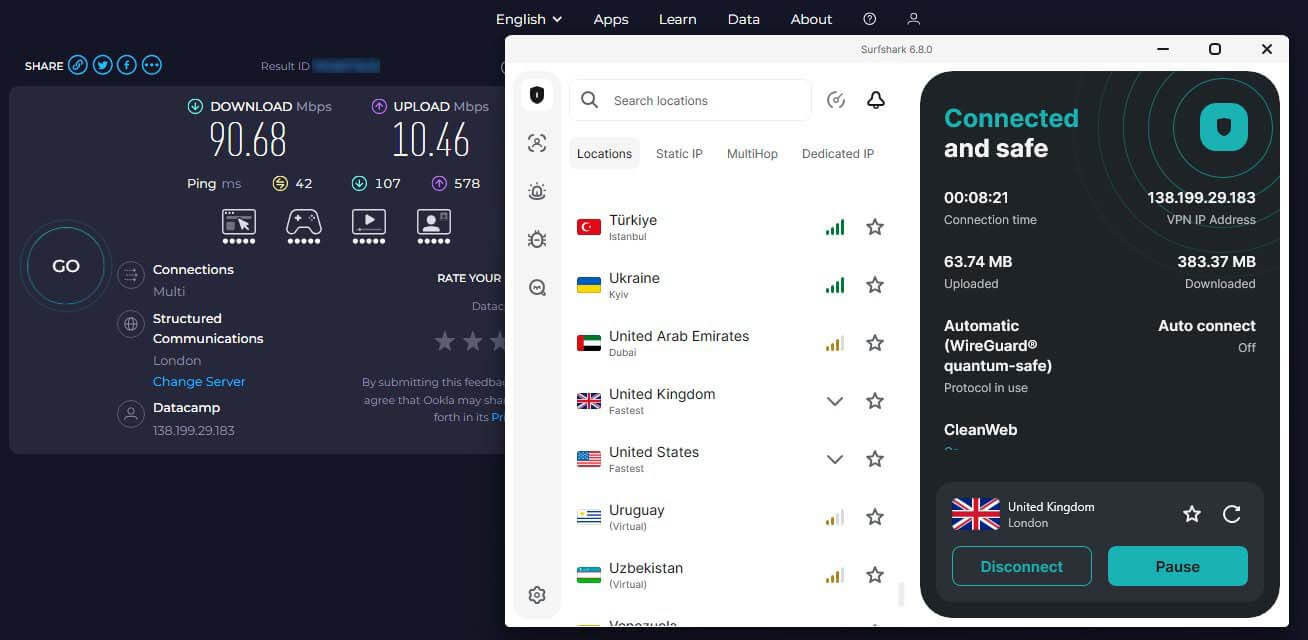
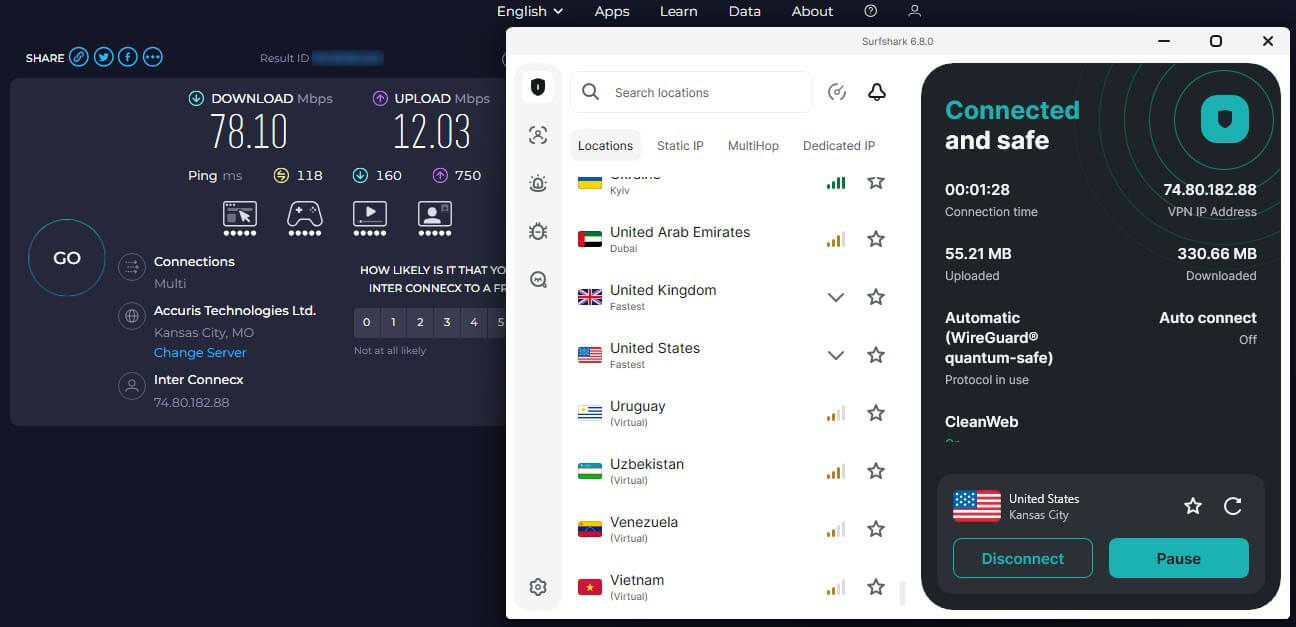
With all the tests done, we’ve compiled the best results for each server.
United Kingdom:
United States:
Australia:
Japan:
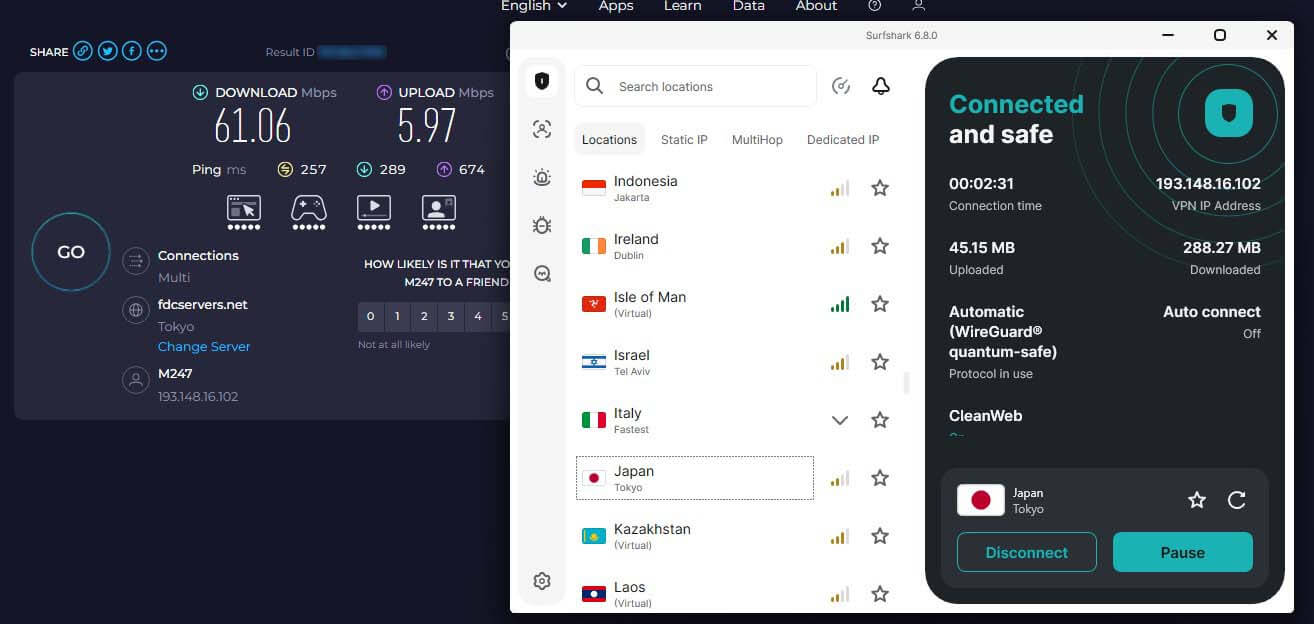
While using the UK server, our speed reduction was barely noticeable. While the US server showed somewhat decent performance, servers in Australia and Japan were much slower. Compared to NordVPN or ExpressVPN, Surfshark is definitely a bit slower, as reflected in its considerably lower price.
| UK Server | US Server | Australia | Japan | |
| 📥 DL Speed Loss | 21.9% | 32.7% | 45% | 47.5% |
| 📤 UL Speed Loss | 17.2% | 4.8% | 32.7% | 52.7% |
Still, speeds like this are sufficient for streaming, torrenting, and browsing in general, as long as your expectations are realistic. Let’s see how Surfshark performs for gamers.
⚡ Is Surfshark Fast for Gaming?
Earlier in this Surfshark VPN review, we mentioned its gaming prowess. Simultaneously, while it’s functional, it’s not the fastest choice, and problematic when using distant servers. Using nearby servers yields better results, with marginal ping increases. However, when we tested NordVPN, the increase was smaller.
Cloud gaming with Surfshark is also less pleasant than NordVPN or ExpressVPN. Due to a slight input delay, even slow-paced games won’t be very enjoyable—except if you don’t plan on playing Solitaire or Mahjong. That said, it’s decent for gaming if you use a close server. NordVPN is the best choice for greater gaming capabilities.
Surfshark Review: Torrenting and P2P
Surfshark doesn’t have dedicated P2P servers like NordVPN or CyberGhost. Instead, its entire server fleet is torrent-friendly. Again, we suggest connecting to a server close to you if you want to maximize performance. When torrenting, we used a server in Slovenia, and we didn’t see performance differences.
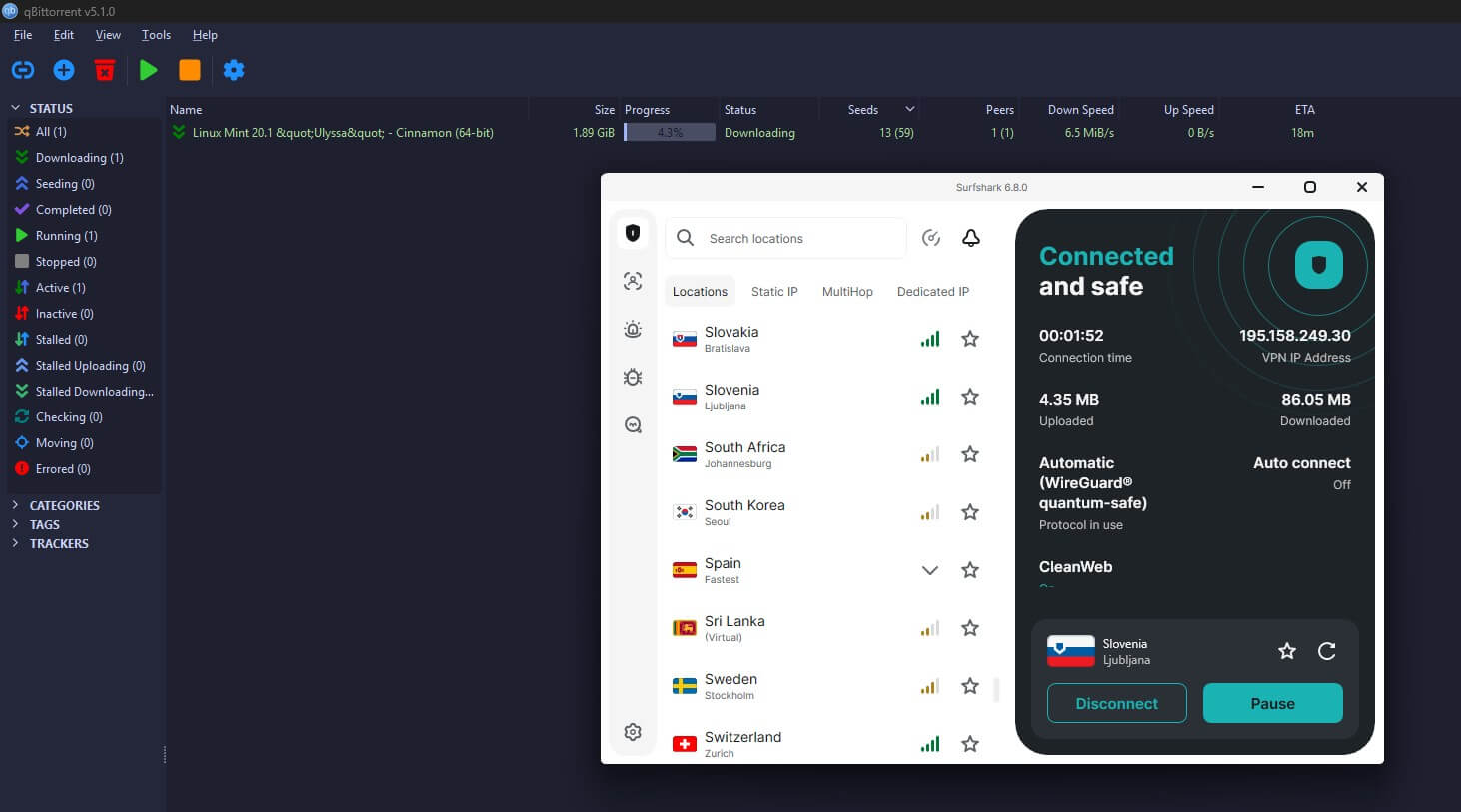
In fact, here’s proof: Downloading Linux from 1337x by using Surfshark. During this, the connection was stable, and we could download every torrent at nearly full speed. It’s a very good VPN usable with uTorrent, BitTorrent, and many other P2P clients. Though it lacks SOCKS5, which NordVPN has.
Can Surfshark Bypass Censorship in 2026?
Contrary to some more expensive VPNs, Surfshark is good for bypassing censorship. Thanks to some of our team members in the UAE, Turkey, Russia, and China, we could test Surfshark VPN directly. Our tests were successful, and Surfshark worked well in all four locations. But keep in mind that we used NoBorders.
In China, for example, Surfshark worked 7/10 times, which isn’t a bad score, especially in 2026 and new Great Firewall Updates. In some restricted countries, specifically the UAE and Turkey, the VPN worked without obfuscation. Still, we recommend keeping it on just in case. Even the VPN enables it by default.
If you face issues, consider changing your protocol. OpenVPN works well, while WireGuard may be an issue. For more tips, read our guide explaining how to use Surfshark VPN in China in 2026.
Servers and Server Locations
Up until recently, this VPN was among the smallest providers server-wise. However, in this Surfshark 2026 review and test, you’ll see that this is not the case. As we speak, this VPN offers 4,500+ servers in 100 countries. This is a pretty impressive server fleet for a VPN that isn’t going to cost you a fortune.
What’s more, the server distribution is decent. It offers city-level servers in the US, UK, India, Canada, Italy, and more locations. Of course, most servers are concentrated in the US and Europe, but less popular locations are also available. Some include Laos, Belize, Morocco, Andorra, and Montenegro.
To that, we’ll add dedicated IP servers in the US, UK, Singapore, Japan, Germany, and at least a dozen more locations. Plus, there are MultiHop servers that you can customize. Compared to NordVPN, this server fleet is middling. However, with 100 countries, you won’t feel restricted or lack VPN locations.
Surfshark Review: Customer Support Quality
Getting in touch with customer support is easy. For this Surfshark review and test, we talked to them numerous times. The bad thing is that the VPN lacks 24/7 live chat support, and as of recently, its main support means is submitting a request. That doesn’t take too long, but we see some users not wanting to bother.
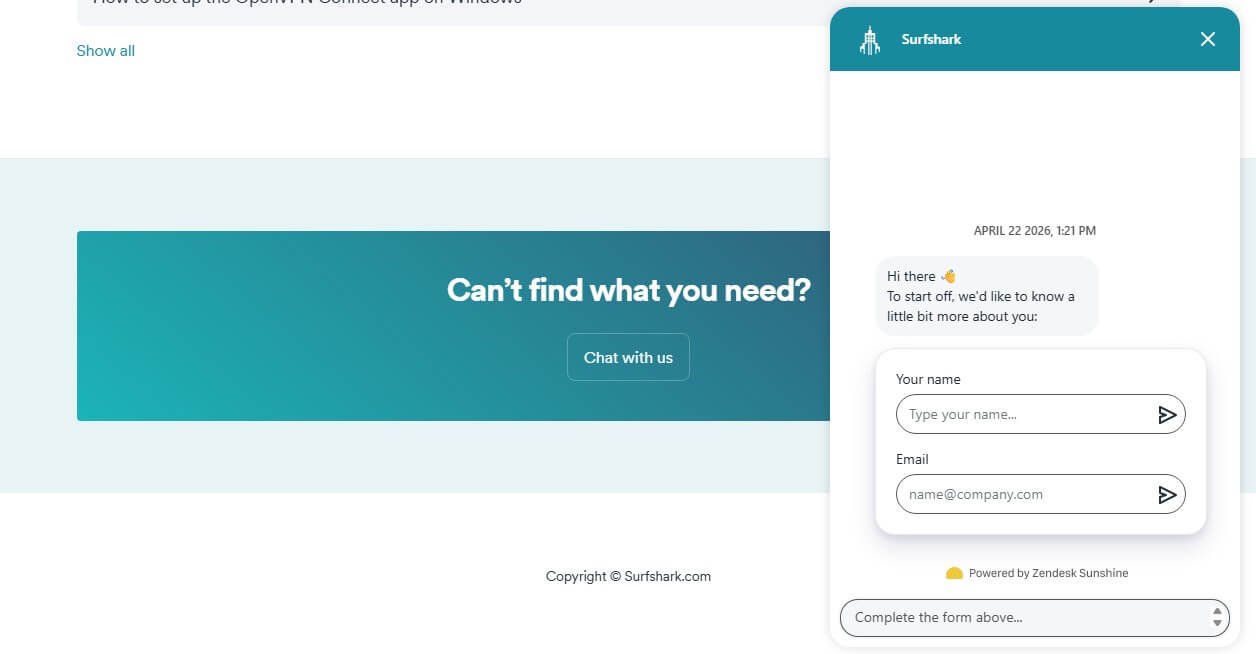
We did, and we’re glad, as the support team was quick to respond; usually in ten minutes. If that’s not an option, you get the Help Center, with insightful tutorials and answers to some of the most frequently asked questions. Good among the bad is that Surfshark is reliable, and issues that require fixing are rare.
What We Don’t Like About Surfshark
Before wrapping up our Surfshark VPN test and review for 2026, let’s discuss a few things we don’t like. You noticed that there aren’t many. Obviously, Surfshark’s main weakness is its average performance compared to NordVPN and ExpressVPN, and as a whole. If you often use distant servers, that may be an issue.
Strangely, it sometimes takes too long to connect to the server. It may take up to twenty seconds or not connect at all; it’s hard to predict. The last bothersome fact is the monthly price of at least $15.45 per month, which isn’t great if you need a VPN for, let’s say, two or three months, as there are cheaper options.
Some options include ExpressVPN or CyberGhost at about $12.99, or NordVPN, a better pick at roughly the same price as these two. Other than that, we found Surfshark to be very good and without fatal flaws.
Surfshark Review 2026: Conclusion
In the end, we say that this is one of the best VPNs for the money. It’s a jack of all trades that can’t be beaten for the price. While its performance isn’t at the top level, Surfshark makes up for it in other departments: Unlimited simultaneous connections, great streaming prowess, and rock-solid security.
Even better, it’s torrent-friendly and works in China, which not many VPNs can achieve. Its price will attract budget-oriented users looking for a decent service. Surfshark is proof that cheap VPNs don’t have to be bad. With CyberGhost, it VPN represents the pinnacle of the budget segment of the VPN market.
So, is Surfshark worth it? We would say yes. If you don’t like it, you can always get a refund and opt for similarly priced CyberGhost or Private Internet Access—the choice is yours.
Surfshark

