Gamers seek the best VPN for Xbox to reduce lag, enjoy DDoS protection, and buy games for lower prices by changing their IP. No doubt, a VPN plays a pivotal role for gamers looking to enhance their experience. Unfortunately, finding a good Xbox VPN is daunting, as very few actually make a positive difference.
A slow and unreliable VPN increases latency and makes gaming a chore. If you randomly pick VPNs and test them, most will fail to impressyou. To prevent you from endlessly wandering around and making mistakes, we tested over 50 VPNs that work with Xbox to evaluate their qualities and bring you our comprehensive list.
Below, you see our five favorites that check all the right boxes for the best Xbox VPNs in 2026.

The 5 Best VPNs for Xbox Consoles in 2026
- NordVPN – The best overall VPN for Xbox
- ExpressVPN – A reliable and secure VPN for Xbox
- CyberGhost – A cheap Xbox VPN packed with features
- Surfshark – The top VPN software for unlimited devices
- Private Internet Access – A VPN for Xbox with a wide server selection
Best VPN for Xbox (Series X/S, One, and 360): Our Top Five
These five VPNs offer all you need to raise the bar for a quality Xbox experience. Fast speed, tight security, stringent privacy, and easy setup. We picked the providers that work with older Xbox consoles for those in love with Xbox’s golden days. With that out of the way, let’s discuss our top five VPNs for Xbox in depth.
1. NordVPN
Pros
- Fast speed and low latency
- Supports all Xbox consoles
- NordLynx protocol (fast & secure)
- Audited no-logging policy
- DDoS protection
- Meshnet (virtual LAN)
Con
- Higher renewal prices (but worth the extra)
NordVPN is undoubtedly the best VPN for Xbox Series X and older generations. It’s a highly secure provider with 8,800+ servers and blazing-fast speeds produced thanks to its in-house NordLynx tunneling protocol. This provider offers a SmartDNS feature for Xbox if you want to enjoy streaming.
Additionally, it allows you to connect it to a router, another way to use it on Xbox. However, we found it much easier to share a VPN connection from the PC. This provides all NordVPN’s benefits on your console fuss-free. NordVPN is perfect for low-ping gaming, offering protection against swatting/DDoS.
It also has bank-grade encryption and a kill switch for preventing IP and DNS leaks. Double VPN servers spice things up with two encryption layers. Meanwhile, Threat Protection Pro on desktop and mobile devices blocks trackers, malware, and ads. Furthermore, it’s a decent option for streaming, and you’ll have no issues accessing Netflix Canada abroad or watching foreign TV channels.
Based in Panama, NordVPN has an audited no-logging policy. Aside from rock-solid security, this provider supports all platforms, allowing for ten simultaneous connections. NordVPN is an affordable Xbox VPN too, with four plan tiers, each offering something unique and worth exploring.
Still, at around $3.09 per month for the 2-year Basic plan, you can get one of the best choices for gaming, in general. Afraid of losing money? A 30-day money-back guarantee has your back; test it risk-free below.
2. ExpressVPN
Pros
- SmartDNS supports consoles
- Excellent speeds for no-lag gaming
- Protection against DDo
- In-house Lightway protocol
- Good for streaming on Netflix
- Affordable introductory deals
Cons
- Light on advanced security features
- Higher price when you renew
Our #2 is ExpressVPN, a provider that fully supports all Xbox consoles, offering two methods of connection. The easier one is through MediaStreamer for streaming and doesn’t require a complicated setup. However, we recommend installing ExpressVPN on your router to take full advantage of it on Xbox.
The provider has 256-bit AES encryption and a proprietary Lightway Turbo VPN protocol. It’s known as one of the fastest VPNs, essential for low-ping gaming. In addition, its encryption with a kill switch, split tunneling, and IP/DNS leak protection make your IP address private all the time, keeping your identity concealed.
This means it’ll protect you from DDoS or swatting attacks. ExpressVPN isn’t just a gaming VPN. It offers servers in 160 locations, so you can switch regions on Netflix or enjoy Disney+ abroad on your Xbox console. Setting up ExpressVPN is easy, especially because the provider gives step-by-step guides for all methods.
Even if you’re a noob (no offense!), you can connect it to your Xbox console in 10 to 15 minutes. ExpressVPNhas a certified no-logging policy for the highestlevel of privacy. Plus, it allows up to 14 simultaneous connections and offers 24/7 support if you have any problems or questions. What about the price?
ExpressVPN is marginally pricier than NordVPN. We advise its biennial Basic plan at 73% off and with four free months. At $3.49 per month, it’s one of the best VPNs for Xbox, thanks to a 30-day money-back guarantee.
3. CyberGhost
Pros
- DDoS protection
- Fast, 10 Gbps servers in 100 countries
- Automatic WiFi protection
- WireGuard for reliable connections
- Very affordable
Cons
- Not great in censored regions
- Limited to seven simultaneous connections
CyberGhost is another great VPN for Xbox in 2026. It’s an affordable choice that supports gamers with many bespoke features. Xbox consoles get the full treatment, as it supports Xbox Series X, Series S, One, and 360. You can use its SmartDNS on Xbox to enjoy streaming or install CyberGhost on a router.
You can create a virtual router on your Mac or Windows PC and connect to it. Whatever the case, CyberGhost has all the tutorials you need to succeed. You’ll get 12,000+ servers in 100 countries, where CyberGhost includes streaming servers for unblocking ABC outside of the US, watching Netflix, and streaming on ESPN.
As a safe and secure Xbox VPn, it offers 256-bit AES encryption, a kill switch, WireGuard, and an ad blocker, useful on streaming sites. Moreover, the VPN has NoSpy servers based in Romania and operated by the company itself. With a no-logs policy, CyberGhost allows you to protect your privacy and avoid DDoS attacks.
Performance-wise, CyberGhost is blazing-fast with WireGuard, although not faster than NordVPN. Still, we had zero issues playing games online, even if we’re talking about using this VPN for Warzone or any other fast-paced shooters and MOBA titles. If you’re interested in CyberGhost, our advice is to get its 2-year plan.
The entire plan costs less than $2.20 per month, with a 45-day money-back guarantee. You can even get its Security Suite for Windows for a bit over a dollar a month and still make it cheaper than 99% of the VPNs.
4. Surfshark
Pros
- No limits on simultaneous connections
- Full support for all Xbox consoles
- Solid speeds with WireGuard
- Robust server network (4,500 servers)
Cons
- Occasional slow speeds
- No virus protection in the cheapest plan
If you’re looking for an inexpensive and reliable VPN for Xbox, Surfshark is a powerful choice. It has a wide server fleet of 4,500 servers in 100 countries, making for a great selection of servers and locations. For Xbox players, this means the ability to play on distant gaming servers in Asia or any other continent.
Surfshark isn’t a speed champ, but it’s far from a slouch. However, it offers WireGuard as the main protocol, having solid performance and stability. This, with support for Xbox, makes for an incredible experience. Surfshark offers Smart DNS, great for streaming on Xbox and avoiding the more complex router setup.
The provider has MultiHop servers to double your encryption for a higher level of privacy. We also like its Static IP addresses, but for added flexibility, you can buy a dedicated IP. Gamers will like Surfshark’s 256-bit encryption that protects against DDoS and swatting. Also, the service offers an IP Rotator.
It rotates your IP every few minutes and prevents snoopers from tracking you. Surfshark works with all generations of Xbox, but the same goes for Xbox’s counterpart, PlayStation. Overall, Surfshark is pretty good, especially for unlimited simultaneous connections and some of the lowest prices.
The biennial Starter plan at $1.99 per month breaks records. But if you want an antivirus, spend about $2.49 per month and enjoy a few more security features. All this is risk-free for 30 days. Could it get better?
5. Private Internet Access
Pros
- Over 30,000 global servers
- Superb Multi-hop privacy
- Servers optimized for streaming
- Affordable biennial plan
Cons
- Antivirus is paid additionally
- Can be slower at times
Gamers love Private Internet Access for its low prices and respectable performance. It’s at #5 because it’s not the fastest VPN. However, its speeds are more than sufficient for an Xbox VPN that aims for a lag-free experience. Users can enjoy Smart DNS and set up the VPN on Xbox without a complex process.
Even if Smart DNS isn’t your thing, you can set up PIA by using the PC method. PIA offers unlimited simultaneous connections to protect all your devices. It also packs over 30,000 servers in 91 countries. We can mention its WireGuard support for stability and speed for mammoth gaming sessions.
Private Internet Access protects you against DDoS using 256-bit AES encryption. Moreover, the VPN employs RAM-only servers to wipe clean every bit of data after a server restart. Besides, PIA has been audited by Deloitte and commended on its absence of logging, crucial for privacy-oriented gamers.
PIA is great for streaming as well. Gamers can pause by watching a few Netflix shows or downloading torrents privately. There’s Tor over VPN support for those curious about the dark web platforms. Finally, PIA VPN comes with non-flexible but still cheap plans. We’re talking about a 2-year plan at $2.19 per month.
The same plan has two or four free months. PIA’s 30-day money-back guarantee makes it risk-free and ready to test. You can read our PIA VPN review first; if not, click the button below and snatch it now.
What Is the Best Free VPN for Xbox?
Our list of the best Xbox VPN services consisted of paid providers. But what about a free VPN for Xbox? Does something like this exist? Let’s just say that some free providers work on this platform, but with many compromises. When something’s free, there’s always a catch: weak performance and data limits.
These providers have slow speeds and outdated 1 Gbps servers, often exacerbated by limited monthly data of 2 GB to 10 GB. Additionally, free providers offer limited device support, meaning that the majority don’t support routers or gaming consoles. Their security is subpar, so don’t expect the same DDoS protection.
The biggest red flag is their logging. Hola, Betternet, and Hotspot Shield are especially notorious for this. Storing logs is their way to earn money, as it allows them to sell this data to the highest bidder. They seemingly give you everything for free, while in the background, they stab you in the back.
So, are there any free VPNs that work with Xbox Series X, Series S, and older generations? YES!
Proton VPN

You can try out Proton VPN. Feel free to check our Proton VPN review here, where we tested its premium version. Its free version, however, also has unlimited data and offers all the security features from the premium version, but with no Secure Core and NetShield. The catch is that you get much slower speeds.
You also get ten server locations, but you can’t choose the one you want. Proton VPN’s free version has no streaming support, and it offers no P2P servers for downloading torrents. We tested it on our Xbox Serie,s X and we can tell you it’s not great for lag-free gameplay, despite unlimited data.
Hide.me

Hide.me offers amazing device support (including routers), with a secure free plan. Of course, this is far from the best VPN for Xbox Series X/S in 2026, although its premium plan is pretty good. The free plan is disappointing. Its security is robust, with 24/7 support and many premium features.
Hide.me has no data limit either. This alone is enough to play games or browse the web indefinitely, as long as its slow speeds aren’t irritating you. It offers eight server locations, two fewer than ProtonVPN. Due to this, Hide.me is a poor choice for bypassing geo-blocks and achieving maximum performance.
Not to mention its lack of streaming support and, once again, no simultaneous connections, making it impossible to protect other devices at the same time. As you can see, having a free VPN for Xbox means dealing with compromises and shortcomings that premium providers won’t struggle with.
How to Set Up a VPN on Your Xbox Console?
Setting up a VPN on your Xbox console depends on the method you choose. If you’re using a router to complete the process, each router has a different setup. NordVPN, ExpressVPN, and CyberGhost all have step-by-step guides for the router models that they support, so you can look them up on their sites.
We use a method of sharing the VPN connection from our Windows PC to the console. We found that this method works well when using a VPN for PS5/PS4, as you don’t need advanced knowledge. Here’s how it works:
- Subscribe to the best VPN for Xbox. It can be any of the top five VPNs above, although we recommend NordVPNand its 73% discount + three free months for the biennial plan.
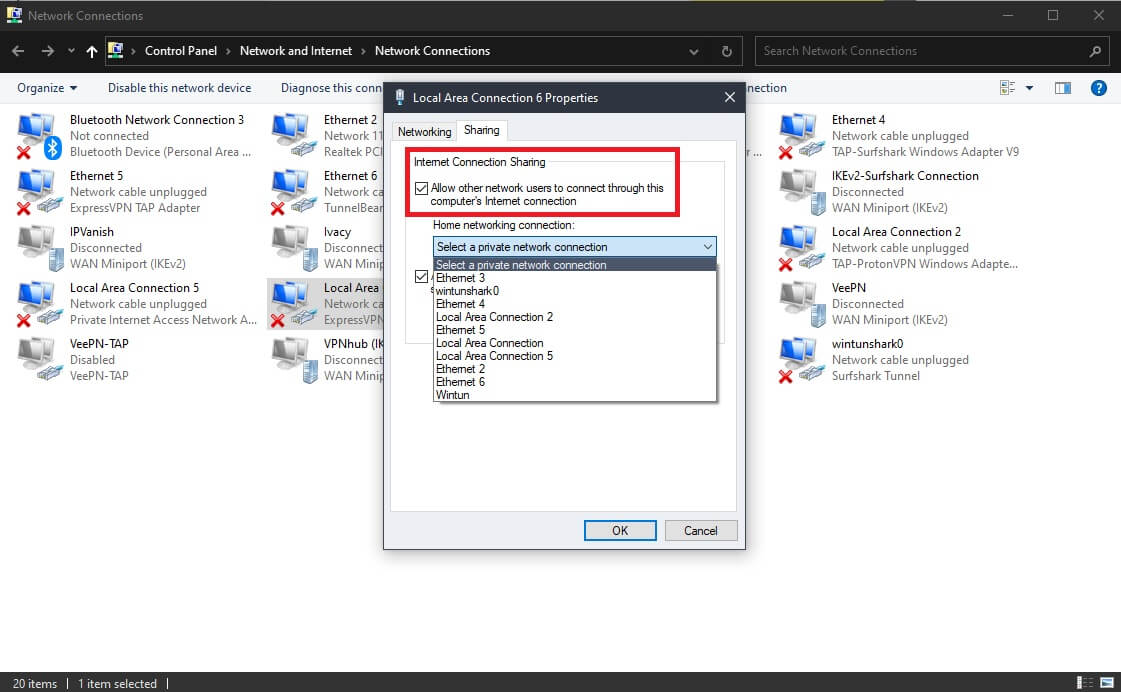
- On your Windows PC, go to Control Panel and open Network and Sharing Center.
- Click on Change Adapter Settings and find the name of the network of the VPN. If you use NordVPN, the adapter will be called TAP-NordVPN Windows Adapter, and if you use ExpressVPN, it’ll be called ExpressVPN TAP Adapter. Right-click on the adapter and choose Properties.
- Click on the Sharing tab and tick the first box that allows other network users to connect through this computer’s internet connection.
- Choose the network you want to share the connection with and click OK.
© 01net.com - Use a LAN cable to connect your Xbox to your PC.
- Connect to a server in the VPN app of your choice. Once the connection is established, your Xbox console will be protected by a VPN, letting you enjoy all of its benefits.
Alternative: Using a Mobile Hotspot Function
Another way to use a VPN on Xbox in 2026 is to enable mobile hotspot in Windows. Here’s how to do it.
- Go to Settings and open Network & Internet.
- On the left, find Mobile Hotspot, click on it, and enable it.
- Once again, go to Change Adapter Settings, and you’ll find this new network. Most likely, it’ll be called Local Area Connection.
- Select the network adapter from the VPN, right-click on it, and select Properties.
- In the Sharing tab, tick the option for allowing other users to connect to that internet connection.
- When the home networking connection drop-down menu can be opened, open it, and select the mobile hotspot network you created (Local Area Connection from Step 3).
- Connect to a VPN server using either of the VPNs from above.
- Turn on your Xbox, find your WiFi network in Settings, and connect to it. With the protection of a VPN, you can now play games safely and lag-free.
Conclusion
Now that you know what the best VPN for Xbox Series X and other generations of this console is, it’s time to wrap up our discussion. Having a VPN for Xbox allows you to avoid DDoS attacks, stream on geo-restricted platforms, and prevent ISP throttling that spoils the party and amplifies your latency.
To achieve these effects, use a reliable VPN such as NordVPN, ExpressVPN, CyberGhost, Surfshar, or PIA. These are secure, they offer the fastest speeds, and unlimited data and bandwidth, making gaming smooth and enjoyable. Best of all is that these providers are easy to set up and use, so you’ll have no issues as a newbie.
Frequently Asked Questions
Will using a VPN for Xbox increase my ping and slow down my internet?
Yes, it may do that, but only if the VPN itself is slow. VPNs generally decrease your internet performance due to encryption and the distance between you and the VPN server. This is typical for slower, usually free providers. For this reason, it’s essential to use a fast provider like ExpressVPN or an even faster one (NordVPN).
The speed reduction will be barely noticeable, especially if you use a server close to you. This also rings true if you suffer from ISP throttling, where your internet is already crippled. A VPN will conceal your IP and prevent your internet provider from interfering. This way, a VPN will preserve your internet speed and decrease ping.
Can I install a VPN directly on Xbox?
No, you can’t because Xbox doesn’t support VPNs out of the box. Thankfully, you can still utilize it via a router or by sharing your VPN connection from a Mac or Windows PC. All these methods are simple and are thoroughly explained by the providers we presented on their sites and FAQs.
Why should I use a VPN on my Xbox console?
There are many reasons why using a VPN for Xbox is beneficial. You can get rid of bandwidth throttling and speed up your connection. Another benefit is bypassing geo-blocks. Xbox consoles have streaming apps. If these apps are unavailable in your country, you can unblock them by changing your IP.
For gaming, VPNs help you stay clear of swatting and DDoS. With your IP unknown to other players, no one can pinpoint your location or execute any type of cyber-attack. Even if someone tries to execute a DDoS attack, it will affect only the VPN server. These servers will simply brush off the attack without consequences.
