
WP Engine, with its WordPress-centric plans, seems a logical option for your website. But wait, suddenly, there’s SiteGround, with its managed WordPress features at a fraction of the cost. What’s the deal with this strange SiteGround vs WP Engine see-saw? That is a good question.
Apparently, SiteGround is a better option for WordPress hosting overall despite costing way less. While WP Engine has its merits and is also reliable, most people can’t stomach the associated sky-high price. Nevertheless, this WP Engine vs SiteGround comparison proceeds as usual.
We’ve already compared them for you, so all that’s left is to open our mouths and speak honestly. You know we always pledge honesty, and this time, it remains the same. So, let’s spill all the ins and outs and explain why we sided with SiteGround over WP Engine in this 2026 analysis.
SiteGround vs. WP Engine Compared in 2026
| SiteGround | WP Engine | |
| Types of Hosting | Shared (WordPress + WooCommerce), cloud, reseller | WordPress and WooCommerce (shared) |
| Storage Size | Up to 40 GB | Up to 50 GB |
| Bandwidth | Unmetered | Up to 550 GB per month |
| Hosted Websites | Up to unlimited | Up to 30 |
| Backups | Daily and on-demand | Daily and on-demand |
| Starting Price | $3.99 per month | $25 per month |
| Money-Back Guarantee | 30 days | 60 days |
| Ease of Use | Very easy | Very easy |
| Site Migration | Free | Free |
| Free Domain | No | No |
| Security | DDoS protection, AI anti-bot, WAF, proactive website monitoring, free SSL | Proactive WordPress security, free SSL, DDoS protection (other features are paid extra) |
| Email Accounts | Unlimited | No |
Plans and Pricing: SiteGround vs. WP Engine
If you dislike confusing pricing schemes, you’ll appreciate the straightforwardness of SiteGround’s pricing. When you click the button to visit its site, you’ll see three plans: StartUp, GrowBig, and GoGeek. All three are identical in terms of WordPress and WooCommerce support.
The StartUp plan costs only $3.99 per month, but the GrowBig plan, which hosts unlimited websites with staging and on-demand backup copies, is a measly $6.69 per month. By the way, we used this exact plan to test SiteGround vs WP Engine in 2026.

That’s pretty much it. SiteGround offers no optional extras or security features that can be purchased separately. What you see is what you get. Oh, and we haven’t mentioned its cloud hosting plans, which, while not the cheapest, provide enough features to tackle your most demanding needs.
WP Engine creates confusion with its WordPress and WooCommerce plans, which are sold separately. You’ll now ask if WooCommerce is a WordPress add-on, and we’ll say YES, but if you buy a WordPress plan, you won’t be allowed to install and use WooCommerce.

For a WordPress plan, you’ll spend as little as $25 per month but derive more value from the Professional plan at $50 per month. This one, however, offers less storage and bandwidth compared to SiteGround’s cheaper GrowBig plan. What about WooCommerce hosting?
If you want to sell online, you can do so for $30 per month, but you’ll get more value from the Professional plan at $63 per month. Both WordPress and WooCommerce plans offer second-tier variants that cost hundreds of dollars for added security, advisory services, and more.
Do They Offer a Money-Back Guarantee?
Yes, they do, and WP Engine has a notable advantage here, with a 60-day allowance. SiteGround offers 30-day refundable plans, but we don’t consider this a disadvantage. It’s an industry standard. Besides, SiteGround is cheaper to begin with, so even if you accidentally forget to obtain a refund, you won’t lose too much.
It’s nice of WP Engine to offer practically two months of testing. However, considering the minimal price of $25 per month, you’ll first have to shell out $300 for a year, which many users may not be able to afford upfront.
🏆 Winner: SiteGround
Hosting Management: Which Web Hosting is Easier to Use?
WordPress-ready hosting services, such as SiteGround and WP Engine, typically strive to be as beginner-friendly as possible. SiteGround uses its sPanel or Site Tools, which is equally functional and beautiful. Once you register, you’ll be able to create a WordPress website in a few clicks.
We love the option to install WordPress and WooCommerce simultaneously, making your online shop ready in no time. sPanel itself is a blessing to have. You can access all hosting options on the left, while the top of the screen is reserved for pinned tools you need the most.
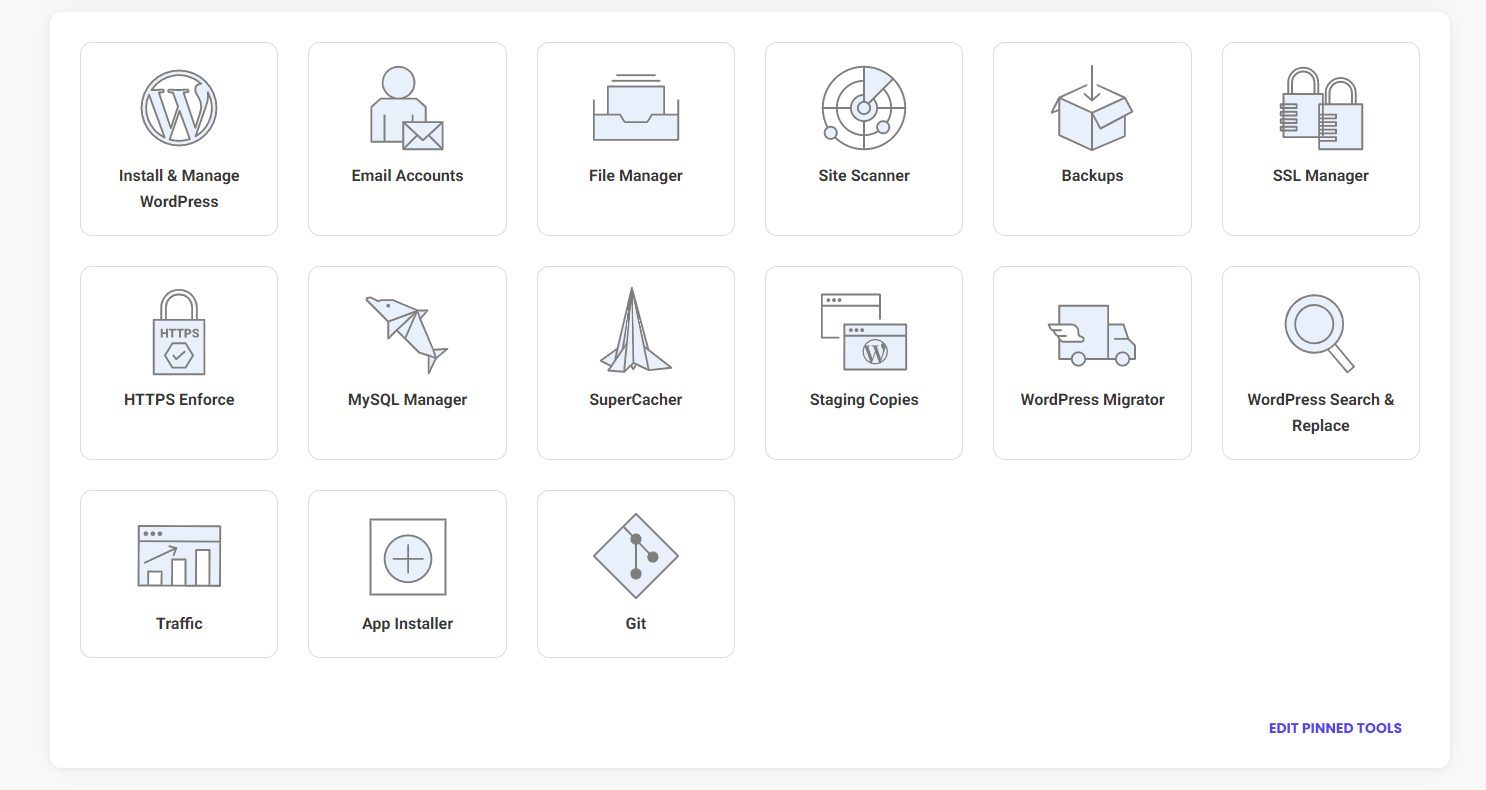
SiteGround’s sPanel “transpires” on a single page, so it’s very smooth. It’s like a fully loaded operating system where you can perform hosting tasks without hang-ups and long loading times. WP Engine also has a proprietary panel that, in our opinion, is just as intuitive as sPanel.
The left-hand side provides access to various tools, migrations, backups, error logs, and other resources. Staging is also available, allowing you to create a copy of a website for experimentation. We love WP Engine’s live checklist, which is an excellent organizational tool.
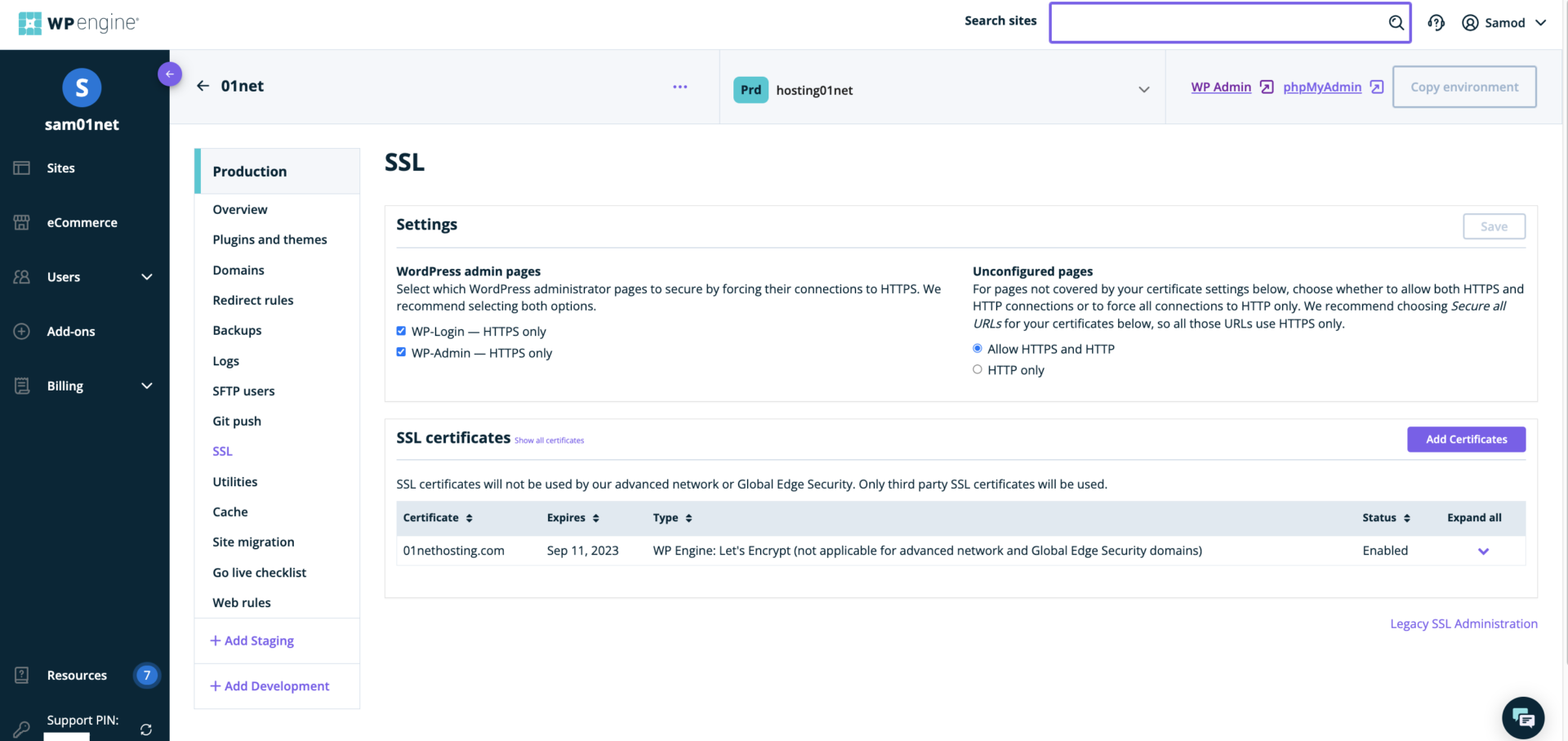
It allows you to track your tasks and their completion, putting you in control throughout the process. As for WordPress and WooCommerce setup, they’re highly intuitive. WP Engine holds your hand as you press a few clicks, provide your username/password, and access your WordPress admin panel.
Some of you might not be content with the absence of cPanel. If that’s your primary concern, then these best cPanel hosting companies might suit you better. This SiteGround vs WP Engine test is a solid tie, as neither disappoints in the ease of use and functionality aspect.
🟰 Winner: Tie
WP Engine vs SiteGround Features
We don’t like blatant bashing, but when we compare SiteGround vs WP Engine side by side, we can notice just how poor WP Engine’s value for money is. I mean, no offense, but SiteGround blows it out of the water.
Performance & Resources
Let’s start with the basics.
We’ll use SiteGround’s GrowBig plan as the best one and compare it to Essential (WordPress/WooCommerce) plans from WP Engine. GrowBig is $6.69 per month, while the Essential plan is $50 per month or $63 per month for WordPress and WooCommerce, respectively.
SiteGround offers:
- Unlimited websites
- 20 GB of storage
- Up to 100,000 monthly visits
- Unmetered traffic
- NGINX static and dynamic caching
- Free CDN
WP Engine offers:
- 3 websites
- Up to 75,000 monthly visits
- 15 GB of storage
- 150 GB of monthly bandwidth
- EverCache site speed boost
- Global CDN
These are essentially identical features, but SiteGround is significantly more generous in this regard. It hosts unlimited websites, allows for increased traffic, and even provides additional storage. Its NGINX caching is also faster, which, as you’ll see, has a significant impact on performance.
WordPress Features
Being the most popular WordPress hosting providers, their plans include everything you need:
- WordPress auto-installation
- Automatic WordPress site migration
- Daily and on-demand backups
- Website staging, etc.

SiteGround has a slight edge here, as it also features the Speed and Security Optimizer WP plugins. Moreover, WooCommerce is supported by default, eliminating the need for additional costs. You’ll need to pay approximately $13 per month, in addition to WP Engine’s WordPress plan, to enable WooCommerce in WP Engine.

What’s more infuriating is that, despite the added cost, the plan’s “possibilities” remain the same. You’re spending that much more money on WooCommerce alone, whilst SiteGround’s cheapest StartUp plan at $3.99 per month supports it without a hitch. Come on, WP Engine!
Additional Features
Since we’re criticizing WP Engine, it’s smart to know that it features many excellent options. However, and this is a big one, they’re locked behind the paywall! Do you want more security? Perhaps the mid-tier plan at $400 or $500 per month (WooCommerce) will do!
Meanwhile, SiteGround is choke-full of freebies in all plans, such as:
- SSL
- Email addresses + email migrator (WP Engine doesn’t offer email addresses!)
- Unlimited databases
- Enhanced security
- Collaborators, and more.
It’s not that WP Engine offers none of these — SSL and MySQL updates are available to enhance the experience. At the price, however, we expected a great deal from WP Engine. A free domain would be welcome, but SiteGround doesn’t offer it either. Although it costs multiple times less, it’s (sort of) justified.
Overall, SiteGround appears to be better equipped than WP Engine despite offering lower prices. You can get much more from WP Engine if you’re willing to allocate a significant portion of your budget. At this point, SiteGround makes more sense if you’re not a money-spending masochist.
🏆 Winner: SiteGround
Speed & Uptime Tests: Which Web Hosting Performs Better?
It’s time for our SiteGround vs. WP Engine performance comparison. Before we proceed, we’ll spoil the surprise and admit that we’ve enjoyed both providers. Expectedly, SiteGround had a slight advantage in load times and overall performance, with nearly identical uptime results.
Let’s start with uptimes and response times.
Uptime & Response Time Results
Both services promise an industry-standard uptime of 99.95%. Having used Pingdom and tested both for 2 months, we, more or less, confirmed that. Both SiteGround and WP Engine experienced minor downtimes during this period, but they collectively lasted for no more than 3 to 5 minutes.
Imagine two months or approximately 87,600 minutes — only 3-5 of them were spent in the dust. That’s essentially 100% uptime on both sides. We also used Pingdom to test their average response times in the same period and detected some impressive results:
- SiteGround’s average response time was 143 milliseconds, with a minimum of 135 milliseconds and a maximum of 442 milliseconds. At under 650 milliseconds, highs, lows, and ultimately, the average result was awe-inspiring.
- WP Engine’s average response time was 238 milliseconds, with a minimum of 196 milliseconds and a maximum of 489 milliseconds. Again, at under 650 milliseconds, which is a standard for shared hosting, WP Engine’s results were commendable.
Page Load Speed Comparison
For this part of our SiteGround vs WP Engine speed test, we used GTmetrix.
To ensure maximum accuracy, which wasn’t difficult since we used WordPress on both sides, we created two identical websites. With access to a few premium themes, we selected one and created a website that featured numerous compressed images, several blog pages, and multiple high-quality videos.
WP Engine and SiteGround offer servers in multiple locations, including North America, Europe, Asia, and the Middle East. However, we decided to host our website in London because both services had several data centers in this city.
Once we launched Pingdom and used its London server for testing, we achieved these results with SiteGround:
- TTFB: 229 ms
- FCP: 345 ms
- TTI: 357 ms
- LCP: 529 ms
- FLT: 731 ms
- CLS: 0
After repeating the test procedure with WP Engine, the results were:
- TTFB: 317 ms
- FCP: 418 ms
- TTI: 423 ms
- LCP: 584 ms
- FLT: 922 ms
- CLS: 0
SiteGround was faster in terms of numbers, but as you can see, the differences aren’t that dramatic. Both providers managed something extraordinary:
- To load the website entirely in under a second.
- To achieve an impressive TTI (Time to Interactive) of under 450 ms.
- Have a class-defining TTFB (Time to First Bite) of under 320 ms.
This indicates the highest level of performance for shared hosting, paired with some of the best server response times we tested. Hostinger is as fast, if not quicker, than these two, and it’s our #1 web host overall. This speaks plenty about SiteGround and WP Engine.
With the performance at the highest level, both will knock your socks off. Still, if you’re yearning for a slight edge and want to squeeze every last drop, SiteGround is just a smidge more impressive in 2026.
🏆 Winner: SiteGround
Security: Which Web Host is Safer to Use?
SiteGround and WP Engine are well-versed in security, and you’ll rarely find something lacking. Again, it’s the approach that makes the difference. SiteGround is an “out-of-the-box” hosting service that includes all of its flagship security features, regardless of the chosen plan.
WP Engine knows how to secure your website but simultaneously asks for more money to do so. This, we think, is one of its worst aspects. For instance, WP Engine (read our WP Engine review if you haven’t) features:
- Free SSL (Let’s Encrypt)
- Automated daily backups
- Proactive WordPress security
To obtain a managed WAF (Web Application Firewall), you will need to pay an additional $26 per month.
Stronger Layer 3 and 4 DDoS protection is included in the Core plan, which is priced at a staggering $400 per month. Even automated plugin updates are $3 per month, which says a lot about WP Engine’s attempts to extract every last penny from your pocket.

SiteGround’s security features are just as impressive, if not more:
- Free SSL
- Daily backups
- Managed WAF
- DDoS protection
- 24/7 proactive website monitoring
- AI Anti-Bot

Guess what? You’re getting them in all plans! SiteGround’s AI Anti-Bot is one of our favorite features. It monitors your website and blocks various threats that come your way. It’s a self-learning tool, which means it “remembers” threats and builds additional “brain” power to counteract new ones when they attack.
All things considered, it’s hard not to give this one to SiteGround. Unless, again, you’re a financial masochist who loves spending hundreds of dollars a month to get virtually the same result.
🏆 Winner: SiteGround
Customer Support
SiteGround and WP Engine offer extensive support for those who need it. Both providers leverage 24/7 live chat support, phone support, and their loyal knowledge bases. SiteGround offers live chat and ticketing support tailored to the scope and complexity of the issue.
Simpler problems are usually solved on the spot, while complex issues are transferred to a higher instance in the form of a ticket. WP Engine primarily relies on live chat support, and in our comparison, we found it perhaps a bit quicker than SiteGround, which was surprising.
While SiteGround prefers your brain to do a bit of lifting and find the solution on its own, WP Engine is somehow more eager to please. Open the live chat widget, fill out the required info, and boom, you’re there. Their knowledge bases are some of the best we’ve seen.
You have numerous setup guides, tutorials answered questions, and more. If you’re not lazy, you’ll be able to find what you need within the knowledge base. If not, you can chat or engage in a phone call, keeping in mind that their numbers aren’t toll-free and may incur costs.
The general impression is that both do their jobs respectably and leave very little room for complaining. Not that we love to complain, but as reviewers, part of our jobs is to nitpick. We aren’t always proud of that.
🟰 Winner: Tie
Our Conclusion: SiteGround Wins Against WP Engine
It’s time to answer the question: Which is the best web hosting provider in 2026?
Is it SiteGround or WP Engine? While the overall best package is Hostinger, SiteGround is just a hair behind and, by extension, in front of WP Engine. Yes, SiteGround is a better option in general, but one of the key reasons for its victory is the price, or more accurately, value for money.
WP Engine’s problem is upselling. It charges you more for features that should already be included. That wouldn’t be a problem if its plans weren’t so expensive in the first place. SiteGround, in comparison, takes a more humanitarian approach with its subscriptions.
At just a few dollars a month, it performs flawlessly and shines in its best light, with no hidden fees for malware protection, additional bandwidth, or other features. Not to mention, SiteGround was actually faster and more feature-rich in our 2026 comparison.
This doesn’t make the decision easier — it resolves the SiteGround vs. WP Engine comparison once and for all. SiteGround is the absolute winner that you should use if you want to host WordPress sites in 2026 safely, securely, and without a hint of problems.
