Despite the many control panels out there, many people prefer cPanel for site or application management. Yet, not all the best hosting providers in the industry have cPanel since some of them have custom solutions. What happens when you have a project that requires the cPanel functions?
In this situation, it is best to stick with a top web host that offers cPanel hosting. However, one needs to be careful when choosing, as the quality of service differs wildly. That’s why we have tested a large number of cPanel hosting services to present the best in this field.
Best cPanel Hosting Providers: At a Glance
- Hostinger – the best cPanel hosting overall
- InMotion Hosting – best for security
- Hosting.com – best for hosting speed
- Bluehost – best cPanel hosting for WordPress
- HostGator – best for affordability
What is cPanel?
If you are hearing the word for the first time or you don’t seem to understand it yet, this should explain it.
cPanel is a control panel used to manage servers, sites, and applications. It is like a dashboard with all the settings you need to customize your hosting account, server, and site.
Whenever you need to make changes to your site, it is there to help you. Settings like CMS installation, domain manager, security manager, email accounts, Git version control, File Manager, web optimization, database management, etc., are easily accessible on cPanel.
Such a control panel is optional for server or site management for a tech-savvy individual. But for beginners, cPanel makes life easy with straightforward processes for basic and advanced settings.
One advantage of cPanel over all other control panels is that it is popular and has extensive support documentation and tutorials. So if there is any issue or action you need help with, your answers are merely a Google search away.
Best cPanel Hosting Providers in 2026 Reviewed
After experimenting with the top web hosts in 2026, we pinpointed five providers that will give an excellent cPanel hosting experience. Now, let’s discuss what each of them has to offer.
1. Hostinger
Hostinger is the best web host overall in 2026 and does not falter regarding cPanel hosting. The Lithuanian-based provider is known for its ease of use and management, affordability, speed performance, commercial-grade security, and great customer support.
Based on our Hostinger test, the company presents as an unbeatable player in the hosting industry with many innovative ideas and top-notch services. Now, let’s get into the specifics of the benefits of the host.
Pricing and Features
One of the reasons why Hostinger is the best cPanel hosting provider in 2026 is that it is very affordable. This makes it an exceptional option for hosting a site on a low budget.

Despite having a proprietary control panel, hPanel, Hostinger offers particular plans with cPanel without extra charges. Better yet, these are VPS plans, which, despite their power, start at only $4.99 monthly. However, our favorite is KVM 2 at a meager $6.99 monthly for two CPU cores, 8 GB of RAM, and 100 GB of NVMe storage.
In addition, you will get access to MySQL databases, File Manager, automated backups, free SSL certificates, and a one-click app installer (Softaculous). At the same time, you will get free email hosting through webmail & cloud SMTP delivery, domain manager, Git version control, redirections manager, etc.
All plans provide AMD EPYC processors for maximum power, with a selection of worldwide data centers. For example, Hostinger even offers servers in Singapore, with many more in the USA and Europe. Interestingly, the current offer provides you with a free “.cloud” domain for a year.
While all plans have limited bandwidth, the limit is so generous, it’s barely nonexistent. It ranges from 4 TB in the KVM 1 plan to 32 TB in the KVM 8 plan.
Speed and Security
Other reasons why Hostinger is a leading hosting provider for cPanel services in 2026 are commercial-grade security and speed performance.
All Hostinger web servers use LiteSpeed server software, creating an optimized hosting environment for sites. On top of that, its operating software is Linux, a very fast OS. You will also enjoy LiteSpeed Web Cache Manager, which allows you to cache your web pages and improve your site’s performance.
It gets better when you install WordPress on your site, as you will get the LiteSpeed Cache for WordPress (LSCWP) plugin for further optimization and better speed performance. From our tests, a WordPress site loads as fast as 769 ms when hosted on Hostinger.
Moreover, the host has multiple data centers around the world, and you can choose the location closest to your visitors to deliver the fastest speeds possible. In addition, it strengthens your cPanel site’s security by providing DDoS protection via Cloudflare.
At the same time, you will get automated backups that you can restore anytime. Other security features include malware attack protection through Imunify360, SSL certificates, and SSH access.
Ease of Management
We consider Hostinger to be the best cPanel host, also because of its ease of management.

The cPanel provided on Hostinger plans comes with a one-click app installer for WordPress, Joomla, Drupal, etc. This makes it easy for you to create a site without technical skills. In addition, you will have access to a domain manager, which you can use to add new sites, manage existing websites, or create subdomains.
There is an SSL certificate installer for automatic installation and updates.
Furthermore, you will get direct access to your PHPMyAdmin dashboard, where you can manage your MySQL databases easily. Since it allows you access to both File Manager and FTP accounts, managing the files on your server or sites gets easier.
Besides, it gives you direct access to cPanel with a username and password. But for a faster connection, you can go to cPanel directly from Hostinger hPanel.
Customer Support
If you need top-notch customer support for cPanel hosting, Hostinger is the best option in 2026.
The web host provides 24/7 support through live chats and emails. It offers support in eleven languages so that you can get help in your most familiar language. The supported languages include English, French, Lithuanian, Portuguese, Spanish, Indonesian, Ukrainian, Arabic, Thai, Vietnamese, and Chinese.
From our practical experience, the customer support agents are competent and quick to respond. They will help you resolve almost every issue. Aside from that, its Knowledge Base is filled with many helpful tutorials. You won’t have to seek help from third-party sites before you solve almost every possible issue.
2. InMotion Hosting
InMotion Hosting is a top provider that offers impressive cPanel hosting services in 2026.
The web host’s main control panel is cPanel. So it has perfected and integrated the control panel into its account management so that users find it relatively easy to manage their accounts, server, or sites.
InMotion Hosting is mainly known for delivering top speeds at affordable prices and several hosting types to clients. Aside from that, it provides great customer support and adequate security options for your site.
According to our thorough tests of InMotion Hosting, it is a web host you go to when you need a reliable and competent provider for speed.
Pricing and Features
As said earlier, InMotion Hosting is quite affordable and provides this affordability without compromising quality. Since InMotion Hosting uses cPanel as its only control panel, you will get it on all its plans.

For some higher plans like dedicated servers, you can create multiple cPanel accounts or licenses to manage various projects. But for hosting types like shared or WordPress, you will get only one account or license, but you can create multiple sites. Now, let’s talk about shared hosting with cPanel.
The first shared hosting package is Core and costs around $2.79 per month. This plan includes free SSL certificates, unlimited bandwidth, ten email addresses managed through webmail & mobile, and 100 GB SSD storage. The server can handle only one site.
The next package, Launch, costs around $4.59 per month on a 1-year plan. This plan will give you a free domain name, a professional email free trial, and NVMe storage. You can also host two websites. In terms of speed, the server has six times the UltraStack performance.
Power costs identically to Launch, with ten websites and 200 GB of NVMe storage, while Pro costs almost $10.60 monthly with 20 times UltraStack performance. Only Pro has 300 GB of NVMe storage and two CPU cores, but they both have phone support and advanced caching features.
Speed and Security
Another reason why InMotion Hosting is one of the best providers of cPanel services is security.
You will get spam protection on your emails and a tool to automate your site’s SSL certificate renewal and installation. In addition, your server will enjoy anti-DDoS and malware protection. There is a way to automate your backups as well, and you will get a one-click restoration feature when things go awry.
Furthermore, InMotion Hosting is a great option when you need features to improve the speed of your projects. The host uses UltraStack technologies to create an optimized hosting environment for your site. So no matter which software you install on your site, it will load up to 20 times faster than most websites.
Besides, your servers have NVMe SSD storage drives that make your data transfer swift! InMotion also has many data centers worldwide that you can choose from to give your visitors the fastest loading speeds possible.
Ease of Management
Generally, InMotion Hosting integrates cPanel in such a way that you will be able to manage all your sites from one dashboard. All the plans give you access to the one-click Softaculous installer, which lets you easily install software like WordPress on your website. You won’t need to use command lines, etc.
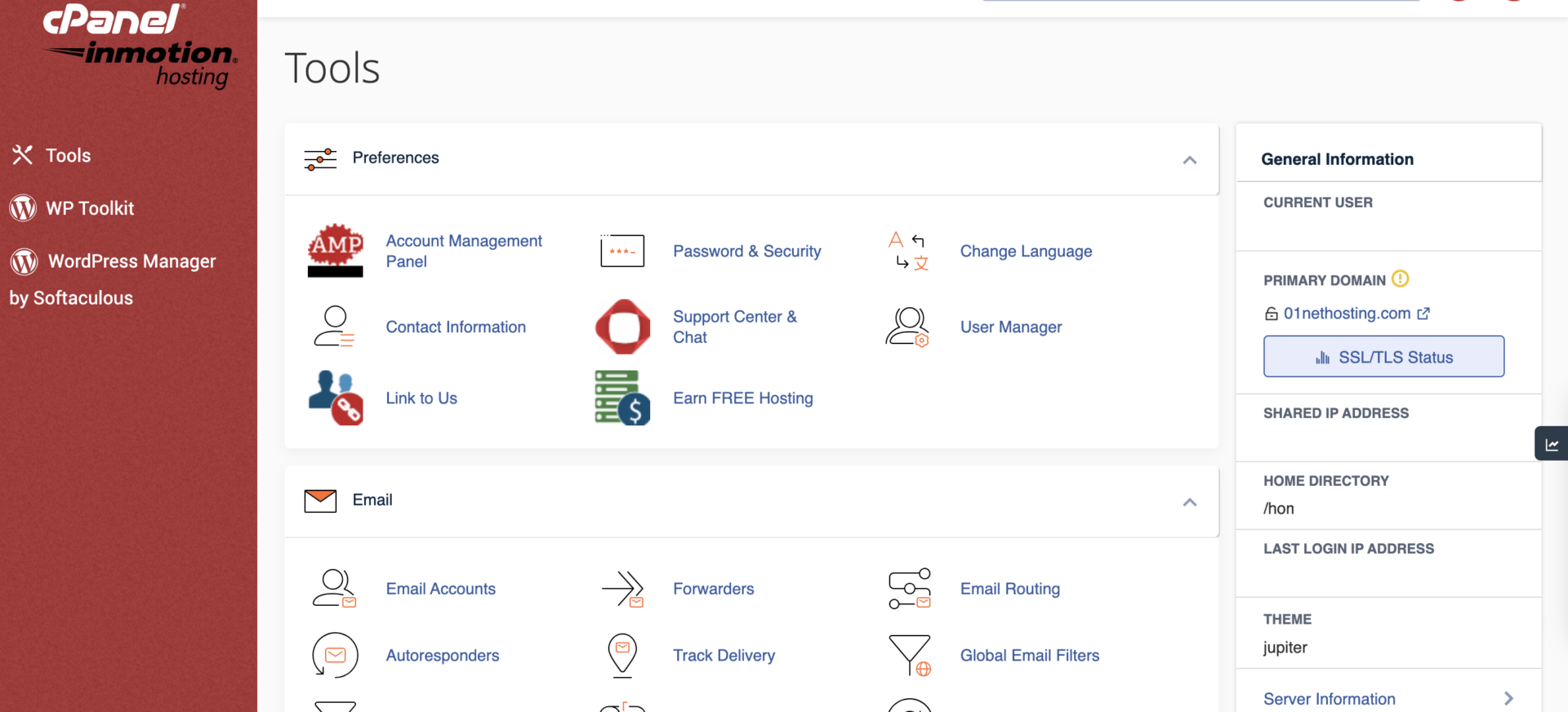
Moreover, it readily supports Ruby on Rails, Python, Node.js, and Git. Therefore, you won’t have issues deploying custom projects on your site or server. To access your cPanel, you can enter directly through your InMotion Hosting account or use your provided credentials.
24/7 Customer Support
A great customer is another reason why we recommend InMotion Hosting as one of the best companies for cPanel services. Since cPanel is the main control panel of the host, it has many articles and tutorials in its Support Center.
These tutorials are not just a bunch of text; they have screenshots of steps and even embedded YouTube videos to follow and replicate. You can contact InMotion Hosting through live chat, emails, phone support, and Skype for human support.
While you can get help from the host’s other channels 24/7, the live chat channel works only from 8 AM to 9 PM EST, Mon-Fri. But overall, the host is quite amazing.
3. Hosting.com
Hosting.com is a web host that offers reliable cPanel services thanks to its speed performance technologies. This is the host you can run to when you want your project or site to have the fastest speeds on the internet. Not only that, you will get top-notch customer support with great security features.
Pricing and Features
Despite delivering great services, Hosting.com makes our favorite cPanel hosts list for being relatively affordable. It offers four amazing plans, with Starter and Plus costing $1.99 monthly. This makes Hosting.com among the least expensive options on this list.

On Hosting.com, all the servers and hosting types are equipped with cPanel as their control panel. So, they all have the crucial features of cPanel integrated into their dashboard.
These features include File Manager, domain manager, image management (thumbnail generator, scaler, and converter), FTP accounts & connections, MySQL databases, web disk & disk usage, automated backups & backup wizard, and Git version control.
The first plan on Hosting.com that supports cPanel is Starter. It costs only about $1.99 per month. The server has 15 GB of SSD storage and can only host one site. It comes with free SSL certificates, a free site builder, staging tools, ten email accounts, and unlimited mail space.
The next plan, Plus, costs the same: $1.99 monthly. This package hosts two websites on 30 GB of storage, with weekly backups, LiteSpeed servers, and more. Pro and Max plans are beefier, but cost way more.
The Pro plan hosts ten websites and provides 50 GB of storage. Meanwhile, the Max plan at $8.99 monthly hosts 100 websites on 100 GB of storage, with 40 email accounts and all other features we mentioned.
Speed and Security
Speed is one of the reasons Hosting.com is a great cPanel hosting company. It is the fastest cPanel host in 2026, according to our recent Hosting.com review.
From our observations, we noted that the host is able to achieve this through the use of the LiteSpeed web servers, NVMe SSD, and several caching technologies. With this, your pages will load in less than 500 ms, even on the cheapest servers! Hosting.com delivered our fully customized test page in 418 ms from our experiments!
For security, Hosting.com has equipped the cPanel with a backup feature and a backup wizard. This allows you to save copies of your files and site to restore them later. At the same time, it has an AutoSSL installer that lets you install SSL certificates on your domain and subdomains automatically.
It also has a site staging tool to test dangerous or extensive customizations in a designated environment without compromising the live website. Other security features on the cPanel include Hotlink protection, Leech protection, and two-factor authentication (2FA).
Ease of Management
When looking for the best cPanel hosting provider that delivers straightforward account or site management, Hosting.com is a great option.
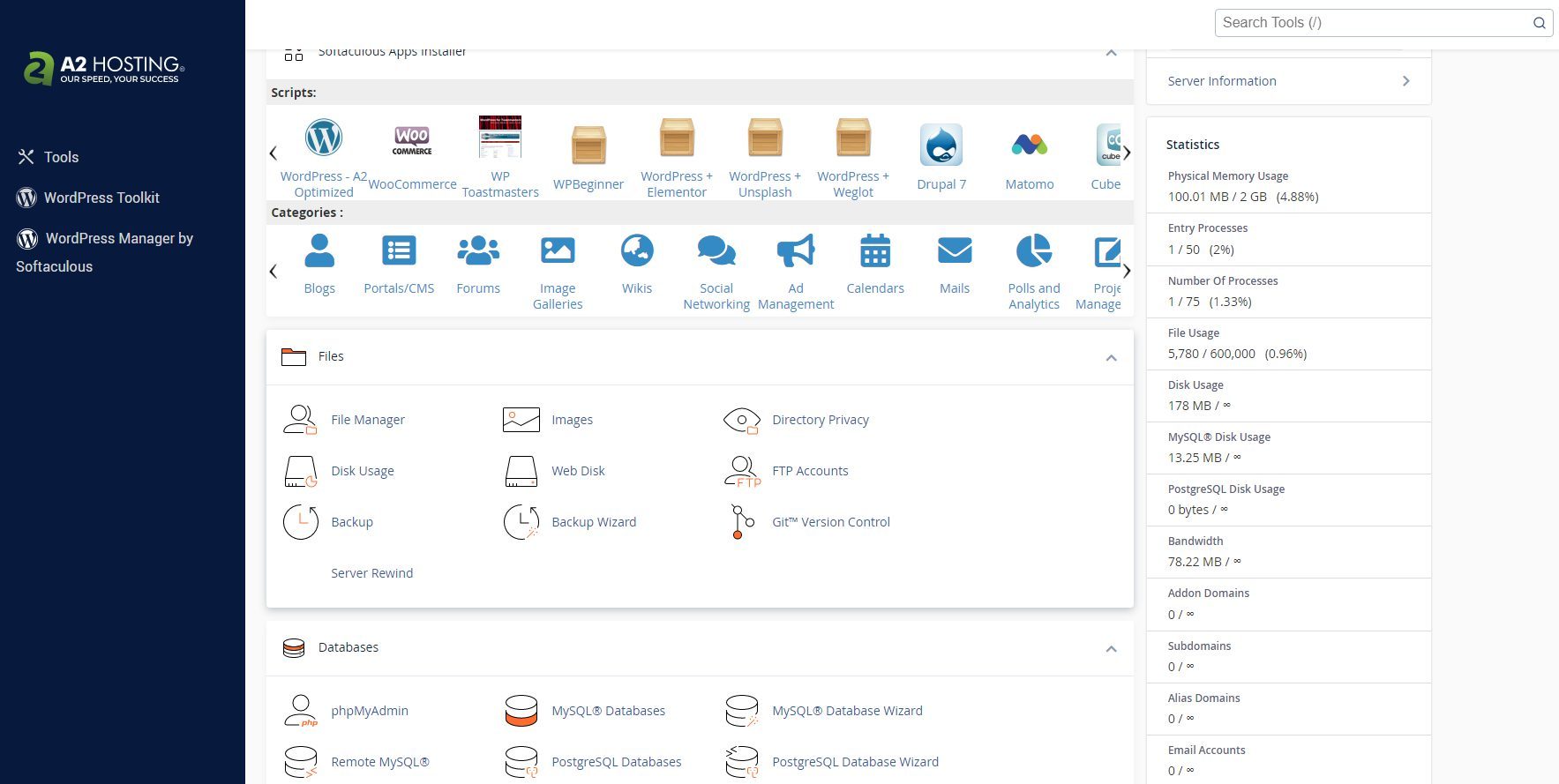
With your cPanel hosting, you can access the domain management tool that lets you control your domains as you like. You can add or remove both domains and subdomains easily here. Access to the File Manager from cPanel allows you to upload or delete files from your server faster since using FTP clients can be time-consuming.
What’s more, you will have direct access to your MySQL databases on PHPMyAdmin from your cPanel to facilitate easy management. Access to your email management dashboard is available, too, and you can create email accounts, forwarders, etc., without technical knowledge.
Lastly, the cPanel comes with the Softaculous installer that allows you to install any supported web app on your site with only mouse clicks.
Swift and Competent Customer Support
When it comes to customer support, Hosting.com makes the list of the best cPanel services according to our research. The company provides support through live chat, emails, and phone calls around the clock.
The good news is that these channels work even on the cheapest plans, but you may enjoy faster response times for emails and phone support on the higher packages.

Our investigations of Hosting.com support show that they are quite competent and fast, especially during a live chat session. In addition to human interactions, Hosting.com has a Knowledge Base with helpful information regarding cPanel.
The Knowledge Base has a search bar that allows you to find what you are looking for using a relevant keyword. The host has more than 600 articles and tutorials on cPanel only. Therefore, you will never have to seek help from Google or other third-party resource pages.
It is one of the best cPanel hosting providers if you are ready to get your hands dirty by following the available guides.
4. Bluehost
Bluehost is also a great web host for cPanel hosting services. The popular web host is highly recommended by many businesses and uses cPanel as its main control panel on every hosting plan.
Here is a detailed review of Bluehost services to give you the full picture of what you stand to enjoy.
Pricing and Features
One of the reasons why Bluehost is a top cPanel hosting services provider is affordability. Bluehost is quite affordable and an excellent option for beginners looking for a shared server to kickstart their businesses. Though all Bluehost hosting types use cPanel, let’s consider its shared servers in terms of pricing and features.

The cheapest plan, Starter, costs around $3.99 per month. This package has 10 GB of SSD storage, a free Content Delivery Network (CDN), a free domain & SSL certificate for the first year, and custom WordPress themes. You can host ten websites on the server, which is pretty generous.
With the Business package, which costs about $6.99 monthly, you will get 50 GB of SSD storage, automated backups, domain privacy, and malware scanning. In addition to other Starter features, it has permanent free SSL certificates, and the server can host 50 websites, with access to staging.
The Ecommerce Essentials plan costs $14.99 per month. Aside from the features in the Business plan, it has 100 GB of SSD storage, many store features (analytics, themes, etc.), and automated daily backups forever. The plan also offers 24/7 support via live chat and limited phone support.
Speed and Security
Though not very strong, Bluehost provides one of the best cPanel hosting services regarding speed and security. For speed, the host uses a free CDN by Cloudflare to cache your site’s content so that your most visited web pages load quickly to visitors worldwide.
What’s more, it has built-in caching that is available on some plans to improve your server response times. With Bluehost, your web pages will load in less than two seconds. But if that is too long for you, consider purchasing a Hostinger plan to get one of the best loading speeds possible for cPanel hosting – less than a second!
Regarding security, even though Bluehost does not provide free services on lower plans, you can purchase add-ons to improve the security of your website.
Bluehost offers most of its security features through SiteLock. However, it ensures that all the security options on cPanel are enabled to secure your site. So it is up to you to rely on only the security options on cPanel or seek third-party services. If you are really concerned about security, we recommend any of Hostinger’s plans instead.
Ease of Management
While investigating the best cPanel hosting services, we were impressed by how Bluehost integrated the control panel into its main dashboard.

From the Bluehost dashboard, you can access the most important settings for your site on cPanel by clicking on direct links. In fact, the host has a direct link to cPanel itself on its dashboard, saving you the time you would have spent manually logging into your site’s cPanel account.
Also, upon registration, you will get your cPanel username and password through email.
Furthermore, you will get access to all cPanel features once you log in to your control panel. Hence, you will have full control of your website. However, this can be overwhelming if you are a beginner who has yet to become very familiar with cPanel.
Customer Support
Bluehost is also a reliable cPanel hosting provider regarding customer support. It provides support 24/7 through live chats and phone calls. From our practical experience, you will usually get swift customer support from Bluehost.
Nevertheless, they fail to meet the standard sometimes due to the unavailability and incompetence of the support staff. Alternatively, you can comb through their Knowledge Base for answers. Since cPanel is their main control panel, most articles in the Knowledge Base are cPanel-related.
5. HostGator
HostGator closes our list of the best cPanel hosting services in 2026. It is a good host for beginners and has perfected its cPanel integration from several years of experience using it as its control panel. Based on the results of our experiments with HostGator hosting, it is a decent host overall.
Pricing and Features
HostGator offers some pricing flexibility, and all plans give you access to cPanel. Thus, you will have access to all the available features irrespective of your hosting plan.

However, pricing and other hosting features on each may differ. For instance, the Hatchling plan on HostGator costs less than $3.80 per month. It gives you access to 10 GB of storage, free email hosting, unmetered bandwidth, a free domain name for the first year, live chat support, and a one-click WP install. It can host ten websites, too.
The Baby plan costs precisely $4.50 per month and can host up to 20 sites. It has all the features of Hatchling but comes with a better storage space of 20 GB, phone support, and Cloudflare CDN, which the Hatchling plan misses.
You can access SEO tools, WHOIS domain privacy, Positive SSL, and professional migration services on the Business or Pro plan. They include all the features of the Baby plan, offering 50 GB and 100 GB of disk space, respectively, and can host 50 and 100 websites. They cost $6.25 monthly and $13.95 monthly.
Speed and Security
HostGator has security features to secure your files and data. It has Positive SSL, which prevents hackers from intercepting data exchange on your site, and automated backups to avoid losing updates or customization progress. You will also get malware scanning and removal services through SiteLock.
In addition, there are so many security options, like Hotlink protection, Leech protection, IP Blocker, 2FA, etc., that you can access through your cPanel. If you are on a plan that does not have the Positive SSL upgrade, you can access your free SSL certificate installation and renewal on cPanel.
Regarding speed, you will have access to many tools you can use to improve your site’s performance on cPanel. You can convert or resize your images to make your pages more lightweight and load faster. You can also use the cPanel Optimize feature to make your website load faster.
Ease of Management
Another reason why we recommend HostGator as one of the best hosts for cPanel hosting services in 2026 is the ease of management.

HostGator’s Portal is an intuitive dashboard that is effortless to navigate. The Portal has several links to various necessary settings available on cPanel. As a result, you won’t have to start looking for these settings again – you can access them directly via the Portal’s redirections.
Additionally, you can access the one-click Softaculous installer directly from the Portal if you want to deploy a website with WordPress. For other CMS like Magento, Drupal, etc., you will have to access the cPanel first. But of course, installing them is also a “one-click” model using Softaculous on cPanel.
Lastly, cPanel settings like File Manager, Databases, Email Accounts, and Domain Manager are easily accessible from the Portal.
24/7 Customer Support
HostGator provides support through live chat, phone calls, and emails 24/7. However, the support system involves a lot of queuing hours that may only sit well with some. Besides, some support agents need to be more competent and may decide to upsell rather than help you out.
Nonetheless, HostGator has a resourceful Help Center with many helpful articles on site and cPanel issues. All you have to do is search using a relevant keyword or phrase, and every related article will be displayed. The tutorial articles are heavily illustrated using step-by-step screenshots, making them easy to follow.
Conclusion: What Is the Best cPanel Hosting?
Many top web hosts offer excellent cPanel services in 2026.
But to get the best cPanel hosting service, we recommend purchasing one of Hostinger’s plans. This is because out of all the mentioned providers in the industry and on this page, Hostinger is the best all-around host for cPanel services. But that is not to say that others are inferior. They have specific areas they are good at.
InMotion Hosting is great for security, while Hosting.com excels at hosting speed. Meanwhile, Bluehost is fantastic for WordPress sites, while HostGator offers versatile plans and flexible pricing.
We’ll let you choose the best cPanel hosting for you, now that you know their ins and outs. In case you’re interested, you can also check our favorite VPS hosting services that also support cPanel for convenience.
Hostinger