If you’re shopping for reliable WordPress hosting, you’re in the right place. This Bluehost vs SiteGround vs Hostinger comparison provides much-needed answers. All three are famous for managed WordPress hosting. Simultaneously, they offer excellent performance, security, ease of use, and uptime.
However, during our SiteGround vs Hostinger vs Bluehost assessment, we discovered some shocking differences. Ultimately, we opted for Hostinger and SiteGround over Bluehost, but it’s hard to explain why in one sentence. For this reason, we invite you to read our full comparison for 2026.
We compared their prices, features, performance, onboarding, security, and more. In the end, we explained which web hosting is best for what, allowing you to make a more informed choice. Let’s get to business now.
Hostinger vs SiteGround vs Bluehost: Key Features Compared
| 🏆 Hostinger | SiteGround | Bluehost | |
| 📋 Types of Hosting | Managed WordPress, VPS, and cloud | Managed WordPress, cloud, and reseller hosting | Managed WordPress, cloud, VPS, dedicated |
| 💾 Storage Size | 10 to 100 GB NVMe | 10 GB to 40 GB SSD | 10 GB to 100 GB NVMe |
| 🌐 Bandwidth | Unlimited | Unmetered | Unlimited |
| 🚧 Hosted Websites | Up to 100 | Up to unlimited | Up to 100 |
| 🔽 Backups | Daily and on-demand | Daily and on-demand | Weekly |
| 💵 Starting Price | $2.99 per month | $3.99 per month | $3.99 per month |
| 🔙 Money-Back Guarantee | 30 days | 30 days | 30 days |
| ⚙️ Ease of Use | Great for beginners | Great for beginners | Great for beginners |
| ♻️ Site Migration | Free | Free | Free |
| 🆓 Free Domain | Yes + WHOIS privacy | No | Yes + WHOIS privacy in higher plans |
| 🔐 Security | Free SSL, web application firewall, DDoS protection, malware scanning, WordPress vulnerability scanner | Free SSL, web application firewall, DDoS protection, malware protection, Security Optimizer, AI anti-bot | Free SSL, web application firewall, DDoS protection, malware scanning |
| 📧 Email Accounts | Yes, up to 10 mailboxes | Yes, unlimited | Yes, free trial |
Plans and Pricing
Hostinger, SiteGround, and Bluehost offer a variety of hosting plans, making them versatile. A point of intersection is managed WordPress hosting, which is their base. However, apart from this highly popular hosting, you’ll be able to pick from a variety of plans from:
- Cloud hosting in all three
- VPS hosting in Hostinger and Bluehost
- Dedicated hosting in Bluehost
- Reseller hosting in SiteGround
Variety-wise, SiteGround is the least impressive, as it lacks VPS and dedicated servers. You can, however, opt for SiteGround alternatives like Hostinger or Bluehost in this case. Now, it’s time to examine their starting prices and determine the cheapest of the three.
- Hostinger starts at $2.99 monthly for 48 months with two free months.
- SiteGround starts at $3.99 monthly for the first year.
- Bluehost starts at $3.99 monthly for three years.
For some, differences in starting prices are imperceptible. However, Hostinger is the least expensive at $2.99 monthly. Then, we have SiteGround and Bluehost for a dollar more. That price piles up over time and results in much higher overall costs. In the next section, we’ll delve deeper into their pricing.
Pricing Comparison
Hostinger’s Premium plan is $2.99 monthly, but the recommended Business plan costs a dollar more: $3.99 monthly. You can also get Cloud Startup, an amazing cloud hosting plan, at only $7.99 monthly. Finally, VPS starts at $4.99 monthly, which is a far cry from many other VPS hosting providers.

SiteGround starts at $3.99 monthly. Its GrowBig is $6.69, while GoGeek is $10.69. As you can see, the price increase is steep, and if you examine its renewal prices, the best-value GrowBig plan renews at $29.99 monthly. In comparison, Hostinger Business renews at only $13.99. What about Bluehost?

Bluehost also starts at $3.99, but the Business plan is $6.99, and the eCommerce Essentials plan is $6.95. This provider continues the trend of fairly high renewal costs, but it’s closer to Hostinger, as the mid-tier plan renews at precisely $13.99 monthly. Both Bluehost and SiteGround have other expensive plans.

For instance, SiteGround cloud hosting starts at a whopping $100. Bluehost’s equivalent is at least $75 monthly, while a VPS is $34.99 monthly. Bluehost also charges you at least $140 for a dedicated server, unlike equally capable InMotion Hosting, which starts at about $35 for the low-tier configuration.
All things considered, the cheapest of the bunch is Hostinger, followed by Bluehost, and then by SiteGround. Hostinger and Bluehost even include one free domain for the first year, solidifying their victory over SiteGround, where this is a separate investment. Let’s now discuss their refund policies.
Money-Back Guarantee & Refund Policies
Luckily, all three are on equal ground here, with 30-day refund policies for initial purchases. None offers free plans, but you can always get a full refund if you contact the chosen host promptly. It’s noteworthy that refund policies apply to all hosting types, so if you’re unsatisfied, you’ll have no problem with the reimbursement.
Winner: Hostinger 🏆
Hosting Management: Which Hosting Is Best?
Our Hostinger vs SiteGround vs Bluehost comparison continues with their hosting control panels. It’s vital to see how simple to set up and use all three are, particularly because we discuss managed WordPress hosting. By logic, it should be user-friendly, as providers manage many things for you.
Hostinger
That’s exactly the case with Hostinger.
The onboarding process is extremely simple. After registration, you can tick the option to install WordPress automatically. Moreover, since you get a free domain, Hostinger allows you to immediately pick one and assign it to your website. Hostinger offers a one-click app installer, which we found to be remarkable.
Essentially, you can set up any app on your server by selecting it from the list. Then, Hostinger installs it in under a minute. We did that with WordPress and even managed to set up WooCommerce to start an online store. Hostinger uses hPanel for hosting management, and as you see, it looks amazing.
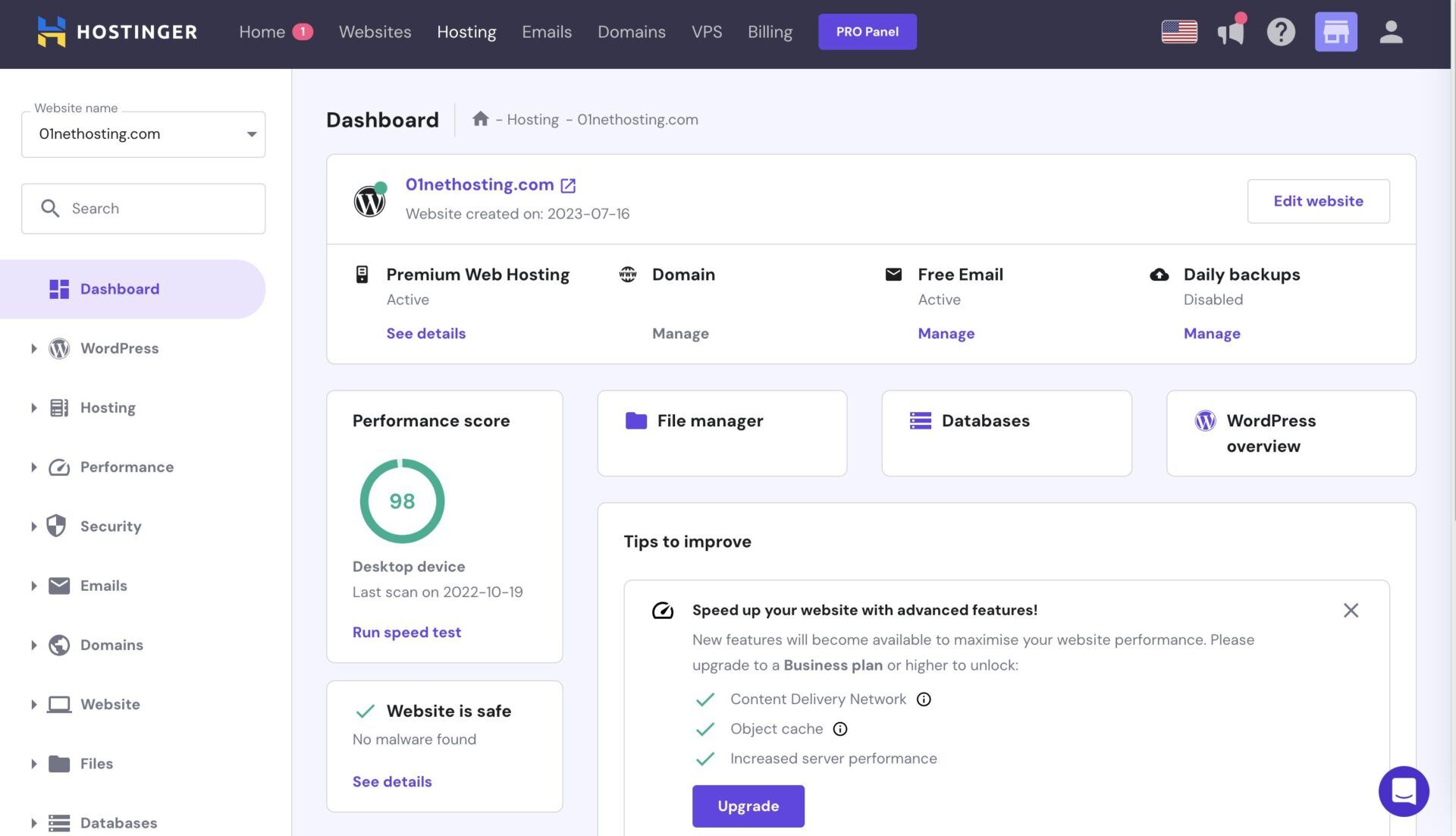
It contains essential information on the home screen, with menus on the left. From there, you can manage your domains, access your WordPress admin panel, tweak security, and access databases. Hostinger is a masterclass in simplicity, with a good-looking interface that even beginners will grasp quickly.
Hostinger also offers cPanel hosting if you’re willing to pay extra. However, in our experience with the best cPanel hosting services, hPanel is just as good, if not better in some instances.
SiteGround
SiteGround’s user experience is phenomenal. The initial setup is a breeze, as the provider even allows you to buy a domain name and set it up. You can skip this step and immediately install WordPress, WordPress + WooCommerce, start from a blank site, or migrate your existing website.
We chose the first option, and SiteGround set up WordPress in a minute or two.
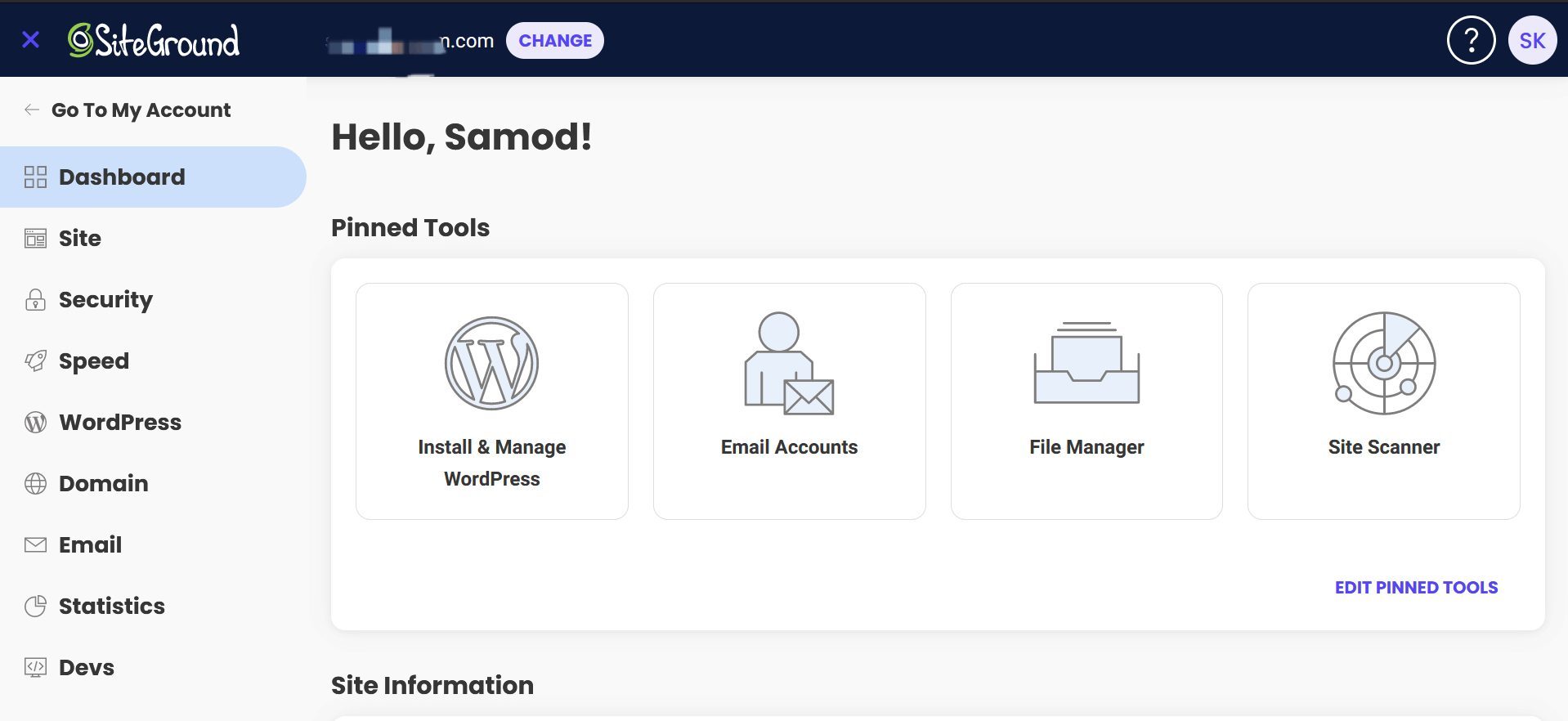
After that, we got a taste of sPanel or Site Tools, as its control panel is aptly called. sPanel is terrific, as it ‘transpires’ in a single window, with no loading as you switch through the menus. The home screen is reserved for your most-used tools, as you can even pin some of them to have them at your fingertips.
SiteGround’s menu on the left lets you access databases, security, domains, and more. Be aware that SiteGround doesn’t offer cPanel hosting, so sPanel is your only option. But hey, it’s buttery-smooth, snappy, and ready for beginners who want to host their websites effortlessly.
Bluehost
We tested Bluehost as well, and can only sing praises.
Onboarding is a piece of cake and resembles Hostinger in many ways. From registering to setting up your domain and installing WordPress – it’s foolproof! Bluehost allows you to migrate your website for free, use WordPress, or even opt for its AI website builder to make something truly unique.
Its initial dashboard offers ample freedom for domain management, and from here, you can also access your WordPress admin panel. However, you can access something else: cPanel. Bluehost’s cPanel is well-realized, with all the tools easily accessible and the option to search for tools manually.

The Softaculous Installer lets you deploy any app within minutes, while the ability to pin your most frequently used tools adds to ease of use tremendously. Bluehost relies on a tried-and-tested formula for hosting management, which has never failed us. cPanel ticks all the boxes, making Bluehost highly intuitive.
All things considered, we struggled to find anything negative about the three WordPress hosting giants. Whether you’re a beginner or a seasoned veteran, navigating their control panels will be a joy.
Winner: Tie 🟰
Bluehost vs Hostinger vs SiteGround Features
We established that Hostinger offers the best value for money out of the three. However, to fully back that up, we must discuss its features and compare them to SiteGround and Bluehost. After all, value for money isn’t only about price: it’s about a much bigger picture that we’ll paint below.
Hostinger’s standout offers are:
- Fast NVMe storage (up to 100 GB)
- Free domain for a year + WHOIS privacy
- AI website builder
- Free email accounts
- Daily + on-demand backups
- Advanced security features
- Unlimited bandwidth
- Free CDN
- WordPress Multisite and Staging
- Up to 100 hosted websites
SiteGround’s best features are:
- Unmetered bandwidth
- Up to 40 GB of storage
- Unlimited free email hosting
- Impeccable security
- Website builder
- NGINX web servers
- Multisite + Staging support
- Free site and email migrations
- Free CDN
Finally, Bluehost offers:
- NVMe storage (up to 100 GB)
- Free domain for a year
- AI site builder
- Free migration
- Free CDN
- LiteSpeed caching
- Unlimited bandwidth
- Weekly backups
Bluehost seems to offer the least, but it has more storage than SiteGround. While SiteGround offers stronger security, as we’ll soon explain, Bluehost offers a free domain name. On the other hand, Hostinger excels at everything. It offers generous NVMe storage, a free domain, and immaculate security features.
Pair this with unlimited bandwidth, daily backups, and a CDN, and Hostinger quickly becomes the best cheap WordPress hosting. It’s worth noting that SiteGround is pretty good, particularly due to its unlimited email and collaborators, and impressive NGINX servers for neck-breaking speeds.
While it does cost more, SiteGround justifies its price, but Hostinger does so a bit better. Bluehost’s weaknesses are security, weekly backups, and the lack of ecommerce features in all plans, except the most expensive one. Before we discuss their security, let’s move to the Bluehost vs SiteGround vs Hostinger speed tests.
Winner: Hostinger 🏆
Speed & Uptime Tests: Which Web Host Performs Best?
Website performance is crucial for user experience, which then becomes a vital metric of your SEO. Everything is connected, and everything starts with hosting, which is why it’s essential to pick the best one. So, which web hosting is the fastest of the bunch? We have the results.
Before we unwrap them, we must explain how we tested Bluehost, SiteGround, and Hostinger.
We made three identical WordPress sites and uploaded the same photos and videos. Using the Astra theme, we made well-optimized, lightweight websites with a few interactive elements for some change. Finally, we chose the server location in the USA, as all three providers offer it.
We used three tools to test their performance:
- Pingdom for uptime
- Loader for response times
- GTmetrix for page-loading speed
Uptime & Response Time Results
We’ll start with the first two. We first fired up Pingdom and observed our websites’ performance in the past two months. After extensive testing, we captured these outstanding results:
- Hostinger: 99.99% uptime
- SiteGround: 100% uptime
- Bluehost: 99.96% uptime
Bluehost was the ‘worst’, but all three are above their 99.9% promise, so we can’t complain. However, we must express our delight with SiteGround’s 100% uptime, which may as well be a coincidence, since no hosting is always 100% on. Nevertheless, our Loader results are in, so let’s see what Hostinger achieved:
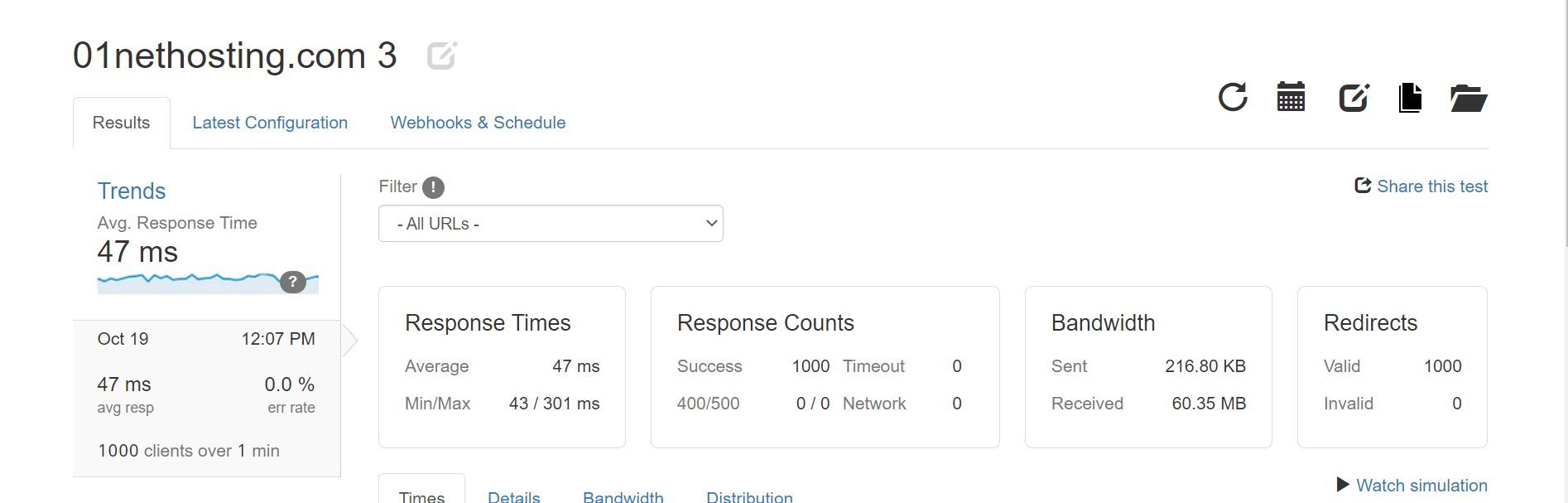
Let’s now check out SiteGround’s results:
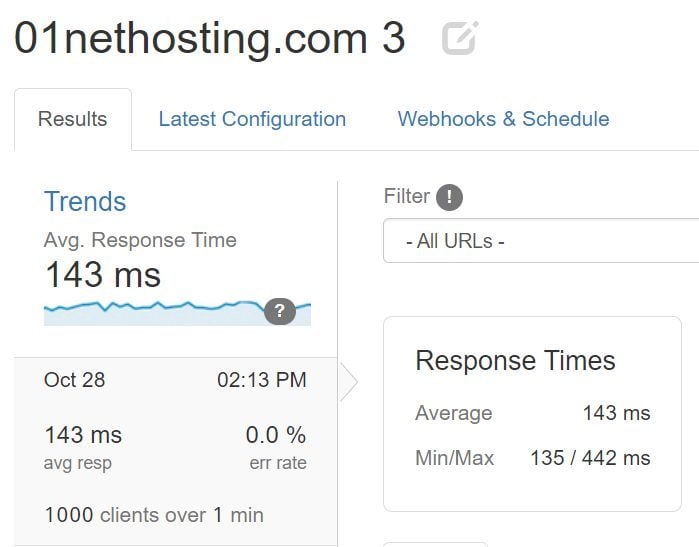
Lastly, here’s what Bluehost pulled out:
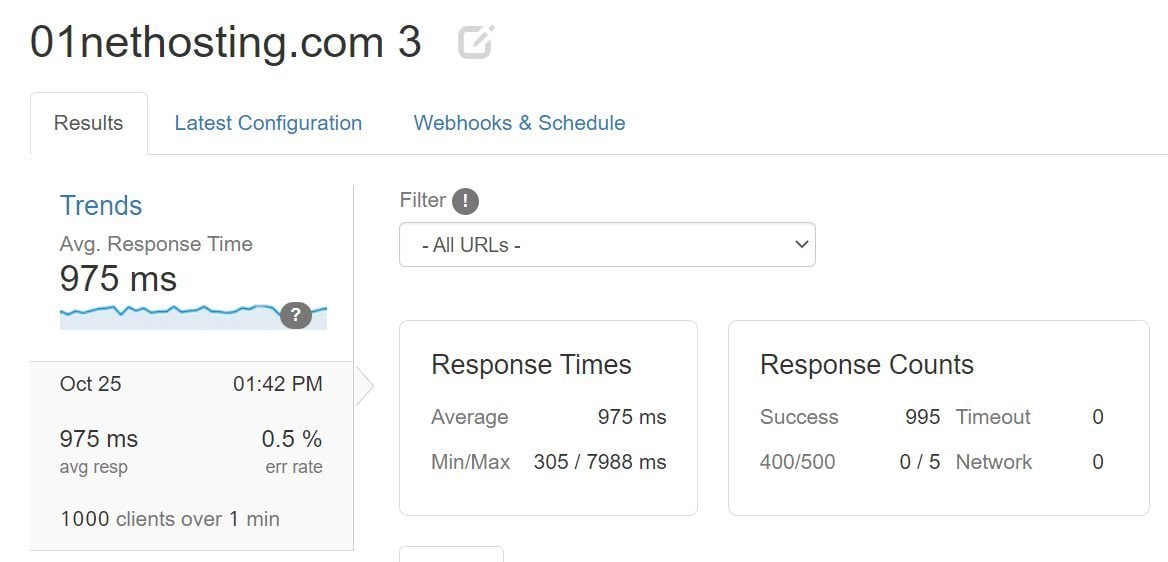
As you can see, we tested all three with 1,000 virtual clients over one minute. Hostinger and SiteGround took the test extremely well, with Hostinger taking the upper hand with an average response time of only 47 ms. SiteGround’s 143 ms may seem like a huge difference, but for shared hosting, it’s really impressive.
Bluehost’s 975 ms is far from remotely good.
The upper limit for shared hosting is between 600 ms and 650 ms, but Bluehost crossed the line big time. Its minimum of 305 ms was stellar, but the sudden spike of 7,988 ms was what killed the experience. If it’s still not apparent enough, Hostinger wins, SiteGround follows, and Bluehost gets bronze.
Page Load Speed Comparison
Time for some GTmetrix testing. We used US-based servers for hosting, but in GTmetrix, we picked the Canadian server for testing. Why? Because we don’t want ideal conditions, as in real life, they’re rarely ideal. We could also pick hosting servers in Singapore, but that would be too far and not realistic.
What did we observe in GTmetrix? These five:
- TTFB or Time to First Byte
- FCP or First Contentful Paint
- LCP or Largest Contentful Paint
- TTI or Time to Interactive
- FLT or Fully Loaded Time
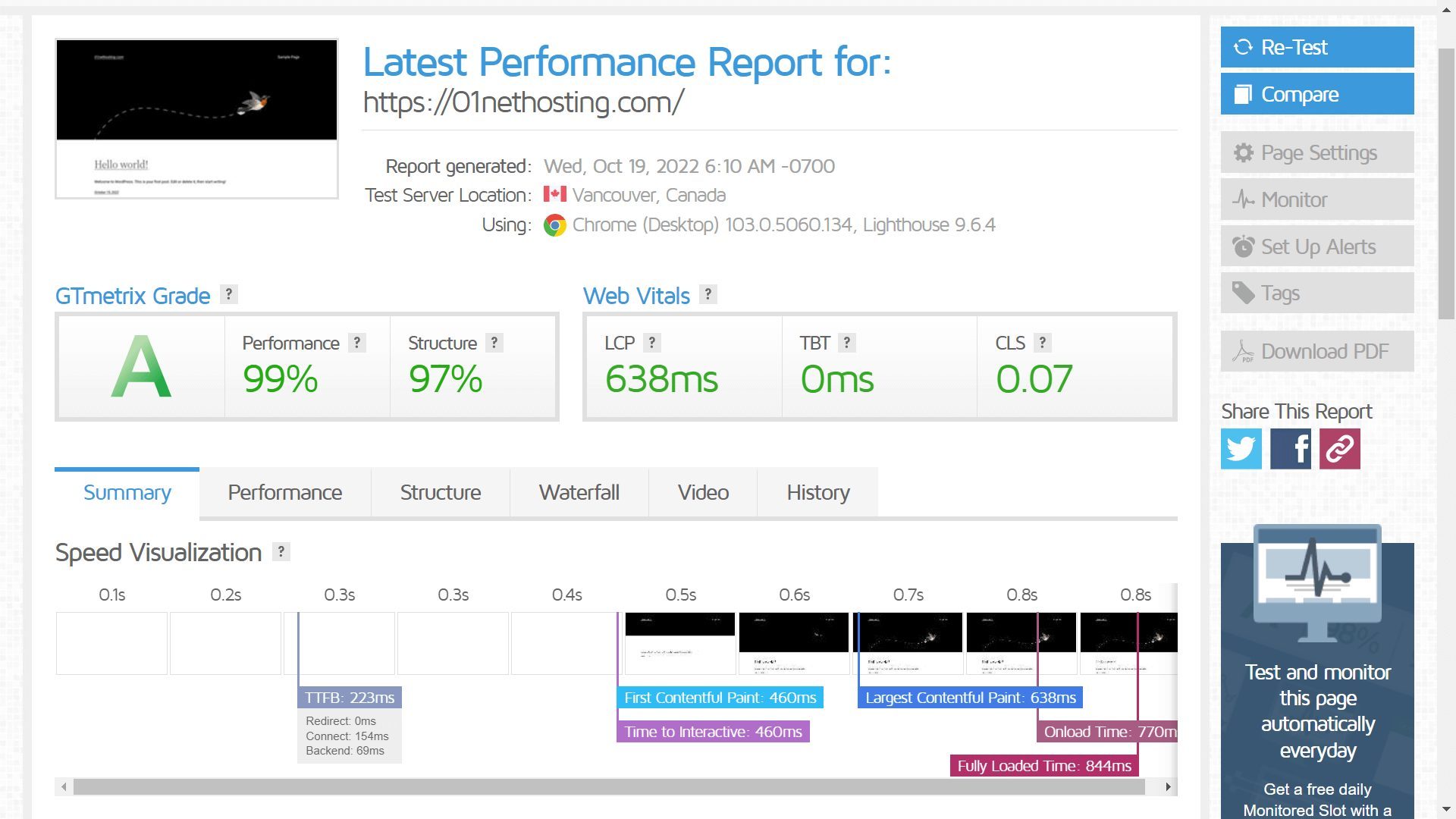
We first tested Hostinger and achieved these results:
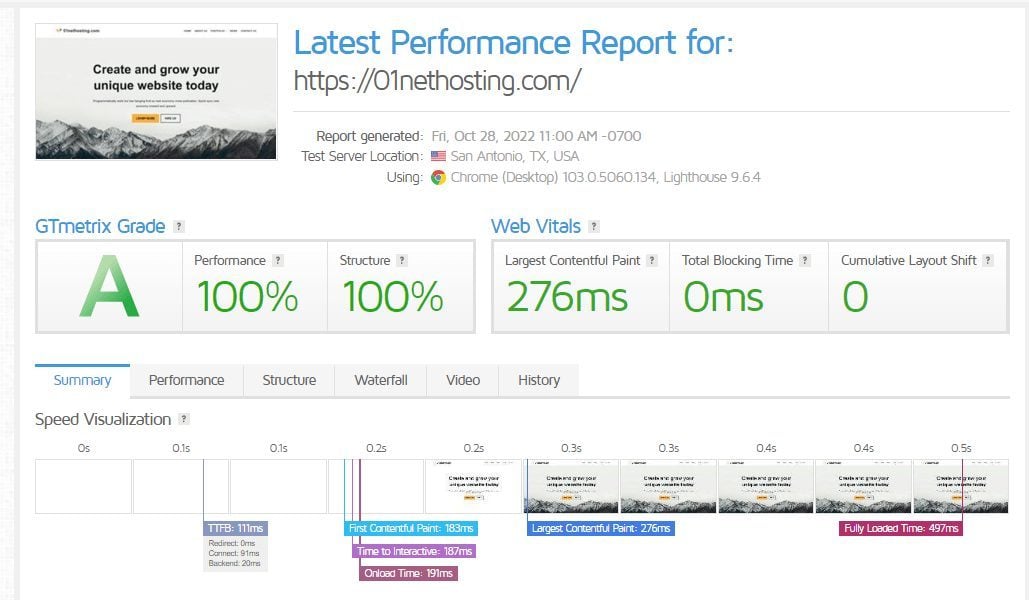
Then, we tested SiteGround, which achieved these results:
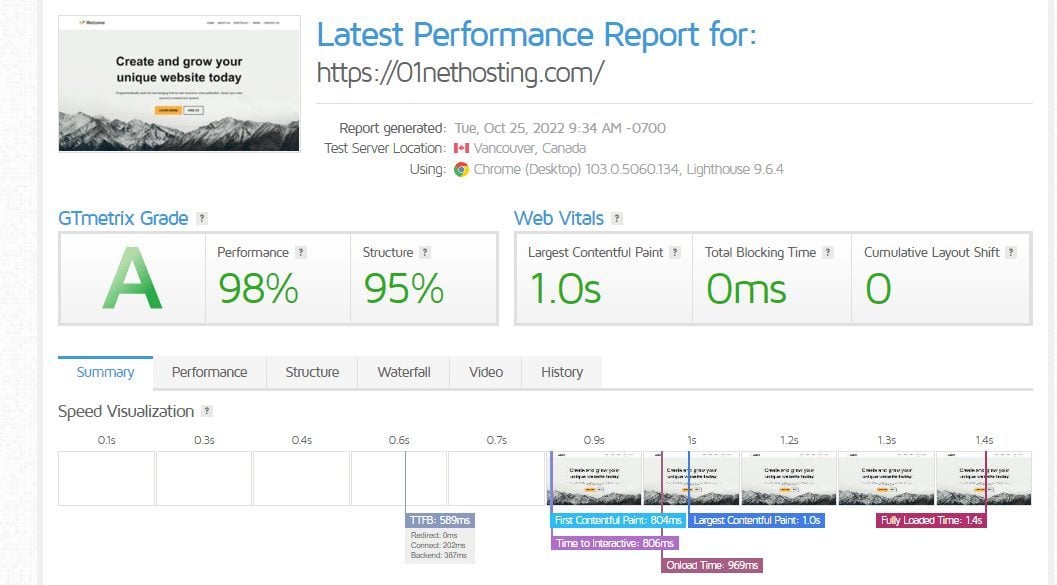
And finally, it was Bluehost‘s turn with these results:
Here’s a table for a more comprehensive overview of our speed test results.
| Hostinger | SiteGround | Bluehost | |
| TTFB | 223 ms | 111 ms | 589 ms |
| FCP | 460 ms | 183 ms | 804 ms |
| LCP | 638 ms | 276 ms | 1.0 s |
| TTI | 460 ms | 187 ms | 806 ms |
| FLT | 844 ms | 492 ms | 1.4 s |
This time, SiteGround really pushed the envelope, providing more than optimal performance and being the fastest host out of the three. Hostinger follows closely, with Bluehost offering stellar, but far from impressive, results. In fact, testing them side by side, Bluehost does feel noticeably slower at times.
Meanwhile, SiteGround and Hostinger feel equal in day-to-day website use. So now, we have to declare the winner. Bluehost’s fate is set in stone: it’s the worst. However, Hostinger wiped the floor with SiteGround in response time tests, while it’s the opposite in our GTmetrix speed test and evaluation.
We conclude that both perform admirably and are the right choice if performance is the primary goal. There are differences, but at this point, they’re negligible and imperceptible.
Winners: Hostinger (Response Times) & SiteGround (Loading Speed) 🏆
Security: Which Web Host Is the Safest Option?
To be clear, we didn’t experience security issues in this Hostinger vs Bluehost vs SiteGround testing. However, there are differences we must mention that make the two providers much better than the third. The third is Bluehost, which, on paper, includes all the essentials, including:
- DDoS protection
- Web application firewall
- Free SSL
- Weekly site backups
- Malware scanning

These security features are in the cheapest plan, but do you notice something? Bluehost’s backups are weekly, and not daily. Malware scanning is only that: scanning, and not removing malware. To remove malware, you must spend extra on at least the mid-tier plan. But what about daily backups?
You have to buy Bluehost CodeGuard.
Meanwhile, SiteGround and Hostinger offer:
- DDoS protection
- Web application firewall
- Free SSL
- Daily + on-demand backups
- Full-on malware protection

Do you see the difference? Each has an extra feature to spice up the formula. Hostinger has domain privacy to complement your free domain and shield your personal information. SiteGround has an AI anti-bot system, which scans your site every 0.5 seconds to detect and remove the most dangerous threats.

It’s not like you can’t get decent security from Bluehost. You can, but you must spend extra, while SiteGround and Hostinger pack everything even in their least expensive plans.
Winners: Hostinger & SiteGround 🏆
Customer Support
On the customer support side of things, we found all three to be sublime.
Their primary means are live chat and email support, while SiteGround and Bluehost include phone support. Bluehost, of course, excludes it from the Starter plan. Nevertheless, in our experience, all three are responsive and helpful, ready to tackle even the smallest issue and work their way to a resolution.
We prefer live chat support, but email support is decently fast, as you’ll get responses in the same day. Phone support is satisfying, but we’d use it only for urgent and serious problems, which you likely won’t face. Lastly, there are knowledge bases filled with FAQs and tutorials to help you get around.
All three have premium-grade support, leaving no room for error. As a result, the final Hostinger vs Bluehost vs SiteGround showdown ends up in a tie. The second and last one for today!
Winner: Tie 🟰
Hostinger vs SiteGround vs Bluehost: The Final Verdict
It’s time to summarize everything we went through in this comparison.
After lengthy testing, Hostinger and SiteGround emerged victorious over Bluehost, which ended up being our least favorite pick. We don’t say it’s bad, but in this constellation and against the two most impressive WordPress hosts, it does fade away. Now, what about the other two giants?
Well, we’d still pick Hostinger over SiteGround, not because it’s necessarily better, but because it’s less expensive, while providing at least an identical experience. Hostinger offers comparable performance, a free domain, excellent response times, and all the security features you can imagine.
It’s also more flexible, offering inexpensive cloud and VPS plans. Plus, it throws in premium support to keep everything in check. We say the same for SiteGround, which beats Hostinger only in page loading speeds at a notably higher price. Pick either of the two over Bluehost, and you’ll be more than happy.
