Leaving Mother Russia will block access to NTV, TVC, Russia 1, and other channels where you can enjoy Russian movies, series, and entertainment programs. That’s why many people want to know how to watch Russian TV outside of Russia. The good news is that you can watch Russian TV abroad, but with a bit of trickery.
Watching Russian TV abroad is quite simple if you use a VPN. This service lets you obtain a Russian IP and pretend you’re there. In turn, you get access to all TV channels in the country without specific restrictions. Below is a short guide on how to do that, but we have a full tutorial later on. Keep reading.
How to Watch Russian TV Abroad? A Short Guide
Our team concluded that CyberGhost is the only viable choice with 60 servers in Moscow. Here’s how to unblock Russian TV channels anywhere with it.
- Get CyberGhost. Use the red button to save more than 80% on the 2-year plan and get a 45-day money-back guarantee.
- Install CyberGhost, open the app, and sign in.
- Open the server list, find Russia, and connect to a VPN server in this country.
- Go to any Russian TV channel and watch it limitlessly.
Why Are Russian TV Channels Unavailable Abroad?
Geo-restrictions are an integral part of the internet. You can see an example of that when trying to watch Japanese Netflix outside of Japan. Netflix is a geo-restricted platform, and so is Max, which you can watch only inside the United States. In the same fashion, Russian TV is accessible only in Russia.
But why does this happen? The simple explanation would be that all channels, platforms, and sites have licensing agreements that allow them to operate in certain conditions. By conditions, we mean countries and regions. Thus, a channel like NTV is allowed to operate in Russia, while ZDF can operate in Germany, and so on.
While some exceptions may exist, and some channels may work abroad, the majority of channels from this country will be geo-restricted. But how do these channels know you’re not in this country? They use a simple trick. These channels read your IP when you try to visit them and see if that IP is from Russia.
If it’s a foreign IP address, your access is blocked, and if it’s Russian, you can access and watch Russian TV online. The solution is to alter your IP address to another country, i.e., Russia, and bypass this geo-block.
How To Watch Russian TV Abroad: Three Easy Steps
This can be done by using a VPN. A VPN is an abbreviation for Virtual Private Network. This service is known for additional online security and privacy by encrypting your connection and making it untraceable by your ISP and the authorities. The VPN routes your traffic through an encrypted tunnel from your device to the internet.
It does so by letting you connect to a remote server in another country, which gives you an IP address from the country where the server is. If you connect to a VPN server in Russia, you’ll get a Russian IP address, essential for watching Russian TV live abroad. Keep in mind that not all VPN providers offer servers in Russia.
Those that do are premium providers, so free services won’t work for this purpose. You might be wondering which provider you should use. You shouldn’t worry about that because we already found one with servers in this country – CyberGhost. We’ll demonstrate how to watch Russian TV outside of Russia with it.
1. Get CyberGhost VPN
Not a single free provider will offer servers in this country, and a premium provider is a must. But then, not all premium providers offer these servers. CyberGhost, on the other hand, offers 60 servers in Moscow, making it an ideal service. It also has unlimited data, excellent speeds, and top-grade security.
The provider is also famous for its extremely affordable prices. Through the button below, you can enjoy a special discount on its longest plan, which lowers the price to $2.19 a month and gives you a 45-day money-back guarantee, which you’ll get in no other VPN (they have 30 days instead).
Click the red button above, follow the steps, and subscribe to CyberGhost. Then, install CyberGhost on your device (Windows, iOS, Android, Linux, macOS), open the application, and sign in.

2. Connect to a Russian Server
The second step is to connect to a server in Russia. You can check our article on how to use a VPN if you’re not sure, but it’s dead simple.
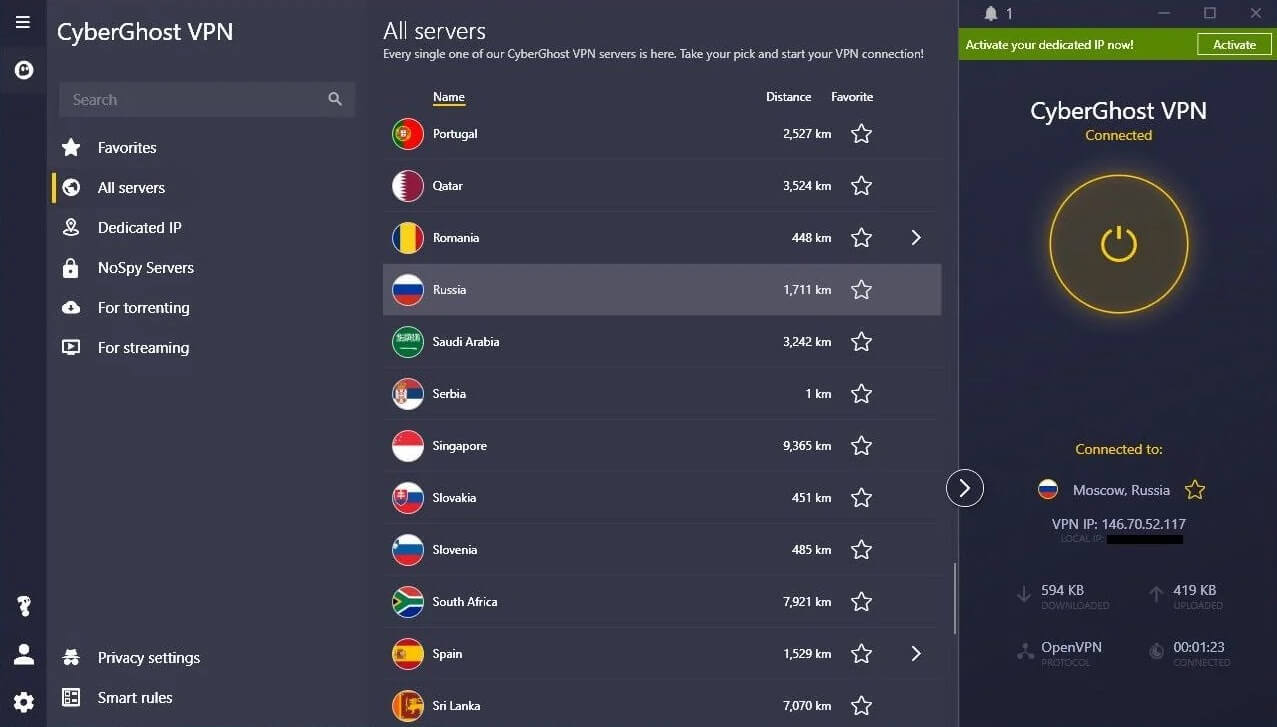
Open the server list by clicking All Servers, scroll down, and find Russia. Once you find it, double-click on it, and CyberGhost will establish a connection to a server in this country in less than a few seconds. Once the connection is established, the connection button on the right will turn yellow.
3. Watch Russian TV Anywhere
With everything in place, you can finally watch Russian TV live outside of Russia by using CyberGhost. All you have to do is visit the channel you want and watch it with no problems. When visiting Smotrim (a website that lets you access almost all channels in one place) with my new Russian IP, we unblocked all popular channels.
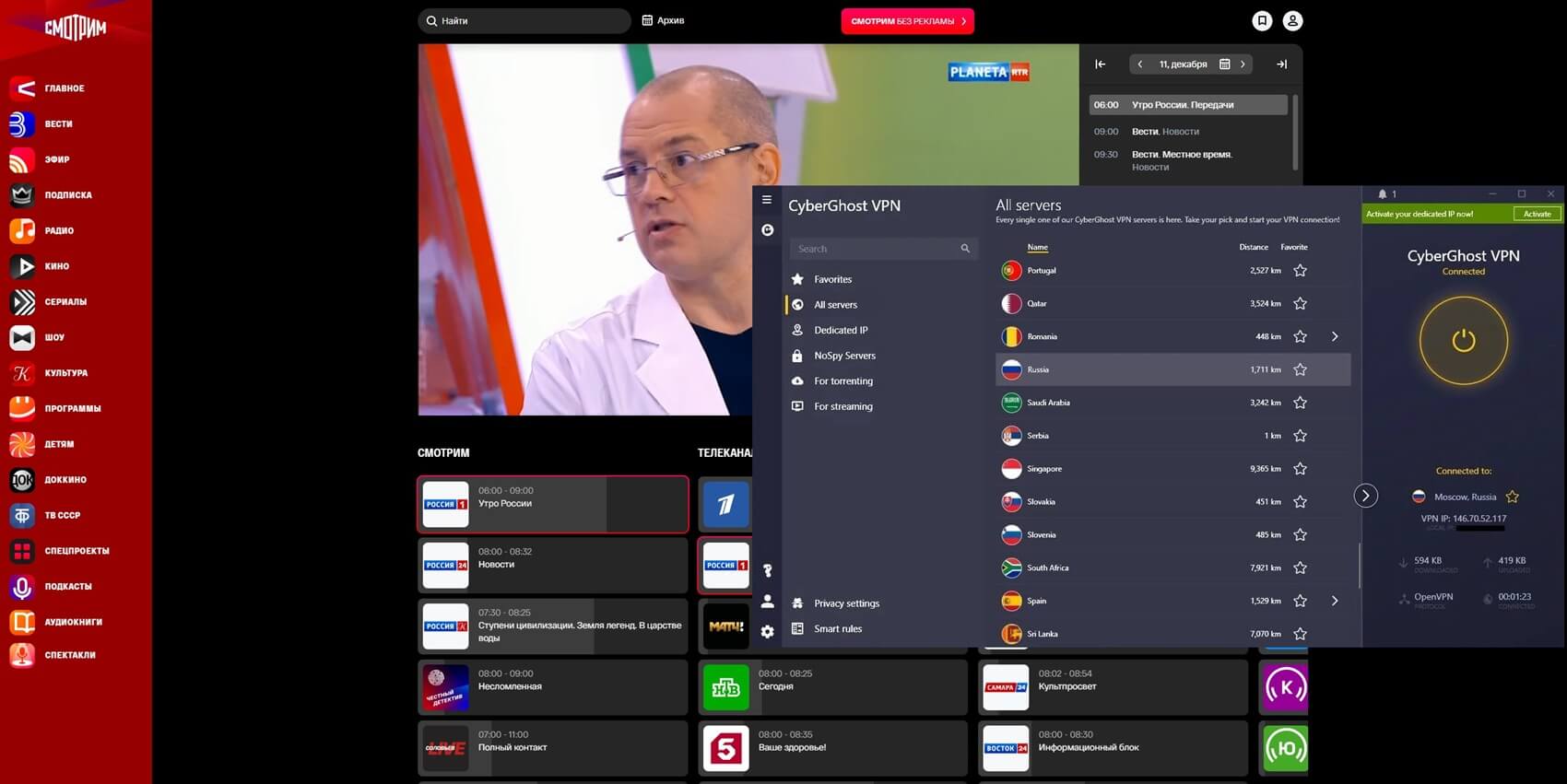
By using the same principle, we also watched the channel called Russia 1. The same principle applies to all channels in this country, but we mentioned just two for the sake of simplicity.
Why Should I Use CyberGhost?
CyberGhost is an excellent choice if you’re looking to watch Russian TV from anywhere. This provider has streaming servers optimized for unblocking streaming services. Streaming isn’t the only benefit you can get here. CyberGhost has 12,000+ servers in 100 countries, letting you bypass geo-restrictions efficiently.
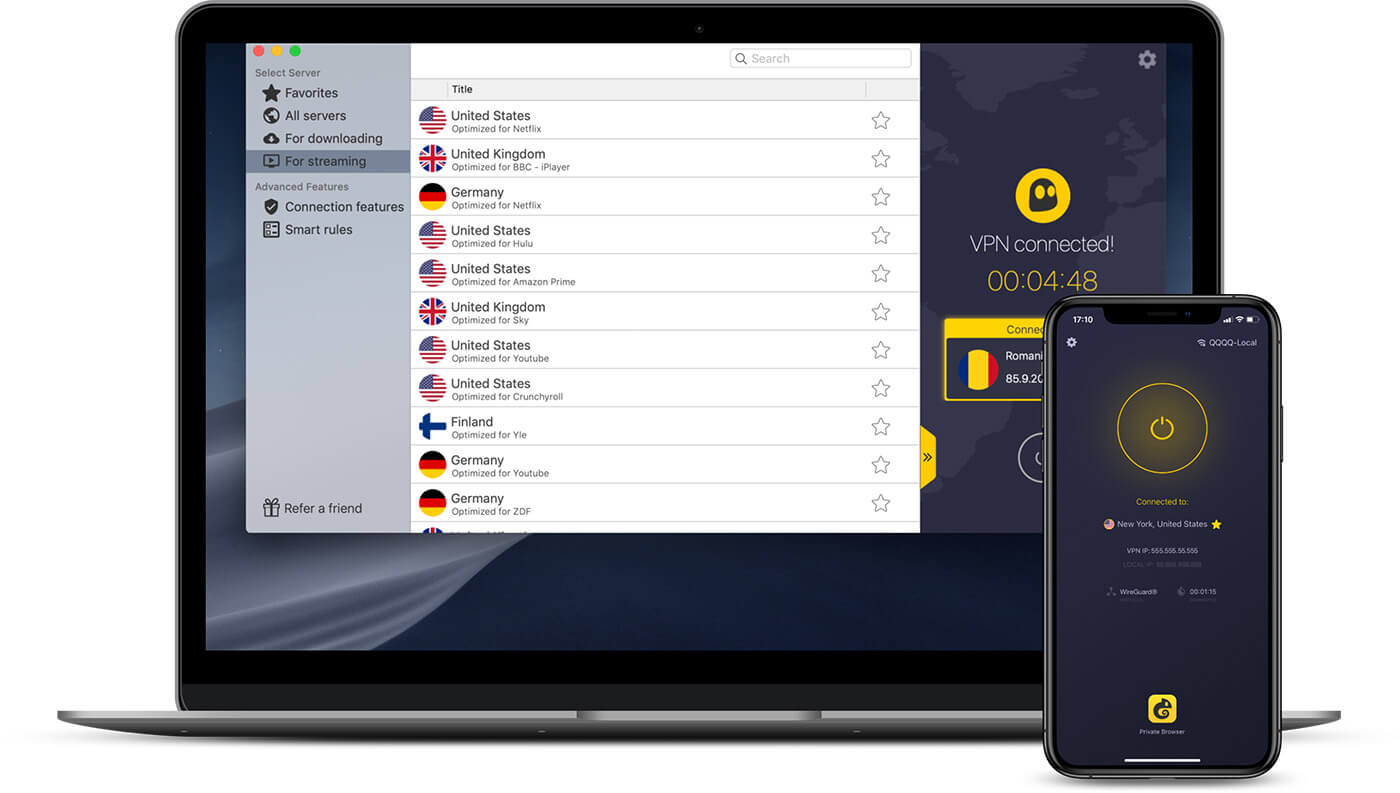
On top of that, it has special P2P servers for torrenting. They’re great for downloading torrents securely through BitTorrent and avoiding tracking. Another impressive thing is the presence of NoSpy servers. They’re independently operated by CyberGhost and are optimized for online privacy.
This lets you stay completely anonymous online and enjoy 100% private browsing. CyberGhost offers a no-logging policy as well, and its applications work on a plethora of devices and platforms, even including Fire TV Stick, Android TV, and gaming consoles. This provider has great speeds and doesn’t limit your data.
As such, you can use it 24/7 and not worry about breaking through any allowances. With 7 simultaneous connections per account, this provider can also secure multiple devices at the same time with no additional costs. All this comes at a silly price of just above $2 a month with a 45-day unconditional money-back guarantee.
Watching Russian TV Abroad: Bottom Line
You’ve learned that you can watch Russian TV live outside of Russia by using a cheap provider like CyberGhost VPN. Bypassing geo-restrictions is simple with this service, and you can see that you can increase your online freedom significantly this way. The main trick is to obtain a Russian IP.
After that, you can go online and watch any channel you want, even in a completely different part of the planet. With everything said and done, try CyberGhost and see how well it works for yourself. Enjoy watching channels from any country and stay in touch with happenings all across the globe from the comfort of your home.
Frequently Asked Questions
Can I use NordVPN to watch Russian TV abroad?
No, you can’t use NordVPN because it doesn’t offer Russian servers. In 2026, the only good VPN with Russian servers is CyberGhost, with limitless data, streaming prowess, and speeds for Full HD streaming.
Will free VPNs work with Russian TV?
No, they won’t because they don’t have Russian servers and aren’t optimized for unblocking content and streaming. If you want a free VPN, consider CyberGhost and its 45-day refund policy.
Is it legal to watch Russian TV outside of Russia?
Yes, it’s legal. You can watch Russian TV overseas and not worry about legal consequences. Keep in mind that unblocking a Russian TV channel may go against its terms of service, but that won’t get you jailed.
