
If you pay for McAfee antivirus, there’s a good chance a VPN came with it. That makes it tempting to switch it on and skip buying a separate one, especially since McAfee is a name most people already trust with their computer. So is McAfee VPN good enough to replace a dedicated VPN?
I used it for browsing, streaming, torrenting, and gaming, and ran it through speed and leak tests. It handled the basics better than I expected in one area, but the rest of the picture is mixed, and one weakness affects nearly everything you’d use a VPN for.
Is McAfee VPN Good? My Verdict
McAfee VPN is a basic VPN for occasional public Wi-Fi use, and little more. It hid my IP address on every server, and the app is easy enough for anyone, but it was slow on distant servers, couldn’t unblock most streaming services, and wouldn’t download torrents.
It suits McAfee customers who want a little extra protection at the coffee shop at no added cost. For streaming, torrenting, gaming, or serious privacy, a dedicated VPN such as NordVPN or Proton VPN is the better choice.
McAfee VPN Key Facts
| Company | McAfee LLC, San Jose, California (US) |
| Price | Included with McAfee plans from $29.99 for the first year |
| Devices | 1, 5, or unlimited, depending on the plan |
| Server locations | 48 countries, no city choice |
| Average speed loss | 66% across UK, US, Australian, and Japanese servers |
| Streaming | Unblocked Netflix US, UK, Canada, and Australia only |
| Torrenting | Torrents didn’t download on any server |
| Apps | Windows, macOS, iOS, Android, ChromeOS |
| Refund | 30 days, monthly plans excluded |
What Is McAfee Safe Connect?
McAfee Safe Connect was the name of McAfee’s VPN for years. The app now calls itself McAfee Secure VPN, and it comes bundled with McAfee’s security plans instead of being sold as a separate product in the US. McAfee bought TunnelBear, a Canadian VPN company, in 2018, and said Safe Connect would use TunnelBear’s technology.
McAfee itself is a US company based in California, and a group of investors led by Advent International and Permira took it private a few years ago. That US base comes up again in the privacy section, because it decides which laws apply to your data.
McAfee VPN Price, Plans, and Refunds
In the US, you get McAfee VPN with one of three security plans, each including antivirus, a scam detector, identity monitoring, and web protection:
- The Basic plan: $29.99 for the first year, 1 device.
- The Essential plan: $39.99 for the first year, 5 devices.
- The Advanced plan: $89.99 for the first year, unlimited devices, plus personal data removal, credit monitoring, and identity theft coverage.
There’s no free version of the VPN. McAfee offers a free trial, but it requires payment details and turns into a paid subscription unless you cancel first. Purchases come with a 30-day money-back guarantee, except monthly subscriptions, which aren’t eligible.
Support is available around the clock by live chat and phone. If you already pay for McAfee antivirus, the VPN costs you nothing extra. Paying for a McAfee plan only to get the VPN, however, makes little sense when a dedicated VPN costs about the same and does far more.
Apps and Device Support
McAfee VPN has apps for Windows, macOS, Android, ChromeOS, and the iPhone. I used the Windows app for my tests, and it’s about as simple as a VPN gets: one large button starts the connection, and a menu in the corner opens the server list. That simplicity has a cost.
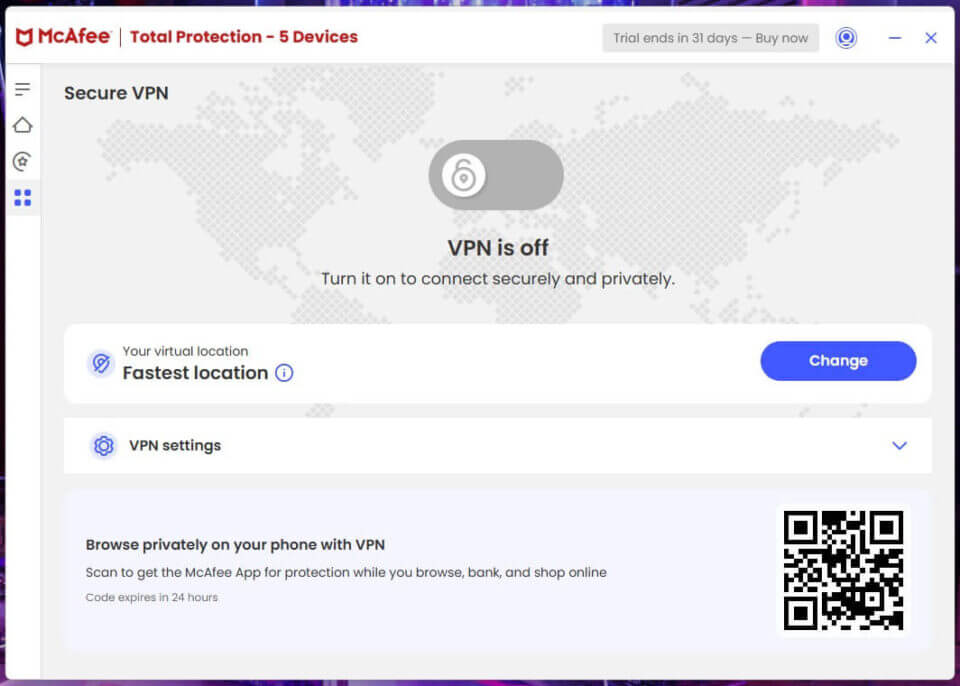
The list shows countries only, with no cities and no search bar, and connecting took a few seconds longer than on most VPNs on every server. The settings menu has the kill switch, split tunneling, and auto-connect, and the rest of the app is little more than usage stats and a help section.
Linux users are out of luck, since there’s no app for it. If that’s your system, choose one of the VPNs compatible with Linux instead.
TV, Firestick, and Router Support
No. McAfee VPN has no app for Fire TV, Apple TV, Android TV, or game consoles, and it doesn’t work on routers either. Many VPNs let you install a VPN on a router to cover every device at home, but McAfee offers no setup files for it, so a Firestick or a PS5 can’t use it.
Since its streaming results are weak anyway, a TV app wouldn’t add much. If you want a VPN on the big screen, NordVPN, Proton VPN, and ExpressVPN have Fire TV apps and router support.
Is McAfee VPN Safe? Security Features Tested
McAfee VPN covers the essentials, but its protections are thinner than those of the safest VPNs. Here’s what I found in my tests.
Encryption and Protocol
McAfee encrypts your traffic with AES-256, the same standard banks and most top VPNs use, so your data is unreadable to anyone on the same network. On Windows, the app connects over WireGuard, a modern protocol built for speed.
McAfee says it also supports OpenVPN and IKEv2, but the app has no protocol menu, so you can’t switch. That’s a drawback on hotel or office networks that block WireGuard, where changing protocol is usually the first fix.
Safe Reconnect: McAfee’s Kill Switch
A kill switch cuts your internet if the VPN drops, so your own IP address isn’t exposed. McAfee calls its version Safe Reconnect, and it’s disabled by default, so enable it in the settings first. Even enabled, it’s a weak kill switch.
It pauses your internet while the VPN tries to reconnect, but if reconnecting fails, McAfee restores your connection without the VPN. When I restarted my PC with Safe Reconnect on, my traffic left without VPN protection before the VPN connected again. For sensitive browsing, make sure the VPN is connected after every restart before opening anything private.
Split Tunneling and Auto-Connect
Split tunneling usually lets you choose which apps skip the VPN. McAfee’s version doesn’t: enabling it sends a fixed list of streaming platforms around the VPN, and you can’t edit the list. Those services then see your own IP address, so I’d leave it disabled.
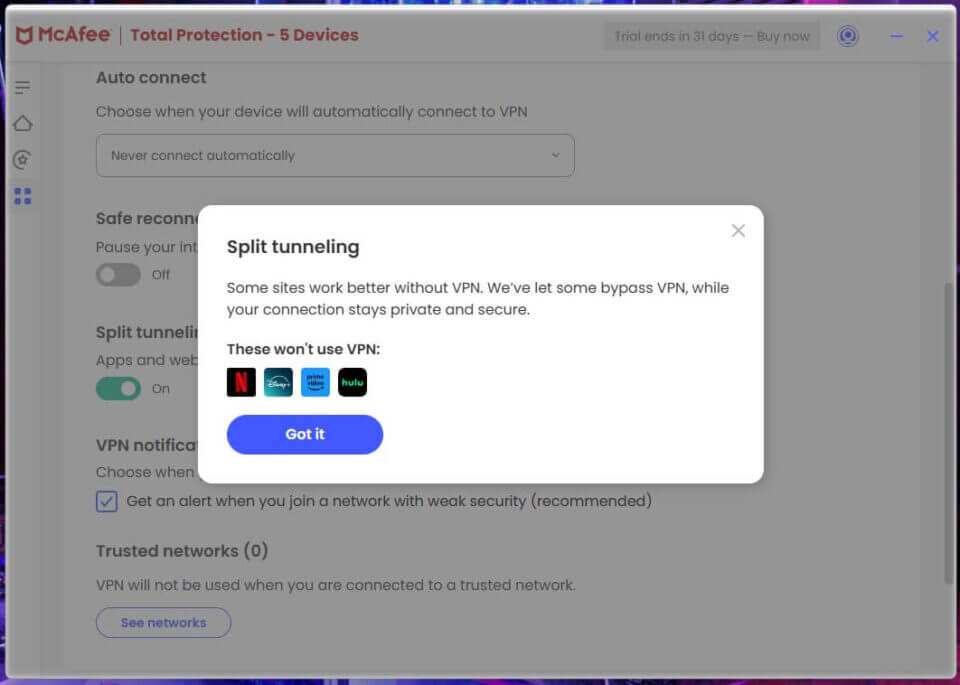
Auto-connect is more useful. Once enabled, the VPN connects by itself on unsecured networks, and you can mark your home or office Wi-Fi as trusted so it remains off there. A separate alert warns you when you join a network with weak security.
IP and DNS Leak Tests
This is where McAfee VPN impressed me. I tested it on ipleak.net and browserleaks.com, and it didn’t leak my IP address, DNS requests, or WebRTC data.
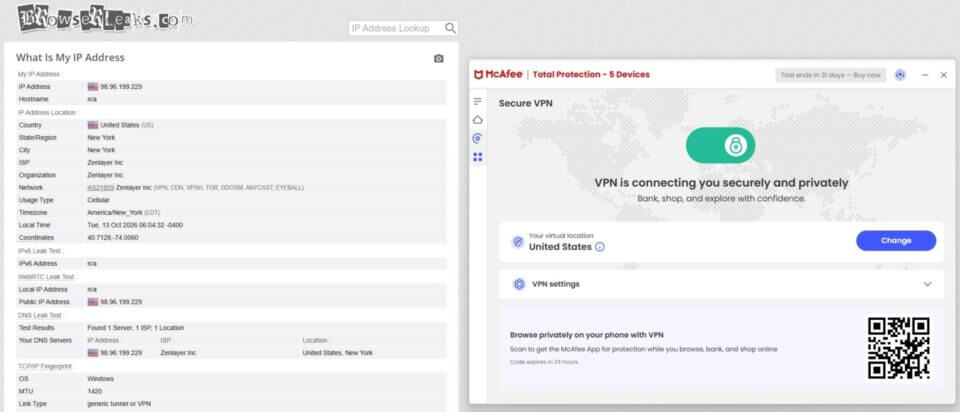
I had some spare time during testing, so I ran the same checks on all 48 locations. With a larger network, that would take forever, but here it was about an hour of work, and I was positively surprised that not one location leaked.
McAfee VPN Privacy and Logging
McAfee has no separate privacy policy for its VPN. The VPN section of its general privacy notice says the VPN doesn’t collect your original IP address, your DNS queries, or the apps and sites you use while connected. It also says the VPN may collect “certain telemetry,” without explaining what that covers.
The bigger problem is that those claims haven’t been verified. McAfee’s VPN page says the technology was independently reviewed, but the audit it points to is a 2020 audit of TunnelBear, a different VPN. On top of that, McAfee is a US company, so it must answer US legal requests for user data.
And the US is a founding member of the Five Eyes surveillance alliance. None of that means McAfee sells your browsing history. Still, if privacy is the main reason you want a VPN, choose the best VPN for privacy, with an audited no-logs policy and a privacy-friendly home country.
Speed Test Results
I live in Europe, and my connection came in at 116.12 Mbps download, 12.64 Mbps upload, and 12 ms ping without a VPN. I tested McAfee VPN on four servers, three times a day for three days, and kept the best result from each. Since the app has no protocol choice, every test ran on its default setting.
| Server | Download | Speed loss | Upload | Ping |
| No VPN | 116.12 Mbps | None | 12.64 Mbps | 12 ms |
| UK | 77.23 Mbps | 33.5% | 8.21 Mbps | 80 ms |
| US | 38.98 Mbps | 66.4% | 5.44 Mbps | 165 ms |
| Australia | 19.09 Mbps | 83.6% | 6.11 Mbps | 369 ms |
| Japan | 22.79 Mbps | 80.4% | 4.96 Mbps | 353 ms |
The UK server was usable, with a 33.5% speed loss that still leaves enough for HD streaming and browsing. Every server further away, however, cut my speed by two-thirds or more.
On the Australian server, ping went above 360 ms and download fell below 20 Mbps, which makes video calls choppy and large downloads slow. If you’re wondering whether a VPN slows down your internet this much in general, it doesn’t: the best VPNs lose under 10% on nearby servers.
McAfee VPN for Gaming
Ping is the delay between your device and a game server, and in fast shooters every millisecond counts. Even on the nearby UK server, McAfee increased my ping from 12 ms to 80 ms, and distant servers were far worse. My results in FPS games got noticeably worse.
Cloud gaming suffered too. If you want an Xbox VPN for Xbox Cloud Gaming, the input lag on McAfee makes anything faster than a turn-based game frustrating, and it has no console app anyway.
McAfee VPN for Streaming
Streaming is where McAfee VPN disappoints most. I connected to its servers and tested the popular services, and here’s what happened:
- Unblocked: Netflix US, Netflix UK, Netflix Canada, and Netflix Australia
- Couldn’t unblock: Netflix Japan, BBC iPlayer, ITVX, HBO Max, Hulu, Prime Video, and Pluto TV
Four Netflix libraries are a decent start, but losing BBC iPlayer, Hulu, HBO Max, and Prime Video rules it out for most people who stream abroad.
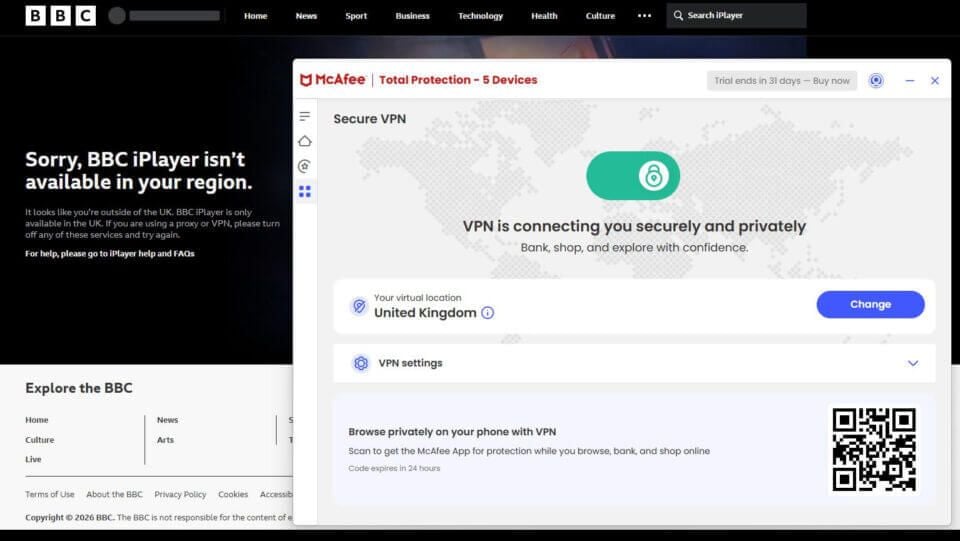
McAfee also has no streaming servers to try instead. For those services, check our article about the top streaming VPNs, which unblocked them in our tests.
McAfee VPN for Torrenting
No. I connected to servers in the US, the UK, Japan, Finland, Germany, and a few other countries, and attempted to download a Linux Mint torrent each time. The client showed no seeds or peers, and the download never started.
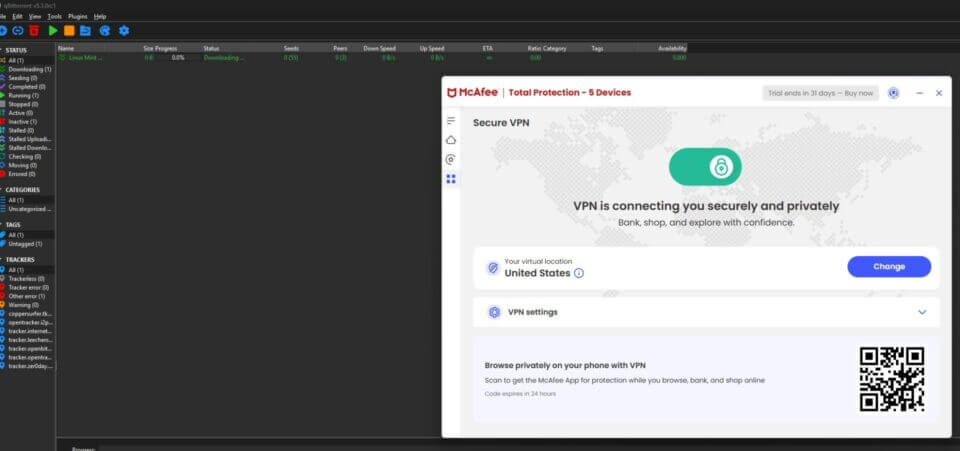
To rule out my own network, I disconnected the VPN, and the same torrent finished downloading within two minutes. So McAfee VPN blocks P2P traffic, and you’ll need a different VPN for torrenting.
Servers and Locations
McAfee VPN has servers in 48 countries, mostly across Europe and North America, with a few in Asia, South America, and Oceania, including Japan and Argentina. India and Hong Kong aren’t on the list, and McAfee doesn’t say how many servers it operates in each country.
You can choose a country but not a city, so there’s no way to select a server on the US West Coast or in a specific UK city. There are no specialty servers either: no streaming, P2P, or Double VPN servers. In practice, the network is useful only if you want to change your VPN location for browsing.
McAfee VPN also has no obfuscation, the feature that disguises VPN traffic on networks that block VPNs. In China and similar countries, I wouldn’t count on it, so if you’re using a VPN while traveling to one of them, choose a VPN that offers it.
Better Alternatives to McAfee VPN
If McAfee VPN doesn’t cover what you need, these three cost about the same as a McAfee plan and did far better in my tests:
- NordVPN: Best overall. It lost only 7.8% of my speed on average, unblocked Netflix, BBC iPlayer, HBO Max, and Prime Video, and supports torrenting on every server. It also has apps for Linux, Fire TV, and routers.
- Proton VPN: Best for privacy. It’s based in Switzerland, its apps are open source, and its no-logs policy is audited every year. Its Stealth protocol disguises VPN traffic on networks that block VPNs.
- ExpressVPN: Best for streaming. It has servers in 113 countries and simple apps for nearly every device, including routers, Fire TV, and Apple TV.
Final Thoughts
McAfee VPN does one job well: it hides your IP address on public Wi-Fi without leaking, and it costs nothing extra if you already pay for McAfee antivirus. For a few coffee shop sessions a month, that’s enough. Ask more of it, and it falls short.
Distant servers are slow, it couldn’t unblock most streaming services, torrents don’t download, and the kill switch can let traffic through after a restart. The privacy claims also rest on McAfee’s word alone. If you just want a little safety on public networks, keep it.
If you want a VPN for streaming, downloads, or travel, NordVPN is the one I’d use instead.
FAQs
Is McAfee VPN free?
No, McAfee VPN comes with McAfee's paid security plans. A free trial is available, but it requires payment details and becomes a paid subscription unless canceled before it ends.
Is McAfee VPN worth it?
No, not as a separate purchase. It costs nothing extra for McAfee antivirus customers, but slow distant servers, weak streaming results, and blocked torrents make a dedicated VPN better value.
Does McAfee VPN work on a Firestick?
No, McAfee VPN has no Fire TV app and can't be set up on a router. It works only on Windows, macOS, iOS, Android, and ChromeOS devices.
Does McAfee VPN keep logs?
No, according to McAfee. Its privacy notice says the VPN doesn't collect IP addresses, DNS queries, or browsing activity, but may collect telemetry. No independent audit has confirmed it.
Does McAfee VPN work with Netflix?
Yes, with some Netflix libraries, including the US, UK, Canadian, and Australian catalogs. It doesn't work with Netflix Japan, BBC iPlayer, Hulu, HBO Max, or Prime Video.
Is McAfee VPN good for torrenting?
No, McAfee VPN blocks peer-to-peer traffic, so torrents don't download while it's connected. NordVPN and Proton VPN support torrenting on their paid plans.
McAfee Secure VPN

Pros
- No IP, DNS, or WebRTC leaks on any server
- Included with McAfee’s antivirus plans
- One-button app that’s simple for beginners
- Warns you about unsecured Wi-Fi networks
- Unlimited devices on the Advanced plan
Cons
- Large speed loss on distant servers
- Couldn’t unblock BBC iPlayer, Hulu, or Netflix Japan
- Torrents won’t download
- Kill switch can let traffic out after a restart
- No independently audited no-logs policy
