
Brave VPN and ExpressVPN are undoubtedly popular. However, you don’t have to be exceptionally intelligent to recognize that ExpressVPN is generally superior. Brave VPN hasn’t been around for long, and it’s easy to notice when you examine it closely. Overall, Brave’s offerings haven’t impressed us.
Meanwhile, ExpressVPN’s constant improvements made the service so much better. In 2026, during our Brave VPN vs ExpressVPN analysis, we found it hard to justify purchasing the former. It’s pricier, less feature-rich, and considerably slower. Thus, we’ll immediately conclude that ExpressVPN is better.
If you’re here for all the nuances or maybe explicitly want to test Brave VPN out of respect for the developer, we invite you to read on. You’ll learn everything you need to know before taking the leap of faith.
Brave VPN vs ExpressVPN: Key Features Compared
| Brave VPN | ExpressVPN | |
| 💰 Starting price | $99.99 annually | $3.49 monthly |
| 💸 Money-back guarantee | No ❌ | 30 days |
| 🆓 Free version | No ❌ | No ❌ |
| 📺 Working with Netflix | No ❌ | Yes ✅ |
| 🔽 Torrenting allowance | Yes ✅ | Yes ✅ |
| 🔟 10 Gbps servers | Yes (500 Mbps speeds) ❌ | Yes ✅ |
| 🥸 No-logging policy | Yes ✅ | Yes ✅ |
| 🌐 Jurisdiction | USA | British Virgin Islands |
| 📱 Simultaneous connections | 10 | 10 to 14 |
| 🛜 Protocols | WireGuard, IKEv2 | Lightway Turbo, OpenVPN, IKEv2 |
| 💾 Servers | 300+ in 20+ countries | 3,000+ in 105 countries |
| 💯 Best for | Ease of use | Security, privacy, streaming, speed, and compatibility |
| ☎️ Customer support | Ticketing, knowledge base, community | 24/7 live chat, email, knowledge base, FAQs |
Price Comparison
Are you looking for a cheap VPN?
You may want to skip Brave VPN and instead opt for ExpressVPN. Brave VPN costs either $9.99 monthly or $99.99 annually, whichever payment method you prefer. In any case, the provider won’t charge you immediately. You’ll first initiate a 7-day trial, but you’ll have to choose the plan and provide a credit card.

Bear in mind that the provider doesn’t have a clear-cut refund policy. Thus, if unsatisfied, there’s likely no way to get a refund. However, a 7-day trial should suffice and allow you to test the service properly.
We then have ExpressVPN and its more ‘traditional’ pricing structure:

The VPN’s Basic plan is only $3.49 monthly, but our favorite pick, Advanced, is $4.49 monthly with four free months for two years. At 67% off, this is a steal, as you get 12 simultaneous connections, additional discounts on Aircove routers, ad-blocking, and all other ExpressVPN’s features.

You can opt for the annual version and pay more, or grab the monthly version and spend upward of twenty quid monthly. We prefer ExpressVPN’s biennial variant, as it’s exceptional value for money, especially since you can protect up to 14 devices simultaneously. You can do only 10 with Brave VPN.
So, ExpressVPN is more flexible, with a cheaper introductory offer that includes more features. Is there a valid reason to consider Brave VPN instead? Only if you’re a fan (we aren’t, as you can see in this review).
Features and Security
We explained that ExpresVPN offers more for a lower price, so what did we mean by that?
Brave VPN
To better explain our train of thought, we’ll mention that Brave VPN offers virtually no features. If you examine its website, or even better, its app, you’ll notice a connection button and a server list. The kill switch is exclusively on iOS, while the firewall, which blocks ads, malware, and trackers, is in the background.
Brave VPN doesn’t let you customize and handle the firewall manually! Noteworthy is that you also can’t change the protocol. Brave VPN uses WireGuard, and occasionally IKEv2. It lacks split tunneling, dedicated IP addresses, Double VPN servers, and other advanced features; such a shame!
At least, Brave Browser includes something called Shields. This feature is renowned for extremely effective ad-blocking that sometimes even goes up against YouTube ads. While not part of the VPN, it, in a way, is, as both the VPN and Shields reside within Brave’s phenomenal browser.
ExpressVPN
Then, we have ExpressVPN, which surely won’t beat NordVPN features-wise. However, it does offer more, starting with a kill switch and then split tunneling, an in-house Lightway Turbo protocol, Private DNS, RAM-only servers, Advanced Protection that blocks ads and trackers, and even Parental Control.

ExpressVPN even has Identity Defender, which comprises a few tools:
- Data Removal
- Credit Scanner
- ID Alerts
- ID Theft Insurance
These features work in the US and essentially protect you from various ID-aimed attacks, data thefts, and unauthorized use of your credit cards.

Another worthy addition is ExpressVPN Keys, the company’s tiny password manager. It creates and manages your passwords, ensuring they don’t fall into the wrong hands. Plus, all ExpressVPN plans offer unlimited eSIM traffic, making it easy to stay in touch with loved ones abroad. Such a great VPN for traveling!
DNS & IP Leak Test: No Detected Leaks
During our Brave VPN vs ExpressVPN comparison, we tested their IP leak protection. Both offer full IPv4, IPv6, and DNS leak protection, which we confirmed on a few leak-checking websites. After testing five locations in each VPN, we failed to detect even minor leaks, resulting in a clean slate for both.
Here’s proof of that from ExpressVPN:

And here’s how Brave VPN performs:

As you can see, they’re nothing short of perfect.
Do Brave VPN and ExpressVPN Store Logs?
Brave VPN and ExpressVPN are famous for their privacy-friendly VPN services, and in our examination, we failed to find anything suspicious. Starting with Brave VPN, this provider is clean as a whistle, with two third-party audits and a no-logging policy that clearly outlines everything you must know.
Brave VPN doesn’t store logs of your originating IP address, DNS requests, traffic destination, or other private data. It retains the minimum logs necessary for operation, but this information is anonymized and can’t be traced back to you. Also, Brave VPN is US-based, which may seem like a red flag.
However, our experience shows that many US VPN services are excellent privacy-wise, including PIA, IPVanish, and others. Our only concern is the lack of RAM-only servers, which ExpressVPN relies on. Speaking of ExpressVPN, its no-log policy is a textbook example of how it should be done.
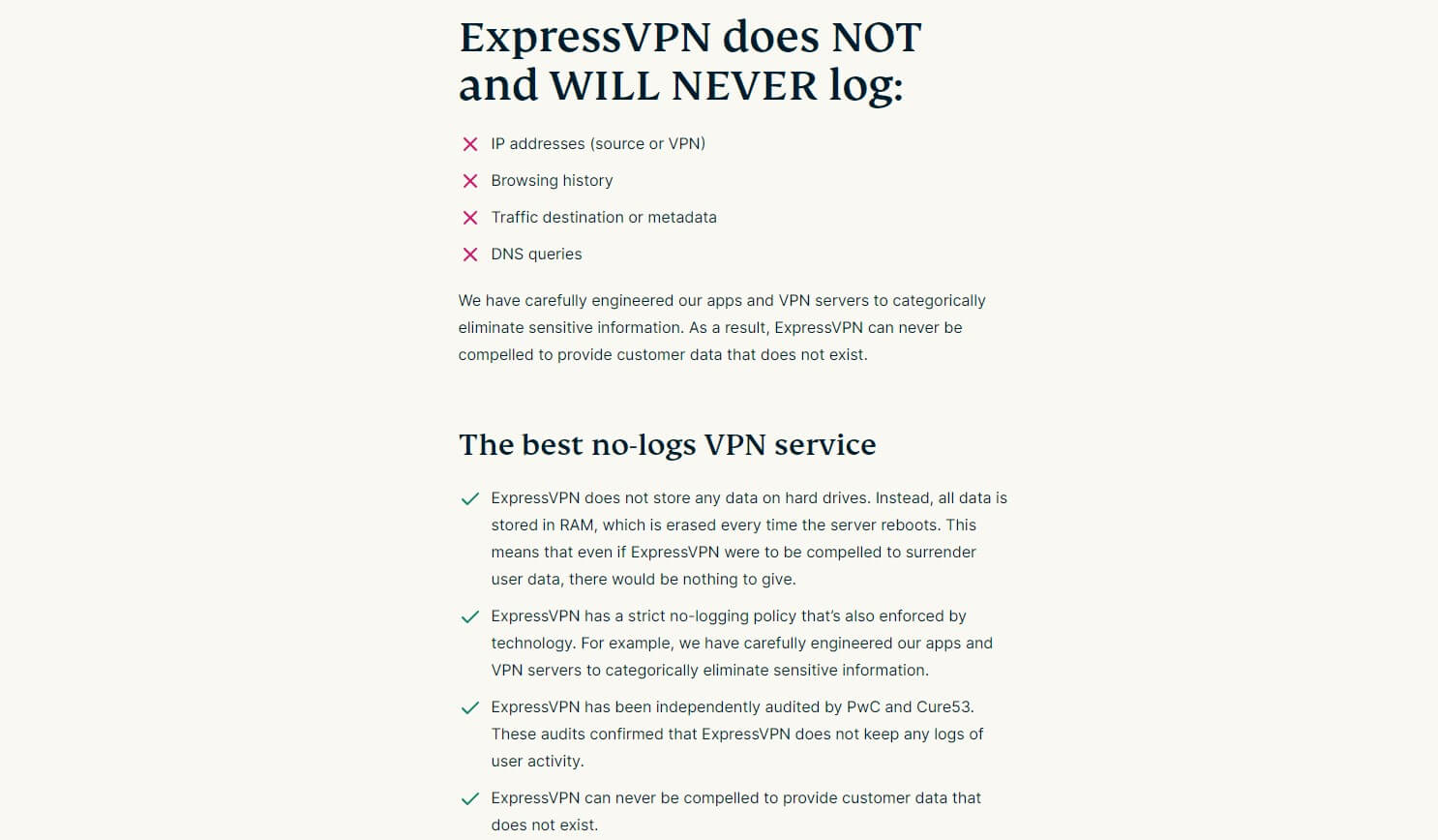
The VPN is famous for retaining nothing relevant, which was proven a few years ago in the unfortunate assassination of Andrei Karlov. Additionally, the VPN has over twenty third-party audits from PwC, KPMG, Cure53, and other renowned cybersecurity companies.
Add to that its British Virgin Islands jurisdiction, and you have one of the best and most reputable VPN services on the planet. Privacy-wise, both are exceptional, though we’d give ExpressVPN a small advantage for its RAM-based servers and more third-party audits.
Device Compatibility and Ease of Use
ExpressVPN and Brave VPN have straightforward apps that we enjoyed using.
However, the former works on all systems; it’s even among our favorite VPNs to use on macOS. ExpressVPN also supports Fire TV Stick, Smart TVs, Apple TV, routers, gaming consoles, and other devices.
Meanwhile, Brave VPN works only on macOS, Windows, iOS, and Android.
You can look at Brave VPN’s app below and notice that it’s an in-browser VPN. Indeed, the provider offers no dedicated applications, but despite that, it still protects all traffic, in and outside the browser. Switching to iOS or Android is identical: you can find the VPN in your Brave Browser.

Then, we have ExpressVPN, which looks stunningly simplistic but offers dedicated applications and a VPN extension for all browsers. Its VPN extension is vastly superior, with tools like WebRTC Leak Protection and Location Spoofing, allowing you to sidestep stubborn geo-restrictions.

A key point for ExpressVPN is its overwhelming compatibility. It allows ExpressVPN to adapt to your ever-changing needs and encrypt all traffic. We mourn Brave VPN’s lack of streaming apps that would’ve been more than welcome. Simultaneously, it doesn’t support Linux, which is discouraging.
At the start, we mentioned that Brave VPN supports 10, while ExpressVPN supports 10 to 14 simultaneous connections. So, ExpressVPN hammers down another nail in Brave VPN’s coffin by offering equal ease of use and unparalleled device compatibility. Good job!
Speed Comparison: Which VPN Is Faster?
ExpressVPN consistently tops our rankings of the fastest VPNs, along with NordVPN. For instance, it was one of the fastest VPNs in Canada. Brave VPN, not so much. We tested these VPNs for three days in a row, three times a day, across a few server locations: the UK, the USA, and Japan.
Before our testing, we ran a quick speed test without a VPN and achieved these results:
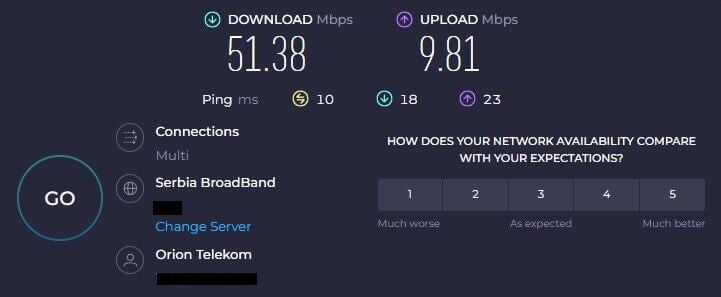
All tests were performed on the web app of Speedtest.net, using a Windows 11 laptop with a LAN connection. At the time of writing, we were in Serbia, and we intentionally chose distant server locations to stress-test these VPNs maximally and see how well they preserve their connection speed.
Here are our best speed test results:
| ExpressVPN | Brave VPN | |
| UK Server DL/UL Speed | 48.12/9.71 Mbps | 36.99/9.12 Mbps |
| US Server DL/UL Speed | 40.08/9.22 Mbps | 22.74/7.44 Mbps |
| Japan Server DL/UL Speed | 34.66/8.01 Mbps | 17.54/8.23 Mbps |
Our maximum latencies across all three locations were:
- Brave VPN: UK – 67 ms, US – 345 ms, Japan – 430 ms
- ExpressVPN: UK – 49 ms, US – 303 ms, Japan – 370 ms
To put things into perspective, we combined their best speed test results from all three locations and created a small table that displays their speed retention rates:
| ExpressVPN | Brave VPN | |
| Download Speed Retention | 80% | 50% |
| Upload Speed Retention | 92% | 74% |
Brave VPN’s performance was underwhelming in all aspects. From download to upload speeds and overall latency. ExpressVPN was the polar opposite. While a smidge slower than our favorite NordVPN, the VPN still performs admirably and offers exceptional performance on long-distance servers.
This boils down to ExpressVPN’s 10 Gbps server ports. While Brave VPN claims to use them, it also states that, realistically, you’ll get up to 500 Mbps speeds, which isn’t ideal for high speeds and online activities that consume a lot of bandwidth. Needless to say, ExpressVPN takes this one.
Brave VPN vs ExpressVPN: Streaming Test Results
Next up, we have streaming, and this is where Brave VPN disintegrated.
After testing all popular online streamers, we were baffled that very few worked. If you’re interested in Netflix or BBC iPlayer, forget about them. BBC iPlayer constantly bombarded us with a geo-restriction message, while Netflix was promising, but in the end, it wouldn’t work with Brave VPN.

We tested Netflix’s largest catalogs, such as the UK, the US, Japan, Canada, and Germany.
None worked! We had luck with a few free channels that streamed MotoGP races, but due to slow speeds, buffering times were slightly longer.
ExpressVPN was completely different and transformed our experience within seconds. We connected to the UK server, went straight to BBC iPlayer, and boom; everything worked flawlessly. Out of curiosity, we tested ITVX while we were there, and, should we say, we were enthralled with the results.

Other platforms, particularly Netflix, were easily unblockable, and in our tests, ExpressVPN helped us access at least ten popular libraries. We tested its browser extension, and with location spoofing, also accessed ESPN+ and Max. ExpressVPN works so much better for streaming.
This applies to unblocking prowess and speed, both of which are vital for a good experience.
Torrenting
Brave VPN’s redeeming factor is torrenting, where it performs fantastically.
We tested a couple of servers, but primarily those in Europe, to maximize download speeds. Needless to say, all worked and we could download Linux Mint in a few minutes. To our surprise, speed reduction was barely noticeable, and Brave VPN kept downloading at full speed until the end.

ExpressVPN repeated the result. Again, we used mostly European locations and noticed no speed reduction. However, when we switched to a few American and Asian servers, ExpressVPN kept going strong, only marginally reducing the download speeds, which we expected.
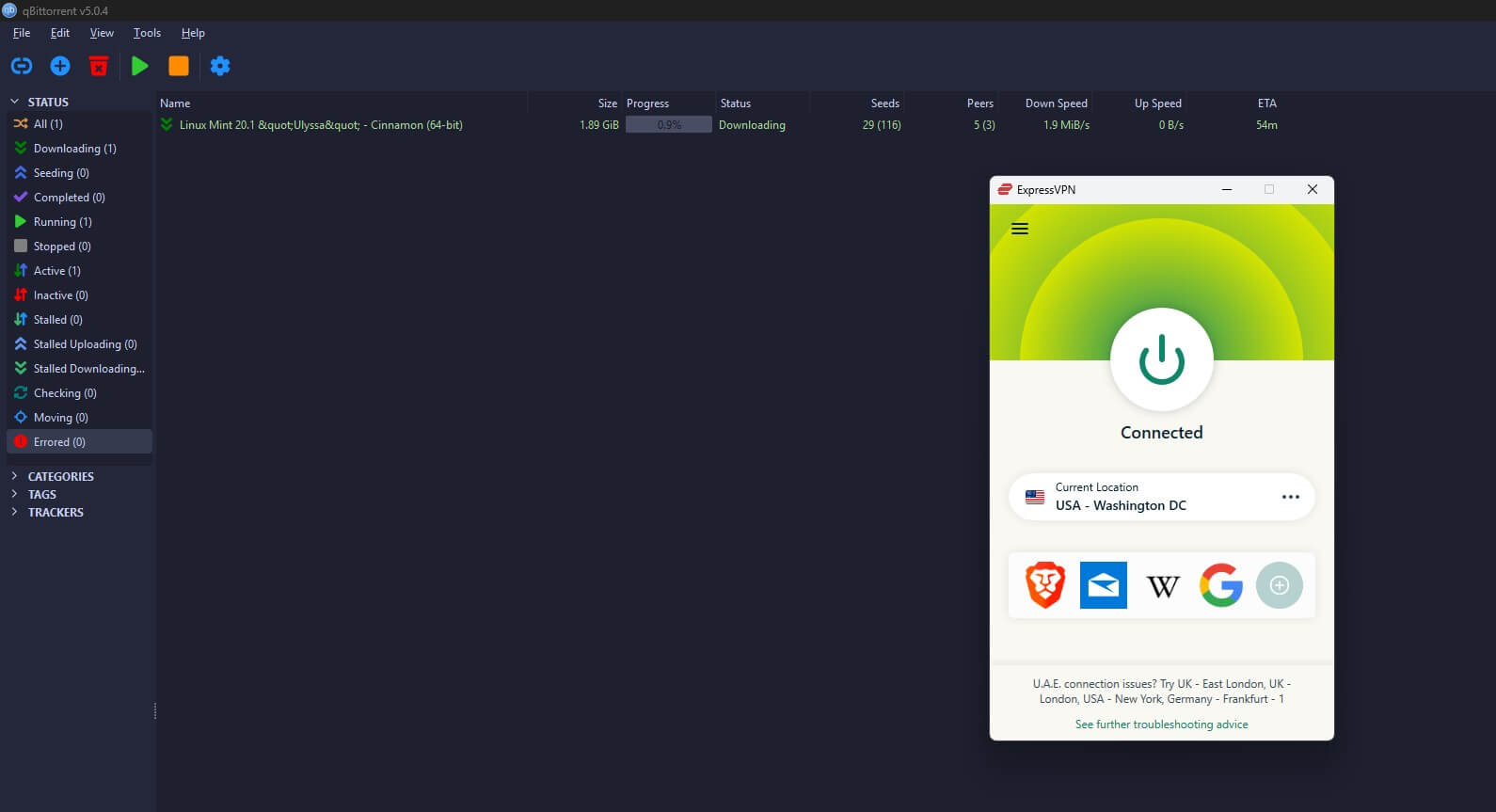
Both VPNs are torrent-friendly, so if this is your primary criterion, there’s no room for mistake.
Server Locations: Brave VPN vs ExpressVPN
But if you want a lavish, well-distributed server network, chances are you’ll side with ExpressVPN. I mean, you get over 3,000 servers in 105 countries. If we take into account city-level servers, ExpressVPN offers over 160 locations, most of which are in the United States and Europe.

Its network quality is exceptional. We’ll mention:
- RAM-only servers
- 10 Gbps server ports
- Dedicated IP addresses
ExpressVPN combines virtual and physical servers, allowing for a wider variety of locations and IP addresses. That’s why it’s often used for a Turkish IP, thanks to its virtual servers that aren’t physically on Turkish soil, but in a safe place, from where they ‘simulate’ a Turkish IP address.
The same goes for other censored regions.

Brave VPN packs only about 300+ servers in 20+ countries and 40+ locations. These aren’t diskless servers, and while 10 Gbps ports exist, Brave VPN’s speed test results imply they’re not fully utilized. Unlike ExpressVPN, it doesn’t have dedicated IP addresses, so if you need them, pick the other VPN.
With 20+ countries, Brave VPN’s distribution is far from fantastic. However, it only uses physical servers if that’s meaningful to you. The server distribution is ‘okay’ for the quantity, but ExpressVPN ultimately comes on top with a vastly larger, more premium server setup.
Customer Support Comparison
We’ll finally address their customer support, which we found to be starkly different.
ExpressVPN’s support is based on 24/7 live chat, and we must say we’re always impressed at how fast it is. Ask a question and you’ll be picked up in seconds. We’re not joking. Plus, ExpressVPN’s support team agents are some of the most helpful we’ve met, always eager to come to your aid.
Additionally, you have a knowledge base with FAQs and optional email support if you’re not in a hurry. ExpressVPN’s support is industry-leading, and we’ll say we even like it more than NordVPN’s support.
We can’t say the same for Brave VPN, which relies on the ticketing system, which is far from speedy or responsive. At least it’s accessible within the browser, but once you send the ticket, expect a waiting time of at least an hour or two. In our experience, it was often more, particularly during the weekends.
While Brave VPN’s support is helpful, we prefer ExpressVPN’s instant responses and helpfulness, which have become the provider’s trademark feature over the years.
Final Recommendations
Now that we know all the ins and outs of both services, it’s time to declare the winner.
No need to be official. If you’ve been with us for the whole ride, you know ExpressVPN is the right choice, and given everything we said, picking Brave VPN virtually makes no sense. ExpressVPN costs less and offers more. It’s faster, more secure, better for streaming, and has more servers.
Brave VPN only came close in torrenting and privacy, but other than that, ExpressVPN wiped the floor with it, and honestly, that’s only putting it mildly. If you’re going with ExpressVPN, which we sincerely hope, you can pick this ExpressVPN coupon and save 67% on its Advanced plan.
Conversely, simply click the button below and try ExpressVPN risk-free for 30 days. If you want to know just how much it’s better than Brave VPN, you can test the latter and pick up ExpressVPN. It’s a night-and-day difference!
