Your rankings look fine, yet ChatGPT keeps recommending someone else. Here is how to measure your AI visibility in Semrush, step by step, and turn the numbers into a plan.
What AI visibility tracking actually measures
When someone asks ChatGPT, Gemini or Google AI Mode for “the best project management tool for a small agency”, the answer names three or four brands and cites a handful of sources. AI visibility tracking records whether your brand is one of them, how often, in what position, and with what tone.
That is a different measurement from a Google ranking. A page can sit at position 2 for a keyword and never be mentioned in the AI answer for the equivalent prompt. Semrush’s own research puts the stakes in plain terms: visitors arriving from AI search convert at 4.4 times the rate of traditional organic traffic. Missing from the answer means missing the highest-intent visitors you have.
Semrush handles this through its AI Visibility Toolkit, which ships alongside the SEO tools in Semrush One. We rated it the top pick in our roundup of the best AI visibility tools and AI marketing tools. The steps below follow the toolkit from left to right in the interface.
Before you start: what you need
You need a Semrush account with the AI Visibility Toolkit enabled. Semrush One includes it on every plan, with 50 tracked prompts on the Starter tier and more on Pro+ and Advanced. The standalone toolkit is also sold separately, but with tighter limits and no SEO tools attached.
Have three things ready: your domain, a list of four competitors that show up in the same buying conversations, and a rough idea of the questions your customers ask before they buy. You will refine the last one in step 3.
Start your 14-day Semrush One trial
Step 1: Get your AI Visibility Score in Visibility Overview
Open the left-hand menu, click AI, then Visibility Overview. Enter your domain and run the report.
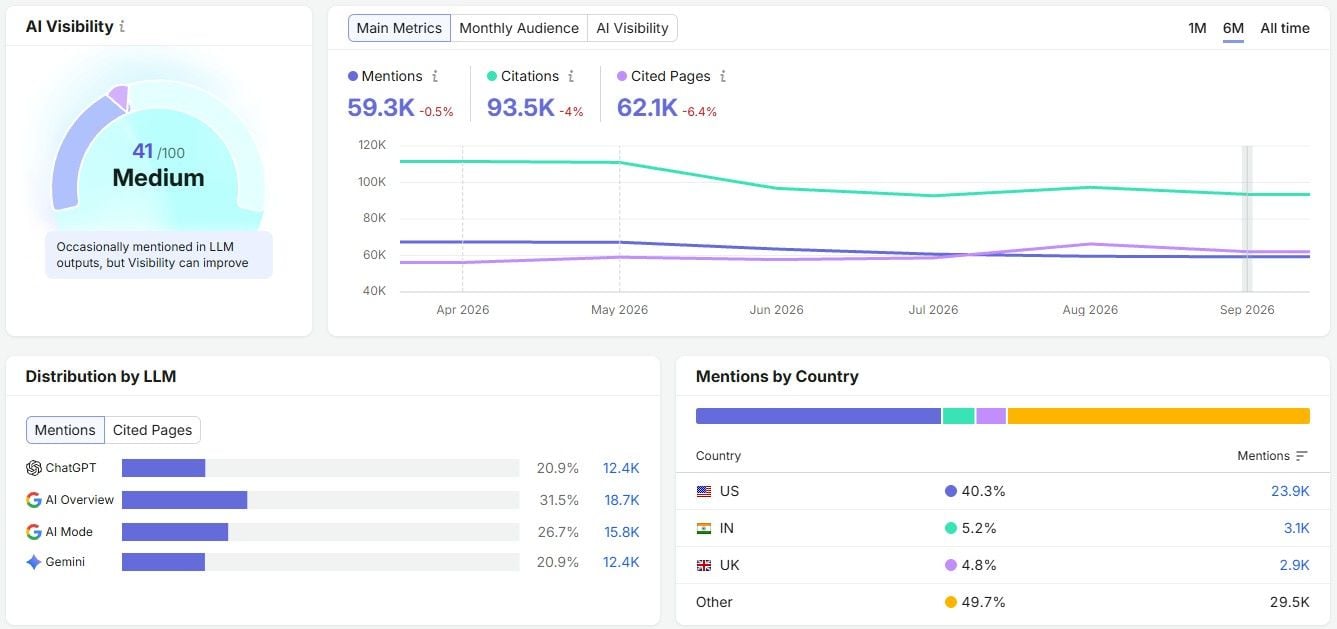
The headline number is the AI Visibility Score, a 0 to 100 benchmark of how present your brand is across AI answers. Below it, three trend lines show mentions, cited pages and citations over time, so you can tell whether the score is moving before you change anything.
Two modules matter most at this stage. Distribution by LLM shows which platforms mention you most: ChatGPT, Gemini, Perplexity, Google AI Overviews or AI Mode. Mentions by Country shows where that visibility comes from geographically. If 80% of your mentions come from one platform in one market, you know where your exposure is concentrated and where the gaps are.
Write the score down. This is your baseline, and everything after this step is measured against it.
Step 2: Find the prompts where competitors win in Competitor Research
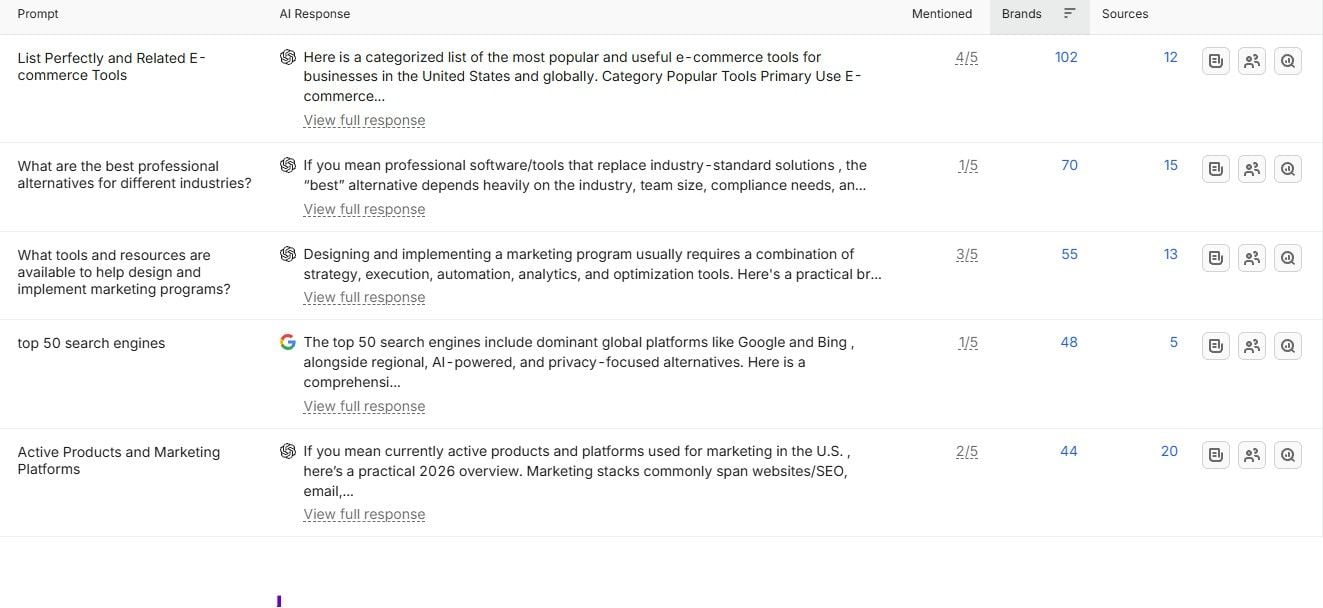
Move to Competitor Research. Enter your domain and add up to four competitors.
The report compares your AI brand visibility against theirs and, more usefully, lists Topic and Prompt Gaps: the prompts where a rival is named and you are not. This is the shortlist of conversations you are currently losing.
Sort the gaps by how close they are to a purchase. A gap on “what is a CRM” is interesting. A gap on “best CRM for a five-person sales team” is money. Keep the second kind for step 5.
Step 3: Discover what people ask AI with Prompt Research
Think of Prompt Research as keyword research for conversational search. Enter a broad topic or product category and Semrush returns related prompts drawn from its database of more than 261 million AI search prompts, each with an estimated AI Topic Volume and an intent label.
Filter by commercial or transactional intent and export the list. Cross it with the gaps from step 2. Prompts that appear in both lists (high intent, competitor named, you absent) go to the top of your tracking set.
Semrush’s internal testing suggests around 10 well-chosen prompts per product is enough to see whether AI systems consistently recommend you or default to a competitor. Start there rather than with 50 loosely related queries.
Step 4: Check how AI describes your brand in Brand Performance
Being mentioned is only useful if the mention is favourable. The Brand Performance suite covers that side of AI brand visibility, and this is where Gemini and Perplexity join the platforms already covered. If mentions specifically are what you care about, we cover them in more depth in how to track brand mentions in ChatGPT, Gemini and Perplexity.
Start on the main dashboard and read the Share of Voice vs Sentiment chart. It plots you and your competitors on two axes at once, so you can see whether the brands with more mentions also have better perception, or whether someone is being talked about a lot for the wrong reasons.
Then work through three reports.
- Perception tracks sentiment over time (positive, neutral, negative) and shows how yours moves relative to competitors.
- Narrative Drivers lists the top cited domains shaping your brand’s story in AI answers. These are your outreach targets: get covered there and the AI platforms pick it up.
- Questions shows the specific prompts where you and your competitors are mentioned, with the exact wording.
At the bottom of each report, the AI Strategic Opportunities section turns the data into recommendations. They are generic in places, but they are a reasonable first draft of an action plan.
See your brand’s AI sentiment with Semrush One
Step 5: Set up daily Prompt Tracking
Steps 1 to 4 give you a snapshot. Prompt Tracking gives you a time series, and it lives inside Position Tracking rather than in the AI menu, which catches a lot of people out.
Open Position Tracking and create a new campaign (or edit an existing one). In the search engine selector, choose ChatGPT, Google AI Mode or Gemini instead of Google. Enter your domain, paste the prompts you shortlisted in step 3, and finish the setup.
From the next day, you get two metrics per prompt, updated daily: Visibility (whether and how prominently you appear) and Average Position (where in the answer you are named). Competitors you add to the campaign are tracked on the same prompts, so a competitor overtaking you on a key prompt shows up within 24 hours.
The Devices and Locations tab is worth a look once a week. It puts your AI search visibility next to your traditional Google rankings for the same targets, which is the fastest way to spot a page that ranks well but never gets cited.
Prompt limits on Semrush One
Starter tracks 50 prompts, Pro+ 100 and Advanced 200, across up to 5, 15 and 40 monitored sites respectively. Extra blocks of 50 prompts can be added if you outgrow your tier. For a single brand with three or four products, Starter is enough.
Step 6: Make sure AI crawlers can reach your site
None of the above helps if the AI platforms cannot read your pages. Run a Site Audit and open the AI Search Health widget.
It flags the technical issues that quietly kill LLM visibility: robots.txt rules blocking OAI-SearchBot, PerplexityBot, Google-Extended or Claude-SearchBot, a missing llms.txt file, stale last-modified headers, and pages too long for AI models to process cleanly. In our experience, at least one AI crawler is blocked on roughly a third of the sites we audit, usually by a rule nobody remembers adding.
Fix these first. They are the cheapest wins in the whole process.
Step 7: Report on it
Visibility Overview, Competitor Research, Brand Performance and Prompt Tracking all plug into My Reports. You can export a PDF, schedule a recurring report, or build a shared dashboard that pulls AI visibility next to organic rankings and traffic.
For stakeholders, three numbers per quarter tell the story: citation rate on your high-intent prompt cluster, share of voice against named competitors, and sentiment. “Our citation rate on ‘best CRM for small teams’ prompts went from 12% to 27%” is a sentence a CMO can act on.
What to do with the data
Tracking is the easy part. Moving the score comes down to three levers, and Semrush points at all of them.
First, create or update content for the gap prompts from step 2, structured so an answer engine can lift a clean passage from it: direct answers, clear headings, schema where it fits. Second, earn coverage on the domains listed in Narrative Drivers, since those are the sources the models already trust. Third, keep the technical side clean with a monthly Site Audit.
Semrush reports that its own team moved share of voice in AI answers from 13% to 32% in a month using this loop. Results vary, but the sequence (benchmark, find gaps, fix access, publish, track) is the same for any brand.
Is Semrush One worth it just for AI visibility?
If you only want to know whether ChatGPT mentions you, cheaper trackers exist, and we compare them in our AI visibility tools comparison. The case for Semrush One is that the AI data sits inside the same projects as your keywords, rankings, backlinks and site health, so a gap prompt in step 2 becomes a content brief, a technical fix and a tracked target without leaving the platform. Ahrefs sells its equivalent as a $179-a-month add-on with no SEO tools included; Semrush bundles both from $199.
The 14-day trial is long enough to complete every step above and see your first week of daily prompt data.
Try Semrush One free for 14 days
FAQ: tracking AI visibility with Semrush
Which AI platforms does Semrush track?
Visibility Overview and Brand Performance cover ChatGPT, Gemini, Perplexity, Google AI Overviews and Google AI Mode. Daily Prompt Tracking currently supports ChatGPT, Google AI Mode and Gemini, with platform coverage expanding over time.
How many prompts should I track?
Start with 10 to 15 high-intent prompts per product line. Add more only once you can explain why each one matters to revenue.
Can I compare AI visibility with my Google rankings?
Yes. The Devices and Locations tab in Position Tracking shows AI search positions next to traditional rankings for the same campaign.
Is there a free way to check AI visibility?
Semrush offers a free AI Visibility Checker for a one-off snapshot of your domain. Daily tracking, competitor benchmarking and sentiment analysis require the AI Visibility Toolkit, included in Semrush One.
This article is sponsored by Semrush and contains affiliate links. We may earn a commission if you make a purchase through these links, at no extra cost to you.