Growing storage needs spawned the existence of some of the best cloud storage services. You’ll agree that file sizes have reached outrageous sizes, making it hard to store them on your typical hard drive effectively. Not only that, but hard drives, especially solid-state drives (SSDs), tend to fluctuate in price.
While you can always buy more physical storage, in today’s day and age, that is not the most economical option. For that reason, people turned towards the best cloud storage services in 2026, as they allow for getting more storage at an affordable price. Cloud storage services range in size, security, and other factors.
With many options, choosing the good one has become increasingly difficult. All these promises often aren’t true, and many cloud storage services fail to meet certain criteria. However, with our years-long experience, we bring you the best cloud storage services comparison and analysis for 2026.
Best Cloud Storage and File-Sharing Services (2026)
- pCloud – Best cloud storage overall
- Internxt – Great for transfer speed and ease of use
- NordLocker – The most secure cloud storage service
- Google Drive – The reference for collaborative tools
- Dropbox – Excellent ease of use
- IDrive – Reliable cloud backup solution
Best Cloud Storage Services Comparison
| pCloud | Internxt | NordLocker | Google Drive | Dropbox | IDrive | |
| 💯 Best Plan | 2 TB Lifetime at $399 | Premium 3 TB Lifetime at $580 | 2 TB Annual at $83.88 | 2 TB Annual at $99.99 | 2 TB Plus Annual at $119.88 | 500 GB Annual at $9.95 |
| 💾 Storage Size | 500 GB to 10 TB | 1 TB to 5 TB | 500 GB to 2 TB | 100 GB to 2 TB | 2 TB to 3 TB | 100 GB to 100 TB |
| 📁 File Versioning | Yes | Yes | No | Yes | Yes | Yes |
| 🔄 Transfer Speeds | Excellent | Excellent | Good | Good | Excellent | Good |
| 🔒 Encryption | 256-bit + client-side | Zero-knowledge | Zero-knowledge | 256-bit | 256-bit | 256-bit + zero-knowledge |
| 📟 Device Compatibility | Windows, iOS, Android, macOS, Linux | Windows, iOS, Android, macOS, Linux | Windows, iOS, Android, macOS | Windows, iOS, Android, macOS | Windows, iOS, Android, macOS | Windows, iOS, Android, macOS, Linux |
| 🎁 Free plan | 10 GB | 1 GB | 3 GB | 15 GB | 2 GB | 10 GB |
Best Cloud Services in 2026: Our Top 6 (Detailed List)
Before our best cloud storage services comparison, let’s address a few things. During testing, we chose only the best possible cloud storage options with solid speeds, plenty of storage space, and a free plan for effortless testing before purchase. Rest assured, we also considered their prices; an affordable one got bonus points.
That makes obtaining the best cloud service inexpensive and economical compared to your typical HDD or SSD upgrade. Without further ado, here are our best cloud storage options with pros, cons, prices, and more.
1. pCloud: Best Cloud Storage Service Overall
Pros
- Affordable pricing
- Very easy to use
- Based in Switzerland
- Crypto Folder
- Free plan with up to 10 GB of storage
- Great upload and download speeds
- Automatic backups
Cons
- Not the best customer support
- It lacks some collaboration tools
pCloud is surely not the most popular cloud storage service on the market. However, not being as popular as Google Drive, Dropbox, or iCloud isn’t a precursor of low quality. In fact, pCloud is the polar opposite, offering one of the best cloud storage services we’ve ever used. Here’s precisely why we like it.
🔐 Security
The company started in 2013 in Switzerland, so it’s a much younger product than some of its competitors. Despite that, pCloud offers state-of-the-art security with 256-bit AES encryption and servers in Europe and the US. What’s more, pCloud lets you choose which server you want to use, making it versatile and functional.
A few years back, pCloud wasn’t the fastest cloud service. Nowadays, that’s not the case as it has seriously improved its upload and download speeds, making it the ultimate cloud storage service in 2026.
💾 Storage & File Sharing
Uploading and downloading with pCloud will finish before you finish your cup of coffee. But what about the storage space itself? Well, pCloud offers up to 10 TB of storage, which will be enough for the vast majority of users. If you don’t want to pay more, you can get a 500 GB plan and enjoy full speeds and rock-solid security.
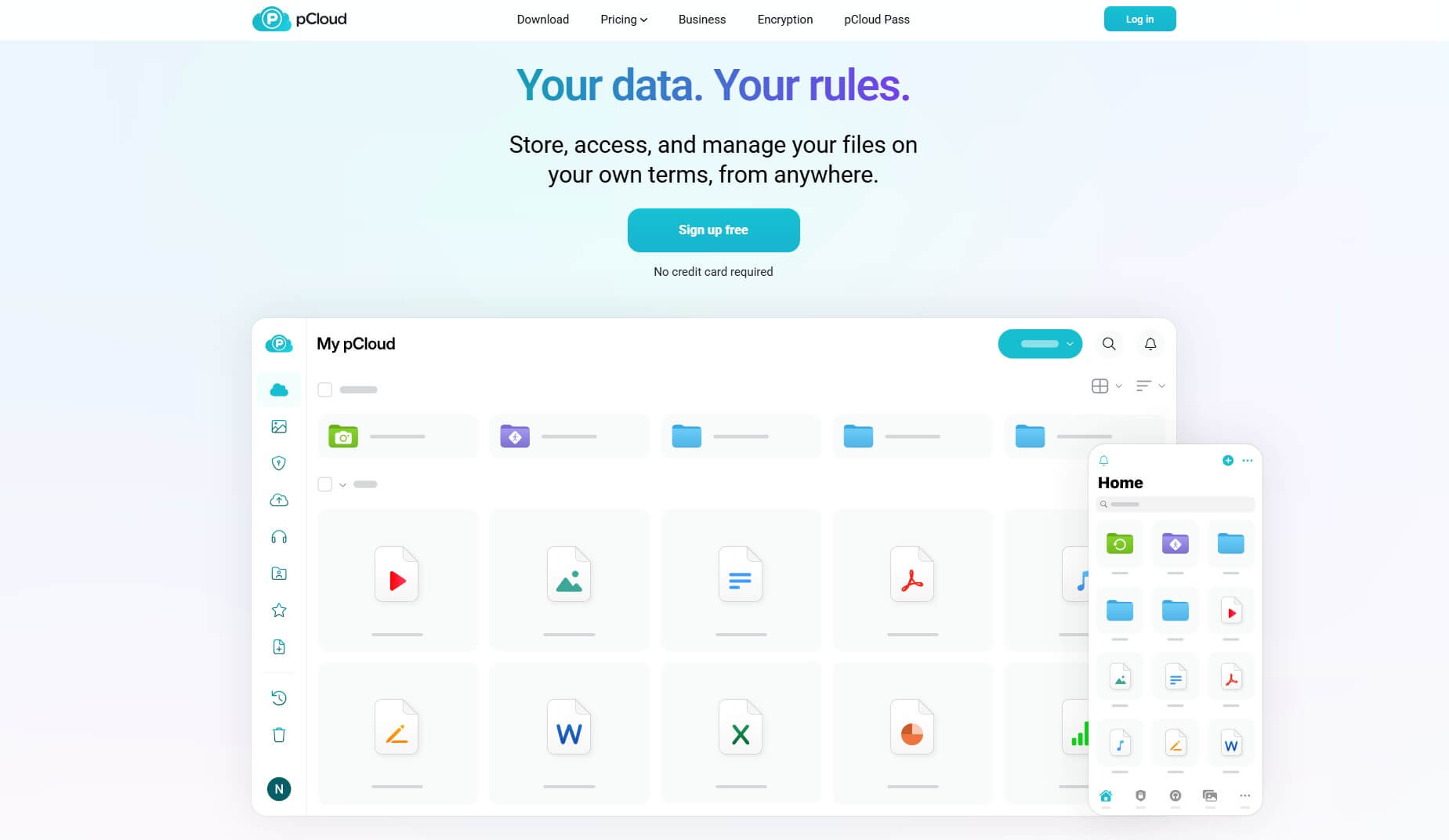
The cloud storage itself is utilized very well. pCloud lets you sort files by their types, import files from third-party cloud services, and back up important files and folders from your computer. We especially like its Crypto Folder, essentially a separate folder where your files are protected by client-side encryption.
Since this is zero-knowledge encryption, only you can access and use your files. Even pCloud itself can’t access them. Users can enjoy safe and secure sharing, where pCloud lets you password-protect shared files and add a logo and branding if you’re a business user. Very few cloud storage services allow this.
🆓 Free Plan
As said, its free plan is also here and is one of the best free cloud storage services in 2026. pCloud gives you a forever-free offering with 5 to 10 GB of storage. Even better, you get all of the premium features here, with the only limit being storage space. Of course, you’ll get a way better experience with pCloud Premium.
If you go down this path, pCloud will include a generous 14-day money-back guarantee. It’s valid only for first-time users, so if you’ve already bought it before and cancel it, you won’t be issued a refund.
🤑 Pricing
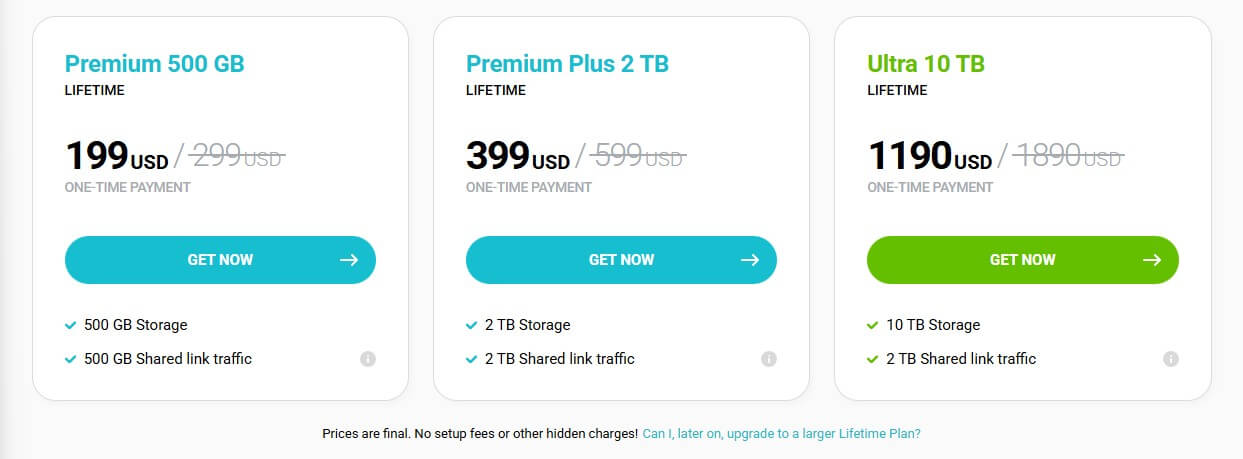
Being one of the best cloud storage services in 2026, pCloud offers flexible subscription plans. However, the best deal is its Lifetime plan, which lasts 99 years and comes with a 14-day money-back guarantee. For $399 (one-time payment), you can get 2 TB of storage for 99 years; it’s the best-value option.
Alternatively, the 500 GB storage will cost you around $199 for 99 years, making pCloud extremely affordable. If you want more, pick the Ultra 10 TB plan at $1,190 for 99 years or switch to annual pricing, where the same plans cost $49.99, $99.99, and $299.99 yearly. Read our pCloud review to learn more about the service.
2. Internxt: Best Online Cloud Storage for Speed
Pros
- One of the fastest cloud storage options
- Incredible ease of use
- Zero-knowledge encryption
- Cheap Lifetime plans (up to 5 TB)
- WebDAV support
- Business plans are available
Cons
- Small free storage (1 GB)
- Not many collaboration tools
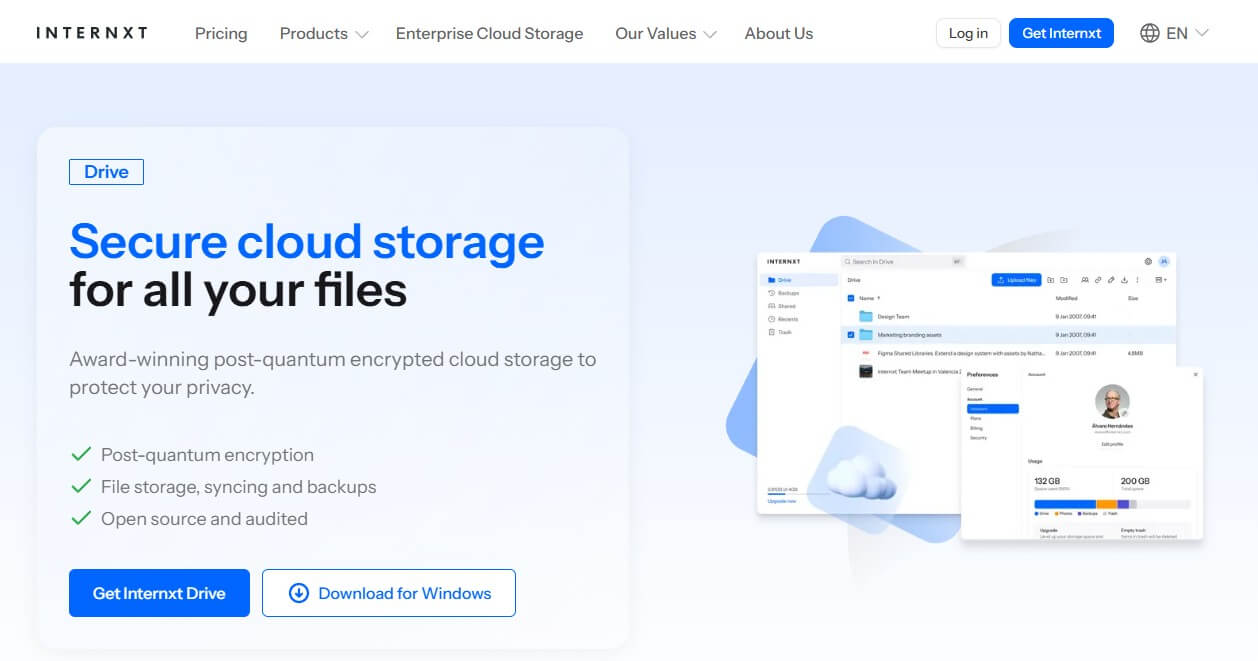
You might be surprised to see Internxt at #2 on our best cloud storage services comparison, but there it is. It’s a very reliable cloud storage service with impressive transfer speeds, highly intuitive apps, and effortless file sharing. We actually compared Internxt to Dropbox, and it was nearly as fast. But there’s more.
🔐 Security
Like pCloud, the provider uses zero-knowledge encryption, but this time, you don’t have to pay for it additionally. Instead, every time you sign in, you’ll wait a few seconds for the storage to unlock and decrypt your files, indicating the presence of encryption. Another benefit of Internxt is in-transit encryption.
That means your files are encrypted from the moment they leave your computer and travel to the cloud, or vice versa. As a result, Internxt protects you from file loss and makes every file transfer risk-free.
It also natively includes a secure VPN. If that’s insufficient, Internxt even has a Cleaner, which rids you of unwanted files on devices, as well as Antivirus software, which, while basic, still does its job in real time.
💾 Storage & File Sharing
Internxt is also an amazing cloud storage for videos because of its blazing-quick transfer speeds and ample storage. The provider offers up to 5 TB of storage at an affordable price, but those with lower demands can opt for 1 TB or 3 TB, both of which are gargantuan. Internxt has password-protected file sharing.
With it, you can even share folders for easier access. File sharing is also encrypted, plus you can access your file from any device thanks to automatic syncing. Recently, Internxt started to implement file versioning, which allows you to recover previous versions of your files. It’s available in Premium and Ultimate plans.
🆓 Free Plan
Internxt has one of the weakest cloud storage free plans around, size-wise. With only 1 GB of free cloud storage, it’s far below even Dropbox’s minuscule offers. However, you still get to enjoy top-tier performance and speeds. Granted, you’ll only be able to store documents and other types of smaller files.
📱 Applications & Ease of Use
Internext has some of the easiest-to-use apps. It offers native clients for Windows, macOS, Linux, Android, and iOS. Let’s not forget all apps are open-source and there’s WebDAV support, which you won’t find in more expensive rivals. During our testing, we were surprised at how intuitive and snappy Internxt was.
🤑 Pricing
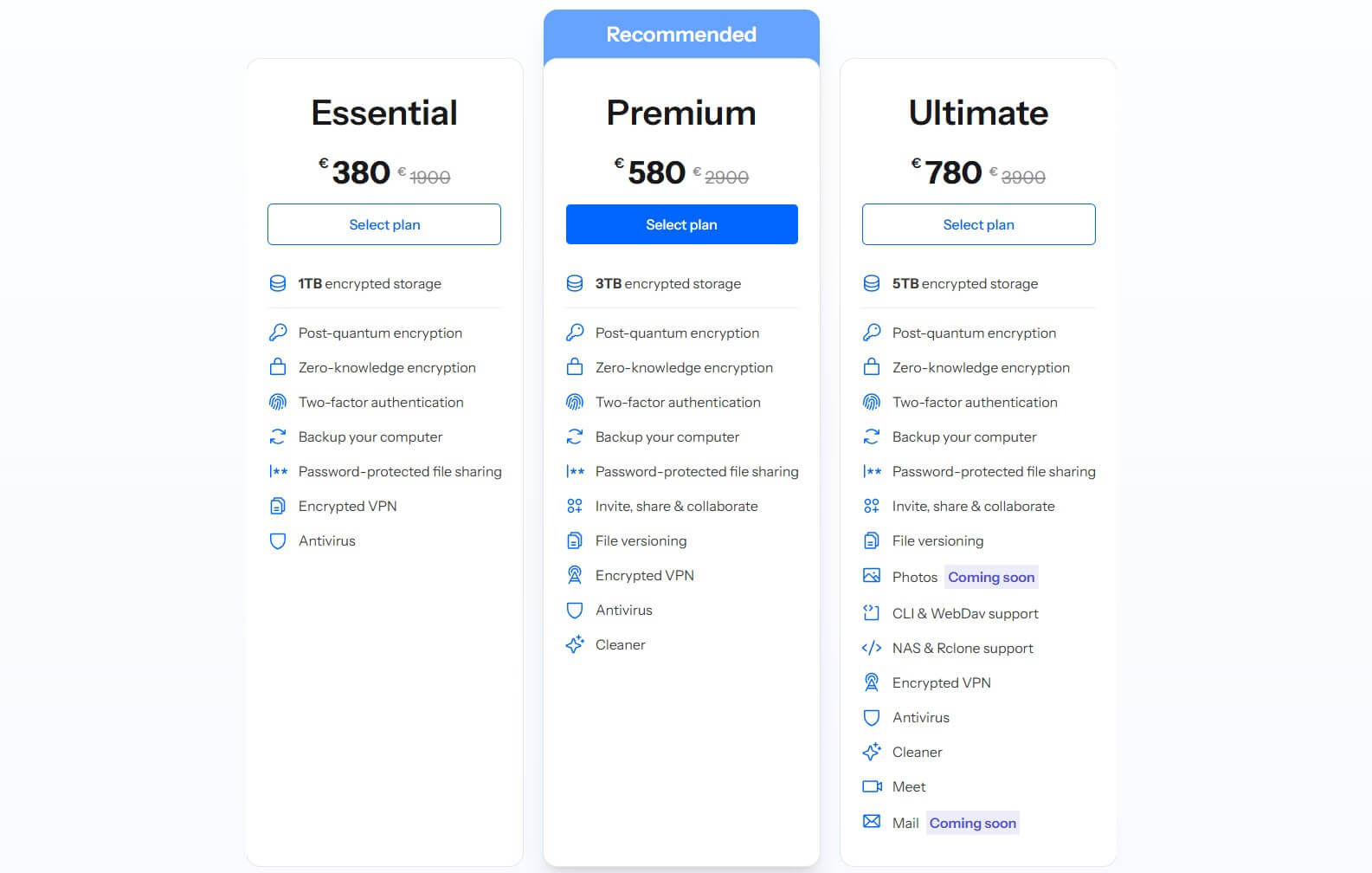
Internxt sports a variety of plans, like Essential, Premium, Ultimate, and Business. The best cloud storage options on a budget are Lifetime versions of these plans, such as Essential at $380 with 1 TB or Premium at $580 with 3 TB of storage. The Ultimate plan is $780, but it has a massive 5 TB of storage.
Annual prices are pretty low. For instance, the Ultimate 5 TB plan costs only $72 per year. Its Essential plan is only $24, as well. Our recommendation is the Premium plan since it has all the fancy tools we mentioned, excluding some collaboration tools like Meet and Mail. Lastly, each plan has a 30-day money-back guarantee.
3. NordLocker: Top Cloud Storage With End-to-End Encryption
Pros
- User-friendly apps
- Zero-knowledge encryption
- Solid download and upload speeds
- Affordable prices
- 30-day money-back guarantee
Cons
- No app for Linux
- Limited to 2 TB of storage
If NordLocker rings some bells, that’s because it comes from the same company that made NordVPN. NordLocker focuses on security and the provision of the best cloud storage experience on the market. While it’s not the best cloud service in 2026 per se, we think NordLocker deserves the spot on this list.
Compared to pCloud or even Google Drive, NordLocker is not very feature-rich, but it’s one of the top options for file security and privacy. Let’s see why it’s one of the best cloud storage services in 2026.
🔐 Data Security
Starting with security, NordLocker encrypts your files with 256-bit AES, Argon2, and ECC protocols. Out of the box, it also offers the so-called zero-knowledge encryption, a paid addition in pCloud and many other services. If file security is your priority, we guarantee there’s no better option than NordLocker.
💾 Storage Options
As you may expect, NordLocker has a free plan too. However, with only 3 GB of storage, it won’t be great for anything more than documents and photos. But if that’s insufficient, the premium cloud storage varies between 500 GB and 2 TB plans. The latter is, in our opinion, NordLocker’s best-value subscription.
When we tested it, we enjoyed stellar upload and download speeds, though NordLocker was slower than Internxt and pCloud. Also, we didn’t like the 2 TB storage limit, as other best cloud storage services offered more. pCloud goes up to 10 TB, while Internxt, a cheaper pick, allows for 5 TB; more than enough.
🌐 Encryption & File Vault
Still, NordLocker is about end-to-end encryption and keeping your files safe. Hence, every uploaded file is immediately encrypted and put into a cloud storage locker. Also, NordLocker lets you create what it calls a local file vault. This means that you can apply encryption to the files located on your computer.
NordLocker provides this folder right off the bat, so all you need to do is drag and drop the files you want to encrypt without uploading them to the cloud. In 2026, NordLocker is undoubtedly one of the most secure cloud storage services. It’s not strange considering that even NordLocker itself can’t access your files.
🔁 File Sharing
NordLocker supports file sharing. However, to share files with other users, they also need to have a NordLocker account and use the app. With this app, you can sync your files automatically and on all devices.
📱 Device Support
Surprisingly, NordLocker is unavailable on Linux, but you can use it on Windows, macOS, Android, and iOS. A 30-day money-back guarantee is available for paid plans, letting you test NordLocker risk-free and get a refund if you don’t like it. Read our comprehensive NordLocker review to find out more about it.
🤑 Pricing
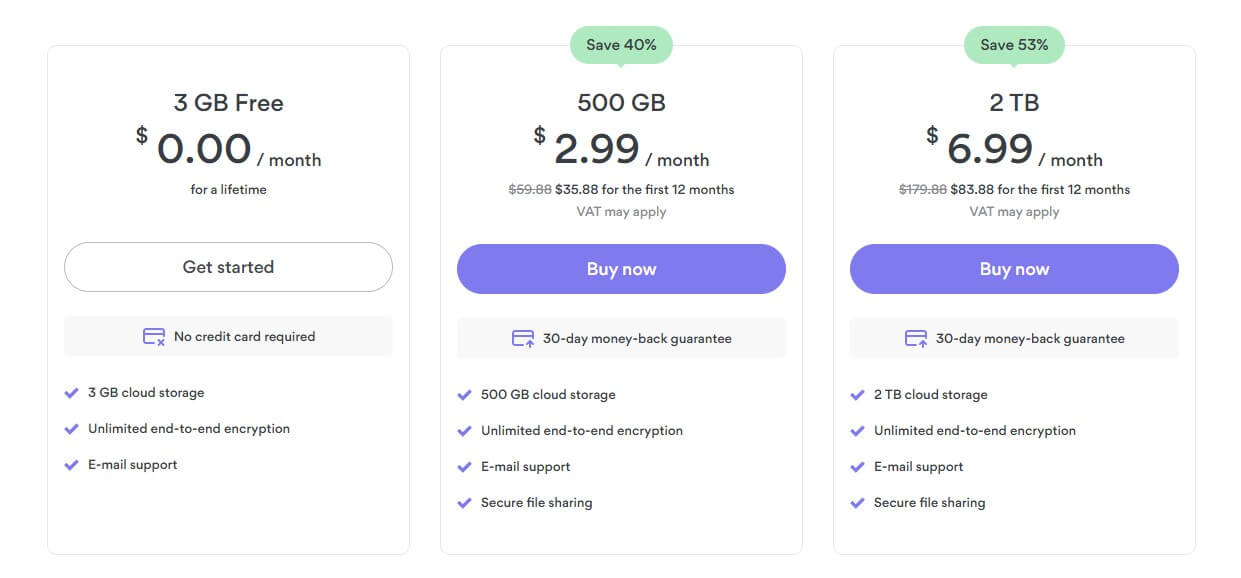
NordLocker’s pricing structure is as simple as it can be. The free plan resides on the left, and in the middle, there’s a 500 GB plan at $2.99 a month (~$36 a year). On the far right, you get the best deal, which is a 2 TB plan at $6.99 a month or around $84 a year. NordLocker is an affordable pick, but not the cheapest.
Compared to Internxt, which costs a lot less, NordLocker may even be expensive. However, it compensates with its end-to-end encryption and robust overall security. If that’s what you aim for, NordLocker is excellent.
4. Google Drive: Cloud Storage with Collaboration Tools
Pros
- Google Office tools
- Data centers in the US, Europe, and Asia
- No limits on the file transfer size
- Unlimited storage for businesses
- Free cloud storage plan of 15 GB
Cons
- High prices
- Not the best speeds
- No ability to get a refund
Talking about well-known cloud service options, Google Drive is among the best cloud services for many reasons, one of which is Google’s refinement and ease of use that not many platforms can achieve.
🔐 Security and Data Centers
While its web variant isn’t as easy to use, you’ll be pleased with its desktop app, which functions a bit better. Furthermore, Google Drive is secure enough, and although less advanced than pCloud, your data will remain safe. Being a large company, Google has dozens of data centers across several continents.
They’re scattered throughout the US, Ireland, Europe, Taiwan, and many other locations. As a result, Google Drive offers stable upload and download performance, despite not being the fastest option.
🔁 File Transfer and Sharing
Also, Google Cloud storage doesn’t impose any limits on the file size, which applies to sharing. Speaking of which, Google Drive lets you share files with a click of a mouse, giving you the option of password-protecting them and adding an expiration date. One of the best things about it is the G Suite.
This means that Google offers all of the Office-like apps like Docs, Sheets, and others, letting you share and edit your documents in real-time. Google Drive also supports automatic backups, but the downside is that Gmail emails also take up your storage space, so always account for that.
💾 Storage
For that reason, we recommend keeping your inbox clean all the time. Storage-wise, Google Drive offers a lot of flexible plans that are, unfortunately, very expensive. You also get a 15 GB free plan with not many features, making it inferior to pCloud’s free plan. The Basic plan gives you 100 GB of storage.
But if you go for Premium, you get 2 TB. Sadly, like NordLocker, Google Drive thinks that it’s enough for an individual, so you can’t get more. However, business users can get unlimited storage for a higher price.
🥷 Privacy
In the end, Google Drive is a great cloud storage service in 2026. With solid security, 2-step verification, and other features, we could say it’s a full package. Although Google isn’t known for user privacy, it is something worth noting. This makes it inferior to NordLocker or pCloud, based in privacy-friendly jurisdictions.
Google Drive has had service outages and data loss incidents in the past. pCloud, Internxt, and NordLocker are issue-free so far. Plus, they operate on a no-log policy, while Google will store quite a bit of data.
🤑 Pricing
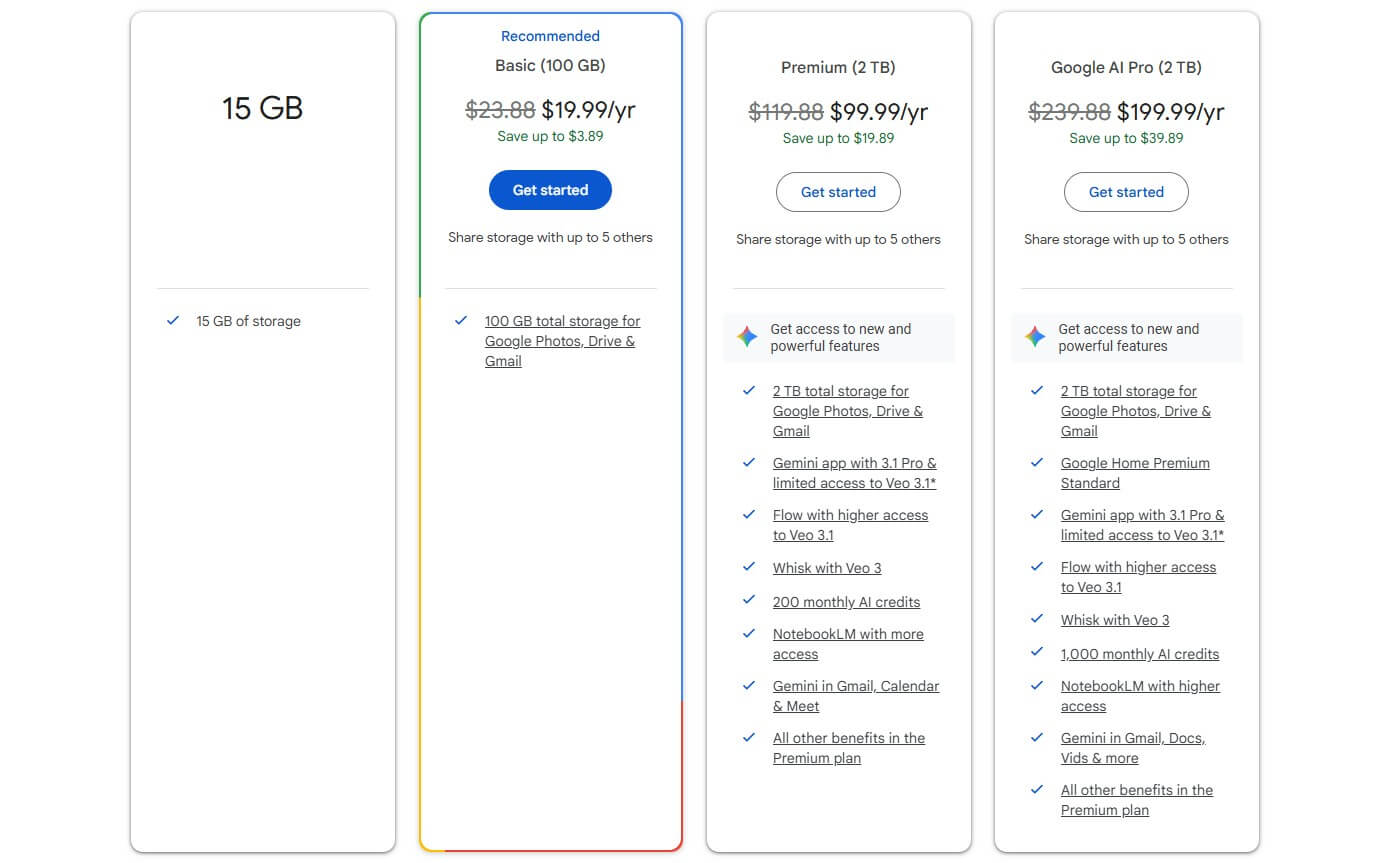
Google Drive is the largest cloud service on the list, and as such, it’s not the least expensive. If you get the Basic plan with 100 GB of storage, you’ll pay $19.99 per year. For 2 TB, you’ll spend $99.99, but the AI Pro version of the same plan is a whopping $199.99 per year, with Gemini AI and its advanced features.
No doubt, Google is the best cloud data storage if you need AI prowess, and that alone may make it worth the price. However, if you need the best cloud storage strictly without any of these tools, Google Drive is quite expensive. At $72 a year, you can get Internxt’s 5 TB plan with all the fancy extras.
5. Dropbox: Feature-Rich Online Storage
Pros
- 256-bit AES encryption
- Easy-to-use interface
- Up to 3 TB of space for individual users
- Available on every platform
Cons
- No refunds
- Expensive pricing
- Backup features could be improved
One of the most popular cloud providers is Dropbox. Dropbox is among the best cloud services in 2026, but its 5th place on the list indicates a flawed experience. For starters, Dropbox is extremely easy to use, offering a welcome free plan for newcomers. But there’s way more to discuss here.
🔐 Security & Encryption
Its seamless integration with third-party platforms is something worth mentioning. However, we should point out that, although pretty secure, Dropbox won’t be as impressive as pCloud. 256-bit encrypted cloud storage is here, protecting your files both on the cloud and those that are being uploaded.
Unlike pCloud, which offers end-to-end encryption as a bonus, this isn’t available in Dropbox at all. That is a big downside, despite the presence of 2FA. Dropbox was a leading cloud storage service for a long time in terms of storage and overall sharing experience. But security was never its strong suit.
💾 Storage & File Transfer
We still think that Dropbox does a great job of file sharing. There are many options, such as adding a password or an expiration date. You can also modify permissions, allow or forbid other users to edit the file, and use the view-only mode. Dropbox is fast and efficient, and it offers a flexible storage selection.
The 2 GB free plan is underwhelming, but when you go Premium, you can choose from 2 TB or 3 TB plans. For teams, Dropbox offers 5 TB and 1 TB plans for at least three people. In our experience, after testing many reliable cloud storage services, that’s usually sufficient. But is Dropbox fast and reliable?
🔁 Transfer Speed & Backups
Dropbox is very fast, rivaling pCloud and Internxt. However, we noticed that, while uploads were faster, the downloads were a tad slower than expected. On the brighter side, Dropbox has a slew of features, like automatic backups for convenience, file syncing for access to your files on all devices, and file versioning.
📱 Device Support
Speaking of devices, Dropbox is available on every platform, ranging from Windows and Mac to iOS/Android and Linux. Keep in mind that, while a lot more expensive than the other best cloud storage services, it doesn’t have a refund policy. So, if you decide to buy it and don’t like it after a while, you’ve lost money.
It’s worth mentioning that Dropbox’s apps include extras like signing PDFs, photo editing, collaboration, third-party apps, and more. It’s an all-in-one cloud storage suite, which sort of explains its higher price.
🤑 Pricing
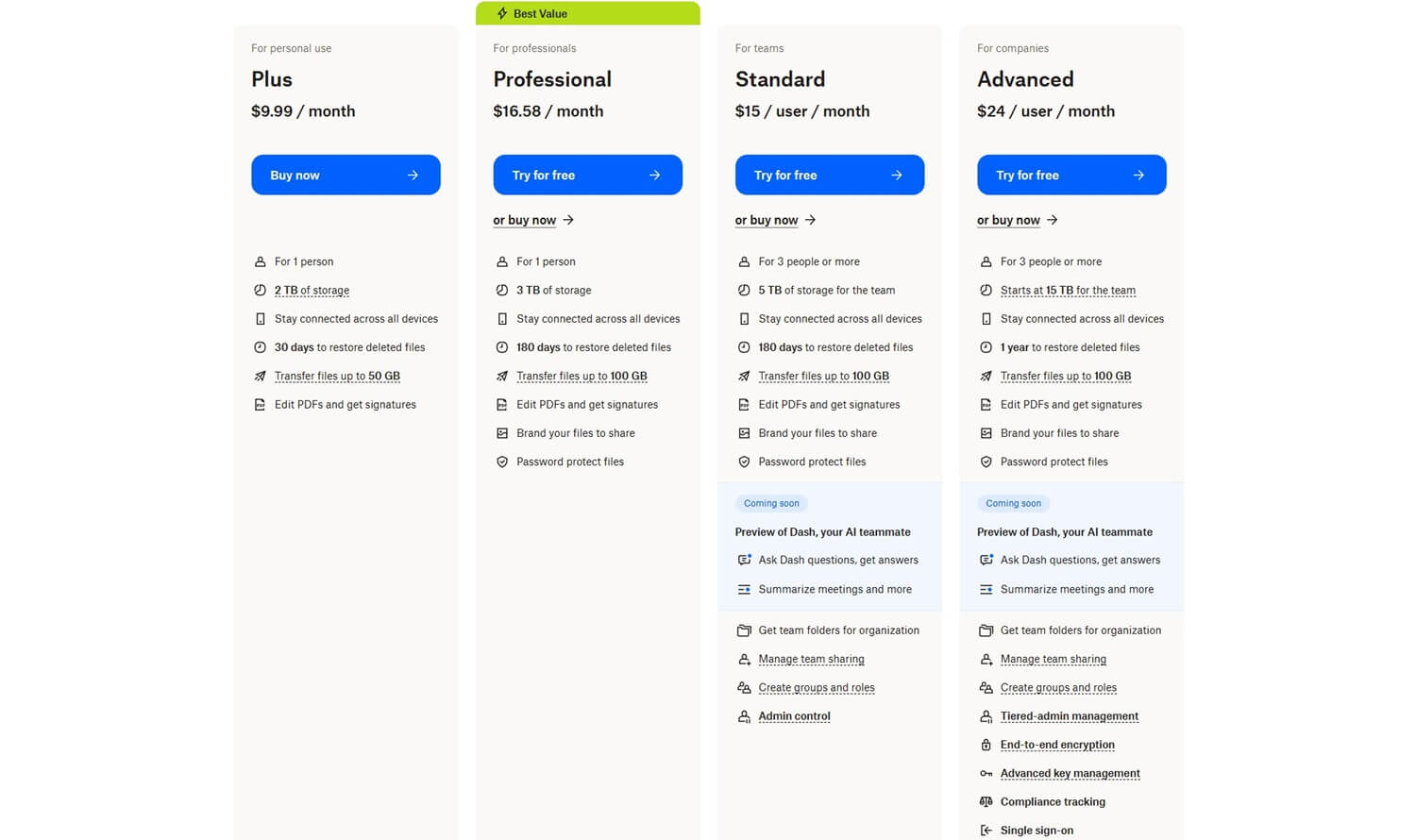
Dropbox doesn’t have smaller plans like the other best cloud services. Instead, it starts big with 2 TB at $9.99 per month, while 3 TB is $16.58 per month. All plans are annual, so to get accurate pricing, multiply these numbers by twelve. Standard and Advanced plans are for teams, starting at $15 per user per month.
Dropbox is a resounding name in the industry, but it’s not that good anymore. pCloud and Internxt are better cloud storage options and cost way less. Given that you can’t even get a refund if unsatisfied, we could say it’s a bit insolent. We compared Dropbox to pCloud to explain why pCloud is much better.
6. IDrive: Best Cloud Backup Solution
Pros
- Excellent security
- Backup & cloud storage
- Flexible pricing
Cons
- It doesn’t have a monthly plan
- Complex pricing structure
At #6, we have IDrive as one of the top online storage services of 2026. We love IDrive because it’s one of the best cloud backup services, but on top of that, it’s a phenomenal cloud storage option with flexible pricing and lots of valuable plans. If you’re enticed, we have a full IDrive review for 2026, as well.
🔐 Security & Encryption
In terms of security, IDrive ticks all the boxes. It offers bank-grade encryption for transfers and files on the cloud. Another perk is the 2FA option, which prevents unauthorized access by anyone but you. Since it’s a backup service, it offers a few more quirks. It uses hardened data centers that keep your files secure.
Its encryption protocol is AES-256, so it’s the highest level you can get. IDrive never had any data breaches, and it remains one of the most reliable cloud and backup services you can get in 2026.
💾 Storage & File Transfer
Storage options in IDrive are as impressive as they are ubiquitous. There’s a free plan with 10 GB, but the entire range starts at 100 GB for one user. IDrive offers up to 35 TB of storage for 35 users/computers, making it among the largest and most robust options you can currently get.
Users get unlimited file transfers, with options like link expiry dates, password protection, and even block-level syncing and copying. This allows for fast speeds, even if you’re transferring huge RAR files.
🛡️ Backups
Apart from being an incredibly dependable cloud storage service, IDrive will back up your entire device in the snap of a finger. Backup options are numerous, and in high-tier plans, you can even use NAS backups to get the highest level of security. IDrive will even back up your server, for example.
However, there’s the option to limit the backup speed if you want to preserve bandwidth for other activities. Like other options on this list, IDrive can back up your mobile devices and keep your images and videos in the cloud. Of course, IDrive won’t be great without robust file restoration and file versioning.
The length of file versioning depends on the plan. Deleted files can also be restored, and if you use IDrive Express, you can retrieve gigabytes of files through the hard drive that IDrive ships to your address.
📱 Platform Compatibility
IDrive works on all devices, so it’s not strange that it made it to our list of the best online storage services. You can install it on Windows, macOS, iOS, and Android. The provider also supports Linux/Unix servers for added backup/restoration ability. It’s a shame its apps may be a bit confusing at first.
🤑 Pricing
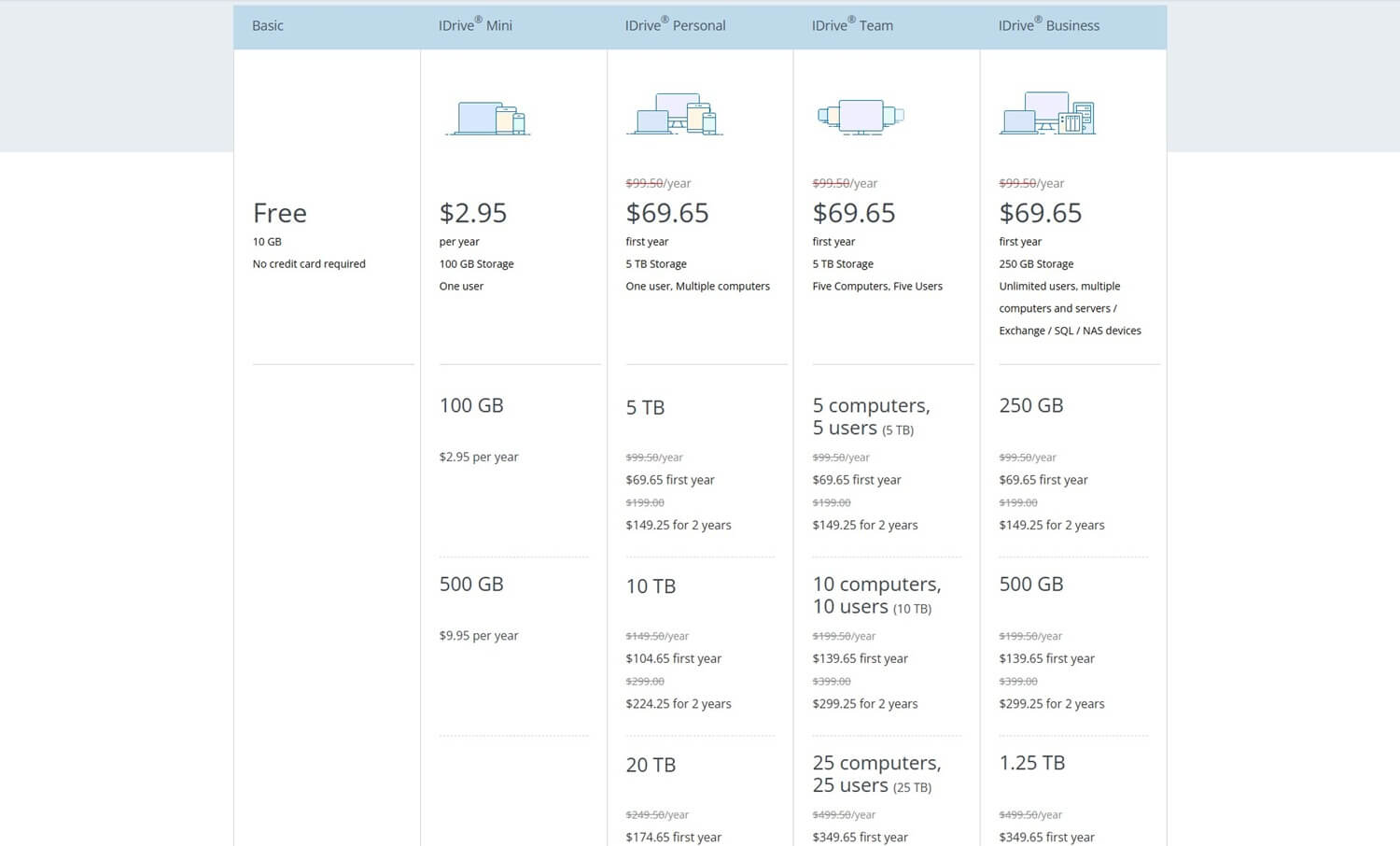
IDrive offers a heap of plans, so it’s hard to discuss them all. Our favorite, in particular, is the 500 GB plan for only $9.95 per year. Remember: you get both the best cloud storage and cloud backup service combined at this price. If you opt for high-tier plans, IDrive offers the Personal plan at 5 TB for multiple computers.
It costs only $69.65 for the first year. Besides, 5 TB is plenty of space, even if you back up a few computers. The provider offers Team and Business plans, and both cost the same: $69.65 for the first year. Of course, IDrive comes with at least ten more plans, all varying in storage and price, making it very diverse.
Why Use the Best Online Storage Services in 2026
Do you need cloud storage? Maybe. Can you live without one? Certainly. But would it hurt to have it? Absolutely not. Here are some of the most popular reasons for using the best online storage on your devices.
Practicality
Upgrading and accessing your physical storage becomes tedious if you constantly need your data, but you’re often traveling. For that reason, we came up with USB drives and external hard disks that are somewhat practical.
But when you think about it, are they? You have to carry your storage around with you, plug it into your laptop or tablet, and gain access to your data. Not to mention that sharing files, in this case, isn’t as easy. However, with the appearance of the best online storage options, things were made much easier.
For one, by using a cloud service, your data is stored on a server online and is accessible from every device, anywhere, if you have an internet connection. Even better is the fact that cloud storages allow for offline access as well. This means that, sometimes, you don’t need the internet and you can still handle your files.
File Sharing
As you’ve learned, you can also share images, audio, video, or documents with other people effortlessly. And by that, we mean not losing a speck of quality in your audio, video, or image files. Moreover, sharing with these cloud services can be 100% safe and secure if you do it correctly. What’s the correct way?
The correct way is password protection, or, for example, adding expiration dates. You can’t share your files securely any other way. The only reliable way is to use the best cloud storage, and that’s what you have here.
Data Loss Prevention
The testament to physical storage not being reliable is the fact that many people lose data. Hard drives and solid-state drives (SSDs) aren’t very reliable, and they have limited life. If an SSD suddenly stops working, guess what, you can say goodbye to your data. If your files are on a laptop or phone, they could get stolen.
As a result, staying without relevant files is common and can happen to everyone. The good side of the best cloud storage services is that they offer data backups. For example, our go-to option, pCloud, offers automatic backups on all of your devices. You can even back up the entire operating system.
So even if you lose, say, your mobile phone, you can get a new one and transfer your photos, music, and videos to a new device without any issues.
Gaining More Storage Space
With the prices of hardware rising exponentially, buying a really fast 2 TB SSD can cost you more than $300. And what if you’re using a mobile phone or tablet where you can’t expand your storage? Luckily, our favorite cloud services in 2026, at least some, offer 3 TB of online storage for as little as $4 per month.
Once you consider all the benefits and conveniences of the best cloud storage options, you’ll see that buying an SSD or HDD in 2026 isn’t as practical in the long run. Not only that, but by storing data on the cloud, you’ll save additional space on your devices, handy for other types of files, like apps and games.
Get Cheap Storage With Internxt
Security
Our best cloud storage services comparison insisted on impeccable security. So, it’s all but strange to see that the top cloud storage options use 256-bit encryption, often even end-to-end encryption. Nearly all options store your data in secure servers across the world. Some even use what’s called file redundancy.
pCloud, Internxt, and NordLocker, for example, copy your files across multiple data centers to prevent data loss. In case one data center stops working temporarily, your files are located in other centers for easy access. With the best online storage solutions, there are virtually no chances of losing your files.
Economic Reasons
In 2026, prices of hard drives skyrocketedespecially when talking about high-quality, high-speed drives that people are more interested in. While these prices sometimes drop, more often than not, popular SSD options are fairly expensive, and you’ll have to pay dozens, if not hundreds, of dollars for them.
A typical 1 TB SSD will cost you more than $100 and even above $200 if we’re talking about high-end options from Samsung. That’s why many people think about the best cloud service providers. They offer terabytes of space at a relatively low price. Take pCloud with its Lifetime 1 TB plan for only $199 (one-time payment).
The highest quality SSD may cost you the same, or slightly less, but will your SSD last ten or twenty years? pCloud lasts 99 years. Also, can you access your SSD’s data anywhere? No. But you can with pCloud, anywhere and on any device, making it not only more practical, as said, but generally speaking, a more economical option.
How Did We Choose the Best Cloud Storage Services?
With dozens of cloud service providers on the market, we had to make a list of criteria that our tested services should check. To make the best cloud storage services comparison, we relied on these few aspects:
Storage Size
When purchasing a cloud storage service, it’s not worth paying for 20, 30, or 40 GB. While compiling this list of our top 6 best cloud services, we made sure that all have flexible storage sizes that you can adapt to your needs. While their free plans have 1 GB to 15 GB, paid plans range from 100 GB to unlimited.
This, of course, depends on the chosen provider and plan. Most likely, you will go for a 2 TB option as this is considered a sweet spot for many users. However, if you need significantly more space, you can get up to 10 TB on pCloud, up to 5 TB on Internxt, and unlimited if you use Google Drive Business.
Transfer Speed (Upload & Download)
We all hate slow upload and download speeds, which deter you from using a cloud service. Just to make it clear, we tested a lot of slow services for this ranking, and some of them remained slow even today. With that in mind, we chose what we think are the best picks in terms of transfer speed.
For the fastest transfer speeds, pCloud is the absolute champ, closely followed by Internxt. While other options on the list are a bit slower, they aren’t considered slow by any stretch. We know that the transfer speed depends on your internet speed, but it’s also about how the cloud storage utilizes your connection.
Slow or not, your internet connection speed should be fully utilized by the cloud storage service. If your native upload speed is, say, 50 Mbps, then the service should be as close to that as possible. In our tests, pCloud always behaved this way, while Sync, which we deliberately excluded, was way off.
File Protection & Encryption
When storing files on a company’s server, you want them to be secured. Our #1 pick, pCloud, does a great job in this regard, even offering zero-knowledge encryption as a bonus. Rest assured, all other choices on the list are secure. We looked for encryption protocols and how each provider handles your data.
Every cloud storage provider should use 256-bit AES encryption, and your files must be encrypted once the transfer to the cloud space starts. We chose the providers with at least a few data centers in privacy-friendly locations. pCloud, Internxt, and NordLocker are the best for their countless secure data centers.
pCloud bases them in Switzerland, Internxt in Spain, and NordLocker in Panama. Plus, all of them duplicate your files across these data centers. This guarantees that you’ll never lose your data. Most importantly, these providers don’t store any sensitive data, so you won’t sacrifice your privacy in the process.
Advanced Features
Cloud services should offer at least some advanced features. It’s not all about uploading files and keeping them on online storage. Users want to back up their system files, share them with their friends and co-workers, and enjoy advanced encryption. Not to mention the ability to open files directly from the cloud.
Be it audio, video, image, or documents. pCloud, for instance, lets you create music playlists inside its app and preview each file. Google Drive, on the other hand, has Docs, Sheets, and Slides, making it easy to open and create new documents and presentations. In Dropbox’s case, you can use third-party apps.
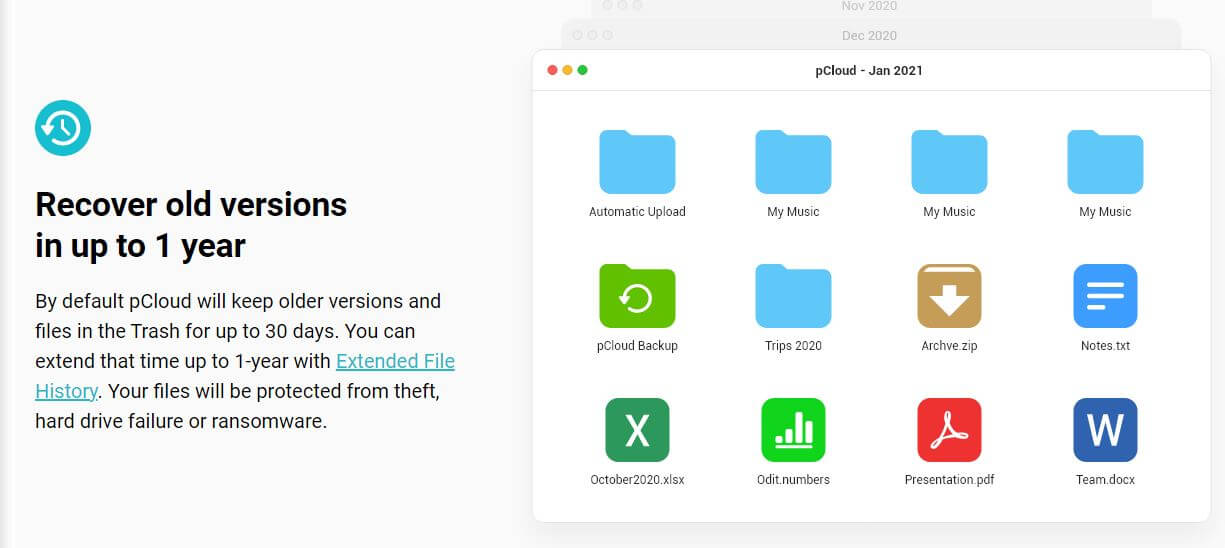
Many of these best cloud services in 2026 have something unique. Internxt is also a solid example with its VPN and antivirus for more privacy. Then, there are more typical features like file syncing, automatic backups, file versioning, and others. These are staples of the best cloud storage solutions in 2026.
Ease of Use & User Experience
While all the features we mentioned sound complex, cloud storage services are extremely easy to use. In fact, you don’t have to be tech-savvy. Pretty much everyone can install and use them without any prior knowledge. This especially applies to pCloud, which offers perhaps the best UI around.
However, you can expect Internxt, Google Drive, Dropbox, NordLocker, and IDrive to be easy to use as well. You can upload and download your files with a single click or tap and enjoy a fast and effortless cloud experience.
Value for Money
Pricing plays a big role when choosing the best cloud storage service in 2026. Choices like Dropbox and Google Drive are a bit more expensive, but these are not the most expensive choices on the market.
We aimed at providing you with choices that are not necessarily the cheapest. Instead, we opted to achieve the best price-to-performance ratio by presenting you with great online storage solutions for the money. pCloud, Internxt, and NordLocker are three affordable providers, especially the first two.
They offer valuable Lifetime plans where you pay once, get huge storage, and use the service for as long as it exists, without a recurring payment. This is our advice if you’re looking to save on cloud storage services.
Conclusion
Okay, so let’s digress. Our best cloud storage services comparison reviewed six options that our experts personally tested and claim to be the most trustworthy. In 2026, pCloud takes the #1 spot for its value for money, speed, and security. Internxt is a close second, with many extra features that make it stand out.
NordLocker is the best encrypted cloud storage, and Google Drive is best for productivity and collaboration. We then have Dropbox, which may be pricier, but is good for versatility and third-party integrations. Finally, there’s IDrive, the best cloud backup service blending cloud backups and online storage.
While we like all five, we suggest focusing mostly on pCloud and Internxt, especially on their Lifetime plans, with the best value for money. No time to lose. Pick your best online cloud storage and enjoy it. Most are risk-free to test for up to 30 days and discounted through our links and buttons. Get on with it.
FAQ About the Best Cloud Storage
How much is cloud storage?
Cloud storage pricing greatly depends on the cloud storage provider. Not only that, but subscription plans tend to cost more if they offer more storage and vice versa. We can give you a broad range of cloud storage pricing. Monthly and annual plans typically start at $9.99 per month. Lifetime deals are cheaper.
Are web services the same as cloud storage?
No, they’re not the same, but they’re similar, and in some cases, they’re inseparable. In simple terms, web services allow you to interact with applications and software over the internet. Cloud storage, as its name implies, is a remote server on which you can store your relevant data and files.
Sometimes, web services can utilize cloud storage in a way that cloud storage stores information needed for the web service to give you access to its apps. Therefore, these two can work together, but they’re also separate things and are used for different purposes.
What is the best cloud storage for photos?
The best cloud storage for photos is pCloud. It’s great for uploading photos with no quality loss, while allowing you to share them effortlessly with other people who don’t need to have pCloud installed to access them.
Not to mention that pCloud imposes no file size limits in terms of transfer or sharing. As such, you can use it to transfer and share an unlimited number of high-quality photos without issues.
What is cloud storage?
Cloud storage is a remote server or physical drive that users can utilize to store data. Since these drives have cloud storage providers, they will charge you a monthly/yearly/lifetime fee for the amount of storage you need. You can then access it via the provider’s website or their software, hence the name cloud storage.
To make it clear, the term cloud refers to storage or any computing resource that you can access through the internet, remotely. More details can be found in our definition of cloud storage.
Is cloud storage safe?
Yes, if you choose a good one. Cloud storage providers we talked about are safe and secure, so you won’t have to worry about your privacy or losing important data. They offer bank-grade encryption, multiple data centers, and additional security features that make file sharing and transferring safe and secure.
That’s not the case with every cloud service provider. Our experience with pCloud, Internxt, and NordLocker showed that these cloud services are 100% safe and can be trusted. That’s why we recommend them first.
Can cloud storage be hacked?
Technically, yes, but in practice, the safest and most secure providers are never going to be hacked. Think about pCloud, the most secure provider with all the fancy features and 256-bit encryption. So far, this provider has had no hacking incidents, and people safely store terabytes of data using it.
