
The Dropbox vs Internxt question is legit if you want only the best for your files in the cloud. These popular cloud storage services are famous for completely different things. Dropbox is a productivity champ, offering a robust online storage service with many third-party integrations.
Meanwhile, Internxt is famous for end-to-end encryption, ease of use, and blazing-fast transfer speeds. But which online storage is ultimately better in 2026, Internxt or Dropbox? We’ll answer this question by comparing them in multiple aspects and declaring the winner based on the score.
We’ll immediately tell you that we prefer Internxt, but suffice to say, Dropbox is one hell of a service, albeit with a few notable flaws. Here’s more information.
Internxt vs Dropbox: A Quick Features Comparison
| 🥇Internxt 🥇 | Dropbox 🥈 | |
| Starting Price | $18 annually | $119.88 annually |
| Storage Sizes | 1 GB (free), 1 TB, 3 TB, 5 TB | 2 GB (free), 2 TB, 3 TB, 5 TB, 15 TB |
| File Versioning | No | 30, 180, or 365 days |
| Block-Level Sync | No | Yes |
| Zero-Knowledge Encryption | Yes | No |
| Data Centers Locations | Spain (Sevilla) | USA, EU, Japan, UK, and Australia |
| File Redundancy | Yes | No |
| Compatible Systems | Windows, macOS, Linux, iOS, Android | Windows, macOS, iOS, Android |
| Business Plans | Yes | Yes |
| Money-Back Guarantee | 30 days | No |
Plans, Prices & Storage Options
Let’s start with their plans. Internxt and Dropbox are highly flexible, offering different storage sizes to cater to everyone’s needs. You’ll get 1 TB, 3 TB, and 5 TB options in Internxt. Meanwhile, Dropbox’s smallest storage is 2 TB, with a 3 TB alternative for more demanding users.
Dropbox
Dropbox offers a plan for teams, which offers 5 TB of storage for teams of 3+ users, and a company plan called Advanced, with 15 TB of team storage (3+ users). Here’s Dropbox pricing in 2026.
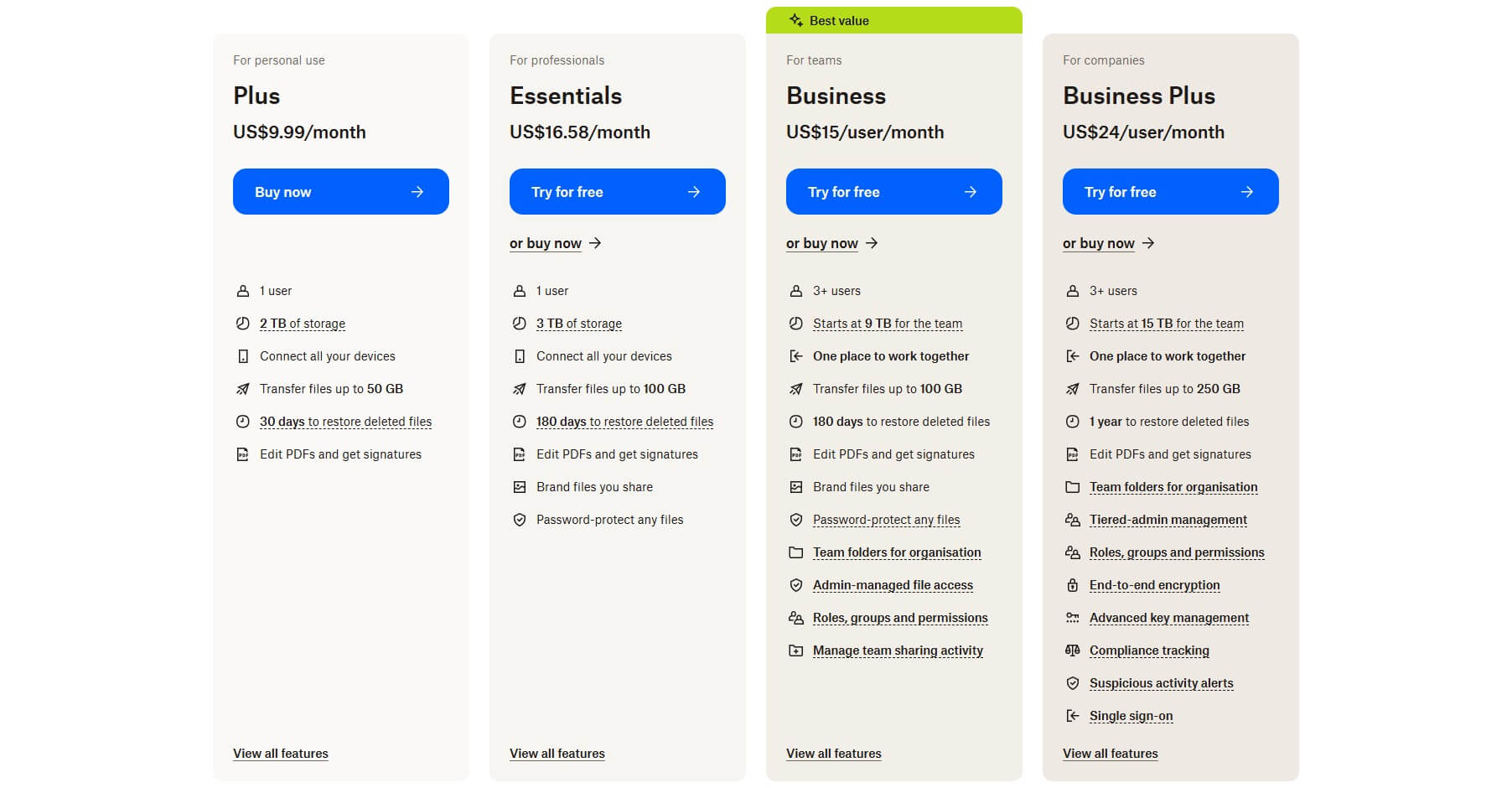
Dropbox starts at $9.99 monthly for 2 TB of storage. It’s a bit pricier offer, especially because it lacks extended file versioning, branded links, and link password protection from the Professional plan. This one, with 3 TB, costs a whopping $16.58 monthly. Remember that all plans are billed annually.
So, multiply these numbers by 12 and you’ll calculate your upfront costs.
Standard and Advanced plans are even costlier, and the prices you see are per user. Thus, if you choose the Standard plan at $15 monthly per user, and you must have at least three users, you’re looking at the cost of at least $45 monthly or $540 annually.
Dropbox doesn’t offer a money-back guarantee, either. So, if you get the premium version and aren’t satisfied, in most cases, you won’t be able to get your money back.
Internxt
Let’s discuss Internxt now. This affordable cloud storage provides exceptional, award-winning value for money because of its lifetime plans. It does offer annual plans, and as you’ll see, they’re considerably less expensive than Dropbox. One more thing: Internxt’s prices are in Euros.
If you’re in the USA, you’ll see prices in dollars that resemble the ones in Euros.

As lifetime plans, these are one-time payments. The Premium plan at $285 provides 3 TB of storage and everything else you see above, including a VPN and antivirus! Now, check this out. The Ultimate plan at $435 offers 5 TB of storage with Internxt’s Cleaner and Meet apps for productivity and collaboration.

More shockingly, its annual plans are unbelievably affordable. We recommend the 5 TB option for only $54 annually, although the Premium plan at $36 annually for 3 TB is also fantastic. Remember that Dropbox charges you nearly $200 for 3 TB and doesn’t provide a money-back guarantee.
However, Internxt lets you test its service for 30 days and get a refund if unsatisfied.
Outcome: Internxt Wins
All things considered, Internxt is significantly more affordable, with a 30-day money-back guarantee for risk-free testing. If you need robust, secure, and feature-rich online storage for less money, Internxt is a no-brainer between the two.
Are Their Free Plans Good?
In a recent article, we ranked the best free cloud storage services.
Internxt made it to the list, but just because of its speed and ease of use. Unfortunately, the service offers only 1 GB of space, which is far from enough for anything more than documents and a few mid-quality images. It also lacks advanced features like password-protected links and more.
Dropbox’s free version is slightly better, with 2 GB of storage.
However, it also lacks premium features, so it’s not fantastic. Sharing features are limited, and you can’t efficiently collaborate and integrate third-party apps. When you fill your storage, Dropbox will also limit file previews and pretty much confine you to the basics, making it feel constrained and fairly unfriendly.
Outcome: No Winner
If we required free storage for photos or videos, we wouldn’t choose any. We’d instead opt for pCloud or Google Drive with 10 GB and 15 GB of storage, respectively. Internxt and Dropbox simply aren’t good enough.
Features: Internxt vs Dropbox
This is where things get a lot more interesting. Dropbox and Internxt are powerhouses, offering an array of features. However, their features are very different. Dropbox is more productivity-oriented, while Internxt is more security-oriented. Here’s what our Internxt vs Dropbox duel revealed:
File Versioning (File History)
Here’s a kicker: Internxt doesn’t offer file versioning!
We checked multiple times to confirm it and found that it’s in the pipeline, but it isn’t there yet. On the other hand, Dropbox’s Plus plan offers 30 days of file versioning, with 180 days in Professional and Standard plans. The most expensive, Advanced plan, offers 365 days of file versioning.
To be honest, that’s a lot more than pCloud, although pCloud lets you purchase Extended File History, which also goes up to a year.
So, if you frequently modify your files and want to keep older versions for possible restoration, Dropbox is a far better option. With Internxt, you’ll have to constantly upload new file versions, which, for frequent modifications, can be extremely tedious.
File Sharing With Dropbox and Internxt
File sharing is up next, and we’re glad that both providers have something to offer.

Internxt lets you use password-protected links and send email invites, where you can control access permissions. However, the provider doesn’t offer other advanced file-sharing options, like, for example, download limits, which you’ll find in more impressive online storage options like Dropbox or pCloud.
Speaking of Dropbox, it offers every file-sharing method you can imagine.
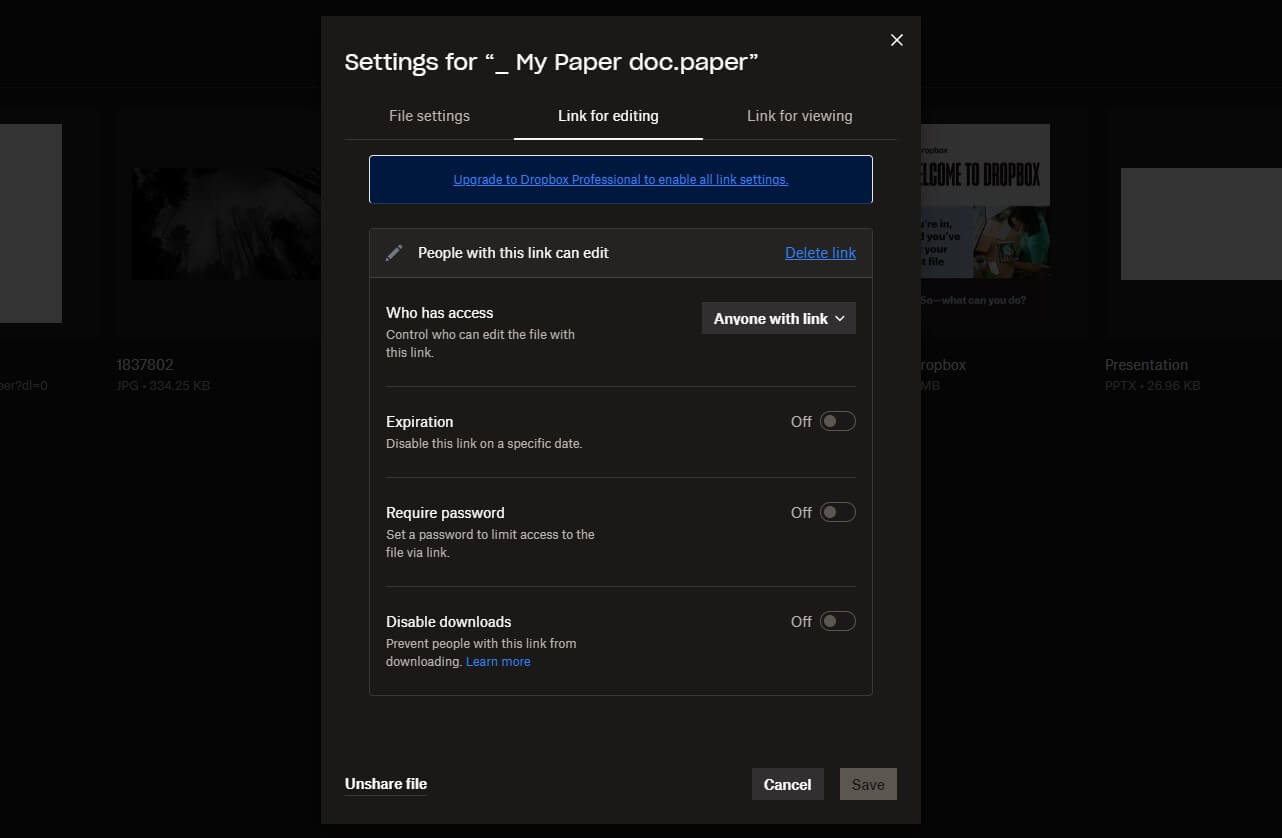
There’s link branding, password protection, and even shared file tracking. The latter allows you to track your files and see if they’re downloaded by the recipient. Dropbox also allows you to share the folder, which makes things far easier.
Dropbox Transfer vs Internxt Send
Another Dropbox’s ace is Dropbox Transfer.
It allows you to transfer large files, from 50 GB in the Plus plan to 100 GB in all other plans, to users who don’t have a Dropbox account. We extensively tested it in our Dropbox vs Internxt review and were impressed. However, we did the same with Internxt Send, a special file-sharing service.
Unlike Dropbox Transfer, Internxt Send has no file size limit, using powerful encryption to protect your files. Internxt’s zero-knowledge business model ensures your files aren’t scanned by Internxt. This lets you share anything you like with anyone, either by a link or by sending an email.
Syncing & Backups
Dropbox and Internxt offer multi-device syncing, ensuring you can always access your files.
They also support device backups. This allows you to back up a device or a specific drive and restore it when needed. Best of all, you’ll do very little manually. Select the drive you want to back up, and everything will work in the background. Internxt has simplified this process, but for the worse.

It doesn’t have selective syncing, so it automatically syncs the entire drive.
You can remedy this (sort of) by designating specific files and folders for backups, but again, this is a one-way trip, not two-way, as is the case with syncing.

Dropbox has selective syncing, making it more customizable. Additionally, it leverages block-level syncing, which syncs only modified portions of the file. It makes syncing faster and more efficient. Dropbox includes a SmartSync tool, which makes certain files available only online, saving you some physical storage space.
Third-Party Integrations (Dropbox)
Dropbox’s main appeal is the sheer number of third-party integrations.
They allow you to operate within Dropbox’s “borders” and virtually do everything in the cloud. Do you want to create or edit documents? You can do it right then and there by using either Microsoft Office or Google Workspace! You can also make and edit presentations, sheets, and other document forms.
Dropbox’s store houses hundreds of third-party apps: it’s astounding!
For instance, there’s AutoCAD, which lets you view, edit, and create new DWG files, which you can effortlessly export to AutoCAD. Canva, Nitro, Gmail, Jotform, and countless other apps are there, all seamlessly blending with Dropbox, creating an all-encompassing cloud environment.
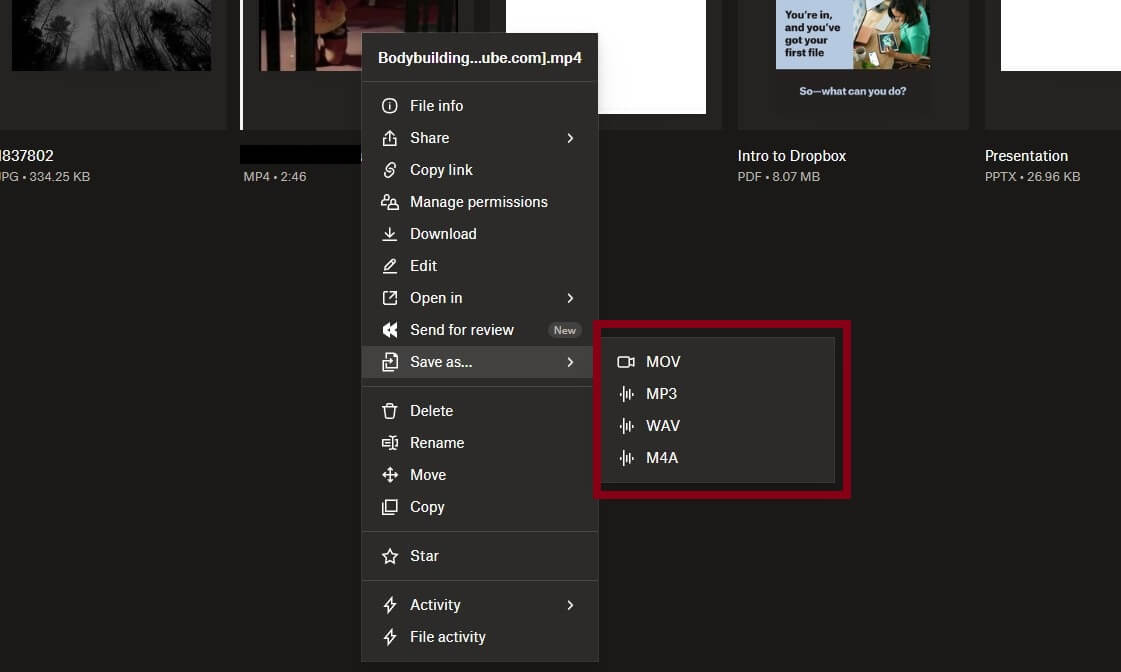
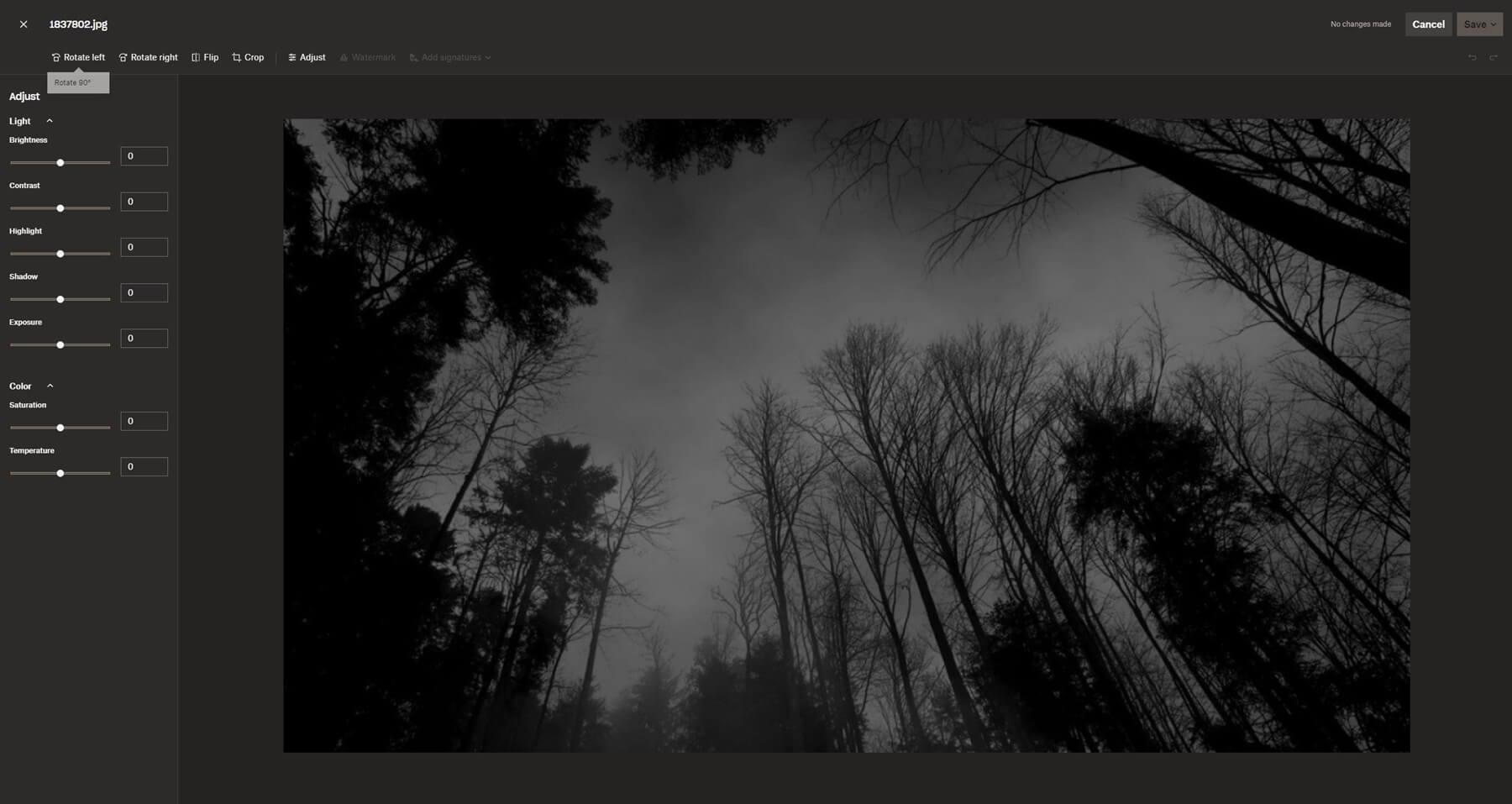
Plus, Dropbox’s built-in tools allow for basic photo and video editing, with the option to convert photo, video, and audio files into different formats. This makes Dropbox one of the top online storage options for videos.
VPN, Antivirus, and Other Apps (Internxt)
Internxt offers nothing similar, and it’s a shame if that’s exactly what you need.
But if you need more privacy and security, Internxt won’t leave you hanging. It’s a fantastic cloud storage package that includes several tools. The desktop app includes antivirus software, which scans your device for malignancies. You can do a quick scan or a system-level scan, which lasts longer.

Internxt includes a VPN, which is a separate app. However, its location span differs. The Essential plan offers French VPN servers, while Premium and Ultimate plans expand to Germany, Poland, Canada, and the United Kingdom. Then, there’s the Cleaner app, helping you clean your device of trash.

Meanwhile, Internxt’s Ultimate plan has the Meet app, offering hassle-free video calls and collaboration. As an open-source cloud storage solution, it supports Rclone, NAS, and WebDAV. Interestingly, Dropbox doesn’t offer these features, despite costing a lot more.
Unfortunately, Internxt doesn’t allow for extensive file edits and previews, but as said, that’s not Internxt’s primary goal.
Outcome: Dropbox Wins
This Dropbox vs Internxt duel revealed their massive differences. However, Dropbox still offers more, particularly in terms of file versioning, syncing, and third-party integrations. Internxt does retaliate with Send, Meet, Antivirus, and VPN services, but ultimately lacks file versioning, block-level syncing, and more.
Dropbox vs Internxt Apps and Ease of Use
During our Internxt vs Dropbox testing, we enjoyed their apps on all devices, and honestly, felt very good. I mean, both are flagship online storage services, and you’d expect nothing different. To start, Dropbox and Internxt have comprehensive web-based apps and dedicated clients for desktop and mobile platforms.
They include Windows, macOS, Android, and iOS.
As said, Internxt supports WebDAV, plus, it offers apps for a few popular Linux distros. Internxt is a tad more flexible and, should we say, easier to use. This ultimately boils down to a more simplistic design and the lack of third-party tools and integrations that complicate things in Dropbox.

We don’t think that’s bad. When you have more features, they must be put somewhere, and Dropbox, despite what we said, did a fantastic job. On top of that, it’s very customizable, letting you view your files as a list or with larger thumbnails for more convenience. You can access other tools on the left.
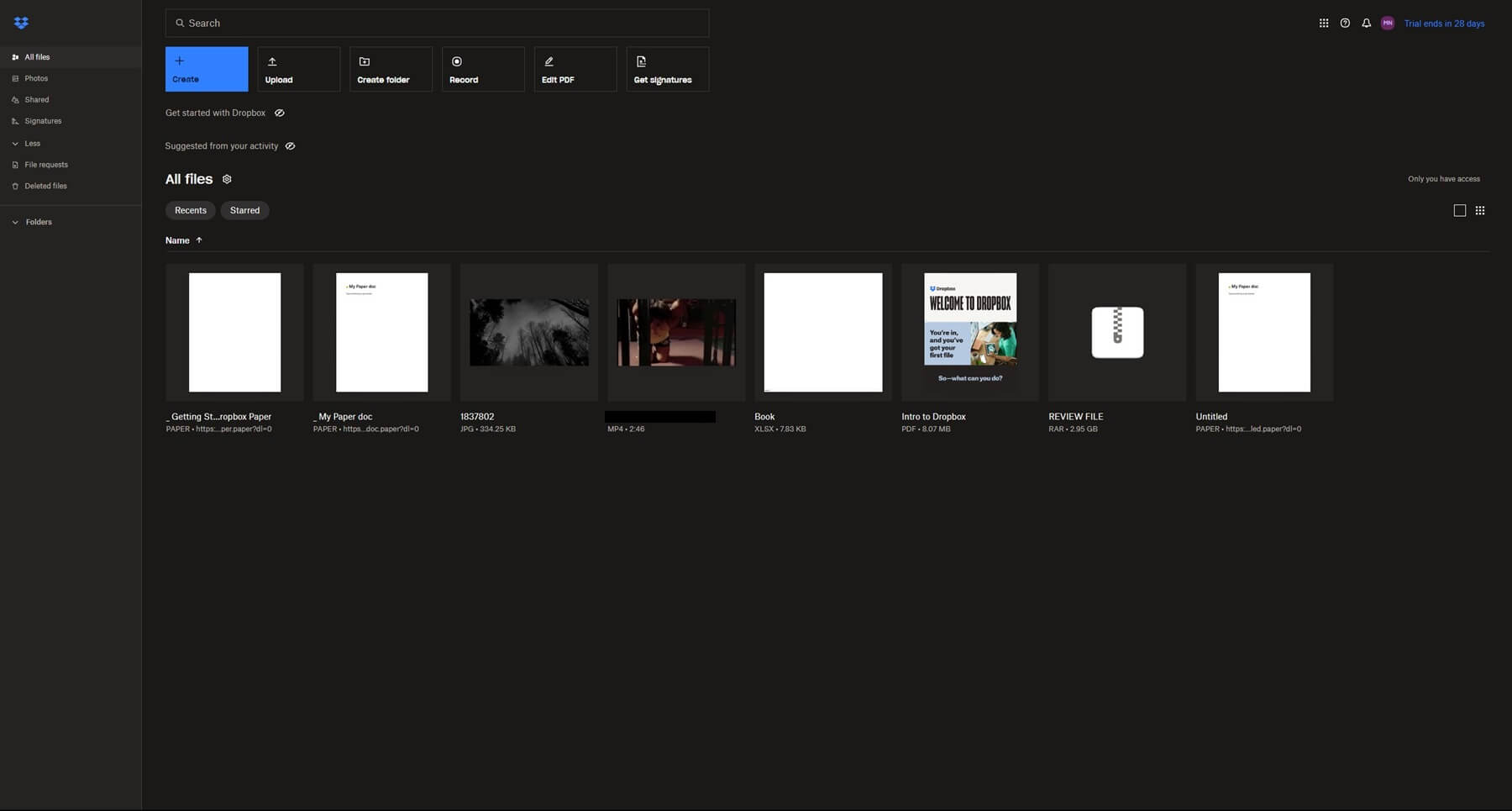
There, you’ll find Dropbox’s services like Dash, DocSend, Sign, and others.
Both providers offer virtual drives on desktop systems, acting as ‘regular’ drives. This allows you to swiftly transfer files by dragging and dropping them. Their mobile apps offer mobile-specific tools, such as camera auto-uploads and others, letting you store photos and videos in the cloud to save space.
Outcome: Internxt Wins
We’d give this one to Internxt because of better compatibility and WebDAV support. It’s also slightly more user-friendly than Dropbox, whose sheer number of features may intimidate beginners.
Transfer Speed Tests
Both Dropbox and Internxt have made it to our list of the speediest online storage picks.
However, only one can win, so let’s see which is faster, Dropbox or Internxt. To do this, we must provide our native internet speeds. We booted up Speedtest.net, ran a quick test, and got this result:
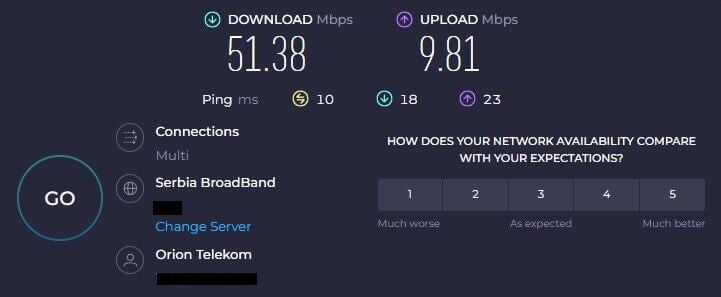
With this result in place, we tested Dropbox and Internxt’s web apps and their transfer speeds. To be precise, we measured transfer times: the shorter, the better!
All tests were performed on a Windows 11 PC using a LAN connection for more reliability. We tested one service, then the other, not simultaneously. Finally, we used a 3 GB RAR file packed with music, videos, photos, and some irrelevant documents. Here are our upload and download times:
| Dropbox | Internxt | |
| Upload Time 🔼 | 48 minutes | 47 minutes |
| Download Time 🔽 | 8 minutes | 9 minutes |
pCloud and Dropbox are pretty much neck-and-neck in this comparison. Dropbox uploaded the file about a minute slower, but it downloaded it a minute quicker. We tested them a few more times after this, and we couldn’t get concrete results that would tell us which cloud storage is truly faster.
At times, it was Dropbox, at other times, it was Internxt. This tells us that both are quick enough and will provide sufficient transfer speeds. For reference, using our full network speed, the 3 GB RAR file should be uploaded in roughly 41 minutes and downloaded in just under 8 minutes.
As you can see, neither missed the mark by more than 20%, which is excellent!
Outcome: Tie
We said that only one can win, but this isn’t true in this scenario. The Internxt vs Dropbox speed test ends up in a tie, as both providers displayed exceptional transfer speeds through their web apps. Dropbox, Internxt, and pCloud are on par, as the fastest available options in 2026.
How Safe and Secure Are Dropbox and Internxt?
Dropbox was never security-oriented, while Internxt presented this aspect as its #1 selling point. So, is Internxt safer than Dropbox? Or is it the other way around, despite what we said? After testing them thoroughly, we ended up preferring Internxt’s approach, and here’s why.
Encryption & Security
Dropbox isn’t known as an encrypted online storage service. It does offer 256-bit AES and TLS encryption standards, but they’re used for files in the cloud and during transfers. Internxt leverages the same encryption, but with a twist: a zero-knowledge, end-to-end encryption model.
What does this mean?

This means your storage is encrypted end-to-end, and since you have the encryption key, only you can access and modify your files. Not even Internxt can see them! This is exactly what zero-knowledge means, as well. Internxt uses a special encryption type, often called post-quantum.
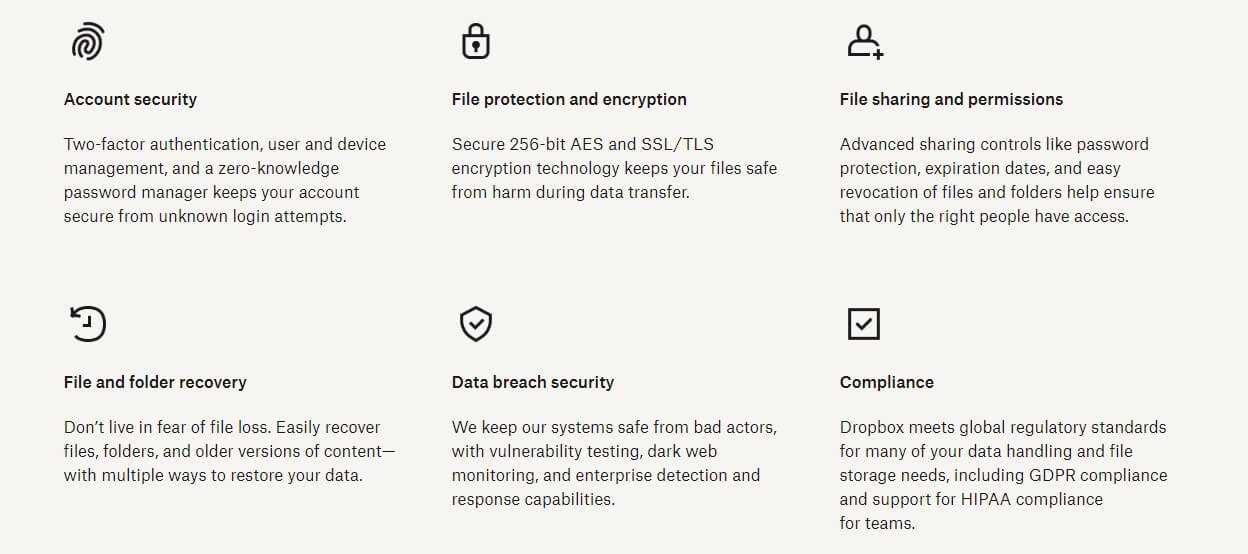
It protects your storage from quantum computer attacks, otherwise known to cause serious harm to unsecured systems. Internxt also includes Two-factor authentication, which, in conjunction with world-leading encryption, makes it one of the most secure cloud storage options to consider.
Dropbox has Two-factor authentication, and apart from the above-mentioned encryption, doesn’t offer anything to latch onto. End-to-end encryption is available only in the most expensive plan, which a few people will get because it’s for companies, and is very expensive.
Privacy
Privacy-wise, Internxt again takes the reins.
Dropbox’s privacy was never its strong suit. First, because of third-party integrations that can often collect your information. Second, there’s Dropbox’s privacy policy, which reveals that the company stores plenty of user data and can access your files. There’s now zero-knowledge encryption: remember that!
Dropbox actually had a nasty scandal in 2012, with over 68 million leaked user passwords amidst a cyber attack. Rumors imply Dropbox’s PRISM Project participation. PRSIM Project is the US government’s surveillance project that requires user data, where Dropbox allegedly participated.
Meanwhile, we have Internxt with data centers in Sevilla, offering a crystal-clear no-logs policy, fully open-source applications, and no incentive to store and hand out your data. Even better, Internxt uses file redundancy, which stores fragments of your files in different data centers.
If one center malfunctions, they’re always accessible on another server.
Outcome: Internxt Wins
Internxt wipes the floor with Dropbox in this round. It’s a considerably safer online storage service with impenetrable encryption, open-source apps, and favorable logging practices that don’t infringe on your privacy. Pick this one for ultimate security!
Customer Support
Dropbox’s customer support is decent for a service of this size. Live chat works Monday through Friday and is generally responsive. The support team gladly comes to your aid and tries to sort things out until you’re satisfied. Dropbox also has email support, which is a bit slower overall.
However, given Dropbox’s massive scale, we were surprised at how quick to respond and efficient it was. Sadly, there’s no phone support for regular users, which would’ve been great. Dropbox offers phone support during business hours for Advanced plan users, i.e., those with the most expensive plan.
Internxt has a live chat widget where you’ll find all the support you need. It’s responsive enough, although it doesn’t function like proper live chat support. Waiting times are, on average, an hour, sometimes more. However, Internxt is nice enough to include a comprehensive help center.
There, you’ll find FAQs and tutorials to pull you out of the mud. We never had to contact Internxt for specific problems, either way, and we believe it’ll be the same for you. Its on-site resources provide enough help.
Outcome: Tie
The last Dropbox vs Internxt comparison is a tie thanks to extensive customer support on both sides. Whichever issue you encounter, we’re confident their support teams will help you quickly and efficiently.
Internxt vs Dropbox: Final Recommendations
We’ll admit that this Dropbox vs Internxt comparison was one of the toughest to make.
These are two extraordinary providers (like pCloud and Sync), with many great features, flexible storage options, ample speed, and decent customer support. While Internxt is an overall winner for us, the optimal choice for you may depend solely on your needs and expectations.
- If you need cloud storage with extra third-party apps, collaboration, and productivity characteristics, Dropbox is undoubtedly more versatile and better for you. However, you must be ready to pay a higher price and compromise on security and privacy.
- If you need encrypted cloud storage with many security tools, top-tier privacy, some collaboration features, excellent performance, and easy-to-use apps, while not paying a fortune, Internxt is right for you. However, don’t expect third-party integrations and extensive file preview and editing.
Now that you know what they’re all about, we believe you can choose properly and bear the fruit of your decision. They’re fantastic, but with glaring differences that you now hopefully understand.
