When shopping for reliable WordPress hosting, Hostinger and Kinsta are undoubtedly among the top options. This Hostinger vs Kinsta comparison explains their main differences and ultimately provides our expert’s opinion. If you’re in a rush, we think Hostinger is a better pick for money overall.
However, during our assessment, we noticed Kinsta’s many qualities, which, at times, even surpassed Hostinger. While Kinsta is generally faster, it comes at a significantly higher cost. Simultaneously, Hostinger performs admirably, costs way less, and offers the same amazing security and WordPress features.
Let’s delve deeper into this comparison and see which managed WordPress hosting service is truly better in 2026. But first, let us quickly compare their features in the table below, for a brief overview of their services.
Hostinger vs Kinsta: Key Features Compared
| Hostinger 🏆 | Kinsta | |
| 📋 Types of Hosting | Cloud, shared, managed WordPress, VPS | Managed WordPress hosting |
| 💾 Storage Size | Up to 100 GB | Up to 100 GB |
| 🌐 Bandwidth | Unlimited | 20 GB to 750 GB |
| 🚧 Hosted Websites | Up to 100 | Up to 60+ |
| 🔽 Backups | Daily and on-demand | Daily and on-demand |
| 💵 Starting Price | $2.99 per month | $30 per month |
| 🔙 Money-Back Guarantee | 30 days | 30 days |
| ⚙️ Ease of Use | Great for beginners | Suited to intermediate users |
| ♻️ Site Migration | Free | Free |
| 🆓 Free Domain | Yes + WHOIS privacy | No |
| 🔐 Security | Free SSL, web application firewall, DDoS protection, malware scanning, WordPress vulnerability scanner | Free SSL, web application firewall, DDoS protection, malware protection |
| 📧 Email Accounts | Yes, up to 10 mailboxes | No |
Plans and Pricing
Let’s immediately jump into their pricing. As explained previously, Hostinger is a lot less expensive than Kinsta. Simultaneously, it offers a better variety and flexibility. To remind you, Kinsta is primarily a managed WordPress hosting service. In fact, this is the only type of hosting you can get here.
Hostinger includes managed WordPress hosting, but you can also choose from many cloud and VPS hosting plans. Moreover, it offers specialized VPS hosting for n8n, VPS hosting for Minecraft, and so on.
In short, their starting prices are:
- Hostinger: $2.99 monthly for the Premium plan (48 months + 2 free months)
- Kinsta: $30 monthly for the single-site plan (annual plan + 2 free months; the first month is free)
So, Kinsta costs roughly ten times more than Hostinger. Whether it justifies the price difference will be discussed in the following comparison.
Hostinger Plans & Pricing
Hostinger’s plans are first, and the provider isn’t very flexible. To us, it’s not a problem, as the three plans below offer all you need. The two on the left are shared hosting plans, and while the Premium at $2.99 is excellent, we’d rather pick the best-value Business plan, which allows you to sell online and includes AI tools.

At $3.99, it’s way less expensive than Kinsta. Plus, it allows you to host 50 websites, while Kinsta allows only one. Hostinger’s Cloud Startup plan is one of the most attractive deals, as it offers cloud hosting at only $7.99 monthly. Cloud hosting is particularly great for speed, but this one can also host 100 websites.
We haven’t addressed Hostinger’s VPS plans, though.

They’re KVM-based, which results in fantastic speeds and uptime. Hostinger uses AMD EPYC processors and relies on NVMe storage. For $4.99 monthly, you can enjoy a single CPU core, 4 GB of RAM, 50 GB of NVMe storage, and 4 TB of bandwidth. We recommend the KVM 2 plan as the best-value option.
At only $6.99, it provides a dual-core CPU, 8 GB of RAM, 100 GB of NVMe storage, and 8 TB of bandwidth. This plan is more than sufficient for resource-demanding apps, game server hosting, n8n, or even Magento hosting. Now go to other hosting providers and examine their VPS plans; they’re much pricier!
Kinsta Plans & Pricing
Kinsta allows you to start for free. The first month is $0 for both single and multi-site plans.
However, after that, you’re charged at least $30 or $59, respectively. At $30 monthly, Kinsta isn’t as generous as Hostinger, as it hosts only a single site on 10 GB of storage and 20 GB of server bandwidth. Its generous CDN bandwidth makes it great, with 125 GB in the cheapest single-site plan.

The multi-site plan at $59 hosts two WordPress sites on 20 GB of storage and with 40 GB of server bandwidth. This time, CDN bandwidth is up to 250 GB as well. Users can scale up their plans using the slider, which increases bandwidth and storage. Pricier variants also increase the backup retention time.
Both plans start at 14 days, but 30 days is the upper limit. Bear in mind that Kinsta’s pricing isn’t definitive because it lacks a free domain for the first year. If you opt for Kinsta, ensure you have enough money for the domain name, on top of your $30. Hostinger’s cheap plans provide a free domain.
Money-Back Guarantee & Refund Policies
During our Kinsta vs Hostinger comparison, we noticed that both providers are risk-free for 30 days. Kinsta’s money-back guarantee is more like a free trial, since the first month is free. So technically, you don’t need to get a refund if you no longer want to use it. Just cancel your subscription and be done.
Hostinger uses a 30-day money-back guarantee instead. This means you’ll spend money on it, and if you don’t like it, be able to get your money back. No provider offers free web hosting, which is no surprise, considering their prowess as premium-grade WordPress hosting services.
🏆 Winner: Hostinger
Hosting Management: Which Hosting is Easier to Use?
In our Kinsta vs Hostinger assessment, we noticed they’re pretty simple to set up and use. Besides, that’s the goal of managed WordPress hosting. To get started quickly and not lose hours setting up a website.
Kinsta
With Kinsta, you’ll register for free and immediately be able to work on your website. However, since there’s no free domain, you’ll have to buy one to publish it. During the setup, Kinsta will immediately install WordPress on your website. Conversely, you can also migrate your existing website.
In that case, you won’t need a domain name, provided your website is already live.
It’s noteworthy that Kinsta lets you pick the data center during the initial setup. It offers over thirty locations, and we picked the US for speed-testing purposes, as you’ll soon find out.

Nevertheless, the five-minute setup is a breeze, and you’re thrust into Kinsta’s intuitive dashboard. It looks so clean and premium. Plus, the home page contains information about your resource usage and WordPress analytics. You’ll find the option to install apps and access databases on the left side.
From there, you can also access your WordPress admin panel. Kinsta has many customization options when you dig deeper, but generally speaking, beginners shouldn’t have issues navigating around and learning the ropes.
Hostinger
The same goes for Hostinger, which is equally simple to set up. After you confirm your payment, Hostinger immediately lets you pick the domain name, install WordPress, or even slap on WooCommerce if you’d like to sell online. Everything takes a few minutes, as Hostinger does many things automatically.
For instance, it automatically connects your site to a CDN and applies SSL. Even DNS propagation is performed immediately, allowing you to publish the website as soon as you’re done. Hostinger uses hPanel, an in-house control panel quite different than cPanel, which we think is a bit outdated.
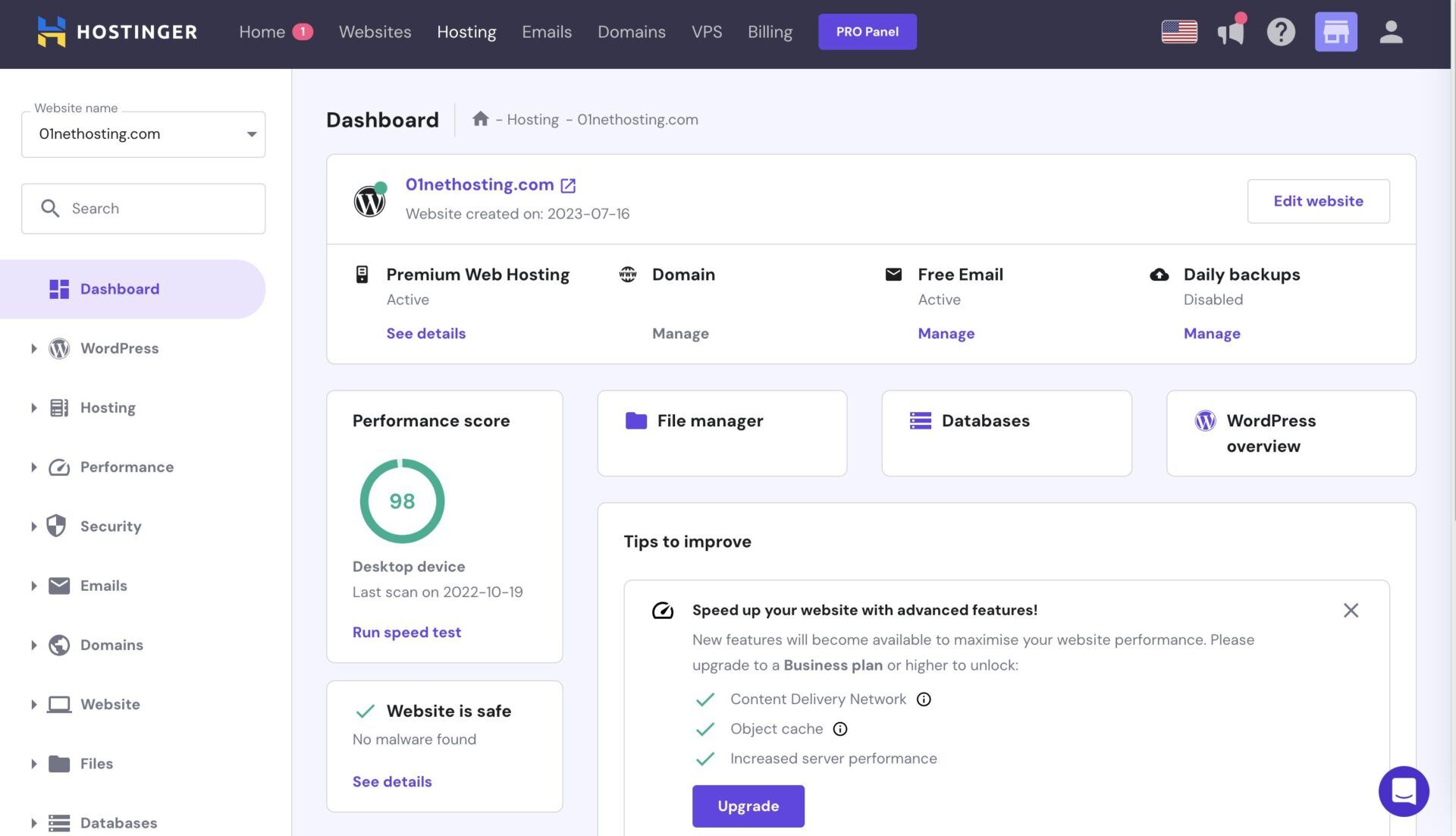
hPanel’s home screen is riddled with useful information about PageSpeed Insights, tips to improve your website, and the security status. On the left, you’ll find menus that allow you to enter your WordPress admin panel, tweak security, access databases, and optimize your website’s performance.
One of our favorite features is the search bar, which allows us to find specific features that would take much longer to find otherwise. Kinsta actually lacks this one. However, as a whole, both providers are simple to navigate, although we’d give a slight edge to Hostinger for beginners and newbies to hosting.
🏆 Winner: Hostinger
Kinsta vs Hostinger Features
We briefly discussed some of their features, but it’s time to do it in more depth and learn which hosting service offers more. If you’ve jumped to this section without reading the rest, we’ll regurgitate that Kinsta is about ten times more expensive than Hostinger. However, it doesn’t offer ten times more.
Kinsta’s plans offer the same features, but you can spend more for more storage, server bandwidth, CDN bandwidth, and backup retention. Here’s what’s on the table:
- 10 GB/20GB storage for single/multiple sites
- At least 20 GB of server bandwidth
- 99.99% uptime SLA
- Free CDN
- Daily + on-demand backups
- Free migration
- At least 14 days of backup retention
- Free Wildcard SSL
- One-click staging
- Multisite support

Kinsta has optional add-ons, like dedicated servers at $300 monthly, PHP performance at $10 per 500 MB, and more. However, the base is the list above. Now, let’s examine Hostinger and see what it offers across the board:
- Hosting of 25 to 100 websites
- At least 20 GB of NVMe storage (up to 100 GB)
- Unlimited bandwidth
- 99.9% uptime SLA
- Free mailboxes, at least two per website
- Free domain for the first year
- Daily + on-demand backups
- AI site-building tools
- Free CDN
- Multisite support
- WordPress staging
- Free Let’s Encrypt SSL

Hostinger offers even more in its Cloud Startup plan, with a dedicated IP, priority support, 100 PHP workers, and so on. Meanwhile, Kinsta scales up only server resources, with no new features. Despite its lower price, Hostinger manages to snatch the victory by offering more features than Kinsta.
🏆 Winner: Hostinger
Speed & Uptime Tests: Which Web Host Performs Better?
The moment you’ve been all waiting for: our comprehensive speed tests.
We tested Hostinger vs Kinsta by making an identical WordPress website using Astra as our main theme, and hosting both websites on the American server. In Hostinger, we used the Business plan, while in Kinsta, we chose its second single-site plan, suitable for ecommerce and with 40 GB of server bandwidth.
After that, we fired up Loader, Pingdom, and GTmetrix to examine three crucial aspects:
- Uptime
- Response time
- Page-loading speed
Uptime & Response Time Results
Let’s examine their uptimes and response times. To test their uptimes, we used Pingdom and examined their performance in the past two months. These are the scores we achieved:
- Hostinger: 99.99% uptime (99.9% promised)
- Kinsta: 99.99% uptime (99.99% promised)
Both providers stuck to their promises, with Hostinger even surpassing them. During this Kinsta vs Hostinger examination, we noticed only two or three downtime periods, but they lasted merely a minute or two combined. Next, we booted up Loader to test their response times and achieved some fantastic results:
- Hostinger: 47 ms average, 43 ms minimum, 301 ms maximum.
- Kinsta: 89 ms average, 61 ms minimum, 176 ms maximum.
Kinsta’s average response time is a bit higher, but look at the maximum: it is better! In practice, this makes little to no difference. However, when we increased the stakes by testing them with 1,000 virtual visitors at the same time (the previous test was with 100), this is what we received as a result:
- Hostinger: 121 ms average, 74 ms minimum, 523 ms maximum.
- Kinsta: 100 ms average, 67 ms minimum, 198 ms maximum.
Kinsta seems more capable of sustaining higher loads and preserving its performance. Not that Hostinger is bad at this, but Kinsta’s servers fared better, without sharp spikes seen in Hostinger, which went up to 523 ms on occasions, with Kinsta maintaining its composure even during “hard” times.
Page Load Speed Comparison
Our Hostinger vs Kinsta page load speed comparison was simpler. We used GTmetrix, which we set to the Canadian server in Vancouver. From there, we observed five parameters, including TTFB, FCP, LCP, FLT, and TTI.
We ran three tests on both sides and then compiled their best results in the table below:
| Hostinger | Kinsta | |
| TTFB | 223 ms | 131 ms |
| FCP | 460 ms | 249 ms |
| LCP | 638 ms | 587 ms |
| FLT | 844 ms | 433 ms |
| TTI | 460 ms | 702 ms |
The results are quite interesting. Kinsta is faster overall, with the only exception being TTI or Time to Interactive, clocking in at 702 ms, versus 460 ms in Hostinger. On the flip side, we have shorter Time to First Byte (TTFB), FCP, LCP, and FLT in Kinsta, which seems to load site elements fairly quickly.
Kinsta is among the fastest hosts we tested, and while it’s not five or ten times faster than Hostinger, we’d rather pick Kinsta if we wanted to squeeze out the most juice. It displayed faster page-loading speeds and better ‘behavior’ under heavy loads from 1,000 virtual visitors. So, Kinsta takes this one!
🏆 Winner: Kinsta
Security: Which Web Host Is the Safer Option?
You’ll agree that hosting security is among the most vital aspects. Malware can ruin years of hard work, while a simple DDoS attack can disrupt your website’s normal function. For this reason, web hosting providers implement various forms of protection, and Hostinger and Kinsta are no different.
Let’s start with Kinsta and see which security features it offers:
- Free Wildcard SSL
- Fully managed Web Application Firewall
- Malware detection and removal
- DDoS protection
- Automatic, daily, and on-demand website backups
- Two-factor authentication
These five are enough to keep nasties at bay and ensure your website’s optimal function. Hostinger’s plans are identical security-wise, so just because you spend less, it doesn’t mean your website will suffer. Here’s what Hostinger brings to the table:
- Free Let’s Encrypt SSL
- Managed Web Application Firewall
- Malware scanning and removal
- DDoS protection
- Automatic, daily, and on-demand website backups
- Two-factor authentication
- Domain privacy
You can notice they’re identical, with Hostinger offering domain privacy (WHOIS privacy) for your free domain. Domain privacy actually shields your identity from exposure, and isn’t a ‘direct’ server security measure. Nonetheless, it’s a welcome addition. We also want to mention their different SSL certificates.
Let’s Encrypt in Hostinger is more of a basic SSL version included in almost all hosting services. Wildcard is more expensive and suited for online stores and securing multiple subdomains with a single certificate. All in all, both are highly secure, and so are Kinsta and Hostinger as a whole. It’s a tie.
🟰 Winner: Tie
Customer Support
The last Kinsta vs Hostinger comparison is customer support, and we found both to be more than excellent. Kinsta relies primarily on live chat, phone, and email support. However, neither works 24/7. Live chat support is available Monday through Friday from 5 am to 10 pm UTC. Weekends are for email support.

Phone support is for sales inquiries, so it’s not for your everyday issues. On the flip side, you can always refer to its knowledge base and look for answers. Kinsta won’t win any awards, but its customer support is indeed satisfying.
Hostinger has no phone support, but there’s 24/7 live chat support assisted by Kodee, an AI chatbot that could use some improvements. Humans, however, are perfect, as they’re helpful and assertive, letting you fix problems and get answers in no time. Email support is decent, with relatively fast responses.

Like Kinsta, Hostinger includes a comprehensive knowledge base with FAQs, tutorials, and other tidbits. During our comparison, we had no issues with either and can only sing praises, hence the tie in this round.
🟰 Winner: Tie
Our Final Verdict for 2026
At the start of this Kinsta vs Hostinger duel, we explicitly said we prefer Hostinger, and now, we believe you can see why. Kinsta’s performance is on a higher level, but apart from that, we don’t think it justifies its higher price. Bear in mind, Kinsta isn’t marginally more expensive. The difference is tenfold!
Our experience has shown that Hostinger Business at $3.99 monthly is likely the best hosting deal you can purchase in 2026. It’s a jack of all trades, with fast LiteSpeed servers, reliable uptime, AI tools, top-tier security, and more. If you want an extra performance edge, pick Kinsta if you’re ready to pay.
If you’d rather have tons of features, more than sufficient performance, and everything else, pick Hostinger. Besides, its cloud hosting plans are also inexpensive, and if you need, you can always switch to its cheap VPS hosting. All in all, you know what’s up: Hostinger is better than Kinsta in 2026.
