The best web hosting services don’t go much further than Hostinger and DreamHost. The two tech giants have been around for a while. While Hostinger specializes in affordable, fully managed WordPress hosting, DreamHost is more about generous bandwidth and hosting unlimited websites for cheap.
Both providers are affordable, and in our tests, they displayed amazing results. However, our extensive tests made us side with Hostinger over DreamHost. Hostinger is a better overall option for roughly the same price. You don’t have to trust our quick verdict. In fact, we encourage you to stay and learn more.
Hostinger vs DreamHost: Key Features Compared
| Hostinger 🏆 | DreamHost | |
| 📋 Types of Hosting | Cloud, shared, managed WordPress, and VPS | Cloud, shared, managed WordPress, VPS, dedicated |
| 💾 Storage Size | Up to 100 GB | Up to 100 GB |
| 🌐 Bandwidth | Unlimited | Unmetered |
| 🚧 Hosted Websites | Up to 100 | Up to 100 |
| 🔽 Backups | Daily and on-demand | Daily |
| 💵 Starting Price | $2.99 per month | $2.99 per month |
| 🔙 Money-Back Guarantee | 30 days | 30 days |
| ⚙️ Ease of Use | Great for beginners | Great for beginners |
| ♻️ Site Migration | Free | Free |
| 🆓 Free Domain | Yes + WHOIS privacy in all plans | Yes + WHOIS privacy in pricier plans |
| 🔐 Security | Free SSL, web application firewall, DDoS protection, malware scanning and removal, Cloudflare DNS firewall, WordPress vulnerability scanner | Free SSL, web application firewall, DDoS protection, 1-clock Backup Restore, malware scanning (in pricier plans) |
| 📧 Email Accounts | Yes, up to 10 mailboxes (free for a year) | Yes, 3 free months (20-60 mailboxes) |
Plans and Pricing
We’ll start the comparison with their plans and pricing, but first, let’s discuss their hosting variety. DreamHost beats Hostinger hands down by offering every type of hosting, including dedicated servers. Hostinger is limited to cloud, VPS, and shared hosting, but we’d love to see dedicated servers in the future.
The greatest thing about Hostinger is that managed WordPress is included in all plans. Bear in mind, the provider doesn’t charge you for more powerful versions of it. Meanwhile, we have DreamHost with regular managed WordPress hosting in all plans, plus DreamPress, a more powerful and pricier version.
Before we analyze their most popular plans, let’s examine their starting prices:
- Hostinger’s Premium plan is $2.99 monthly for 48 months + two free months.
- DreamHost’s Web Hosting Launch plan is $2.99 monthly for at least a year.
Interestingly, both providers renew at $10.99, so price-wise, they’re exchanging punches as some of the least expensive hosting solutions across the board.
Hostinger Pricing
Let’s analyze their prices individually. Hostinger starts at $2.99 monthly, but its best plan is Business at $3.99 monthly. It includes the same managed WordPress features, adding a lot more, like daily backups, AI tools for site building, a free CDN, WordPress MultiSite, and ecommerce hosting features.

Hostinger’s basic set of plans includes even cloud hosting. The Cloud Startup plan is on the far right, costing $7.90 for 100 GB of NVMe storage and 100 website allowance. This plan even includes a dedicated IP, priority support, and additional RAM for better performance. For cloud hosting, this is an outstanding price.
Finally, Hostinger has VPS plans that start at $4.99 monthly, unusually inexpensive for a VPS. We advise the mid-tier, KVM 2 plan at $6.99 for the best performance. However, even if you go an octave above, you’ll notice that VPS plans are inexpensive while still possessing powerful AMD EPYC processors and more.
DreamHost Pricing
DreamHost’s pricing structure is virtually identical. The mid-tier Web Hosting Growth plan is $3.99 monthly, with daily backups, unlimited free SSL, 50 GB of NVMe storage, and more. However, DreamHost lets you commit for a year, instead of 48 months, for this price. The bad news is, a longer commitment isn’t cheaper.

Instead, you pay the same price even when choosing the 4-year variant, making the price basically identical to Hostinger. Cloud hosting is pretty affordable here, starting at $4.50 and going up to $48 monthly. DreamHost’s cloud hosting was never its forte, and for $4.50, you get a single-core CPU and 80 GB SSD.
On the VPS front, DreamHost is pricier, with the Business plan starting at $10 monthly. To get more out of the experience, the Professional plan at $20 is ideal. You get two CPU cores and 4 GB of RAM. Hostinger’s $6.99 plan includes two CPU cores and 8 GB of RAM, so it’s both less expensive and more powerful.
Money-Back Guarantee & Refund Policies
DreamHost used to offer a 90-day money-back guarantee, ideal for indecisive people who wanted to test it thoroughly. Nowadays, the company offers only 30 days, but the same goes for Hostinger, whose 30-day refund policy stands firmly for all plans. So, what can we see in this DreamHost vs Hostinger comparison?
We’ve learned that they’re priced similarly across the board, but Hostinger edges it out in a few cases. It’s cheaper for VPS and cloud hosting, and in both scenarios, it provides more generous server resources. As a whole, Hostinger is slightly more affordable, and as you’ll soon learn, a better performer for the price.
Winner: Hostinger 🏆
Hosting Management: Which Hosting is Easier to Use?
Ease of use is vital for hosting management, so let’s dive deeper and see if these guys live up to the task. We’ll quickly address their nearly identical onboarding processes. Both hosting services offer free domains, so you don’t have to jump through hoops to make your website from the start.
Simply register for the plan, select your domain name, and you can start working on it. Both allow you to install WordPress immediately or use their website builders. You can go for any route you deem comfy.
Hostinger
After the initial setup, which honestly lasts a few minutes, Hostinger will introduce you to its control panel, also known as hPanel. It looks sleek and modern, providing ample information about your hosting and websites on the home screen. It displays malware if found, hosting resource usage, and much more.
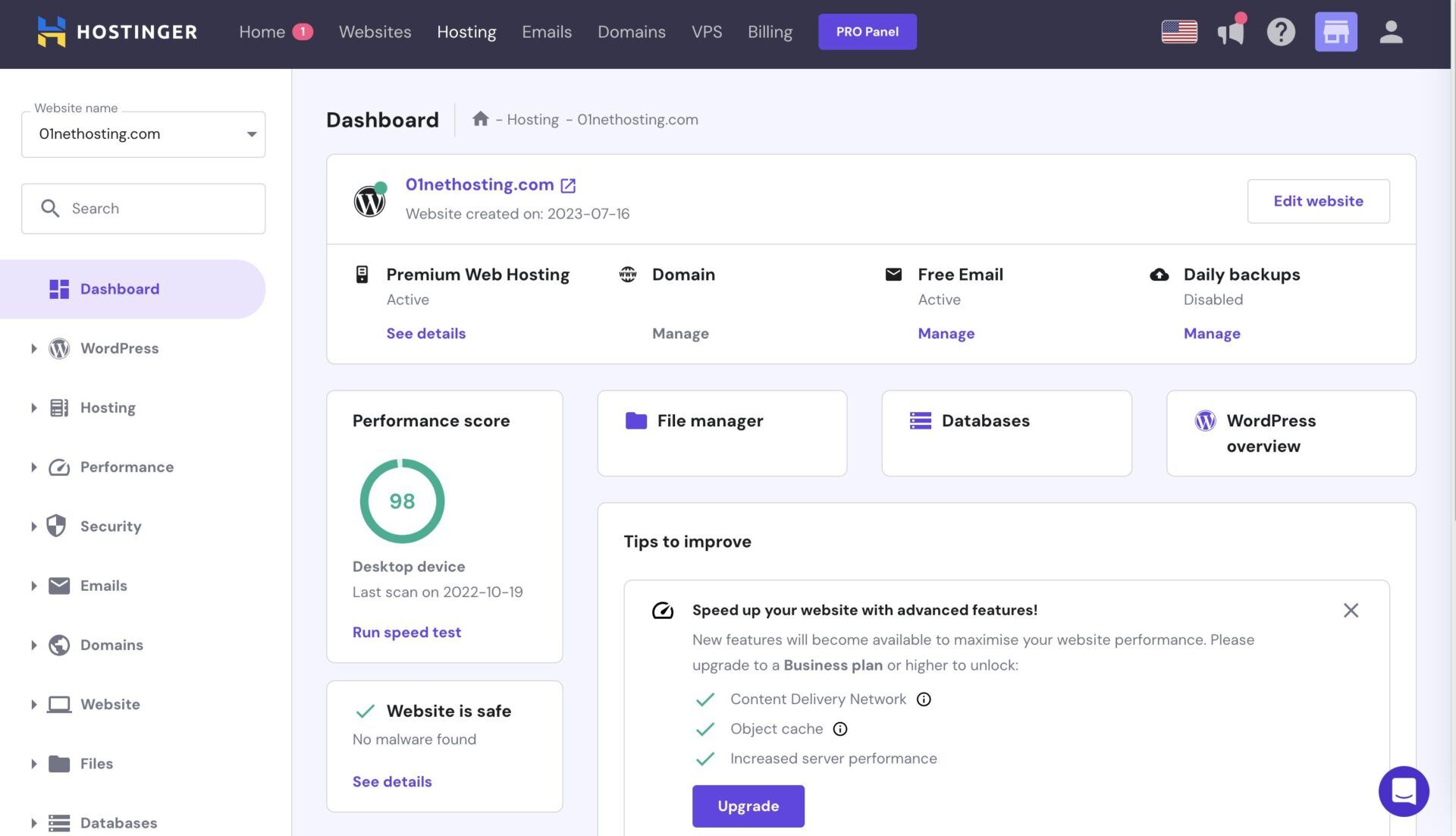
We love hPanel for its simplicity. All the menus are on the left, and from there, you can use your email, sift through security features, and add new websites. There’s also a dedicated button for accessing your WordPress admin panel. Similarly, you can install apps on your server with a click (from the home screen).
hPanel is incredibly smooth and feels polished. Going back and forth between menus takes mere seconds. Plus, you have the search bar, allowing you to precisely find everything you need. We especially like the Tips to Improve section on the home screen, which outlines a few tips for potential improvements.
All in all, hPanel is impeccable and does its job wonderfully well. If you’d rather avoid both providers’ proprietary panels, look into these cPanel hosting services instead.
DreamHost
If not, let us introduce you to DreamHost. DreamHost also uses a proprietary control panel, which may look a bit less sleek, but is still posh. The home screen isn’t as informative, but you still get quick access to your WordPress panel and other menus on the left. We’d say it functions similarly to hPanel.

You’ll notice that all menus on the left are nearly the same: Domains, Email, WordPress, VPS, Security, Support, etc. Making things better is the search bar at the top, which lets you find intricate settings and options without digging around. Regarding app deployment, this host simplifies it to a pulp.
You can install WordPress or other apps with a click. The setup process is straightforward, and DreamHost’s guides will guide you through it. Like Hostinger, DreamHost handles most of the background tasks, including updates, WordPress optimization, etc. You’ll manage your site, its content, and your email.
Our observation showed that Hostinger was just a bit more beginner-friendly, but its rival was dangerously close. Hostinger’s features are at your fingertips, while DreamHost requires a few more clicks to find specific tools. We’ll give this one to Hostinger, but it’s a toss-up if you’re a more experienced user.
Winner: Hostinger 🏆
DreamHost vs Hostinger Features
Their features depend on the chosen plan, but let’s cover some basics and see which host offers more for the money. This time, we’ll begin with DreamHost, whose shared hosting plans are vastly improved. Many things have changed for the better, and DreamHost offers these features:
- 25 to 100 websites
- 25 GB to 100 GB NVMe storage
- Unmetered bandwidth
- Daily backups
- Free SSL
- Three-month email hosting trial
- Free Starter website
- Free domain for the first year
- AI site builder
- Free WordPress migration
- SEO tools + error log analyzer, and more.
Hostinger includes the following:
- 20 to 100 websites
- 20 GB to 100 GB NVMe storage
- Unlimited bandwidth
- Weekly or daily backups
- Free Let’s Encrypt SSL
- 1-year free trial of email hosting
- Email marketing (free for a year)
- AI website builder + AI SEO tools
- Free domain name for a year + WHOIS privacy
- Free WordPress migration
- Content Delivery Network (CDN)
- WordPress MultiSite + Staging
DreamHost and Hostinger are pretty similar; however, we slightly prefer Hostinger for WordPress hosting. In particular, Hostinger offers a free CDN, MultiSite, and Staging tools that DreamHost reserves for its pricier DreamPress plans. Apart from that, they’re neck-and-neck, specifically in server resources.
Both even offer a free domain name, and DreamHost includes a starter website made for free and within minutes of registration. Hostinger’s cheaper Premium plan backs up your website weekly, while the Business plan does so daily. In comparison, DreamHost does that daily in all plans, so it’s a bit more generous.
We’d also like to take a moment to praise their AI tools. Both services have AI tools to help you with content creation, marketing, SEO, and more. Hostinger can even make logos and generate product descriptions. DreamHost can generate content and provide insightful tips to aid different business decisions.
In the end, we give a slight edge to Hostinger for better WordPress features that DreamHost offers only in its expensive DreamPress plans.
Winner: Hostinger 🏆
Speed & Uptime Tests: Which Web Host Performs Better?
It’s time for some speed and uptime tests, and as always, the DreamHost vs Hostinger test is performed on WordPress sites. To be precise, we made two identical WordPress sites using the same Astra theme, with identical images, videos, and blog posts. To ensure the best accuracy, we hosted both on American servers.
It’s noteworthy that Hostinger uses LiteSpeed web servers, while DreamHost’s server option is Apache. DreamHost lets you choose NGINX for DreamPress and dedicated server plans, and that’s great, as Apache is a bit outdated and usually slower than NGINX and LiteSpeed variants. Which tools did we use?
We relied on Pingdom for uptime testing, Loader for response times, and GTmetrix to test their page-loading times. Let’s discuss the results.
Uptime & Response Time Results
Both providers promise 99.9% uptime (DreamHost promises 100%). We fired up Pingdom and tested DreamHost and Hostinger for downtimes in the past two months, with these results:
- Hostinger: 100% uptime in two months
- DreamHost: 100% uptime in two months
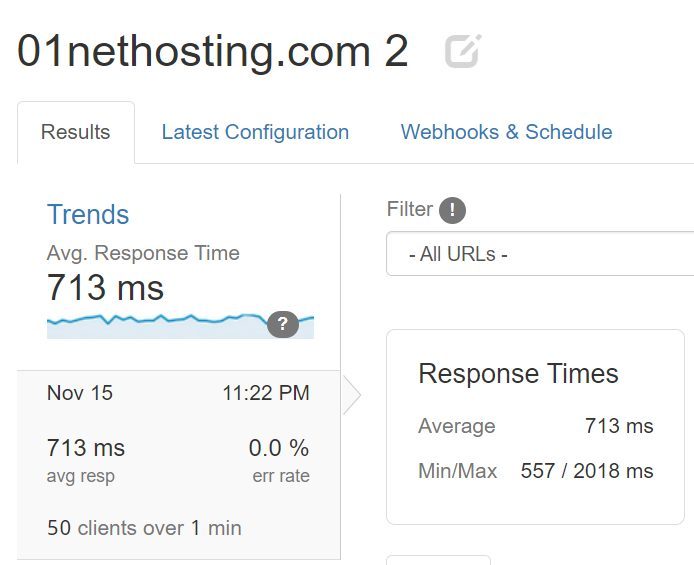
Identical, and admittedly fantastic results for two months. Both had no downtime periods, which was surprising and refreshing, especially for this lengthy period. Next up, we have response time tests using Loader. We first tested DreamHost with 1,000 clients over a minute and achieved this:
With Hostinger, we achieved the following results:
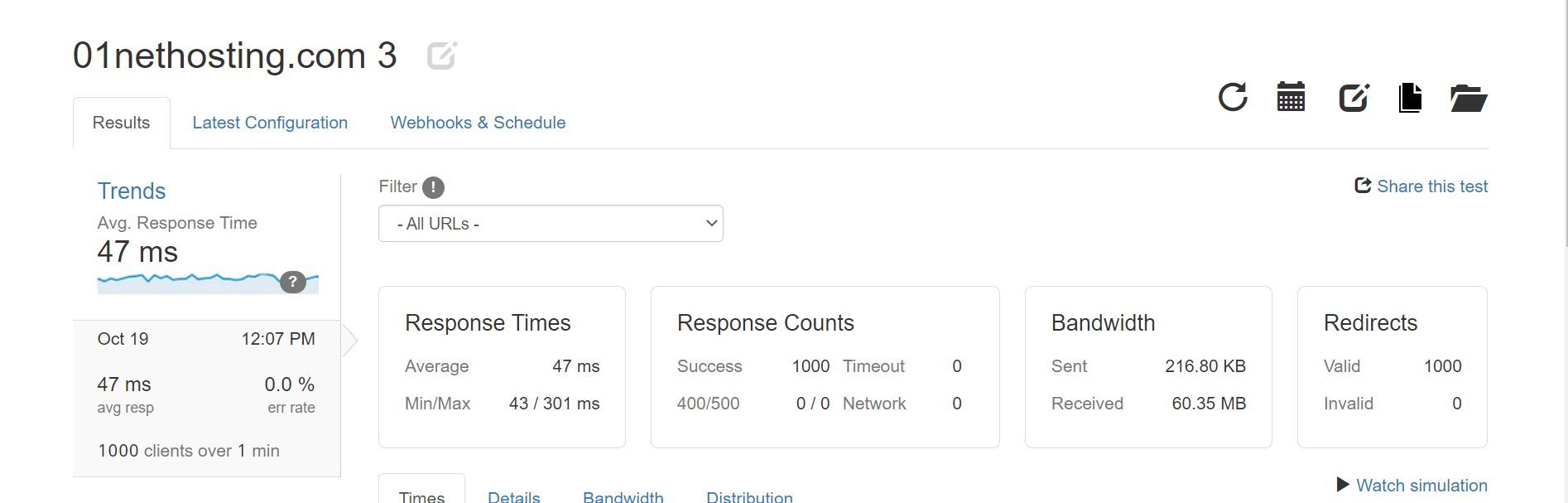
To regurgitate, Hostinger’s average was 47 ms, while DreamHost’s was 714 ms. Bear in mind, we included the best results from both providers, implying that Hostinger’s performance was far more impressive. Everything below 650 ms for shared hosting is great, but DreamHost’s results are slightly above.
Even its lowest result of 557 ms is terrible compared to Hostinger, which achieved 43 ms. In this case, things are pretty clear: Hostinger’s response times are on another level, which we also loved in our review.
Page Load Speed Comparison
Using GTmetrix and its Canadian server (Vancouver), we tested Hostinger and DreamHost and determined the faster web host. But first, let’s clarify the parameters we emphasized:
- TTFB of Time to First Byte
- FCP or First Contentful Paint
- LCP or Largest Contentful Paint
- TTI or Time to Interactive
- FLT or Fully Loaded Time
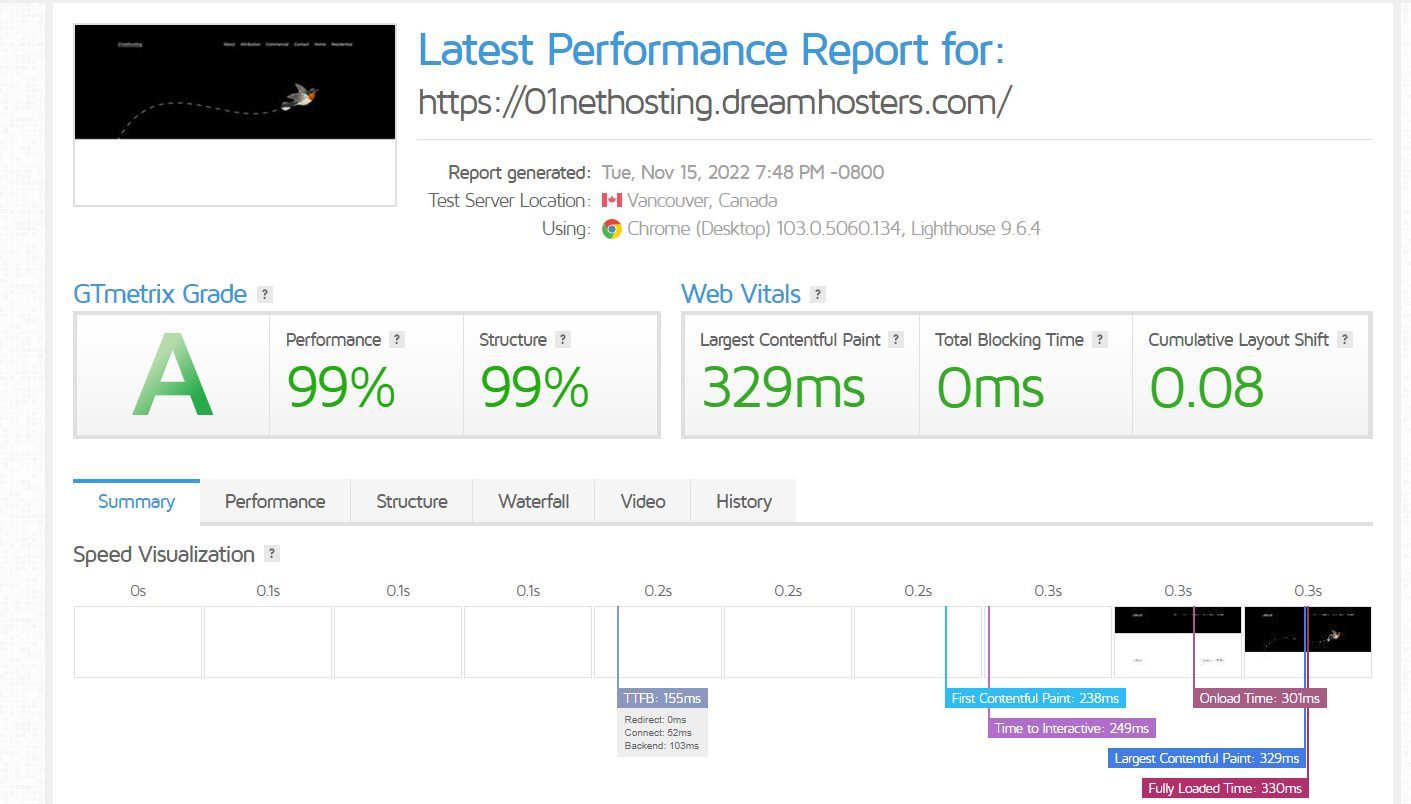
We first ran several tests with DreamHost, and these were the best results:
After running a few Hostinger tests, we also settled for the best result:
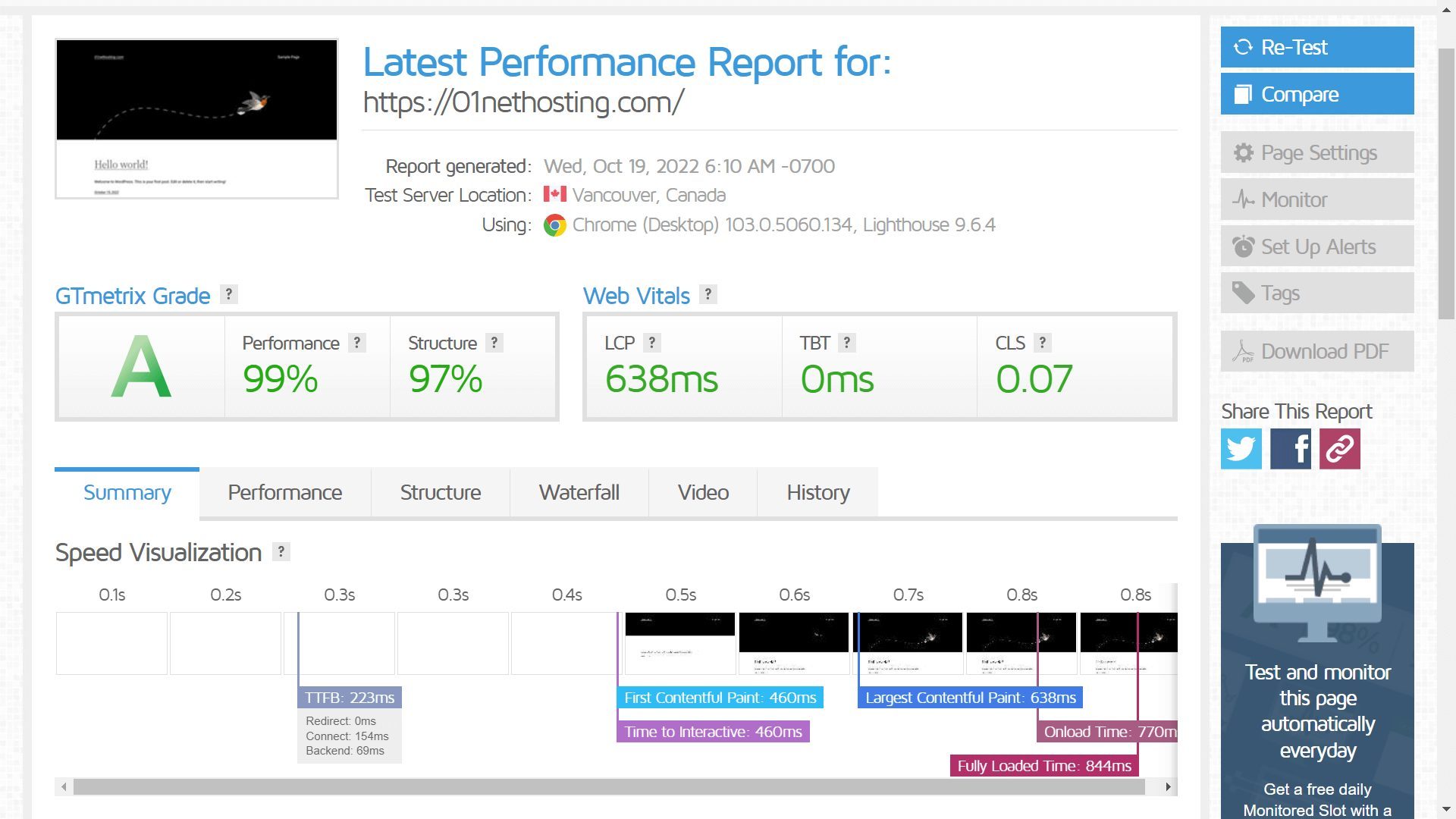
For a better overview, we grouped the test results into a table:
| Hostinger | DreamHost | |
| TTFB | 223 ms | 155 ms |
| FCP | 460 ms | 238 ms |
| LCP | 638 ms | 329 ms |
| TTI | 460 ms | 329 ms |
| FLT | 844 ms | 330 ms |
DreamHost managed to turn the tide and actually beat Hostinger in the page-loading test. All five parameters are on DreamHost’s side, and the most vital one, FLT, was impressively low. It implies that DreamHost’s site loaded significantly faster and was more responsive.
However, we can’t say Hostinger is out of the shared hosting boundaries. It’s still super fast, but not as much as DreamHost, which surprised us. One has better response time, and the other has shorter load times, which means only one thing: we have a tie, the first one in this Hostinger vs DreamHost comparison.
Winner: Tie 🟰
Security: Which Web Host Is the Safer Option?
Hostinger consistently delivers on the security front, with DreamHost never being famous in this aspect. Does that mean DreamHost is insecure? Far from it, as explained in our review of this famous hosting service. However, it’s worth noting that Hostinger doesn’t sell features separately, so it includes:
- DDoS protection
- Web application firewall
- Weekly, daily, and on-demand site backups
- Malware protection (detection + removal)
- WordPress Vulnerability Scanner
- Domain privacy
- Free Let’s Encrypt SSL
DreamHost’s plans contain the following:
- DDoS protection
- Web application firewall
- 1-Click backup restore
- Daily site backups
- Domain privacy
You’ll notice the list is smaller because DreamHost lacks malware protection. You can get it in the mid-tier plan in the form of DreamShield, a separate site security tool from DreamHost. The trick is, you get only one free, on-demand a month, per website. At the same time, you don’t have any limits in Hostinger.
Keep in mind that DreamShield scans and doesn’t delete the malware. So, if you happen to find one, you have to contact DreamHost and ask for the next steps to get rid of it. This does sound silly, and for the price, DreamHost could’ve put a bit more effort into it. Until it does, we’re happy to give this one to Hostinger.
Winner: Hostinger 🏆
Customer Support
Hostinger and DreamHost rely on email and chat support available 24/7 for quick problem resolution. During our comparison, we had no issues getting in touch and getting a coveted response within minutes. We love both equally, especially their live chat support, as it’s a fast way of getting the required help.
Email contact is also a thing, but response times extend to about an hour. Neither offers phone support, which we’d like to see in the future. However, their knowledge bases have many frequently asked questions and answers, tutorials, and guides, helping you navigate the hosting landscape.
With everything said, we can’t complain. Whether you opt for DreamHost or Hostinger, you can be sure there will be someone to tackle your issue, be it the support team or something from the knowledge base.
Winner: Tie 🟰
Hostinger vs DreamHost: Our Final Verdict
It’s time to land the plane and put a seal on our DreamHost vs Hostinger comparison.
After exhaustive testing, we ultimately chose Hostinger. Despite winning the most rounds, this was a close battle, particularly because DreamHost costs virtually the same and follows in Hostinger’s footsteps relentlessly. Unfortunately, DreamHost lacks a few features that make Hostinger so popular.
It’s not as secure, and its exclusive WordPress features cost a fortune. DreamHost’s response times were also disappointing for shared hosting. To its credit, DreamHost’s page-loading times were shorter, with generous bandwidth, flexible plans, and a variety of hosting types, including dedicated servers.
As a whole, Hostinger is a better package for the price and our victor for today. You may as well explore other managed WordPress options if you want, but know that Hostinger is by far the best one in 2026. We advise the Business plan at $3.99 for 50 months to get your site up and running in no time.
Try Hostinger Risk-Free for 30 Days
Hostinger