
Should I go for Cloudways or Hostinger? It depends on many aspects, and although we love Hostinger more, we can’t neglect Cloudways as an excellent option. Cloudways is a reseller of cloud hosting services from famous providers. Meanwhile, Hostinger has its own servers: that’s a big difference.
Cloudways offers strictly cloud hosting, while Hostinger provides more variety with its managed WordPress and VPS plans. In our Hostinger vs Cloudways test, we realized they’re not very similar and are suited to different needs. This is precisely what will dictate your choice.
We compared Cloudways to Hostinger to see which one is better overall. However, you’ll have to decide based on your preferences. Read our Cloudways vs Hostinger comparison for 2026 for more information.
Cloudways vs Hostinger: Key Features Compared
| Cloudways | Hostinger 🏆 | |
| Types of Hosting | Cloud | Cloud, shared, managed WordPress, VPS |
| Storage Size | Up to 3,840 GB | Up to 100 GB |
| Bandwidth | Unlimited | Unlimited |
| Hosted Websites | Unlimited | Up to 100 |
| Backups | Daily and on-demand | Daily and on-demand |
| Starting Price | $14 per month | $2.69 per month |
| Money-Back Guarantee | No (3-day trial) | 30 days |
| Ease of Use | Not for beginners | Great for beginners |
| Site Migration | Free | Free |
| Free Domain | No | Yes + WHOIS privacy |
| Security | Free SSL, DDoS protection, server-level firewall with IP-blocking, and WordPress vulnerability scanner (malware protection is bought additionally) | Free SSL, web application firewall, DDoS protection, malware scanning, WordPress vulnerability scanner |
| Email Accounts | No (bought additionally) | Yes, up to 10 mailboxes |
Plans and Pricing
Hostinger and Cloudways have different “views” on hosting.
This spawns a different pricing structure, as Cloudways includes only cloud hosting, while Hostinger offers shared (managed WordPress), VPS, and cloud hosting plans. What are their starting prices, though?
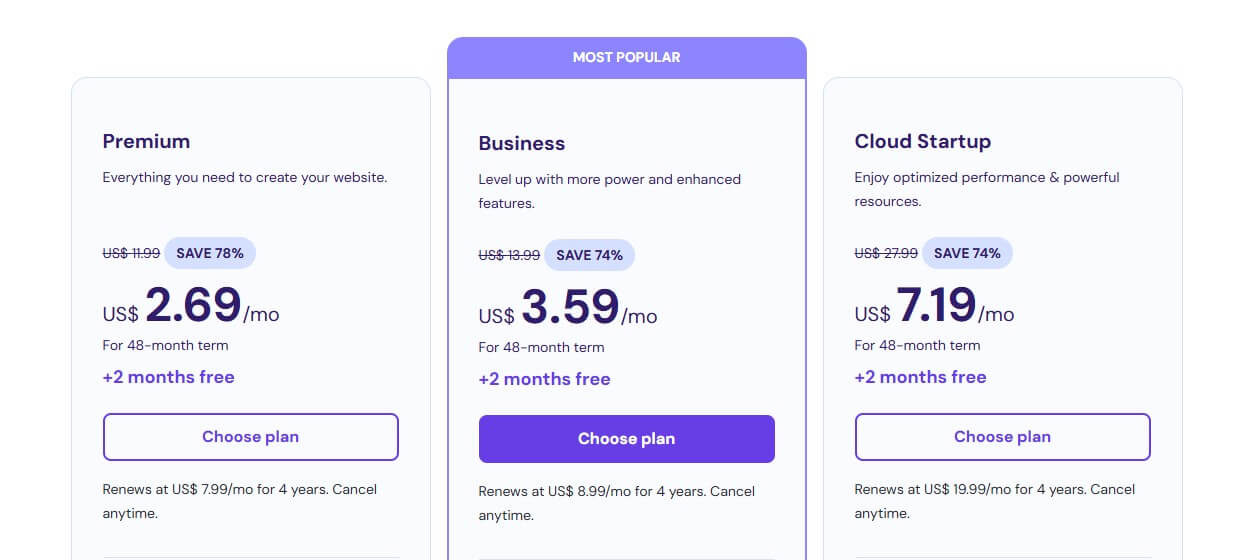
- Hostinger’s Basic plan is $2.69 monthly for 48 months + two free months
- Cloudways’ Standard Micro plan is $11 monthly
Right off the bat, we can see that Hostinger is a cheaper web host. While its subscriptions are considerably longer, they’re still minor investments. This Hostinger coupon can help you drop the price even more.
Hostinger Plans & Pricing
Apart from the Basic plan, Hostinger offers what we consider the best option overall in 2026: the Business plan. It costs only $3.59 for four years, plus two free months. However, it includes a free domain for a year, excellent NVMe storage, eCommerce tools, and unlimited bandwidth.
More about its features later in this review.
It’s good to know that VPS plans, among which is KVM 2 at $6.99 a month, are some of the best around. In fact, Hostinger also lets you self-host n8n for a pocket-change price. The KVM 2 plan includes 8 GB RAM, 100 GB NVMe storage, 8 TB bandwidth, and two vCPU cores.
Even if you go for KVM 8, which is $19.99, you’ll get insane value because of AMD EPYC processors, free weekly backups, a managed firewall, and up to 32 GB of RAM and 8 vCPU cores.
Get the Best Price on Hostinger
Finally, there’s cloud hosting, which starts at $7.19 monthly.
This plan includes two free domains for a year, free email hosting, a dedicated IP, a CDN, AI SEO tools, and more. At this price, you won’t get better cloud hosting! You can increase your computing resources if you want, and shoot for the Enterprise plan at $29.99 monthly.
It costs a lot more, but still not as much as some Cloudways plans.
Cloudways Plans & Pricing
Okay, so Cloudways is priced based on computing resources and cloud providers. It offers cloud hosting services from renowned companies, such as:
- DigitalOcean, which now owns Cloudways
- Vultr
- Linode
- AWS
- Google Cloud
All five are excellent and offer diverse cloud hosting, which is usually divided into multiple categories: Basic, General Purpose, and CPU Optimized. The latter is generally more expensive and costs up to $1,000 monthly or more. Basic plans will satisfy most users.

For instance, when we tested Cloudways, we used its Premium Micro plan from DigitalOcean, which was $14 monthly. It was fantastic. If you need a more “premium” option, consider plans from AWS or Google Cloud, but be aware of their higher prices (they usually start at over $20 monthly).
Try Cloudways for Free for 3 Days
It’s hard to discuss the precise costs of this provider in our Cloudways vs Hostinger comparison.
The former has many plans and computing resource variants. However, it lacks freebies like a free domain, a CDN, SEO tools, and others. Most of these “extra” features are paid additionally, as we’ll soon explain.
Money-Back Guarantee & Refund Policies
Hostinger provides a 30-day money-back guarantee for all plans. Cloudways has a 3-day trial for all plans, without a money-back guarantee.
We’re unsure which one we prefer here. While a 30-day refund policy is reassuring, you still have to splurge on Hostinger to test it. Meanwhile, Cloudways lets you try it for three days without a credit card. But then, three days are usually insufficient to make a proper judgment.
We’ll leave this one to you. For now, we’ll give the first round to Hostinger, as it’s way less expensive and offers better hosting options, including cloud hosting that excels in performance and ease of use.
🏆 Winner: Hostinger
Hosting Management: Which Hosting is Easier to Use?
Hosting should be easy to set up and use. It shouldn’t be a burden trying to make your life harder as you struggle to manage one, two, or more websites. In this Hostinger vs Cloudways comparison, we found Hostinger just a smidge easier to use, and here’s why.
Hostinger Is a Managed Hosting Service
Yes, we know Cloudways is also a managed hosting provider, but not to Hostinger’s extent.
Hostinger’s plans are essentially managed WordPress hosting, which includes one-click WordPress setup. Moreover, you can install various apps, such as Laravel, Magento, n8n, and likely dozens more, with a mouse click. Best of all, Hostinger doesn’t force manual labor for simple stuff.
You have a free Let’s Encrypt SSL, which is automatically applied.
A free domain means you don’t have to go to GoDaddy or any other domain registrar to purchase one. This strips off mundane tasks like DNS propagation, pointing a domain to the server, etc. When you subscribe, you can immediately select a domain name, register it with a click, and go about your day.
Cloudways is simple to set up. It also allows for a one-click WordPress setup, but the problem is that you have to manually apply SSL, add a domain, point it to a server, wait for DNS propagation, etc. Despite on-site tutorials, beginners may find Cloudways just a bit more intimidating to set up.
Hosting Panel Differences
Once you pass the initial gate, the room you’ll find yourself in will feel pleasant.
Hostinger leverages its in-house hPanel, and we think it looks stunning. It’s extremely simple to use and provides fundamental information on the home screen. As you can see, it even displays the performance score and actionable advice to improve your website and SEO.
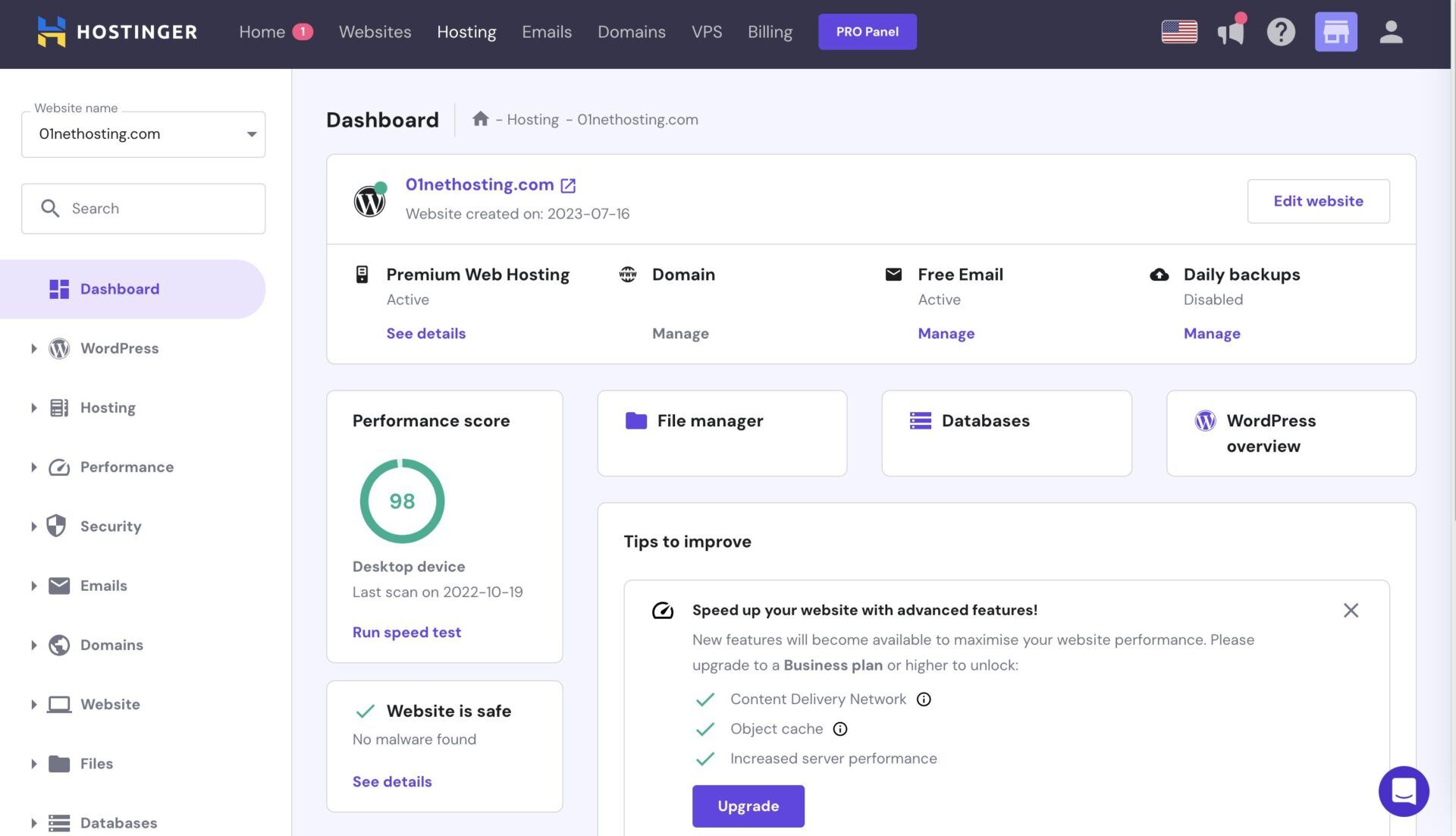
On the left-hand side, you’ll find menus for Performance, Domains, Emails, Files, Databases, WordPress, etc. From here, you can access your WordPress admin panel, manage your business emails, and manipulate your files. Hostinger also includes security settings in its hPanel.
However, the home screen also contains information about your website security, including whether Hostinger has detected malware that could harm your platform. Hostinger’s hPanel takes little to no time to get used to, and it’s a fantastic choice for both beginners and seasoned veterans.
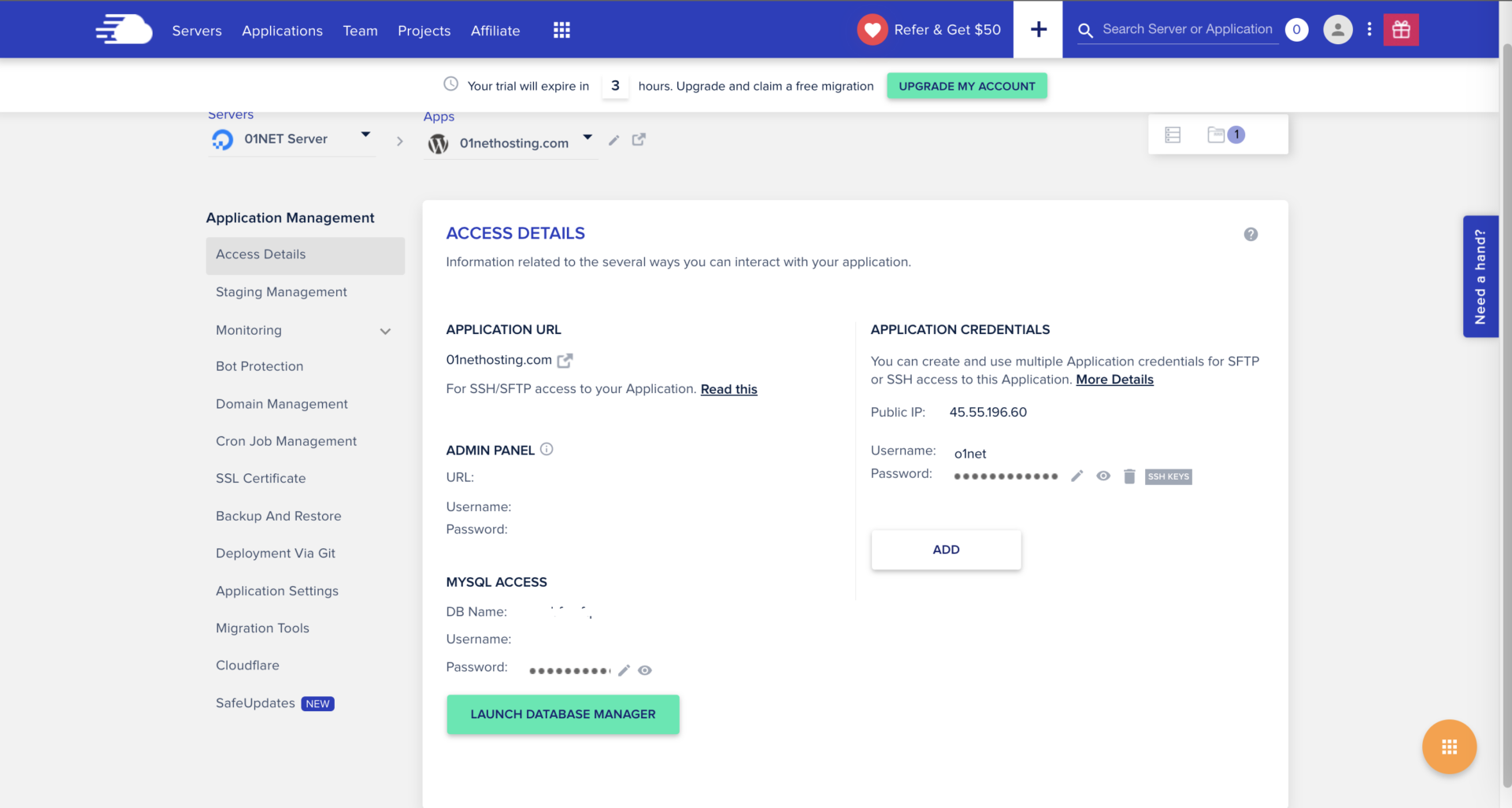
Cloudways also has an in-house panel, and to be honest, it’s pretty simple.
While not as insightful as Hostinger’s solution, it provides ample settings and menus where you’ll quickly find what you need. We liked the ability to install applications with a click. Similarly, you can apply your SSL by going to SSL Certificate, selecting your website, and adding it in seconds.
Cloudways lets you install WordPress and a combo of WordPress and WooCommerce from the home screen. From here, you can also access your WordPress panel and edit your website for added convenience.
Hostinger offers optional cPanel hosting, while Cloudways, again, lacks this neat option.
Regarding ease of use and the initial setup, Hostinger is undoubtedly a more user-friendly choice, and consequently, it wins the second round.
🏆 Winner: Hostinger
Cloudways vs Hostinger Features
Whichever hosting you end up choosing, don’t worry about the lack of features.
However, be aware that Hostinger offers more tools out of the box. We’ll examine its best-value Business plan, which costs $3.59 monthly, and which packs some of the best features we’ve seen:
- Free domain for a year
- 50 GB NVMe storage
- Hosting for up to 50 websites
- Daily + on-demand backups
- AI site-building tools
- LiteSpeed servers + LiteSpeed caching
- Free CDN for better performance
- Managed WordPress hosting features
- WordPress Staging
- Unlimited bandwidth
- Advanced security (WAF, malware protection, etc.)
- Unlimited free SSL, etc.

The list goes on, but you get the point. Hostinger beats most of its alternatives on features alone. Again, it’s not strictly about features. It’s about features for money. And, at roughly four quid, it’s virtually impossible to get more, especially if you shoot for managed WordPress hosting.
Then, we have Cloudways, which offers these features in all plans:
- NVMe storage (varies in size)
- Unlimited visits and websites
- Website staging
- Free SSL
- Server-level firewall
- Automated and on-demand backups
- Object Cache Pro & Redis Cache
- WordPress Vulnerability Scanner
- Vertical scaling

You’ll notice that Cloudways lacks a few things: a free CDN (it’s an optional extra), a free domain, and a few security features (more about that in a minute).
Our main gripe with Cloudways is that it hides some of its features behind a paywall. While this mostly applies to security features, other features, like mailboxes, cost $1 per mailbox monthly (Rackspace Email). If you need a CDN, Cloudflare’s enterprise solution is $4.99 monthly per domain.
Hostinger ultimately wins the round because it includes more features for the price. Cloudways’ worst offense is the lack of a free domain, which drastically increases the initial cost, while Hostinger includes two free domains in its cheapest Cloud Startup plan.
🏆 Winner: Hostinger
Speed & Uptime Tests: Which Web Hosting Performs Better?
Is Cloudways at least faster than Hostinger? Or is it the other way around?
We tested both and realized that Cloudways has superior response time, while Hostinger takes the rest. But let’s not leave it at that. We’ll have to explain the background of our Hostinger vs Cloudways speed comparison and which tools we used during the assessment. But first, let’s address their plans.
- We used the DigitalOcean Premium Micro plan in Cloudways.
- For Hostinger, we selected its Cloud Startup plan.
The premise is simple. We made two identical WordPress websites and opted for US-based servers in both instances. After that, we fired up a few bits of software to test their uptimes, response times, and page load speeds: Loader, Pingdom, and GTmetrix. The results are below.
Uptime & Response Time Results
To determine the fastest hosting service, we started with Pingdom.
Here are our test results from Cloudways:
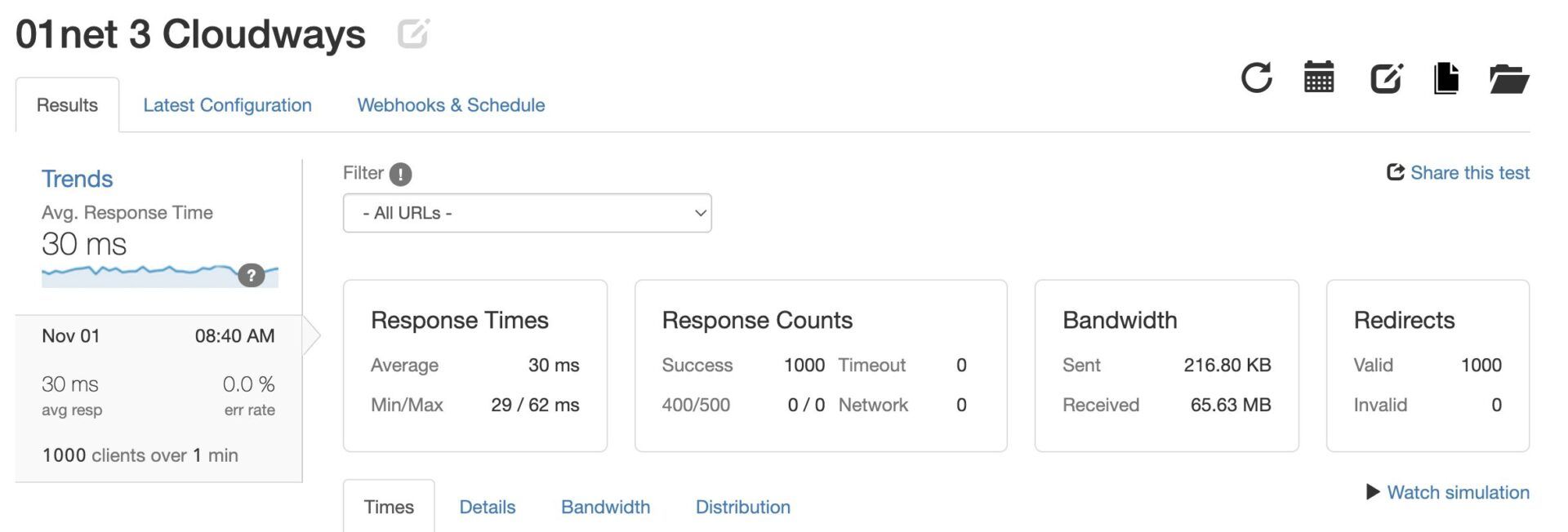
We scored a fantastic average response time of 30 ms, with a low of 29 ms and a high of 62 ms. That’s a tremendous result for pretty much any hosting type and implies that the server response is more than speedy.
Here’s what we got from Hostinger:
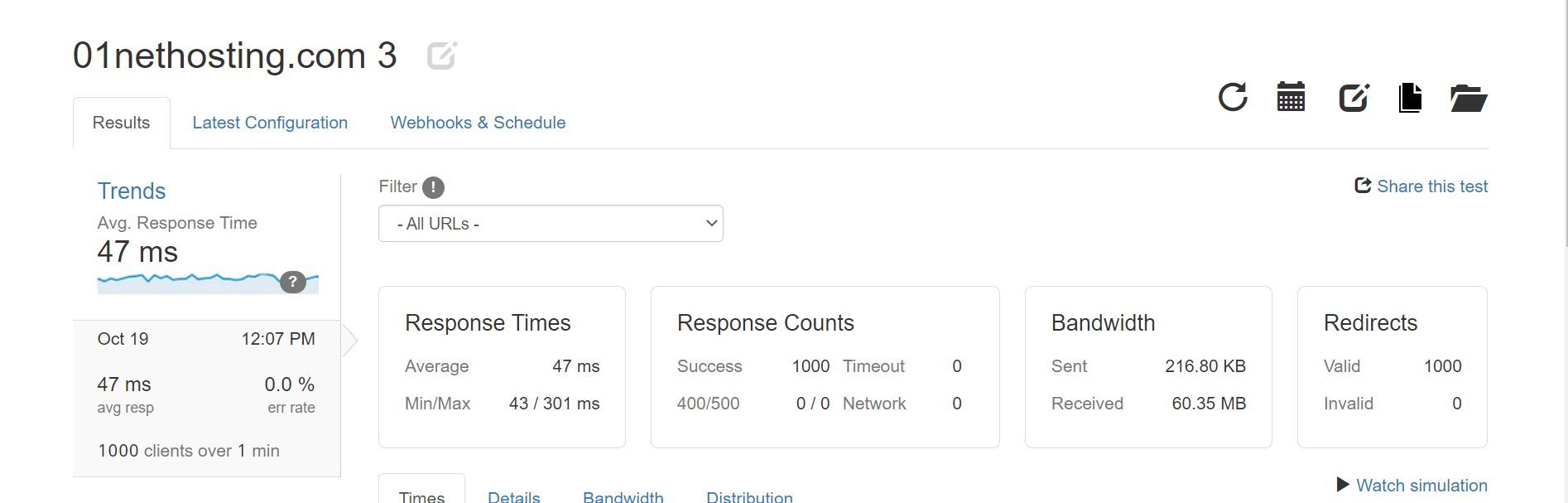
With an average of 47 ms, Hostinger is still miles ahead of other top-rated cloud hosting services. However, its minimum of 43 ms was spoiled by an unexpected spike of 301 ms at one moment. In practice, we barely noticed a difference between the two, but on numbers alone, Cloudways seems to have an advantage.
We also measured their uptimes and found that:
- Cloudways adhered to its 99.9% uptime promise.
- Hostinger excelled its 99.9% uptime promise by scoring 99.99% in our tests.
Page Load Speed Comparison
We had a close call in the previous Cloudways vs Hostinger comparison, but now, let’s see if anything changes in the page load speed test.
For this one, we used GTmetrix and set the test server to its default location: Vancouver.
We observed a few crucial metrics, such as:
- Time to First Byte or TTFB (ideally under 0.8 seconds)
- First Contentful Paint or FCP (ideally under 1.8 seconds)
- Largest Contentful Paint or LCP (ideally under 2.5 seconds)
- Fully Loaded Time or FLT (ideally under 3 seconds)
- Time to Interactive or TTI (ideally under 4 seconds)
After running a few tests, we got these results for Cloudways:

Meanwhile, Hostinger’s results looked different:
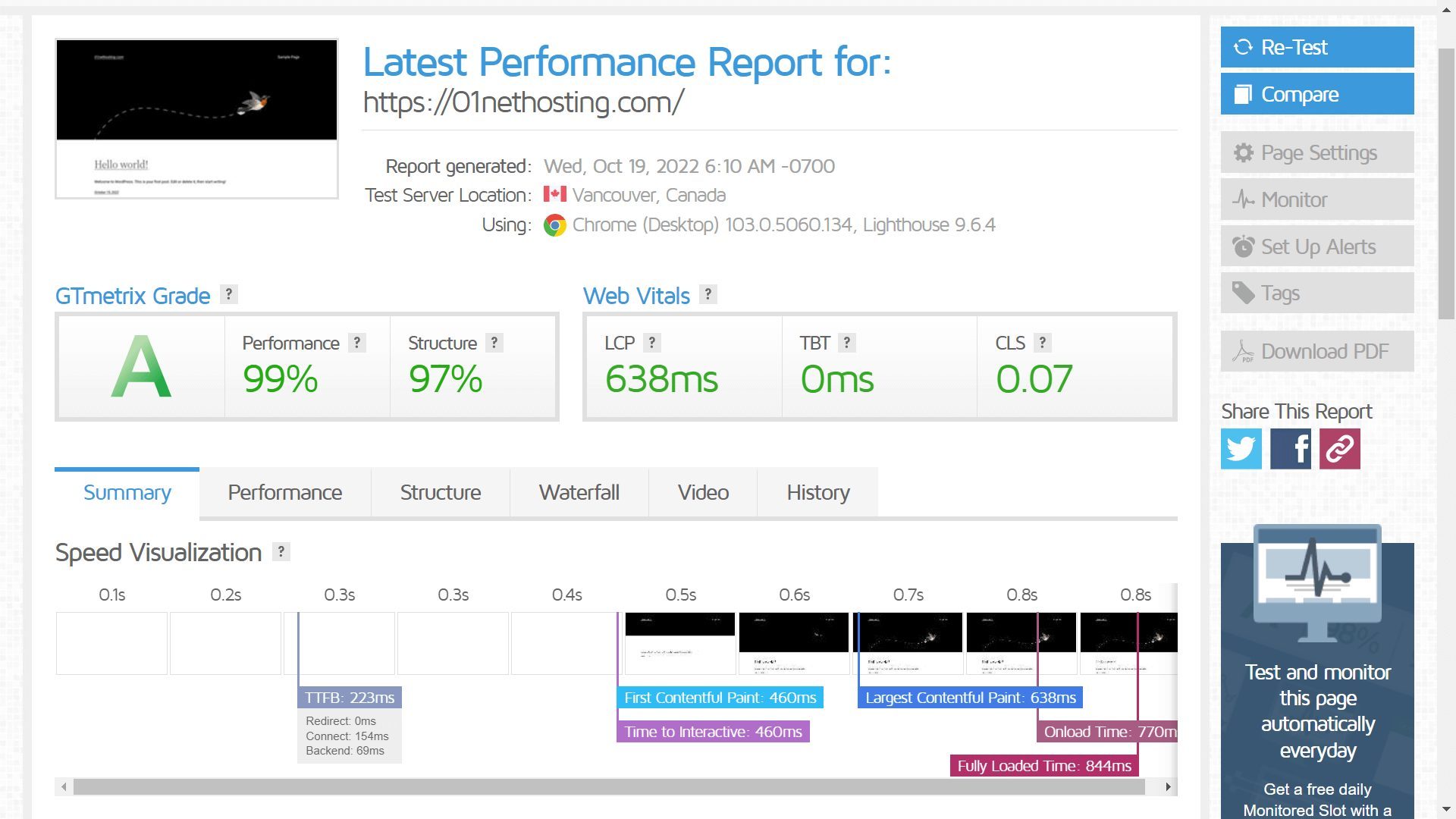
We compiled all results in the table below:
| Hostinger | Cloudways | |
| TTFB | 223 ms | 363 ms |
| FCP | 460 ms | 494 ms |
| LCP | 638 ms | 801 ms |
| FLT | 844 ms | 1.3 s |
| TTI | 460 ms | 494 ms |
These are interesting results, aren’t they? Hostinger defeated Cloudways in all five page-loading parameters. With an FLT of 844 ms, it was noticeably faster than the 1.3 s we measured in Cloudways.
We don’t have to analyze each result separately. Hostinger lost to Cloudways in the response time test, but only barely, while holding its own and defeating it in the remaining two tests. As a result, Hostinger takes another round in this comprehensive 2026 comparison.
🏆 Winner: Hostinger
Security: Which Web Host Is the Safer Option?
Our problem with Cloudways is, again, hiding advanced security features behind a paywall.
We complained about it earlier, but now, we think it’s more noticeable. When you purchase Cloudways, no matter the chosen plan, you will instantly get these security features:
- Firewall + IP blocking
- Automated backups
- Auto-healing servers
- Server-level firewall with DDoS protection (Imunify360)
- Free SSL
- WordPress Vulnerability Scanner
It sounds nice until you realize there’s no malware protection. Luckily, you can buy it for $4 per website monthly. It’s a nice feature because it automatically removes malware, but if you have multiple sites to protect, it’s a major security investment. There’s also the SafeUpdates tool.
It secures and updates your WordPress themes and plugins at $3 monthly per site. Again, everything is automated, but it costs more. By the way, you’ll also want to add a CDN that we mentioned earlier, so when you bundle everything up, the cost of maintaining your website can be shockingly high.
Hostinger takes a more serious approach and includes all security features in the package:
- DDoS protection
- Malware scanner
- Free domain with WHOIS privacy
- Web application firewall
- Automated daily backups
- WordPress Vulnerability Scanner
- Smart WordPress auto-updates, and more.
All of these features are available in Hostinger’s Premium plan for $2.69 monthly, which costs multiple times more in Cloudways! Do we need to proclaim the winner again? It’s Hostinger.
🏆 Winner: Hostinger
Customer Support
Hostinger and Cloudways offer round-the-clock support, likely sufficient for most people.
They leverage 24/7 live chat support and combine it with rich knowledge bases as staples of their customer care. Having tested both, we can confirm they’re responsive and helpful, although they can sometimes take a bit longer to respond when you ask a more complex question.
However, the communication quality is top-notch, and support agents usually solve the problem in a single chat session. If that’s impossible, the problem is transferred to a higher level of support team, which gets in touch with you via email and tries to work things out.
Cloudways tries to make money here again by offering a premium support solution called the Advanced Support Addon. It costs a whopping $100 monthly and includes support for themes, plugins, and performance optimization. Hostinger’s support includes all that at no extra cost.
All things considered, this round is a tie, as we haven’t experienced any inconveniences or unpleasant situations with their support teams.
🟰 Winner: Tie
Cloudways vs Hostinger: The Final Verdict for 2026
Cloudways is a stellar option for cloud hosting and actually isn’t bad by any stretch. While its value for money isn’t the best and you have to spend more on certain features, its performance, reliability, and customer support are some of the best we’ve seen. But then, there’s Hostinger.
Hostinger virtually wiped the floor with Cloudways.
It’s marginally faster but offers superior ease of use, security, and value for money. The latter ultimately decided the fate. Hostinger’s shared and cloud hosting plans offer more features and cost way less, making them a no-brainer choice in this Hostinger vs Cloudways comparison for 2026.
Cloudways is more scalable, but for an average user who doesn’t need terabytes of storage and RAM, Hostinger is a more sensible option. Click the button below, get a free domain from Hostinger, and start your website today. You have nothing to lose with the #1 hosting service in 2026.
