If you want to change your IP address, bypass geo-blocks, and anonymize your internet traffic, chances are you consider using a proxy or VPN. While these services have things in common at first, the way they work shows a few differences. Both services route your traffic through an intermediary, third-party server.
This process masks your original IP address. In addition, proxies and VPNs help you bypass firewall restrictions and make your browsing activities anonymous. What are the differences between proxies and VPNs? And one important question – which is better for bypassing regional restrictions and staying anonymous?
This VPN vs proxy comparison answers everything you wanted to know. Keep reading.
What Is a Proxy and How Does It Work?
Let’s start by explaining what a proxy service is. Proxies present a middleman, or better said, an intermediary server between you and the website you want to visit. Think of it as a machine in the middle that hides your original IP address and lets you visit the site you want.
Once you connect to a proxy server, you take on an IP address from that server, which is used to access the website. In this case, the site sees the IP address of that remote server rather than your original IP address, which is hidden in this process. The trick is that proxies have a limited area of effect.
They don’t secure your entire connection. Take a typical proxy – the one you can Google search and access from the first page. You’ll notice that this proxy affects only your traffic inside the browser. This means all other incoming and outgoing traffic in other apps and processes is not affected and still uses your original IP.
In other words, this part of the traffic isn’t secured and anonymized, so your privacy is still exposed. Proxies, for one, do not encrypt your traffic, and two, they affect only a small portion of the traffic coming from a single app, be it a browser or a torrent client. You can fix this by using a high-quality, paid proxy.
Paid proxies are quite expensive and often require more technical knowledge to be set up correctly
Types of Proxies
When discussing proxies, it’s vital to mention that not all are the same. However, they’re built on the same base, with a few slight differences. Here are the types of proxies you can find and use.
HTTP Proxies
If you’ve ever used a proxy service, chances are that you’ve had experience with HTTP proxies. These are the typical free proxies you use in the school, library, or workplace to be able to unblock sites like online bookmakers, Facebook, Twitter, or any other entertainment-focused site.

These are typically free solutions that you can find online. They can also come in the form of browser extensions. On top of that, they’re very simple to use, as they just require you to enter the URL of the site you want to visit, press Enter, and access it. Since they’re free, they’ll be congested and slow
Some will earn money through advertising or selling their personal data. Paid HTTP proxies also exist, and while they’re faster, they still don’t offer encryption like VPNs. Oh, and one more thing – they mask your IP address only inside the browser, so other parts of your traffic are still exposed to the public eye.
SOCKS Proxies
SOCKS proxies also don’t have encryption, but they can be used on a variety of applications and even games. The most popular, SOCKS5 proxy, is used with torrent clients for hiding an IP address and downloading torrents anonymously. This type of proxy can be used for all traffic and is configured for each app or game separately.
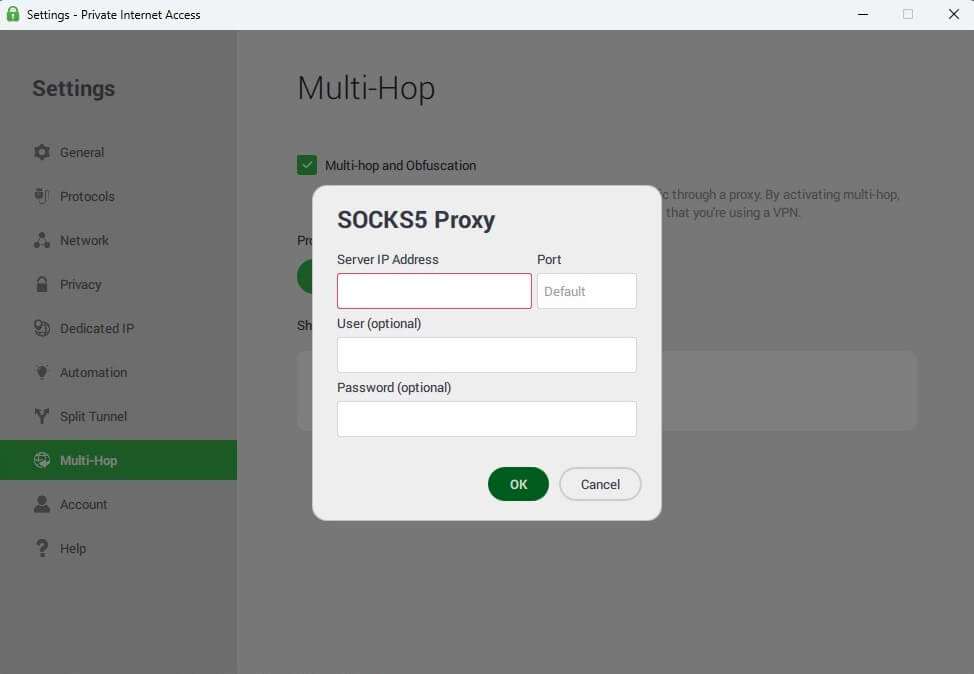
As such, it allows you to apply its settings to particular games or apps where you want to hide your IP address and anonymize your traffic. In some cases, SOCKS proxies will offer additional encryption, but in more than 90% of the cases, we’re talking about the lack of it, which is still a security vulnerability.
Transparent Proxies
Transparent proxies are very interesting because we’ve all encountered them in our school, first and foremost, and then in our workplace, hotels, and other public institutions. An HTTP proxy allows you to visit restricted websites, while this one prevents you from going to specific websites.
Transparent proxies are set up by network administrators, and they’re used for monitoring users’ online activities and blocking access to sites and domains. It’s easy to see how schools and companies block access to social media, adult sites, or anything else that ruins the working atmosphere – with transparent proxies.
DNS Proxies (Smart DNS)
DNS proxies are popular among VPN providers, yet another overlapping characteristic of proxies and VPNs. This type of proxy is set up through Settings on your device, and devices that support it include gaming consoles, smart TVs, and even smartphones and tablets.
Providers like NordVPN, ExpressVPN, and CyberGhost offer a DNS proxy, also frequently called Smart DNS. Its task isn’t to encrypt your connection because you don’t get encryption here. Instead, it’s used for bypassing geo-restrictions and gaining access to blocked websites.
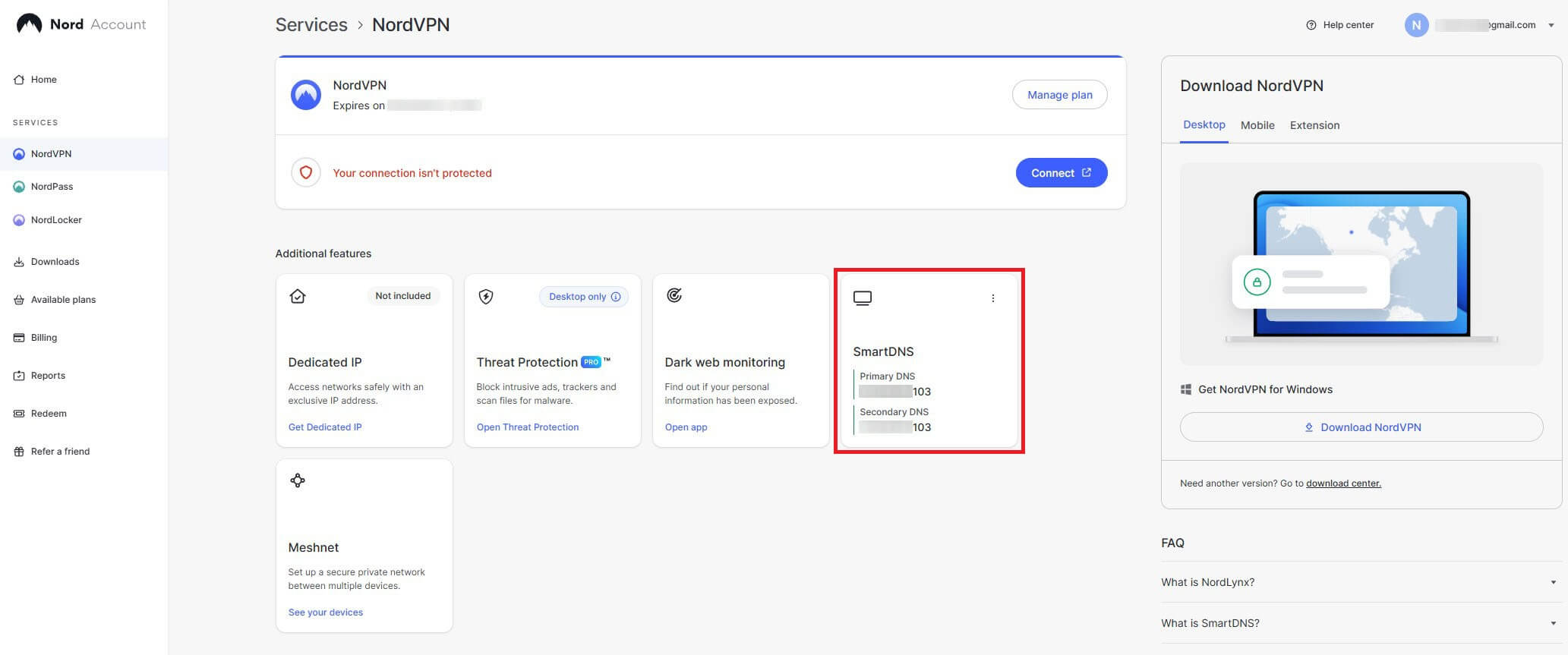
Smart DNS tricks the site into thinking you’re elsewhere, which bypasses geo-blocks and gives you easy access. Smart DNS or a DNS proxy is less likely to be blocked than a VPN by sites like Disney+, Netflix, or Prime Video. These sites block VPNs, and Smart DNS from the VPNs above have proven to work well.
SSL Proxies
These and HTTP proxies are both used for securing your in-browser traffic, but you get a layer of encryption here. SSL encryption is a well-known term, and when using this type of proxy, you get full encryption between you and the site you visit. Again, it acts as a middleman between you and the website.
However, it’s vital to know that this proxy decrypts your traffic when your traffic reaches it. Then, it encrypts it again and sends it to the site you’re visiting. Such decryption can be dangerous, so it’s vital to use a trustworthy SSL proxy service. This decryption doesn’t happen with a VPN, which is why it’s more secure.
What Is a VPN? How Does It Work?
In our article about what is a VPN, we explained everything you need to know about this service. But for the sake of this article, let’s explain this service briefly and see how it is different than proxies. A VPN stands for Virtual Private Network, and it seemingly works the same.
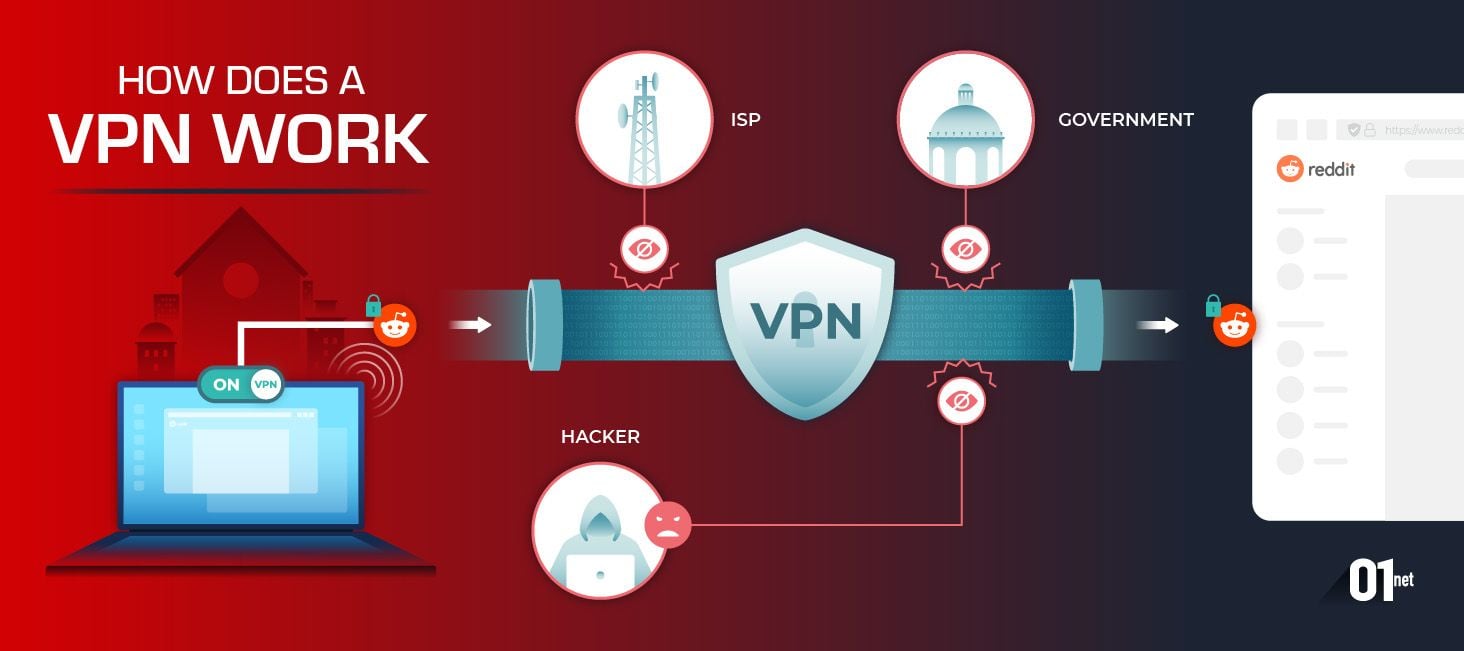
Once you’re connected to a VPN server, you assume its IP, which hides your original IP address and location. However, the main difference is that this server also encrypts your connection using 256-bit encryption. It routes your traffic through an encrypted tunnel, making it completely invisible and untraceable.
In addition, a VPN encrypts and secures all your traffic, the main and crucial advantage over proxies. This means that no one can see what you’re doing online, allowing you to download torrents or go on the dark web safely, for example. Yes, your ISP can see that you’ve changed your IP with a VPN.
But that’s futile because it won’t see your activities while connected to a VPN. Thanks to their numerous security features, VPNs are great for avoiding government surveillance, bypassing ISP throttling, staying safe on public WiFi networks, and bypassing censorship in China and other similar countries.
Unlike proxies, VPNs come in the form of applications for platforms like Windows, iOS, Android, Linux, macOS, Smart TVs, routers, and many other platforms. Once you install the app, you can select a VPN server in a particular country and get its IP address, making this service more flexible.
The best VPN services of 2026:






 8922 servers
 129 covered countries
 30 days money-back guarantee
 10 simultaneous connections
9.8 /10

3000 servers
105 covered countries
30 days money-back guarantee
10 simultaneous connections
9.4 /10

12000 servers
100 covered countries
45 days money-back guarantee
7 simultaneous connections
9.2 /10
Proxy vs VPN: All Differences Summarized
Now that you know how proxies and VPNs work, let’s summarize their differences and compare them
- Proxies affect only the traffic inside the browser or a particular application. VPNs encrypt and secure all internet traffic.
- Proxies hide your IP address and assign you a new one; they don’t have encryption, so they’re not secure. VPNs have encryption and are more secure and reliable if you want anonymity.
- Proxies have no encryption and don’t prevent ISP monitoring. With a VPN, encryption is applied immediately, giving your ISP information that you’re using a VPN but with no ability to track you.
- Free proxies usually don’t let you choose the location of your IP address. VPNs have thousands of servers in hundreds of countries, and you can choose the location of the IP address, making them more suitable for bypassing geo-restrictions.
- Proxies are web-based apps, websites, or browser extensions. VPNs may offer cut-down browser extensions, but they have applications for different platforms.
- Proxy server connections aren’t very reliable, and if you’re using a free proxy, frequent connection drops are typical. VPNs are very reliable, and you’ll rarely get connection drops. Plus, there’s a kill switch in VPNs that prevents data leaks.
- A VPN is usually a paid service. A proxy is usually free. Free proxies are dangerous to your privacy, as they often collect and sell your private data to third parties. Free proxies are usually owned by unknown entities, so you can’t fully trust them. VPNs have no-logs policies (not all of them), so they don’t have access to your personal data.
- VPNs come with many security features, such as split tunneling, a kill switch, MultiHop, and a vast selection of VPN protocols for securing your traffic. Proxies rarely have any security features, except for paid proxies that are expensive.
- Some types of proxies, like DNS proxies, can be better for unblocking popular streaming sites than VPNs, as they’re less likely to be blocked. They, however, don’t offer encryption, so they’re not as secure as VPNs.
Some VPNs We Recommend [Top 3]
Choosing a safe and secure VPN is often time-consuming if you don’t know where to look. If you’ve never used one, it’s even worse. You’ll be drowned in VPN offers claiming to be the best the world has ever seen. To ease your suffering, here are our three recommendations.
NordVPN
If you’re choosing between a proxy or VPN, have NordVPN in mind. It comes with apps packed with Double VPN servers, Threat Protection Pro (malware, tracker, and ad blocker), and the advanced NordLynx Protocol. NordVPN is extremely secure, with several third-party audits to back up its quality.
Proxies look like pale copies of VPNs when you look at NordVPN. It’s fast, with the ability to download torrents, unblock streaming services, and provide lag-free gaming on a variety of consoles. Moreover, NordVPN won’t limit your data. This allows you to go online freely, without fear of crossing the red line.
Our team likes its modern and sleek apps, with ten simultaneous connections to protect multiple devices. You can snag a good 73% discount on NordVPN and get three months for free on the red button.
ExpressVPN

ExpressVPN is slightly below NordVPN, but still better than any proxy. It has impeccable performance with 3,000+ servers in 105 countries. Proxies merely offer the option to choose your new online location, so that’s a plus for ExpressVPN. This provider allows streaming and can unblock Netflix and BBC iPlayer.
Being better than any proxy, it’s also far more secure to go online and not worry about ISP surveillance. Another point is excellent device compatibility. The service works on all desktop and mobile platforms, offering unlimited data and the Lightway Turbo protocol for insane speeds and stability.
All this is backed by 10 to 14 simultaneous connections and P2P capabilities that you won’t find in any free proxy. Check out its 73% discount with four free months for the biennial Basic plan below.
CyberGhost
VPN or proxy – which one to use? CyberGhost is a smart option, with over 12,000 servers. It’s fast, intuitive, and ready to tackle your torrenting and streaming needs. Above all, the VPN is secure, with AES-256 encryption and a kill switch. You’ll like CyberGhost for its great-looking apps and NoSpy servers for added security.
It also keeps no logs, unlike many free proxies. CyberGhost prides itself on having RAM-only servers with superb Private DNS, which you won’t find in a proxy service. This VPN is excellent value, as its 2-year plan is only $2.19 per month. However, it also includes a 45-day money-back guarantee.
CyberGhost’s optional antivirus for $1 per month is nice to have, and its selection of over 20 dedicated IP locations makes the provider highly versatile. Explore its features and get it for 83% less today.
Are VPNs Better Than Proxy Services? Our Verdict
In the end, we need to answer the burning question: Should you use a proxy or VPN? Our answer is simple – you should use a VPN. This is a much better, more versatile, and more reliable service for all purposes. A proxy is a good short-term solution to unblock a website at school or the workplace.
However, as a long-term solution, a proxy service isn’t secure because it offers no encryption and affects only your browser traffic. Free proxies that most people use will likely sell your data and use targeted ads, both of which infringe on your privacy. A VPN like NordVPN, ExpressVPN, or CyberGhost are far better.
These services are built by respected companies, and they have no-logs policies, which means no data collection or selling of your personal info to third parties. Plus, VPNs are far more secure thanks to encryption and other security features. The only downside is that they’re paid, but on the upside, they don’t cost much.
Meanwhile, paid proxies are much more expensive. You can get special discounts on NordVPN, ExpressVPN, and CyberGhost through our site and save up to 83%. Along with a money-back guarantee, you can test a VPN risk-free and compare it to any free proxy you find online. Between a proxy and a VPN, the latter is superior.
Proxy or VPN: Frequently Asked Questions
Can I use a proxy and VPN together?
Yes, you can, but it’s pointless. A VPN alone is secure enough, and adding another middleman to the equation can only make your internet connection slower. Remember that VPNs offer all the security of a proxy plus tons of other features, eliminating the need for using a proxy altogether.
If I use a VPN already, do I need a proxy?
You don’t need a proxy if you use a VPN. The only situation in which that can be viable is if you’re using Smart DNS. For example, you can use Smart DNS on your PlayStation console for streaming on geo-blocked platforms. However, you aren’t using your VPN and Smart DNS at the same time.
You’re either using Smart DNS or a VPN, one at a time. Configuring proxies and VPNs to work together takes a bit of technical knowledge, and it’s complicated. There’s no purpose because a VPN has everything you need for security, anonymity, fast speeds, and streaming capabilities when you connect to a server.
Free VPN vs free proxy, which is better?
We usually don’t recommend using free VPNs in favor of paid services, but we do believe that free VPNs are better. We recently reviewed Hide.me VPN, and it offers a solid free plan with rock-solid security, unlimited data, and a no-logging policy. On the downside, it limits speed, streaming capabilities, and P2P allowance.
Free providers have these limits, and very often, they also collect your personal data and sell it to third parties. Free proxies will do the same because they also need money. You won’t know who is behind that proxy, and the lack of encryption in particular makes free proxies far less secure.
The best-case scenario is to use a paid VPN and avoid free providers and proxies altogether. Paid providers allow streaming, have unlimited data, and offer the rest of the exclusive features.
