One of the top video editors may be unavailable in your country, which is why you may want a CapCut VPN. The best VPN for CapCut provides easy access to this editor, letting you use it normally wherever. Even if CapCut works in your location, sometimes it gives you a limited version that lacks some features.
Luckily, the best CapCut VPN comes to the rescue. It encrypts your traffic and changes your online location. In turn, it makes it appear that you are browsing from a different country. If that country is where CapCut works, you’re all set. Let’s examine the best VPN for CapCut and see how to use it to unblock the video editor anywhere.
CapCut VPN: How to Unblock CapCut Worldwide
In short, the best CapCut VPN options include:
- NordVPN – Best CapCut VPN overall 🥇
- Proton VPN – Best for privacy 🥈
- ExpressVPN – Best for speed and stability 🥉
How to unblock CapCut in India or Taiwan with a VPN? Here’s a step-by-step tutorial for 2026:
- Subscribe to a reliable CapCut VPN.
- Set up the VPN on your device.
- Open the VPN and sign in.
- Connect to a server location where CapCut works normally.
- Sign in to CapCut and use it without restrictions.
CapCut Ban: All You Need To Know
Let’s start with important information. CapCut is an all-in-one video editor for desktop and mobile platforms. Unbeknownst to many, this is a Chinese app, which has raised many concerns amongst worldwide governments because of data collection. Chinese apps are notorious for data collection and spying, as you likely know.
For this reason, TikTok was also banned in multiple countries. Recently, countries like India, the US, and others started implementing restrictions on CapCut and similar apps. While CapCut works in the US at the time of writing, India has banned this software completely as part of the Information Technology Act, 2000.
In some countries, CapCut is partially available, as some features are either restricted or missing. The reasons for using the best VPN for CapCut are clear: unblocking the app, accessing all its features, and gaining privacy because of its data collection. With a simple VPN connection, you can achieve all three.
How to Unblock CapCut With a VPN
As we mentioned, a VPN is a perfect solution. It’s safe and secure, preventing apps and ISPs from spying and collecting your data. A VPN is also ideal for unblocking restricted apps, websites, and platforms because of its IP changing. The key is to use a CapCut VPN with reliable servers to unblock CapCut anywhere.
We’ve chosen NordVPN. It offers 9,000+ servers in 130 countries, unlimited data, excellent security, and fast speeds. Let’s see how to use NordVPN as the top-ranking VPN for CapCut in 2026 to unblock this video editor.
🌐 Get a VPN (Our Recommendation: NordVPN)
To get the most reliable CapCut VPN, click the button below to claim a 69% discount for the two-year Basic plan. Once you subscribe, create a secure password and download the VPN. This is one of the top VPNs for iPhone, but it works on all major platforms and supports 10 simultaneous connections.
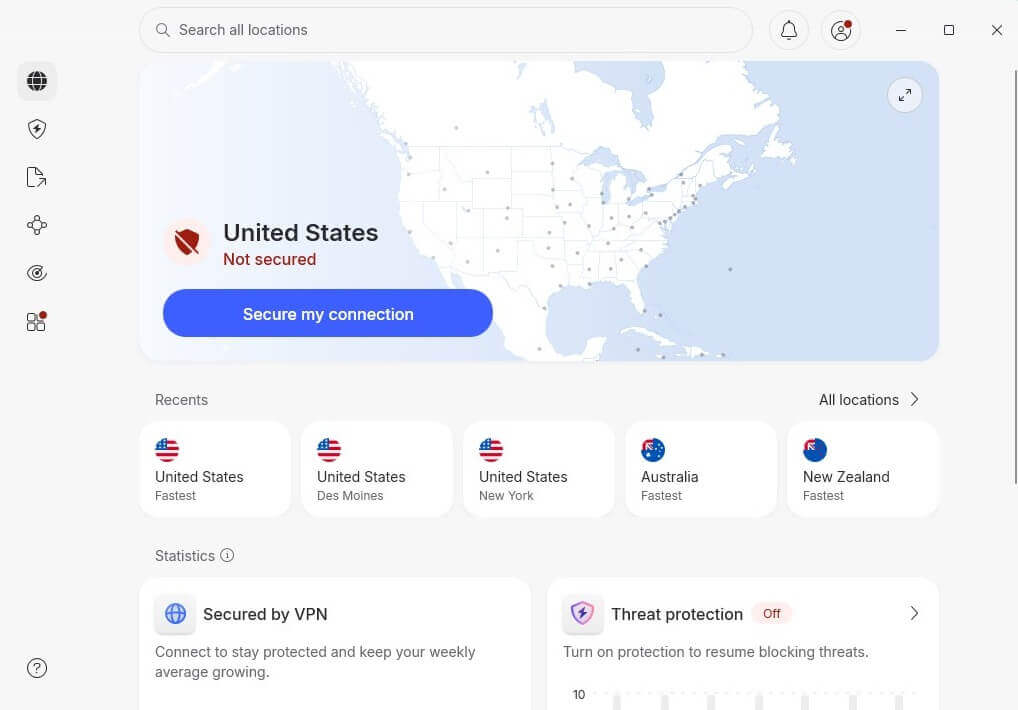
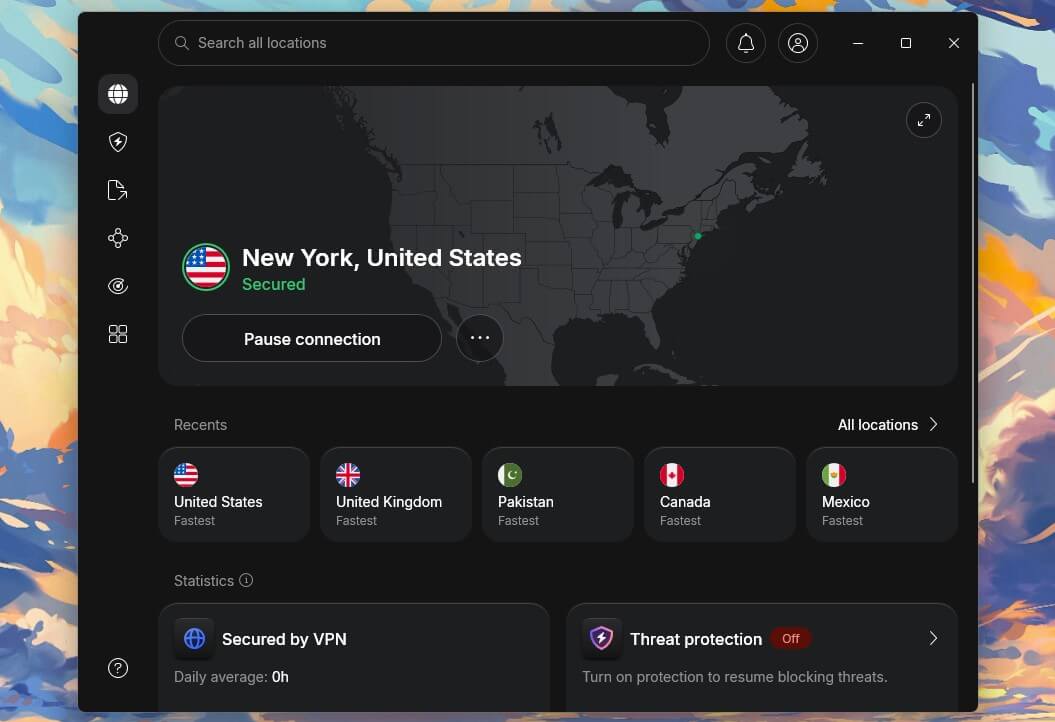
For this guide, we used our Windows 11 computer, so we downloaded the setup file and ran it. Once we installed NordVPN, we launched its application and signed in to the dashboard.
📍 Connect to a Server Where CapCut Works
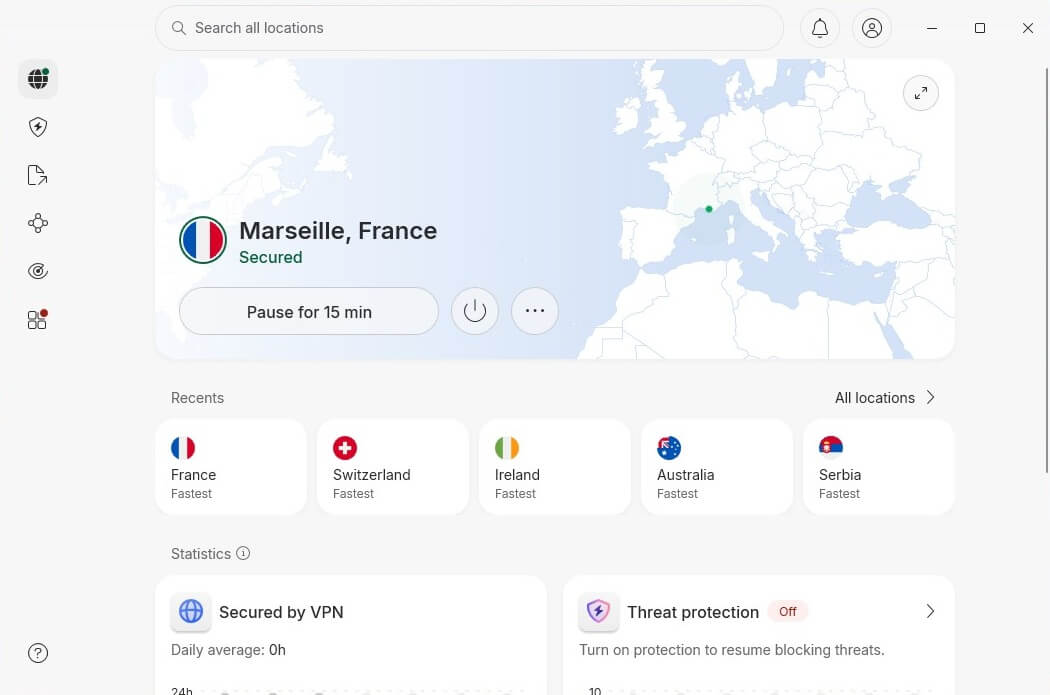
CapCut is banned in India and several other locations. However, despite trust issues on the US side, the app still works in this country. That said, you can use any US server or servers abroad. To connect to a server, click the country you want on the list. For this guide, we went with a random server in France.
🎞️ Download and Use CapCut
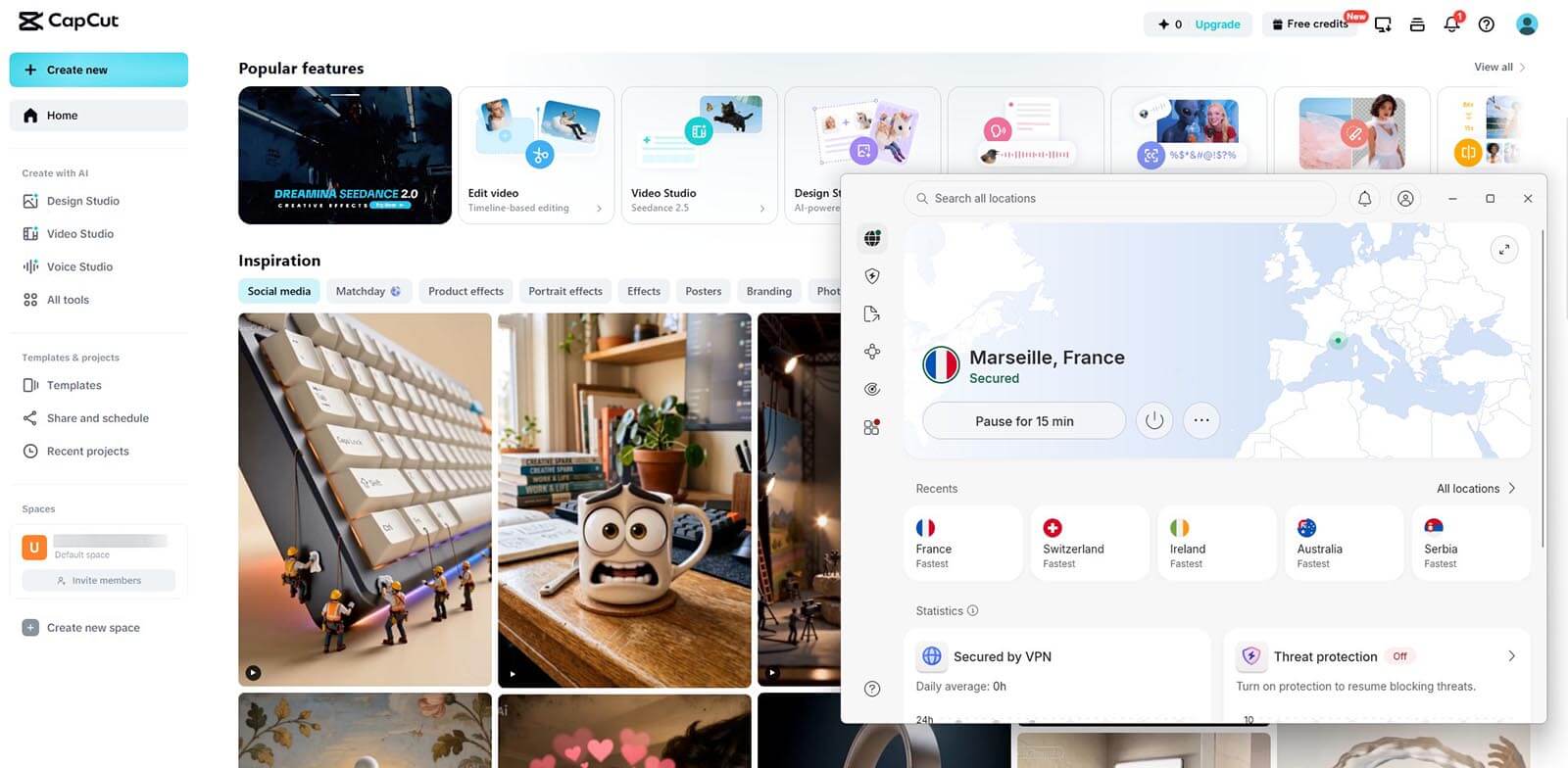
Visit CapCut’s website and see if it works. It should work perfectly, and you should be able to download the app without issues. On the site, click on Download, select your platform, install the app, and enjoy. We tried its web application, and as you see below, it worked well, without any restricitons in features and options.
Compare the Best CapCut VPN in 2026
Our guide on using the best VPN for CapCut was short and simple. However, let us introduce you to our top three favorite CapCut VPNs in 2026. We tested over 50, but these three came out on top as the best-performing.
| NordVPN | Proton VPN | ExpressVPN | |
|---|---|---|---|
| Best for | Fastest exports | Privacy and price | Simplest setup |
| Server network | 9,500+ servers, 149 countries | 20,000+ servers, 148 countries | 113 countries, 214 locations |
| Average speed loss | 9% | 12% | 13% |
| Fastest protocol | NordLynx | WireGuard | Lightway Turbo |
| Split tunneling | Yes, Windows and Android | Yes, Windows and Android | Yes, most platforms |
| Disguises VPN traffic | Obfuscated servers and NordWhisper | Stealth protocol | On every connection, no setting |
| Devices at once | 10 | 10 | 10 on Basic |
| Price from | $3.49 a month | $2.99 a month | $2.99 a month |
| Refund window | 30 days | 30 days | 30 days |
1. NordVPN: Best VPN for CapCut Overall
Pros
- Wide server spread
- Good for unblocking sites and apps
- Advanced security features
- Fast and reliable speeds
- Affordable Basic plan
Con
- Occasional connection issues
NordVPN is a household name and easily the best CapCut VPN. It’s crafted masterfully and offers servers in 149 countries. Rest assured, the VPN works with the video editor and unblocks it anywhere, with 100% efficiency. One of its best characteristics is security, thanks to double VPN servers for better encryption.
The Plus plan also includes Threat Protection Pro for blocking malware and ads. This makes NordVPN better than McAfee VPN or any other VPN from antivirus companies. Beginners like its one-click connections for unblocking CapCut. Similarly, the VPN has easily accessible P2P servers for hardcore torrenters.
When you take a break from content creation, you can also rely on NordVPN to unblock all popular streamers, including Netflix. Its broad device compatibility means you can use it on all major platforms, even on routers and gaming consoles. Best of all, NordVPN’s cost is one of the lowest in 2026.
The Biennial Basic plan is about $3.5 per month, and for half a dollar more, you can get a Plus plan with more security features. The best-value VPN for CapCut offers a 30-day money-back guarantee for risk-free testing. Plus, you can often save even more on it thanks to great NordVPN discounts throughout the year.
2. Proton VPN: Best VPN for Privacy

Pros
- Secure Core servers
- NetShield blocks ads
- Stealth obfuscation
- Port forwarding
- VPN Accelerator
Cons
- No Smart DNS
- Slower support
Proton VPN is the best VPN for CapCut users who care about privacy. Its 20,000 servers in 148 countries work well with region-locked content. Plus, there’s WireGuard with impressive speeds, paired with VPN Accelerator. As a premium service, it has unlimited bandwidth and data for day-to-day CapCut creation and editing.
The VPN also blocks ads and trackers using NetShield. On top of that, Proton VPN is famous for its torrenting servers reliable for their purpose, as proven in our Proton VPN review. Its flawless privacy makes it one of the most desirable CapCut VPNs. First, it owns many of its servers, including Secure Core.
Second, Proton VPN has a zero-log policy audited several times. Third, its apps are fully open-source. Overall, Proton VPN is highly safe, secure, and capable, all for a pocket change. The biennial plan is our favorite, with a price of $2.99 per month. Proton VPN has a 30-day money-back guarantee for all plans.
3. ExpressVPN: Built for Beginners

Pros
- Easy-to-use apps
- No-log policy
- One of the fastest VPNs
- Built-in ad blocker
Cons
- No multi-hop connections
- Limited customization
Another option to unblock CapCut is ExpressVPN. As one of the top-rated CapCut VPNs, it’s incredibly fast, with servers in 113 countries. Its Lightway Turbo protocol blends speed and unblocking prowess, and even works in censored countries, rendering this provider one of the top VPNs for India and China.
Furthermore, its apps are intuitive, with seamless one-click connections. Security hasn’t taken a punch, and ExpressVPN still offers 256-bit encryption to prevent spying and data collection. Speaking of that, ExpressVPN doesn’t keep logs and even has an audited no-log policy that reinforces its brave claims.
During our tests, we noticed that ExpressVPN is perfect for streaming, unblocking, and watching content in Full HD. It isn’t surprising that ExpressVPN works with Netflix and even has SmartDNS to support non-VPN-friendly devices. As the best CapCut VPN, it has all you need for top-to-bottom privacy.
RAM-only servers, Forward Secrecy, leak protection, and even ad-blocking. You can also get up to 14 simultaneous connections, depending on the plan. We advise the biennial Basic plan with four free months for $3-$3.5 per month, with 10. However, feel free to explore other deals and get fantastic discounts below.
Will a Free VPN for CapCut Work?
When talking about a VPN for CapCut to avoid, free VPNs come first. These VPNs won’t work because of their smaller server fleets. While all free VPNs have US servers, and many others, they’re usually not optimized for unblocking. That includes streaming platforms. Most free VPNs also restrict the amount of data.
Windscribe and TunnelBear, two popular options, limit you to 10 GB and 2 GB, respectively. Another thing we often criticize is the lack of security and privacy. Exceptions exist, but nearly all free VPNs lack tracker protection, Double VPN servers, ad-blocking, and, in some cases, even basics like a kill switch.
The majority of free VPNs also keep logs, which isn’t great for privacy. We can recommend Proton VPN’s free plan with unlimited data. However, as it’s slower, not P2P-optimized, and has just ten server locations, this provider is underwhelming. In general, free CapCut VPN services won’t work well, at least not in the long run.
It’s smarter to get the best VPN for CapCut from our list and use a money-back guarantee. This will provide you with a refund option, and you can enjoy the VPN for up to 45 days.
Summary of the Best VPN for CapCut
Using a reputable VPN for CapCut is a huge advantage. It unblocks CapCut anywhere, and with security and encryption, it’s easy to see why many want it. NordVPN is the top performer and an almost flawless VPN. However, we strongly encourage you to give other VPNs a shot. Proton VPN and its 20,000+ servers are unique, while ExpressVPN and its user-friendly apps with strong security impress the most demanding users. Pick your VPN, download CapCut, and take full advantage of its tools.
Frequently Asked Questions
🌎 In which country CapCut is available?
Pretty much everywhere apart from India and Taiwan. Depending on the time, other countries may ban the app, including yours. If this happens, using NordVPN, Proton VPN, or ExpressVPN will help.
💾 What is the best VPN server for CapCut?
The best VPN server for this video editor is any location outside India and Taiwan. That said, you can use pretty much any server to get CapCut's full video-editing suite and enjoy the app without restrictions.
⚖️ Is using a VPN for CapCut legal?
Yes, it's legal. People in India and Taiwan use VPNs to access restricted content. In fact, these great VPNs for Taiwan unblock this video editor and provide online privacy to combat government surveillance.
✅ Do I need a VPN to use CapCut?
No, a VPN is not necessary. However, it's recommended to unblock the service and access every feature. It's also welcome for security and preventing data collection from this app and your ISP. That said, if CapCut works in your country, you're all set. In this case, you can use a VPN for other purposes.
📥 How to download CapCut in India?
To download CapCut in India, you first must connect to a VPN. Since the video editor is now unavailable there, you must change your IP address to a country abroad. From there, you can sign in to your account and download the video editor or use it online. During this, use a trusted VPN provider like NordVPN or Proton VPN.
