
Let’s settle the Kinsta vs SiteGround debate once and for all. Which web hosting is better for your WordPress website in 2026? After thoroughly examining both, we ended up settling for SiteGround as a more affordable, but nearly equally capable option. Interested in more nuance behind this quick conclusion?
That’s where our SiteGround vs Kinsta comparison comes in. We compared their speeds, features, prices, plans, security, ease of use, and customer support for you. At the end of each round, we declared the winner, and at the end, we explained why we prefer SiteGround overall. Ready for a tough battle? Let’s go.
SiteGround vs Kinsta: Key Features Compared
| SiteGround 🏆 | Kinsta | |
| 📋 Types of Hosting | Managed WordPress, cloud, and reseller hosting | Managed WordPress hosting |
| 💾 Storage Size | Up to 40 GB | Up to 100 GB |
| 🌐 Bandwidth | Unmetered | 20 GB to 750 GB |
| 🚧 Hosted Websites | Up to unlimited | Up to 60+ |
| 🔽 Backups | Daily and on-demand | Daily and on-demand |
| 💵 Starting Price | $3.99 per month | $30 per month |
| 🔙 Money-Back Guarantee | 30 days | 30 days |
| ⚙️ Ease of Use | Beginner-friendly | Suited to beginners and enthusiasts |
| ♻️ Site Migration | Free | Free |
| 🆓 Free Domain | No | No |
| 🔐 Security | Free SSL, web application firewall, DDoS protection, malware protection, Security Optimizer, AI anti-bot | Free SSL, web application firewall, DDoS protection, malware protection |
| 📧 Email Accounts | Yes, unlimited | No |
Plans and Pricing
The first aspect we’ll examine in our Kinsta vs SiteGround review is their prices. They’re very different, with SiteGround costing considerably less, and Kinsta offering some fairly expensive prices. Hosting types are also different. SiteGround offers shared, managed WordPress hosting and cloud hosting.
Meanwhile, Kinsta is primarily a managed WordPress host, but it’s not a typical shared hosting provider. Instead, it uses exceptional isolation technology, which isolates each website to prevent service and resource sharing with other users. As you’ll soon see, this results in difficult-to-beat performance.
For those in a hurry, let’s quickly address their starting prices:
- Kinsta: $30 monthly for the single-site plan or $59 monthly for two websites.
- SiteGround: $3.99 monthly for the StartUp plan that hosts one site.
As you can notice, SiteGround is just about seven times less expensive in its most affordable plan. However, let’s dive deeper into both providers’ pricing plans and determine their value for money.
Kinsta Plans & Pricing
Kinsta is pretty flexible, and its starting prices of $30 and $59 for one or two websites can be scaled up to hundreds of dollars. Moving the slider to the right increases server bandwidth, CDN bandwidth, storage, and backup retention. By default, it’s 14 days, but if you spend more, Kinsta will keep your backups for 30 days.

For multiple sites, moving the slider to the right adds another parameter: the number of hosted websites. You can go up to 60+, while SiteGround allows unlimited. Finally, there’s the Agency plan at $284 monthly, which includes features for small and large businesses, like unbranded WordPress, account management, and others.
Be aware that Kinsta doesn’t offer a free domain name for the first year. To buy one, you’ll spend at least $15, and to add WHOIS privacy, you’re looking at another $15 to $20 annually. At least Kinsta’s first month is entirely free, but after that, you have to splurge $350 for an entire year. Plus the associated domain costs.
SiteGround Plans & Pricing
SiteGround doesn’t offer a free domain either. And its first month isn’t free, so that puts it in the same soup, right? Not exactly. SiteGround starts at $3.99 monthly, but even if you go for the next-tier GrowBig plan, which is $6.69 monthly, you still spend way less than on Kinsta. You can even pick the GoGeek plan at over $10.60.
This is SiteGround’s top-tier plan with the largest storage, unlimited websites, and much more.

In our SiteGround review, we used the GrowBig plan and enjoyed it thoroughly. It still offers unlimited sites, 20 GB of storage, unmetered traffic, and ‘space’ for up to 100,000 visitors. Not to mention, it’s still packed with managed WordPress features and optimization methods, allowing your website to flourish seamlessly.
SiteGround has plenty of interesting freebies that we’ll address later. Let’s just mention that SiteGround has free email for your domains, which you’d otherwise buy in Kinsta. SiteGround’s only downside is the renewal cost, which is a bit higher, but still not higher than Kinsta’s.
So, you could say that SiteGround is a better value for money overall.
Money-Back Guarantee & Refund Policies
You can test both providers risk-free, but differently.
Kinsta’s 30-day money-back guarantee is a free trial. When you sign in, you’ll provide your credit card, but you won’t pay immediately. You have 30 days to play around with it and see how you like it. SiteGround must be paid for immediately, but you have 30 days to get a refund if you’re unsatisfied. Do they offer free plans?
No, and we can’t say we’re surprised given their popularity as top-tier managed WordPress hosting services. We listed some decent free hosting services here, but you can also enjoy some amazing VPS hosting providers for free for 30 days.
Winner: SiteGround 🏆
Hosting Management: Which Hosting is Easier to Use?
In our SiteGround vs Kinsta comparison, we had the pleasure of exploring their intuitive and polished control panels. We must say we’re impressed with both. Managed WordPress hosting is all about convenience, and neither provider skimps on that.
Kinsta
Getting started with Kinsta is effortless. You’ll first register for free and immediately be offered a few options to start. You can make a new site from scratch, migrate one, or install WordPress on the spot. We chose the latter option, and Kinsta installed WordPress in merely a few minutes.
Since we didn’t have the domain name, we bought one soon after. Then, we made a WordPress website and picked one of 37+ server locations: the United States.

After that, we connected the domain to our site, waited about 24 hours for DNS propagation, and we were ready to go. Kinsta offers a proprietary control panel, with many bits of information about server resource consumption, used bandwidth, visitors in a month, etc. The left-hand-side menu holds all the options you’ll use.
You can manage applications, access databases, and list your WordPress sites. Adding apps and services is easy with the black button on the home screen. Meanwhile, you’ll dig out many advanced options as well, which makes Kinsta highly customizable. Managed WordPress is part of the mechanism, making your life easier.
Kinsta optimizes your site for performance and security, manages updates, and even automatically connects your free Wildcard SSL and a CDN.
SiteGround
SiteGround’s start-up process is nearly identical. However, since you can buy a domain name straight from its site, it was a bit simpler. We did that and connected the domain name to our site right away. SiteGround’s initial setup asked us whether to install WordPress or a WordPress + WooCommerce combo.
We picked the first, and like Kinsta, SiteGround did that within minutes.
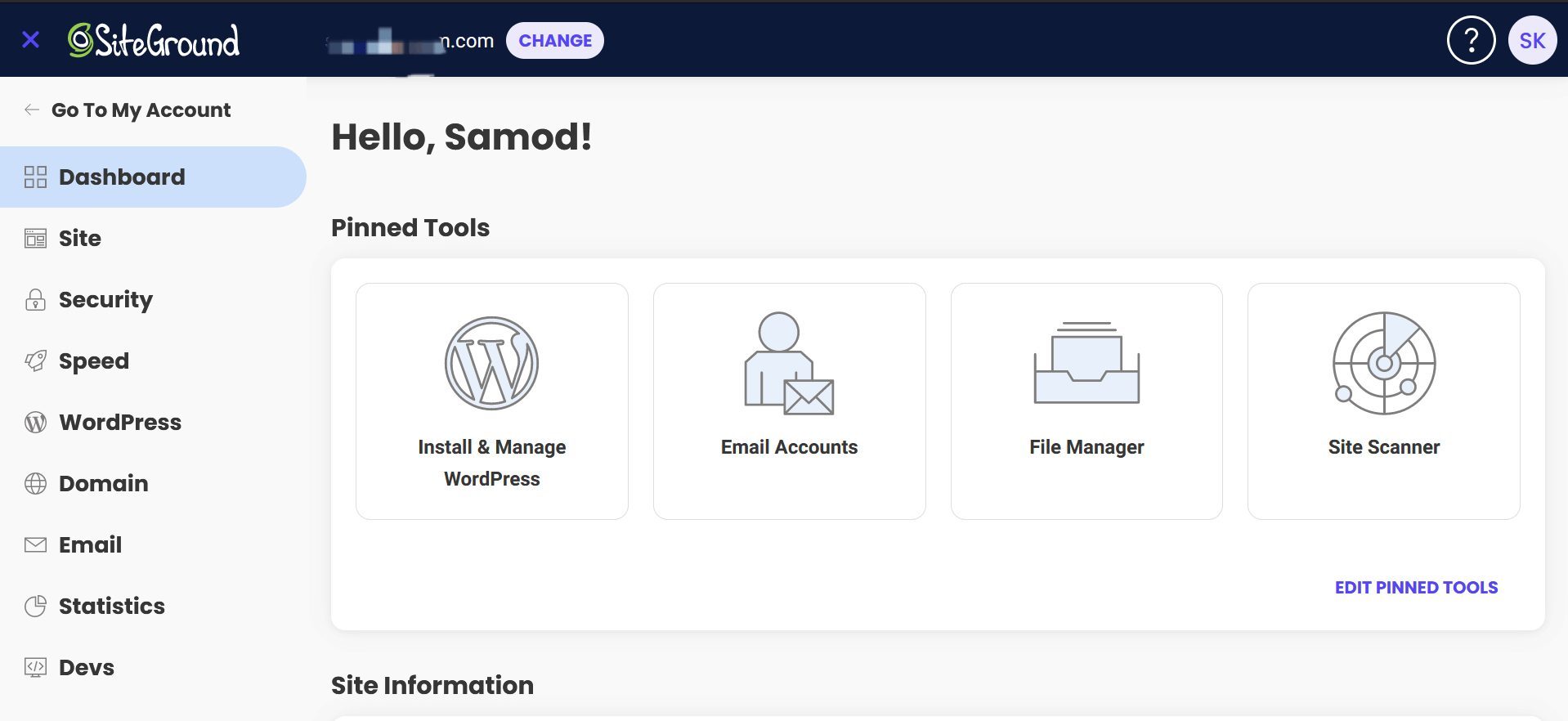
After that, we signed in to our admin panel and made an identical website. Seconds before that, SiteGround allowed us to pick the server location, and we again chose the USA. You can go with Singapore if you target the Asian audience. SiteGround uses sPanel or Site Tools, whose home screen allows you to pin the most used tools.
On the left, you still have standard tools like Security, WordPress, Email, Statistics, etc. SiteGround’s sPanel is incredibly smooth, with everything happening on a single web page, without unnecessary loading. Kinsta’s control panel is a little less smooth in this aspect, but equally intuitive and satisfying to use.
Basically, they’re two different philosophies. Yet, both make us feel at home, as if we had used them for centuries. This leads to the second Kinsta vs SiteGround comparison’s outcome, which is a tie!
Winner: Tie 🟰
Kinsta vs SiteGround Features
We’ve established Kinsta’s more expensive plans, which should, in theory, offer more. Apart from having isolated server resources, which is a big plus, Kinsta doesn’t have any specific advantages that make its higher price justifiable. Here’s what you’ll get:
- At least 10 GB or 20 GB of storage for a single site or two sites
- At least 20 GB of server bandwidth
- Free CDN with at least 125 GB of bandwidth
- 99.99% uptime guarantee (with uptime checks every three minutes)
- Daily and on-demand backups (14 to 30-day retention)
- Free website migration
- Wildcard SSL included for free
- WordPress MultiSite and Staging
SiteGround’s standout features include:
- 10 GB to 40 GB of storage for a single site or unlimited sites
- Unmetered server bandwidth
- Free Cloudflare CDN
- 99.9% uptime guarantee (with uptime monitoring)
- Daily and on-demand backups (30-day retention)
- Free website migration
- Let’s Encrypt SSL
- WordPress MultiSite and Staging
- Free email (unlimited accounts)
- Free email migration
- Unlimited collaborators
- Free website builder
You’ll notice that SiteGround’s feature list is a bit lengthier. Kinsta can be configured to offer more storage, but ultimately fails to deliver free email and email migrations, and unlimited collaborators that SiteGround offers in all plans. SiteGround’s 30-day backup retention is superior to Kinsta’s default 14-day backup retention.
You can say the rest of the features are nearly identical, and you’d be 100% right. But is Kinsta much more expensive than SiteGround? Yes! At this price, we expected a free domain name, email hosting, or even a formidable website builder, which SiteGround offers for free in every plan. This round goes to SiteGround.
Winner: SiteGround 🏆
Speed & Uptime Tests: Which Web Host Performs Better?
This Kinsta vs SiteGround comparison made us realize we’re dealing with some of the most impressive hosts, performance-wise. Before we describe our results, let’s take a moment to explain how we tested them. As hinted at before, we made two identical websites and hosted them on the US server.
The WordPress theme we picked was Astra, a popular lightweight theme, which we enriched with a few custom tidbits and lots of compressed images and videos. We then used three tools to test their performance, including Pingdom, Loader, and GTmetrix, for uptime, response time, and loading speed.
Uptime & Response Time Results
Let’s kick it off with Pingdom, which we used to monitor their uptime. The testing period was the past two months, and the results we achieved were phenomenal:
- Kinsta: 99.99% uptime (99.99% promised)
- SiteGround: 100% uptime (99.9% promised)
In the past two months, from the time of comparing SiteGround vs Kinsta, the former achieved a slightly better result. However, the difference is so minor that it’s hard to solidify SiteGround as a winner. We’re sure it does have some downtime, and the 100% result is, to some extent, a coincidence.
What’s not a coincidence is the response time result. We launched Loader and tested both websites with 100 virtual users to achieve these extraordinary results:
- Kinsta: 89 ms average, 61 ms minimum, 176 ms maximum.
- SiteGround: 143 ms average, 135 ms minimum, 442 ms maximum.
SiteGround was slower here, but still impressively fast for WordPress hosting with shared resources. We believe it’s also down to SiteGround’s NGINX server implementation, which is true on Kinsta’s side, whose performance superiority ultimately stems from better server isolation, as explained earlier.
Page Load Speed Comparison
Next up, we have GTmetrix speed test results, which were very satisfying on both sides. We used the US server to host our two WordPress websites, but opted for the Canadian server in GTmetrix. This was to avoid having ideal conditions where both visitors and the website itself are in the same region.
During this SiteGround vs Kinsta comparison, we observed:
- Time to First Byte or TTFB
- First Contentful Paint or FCP
- Largest Contentful Paint or LCP
- Time to Interactive or TTI
- Fully Loaded time or FLT
Let’s examine the table below for more comprehensive information:
| Kinsta | SiteGround | |
| TTFB | 131 ms | 253 ms |
| FCP | 249 ms | 353 ms |
| LCP | 587 ms | 484 ms |
| TTI | 433 ms | 662 ms |
| FLT | 702 ms | 708 ms |
Numbers are on Kinsta’s side, with lower TTFB, FCP, and TTI values, implying slightly better performance. Interestingly, SiteGround loaded the largest element on the page just a tad quicker, and managed to achieve only a smidge slower Fully Loaded Time (FLT).
Ultimately, SiteGround and Kinsta loaded the page virtually at the same time, while Kinsta’s scenario allowed the page to become interactive much more quickly. The experience is ultimately great on both sides, but since Kinsta has superior response times and slightly better GTmetrix results, it’s this round’s winner.
Winner: Kinsta 🏆
Security: Which Web Host Is the Safer Option?
On the security front, neither holds its punches. In a recent WPX vs SiteGround comparison, we were impressed with the two managed WordPress’ security. This time, it’s no different, as we experienced zero issues thanks to their ironclad security measures. Speaking of them, here’s what Kinsta offers:
- Free Wildcard SSL
- Malware protection
- Uptime monitoring
- DDoS protection
- Managed Web Application firewall
- Daily automatic backups
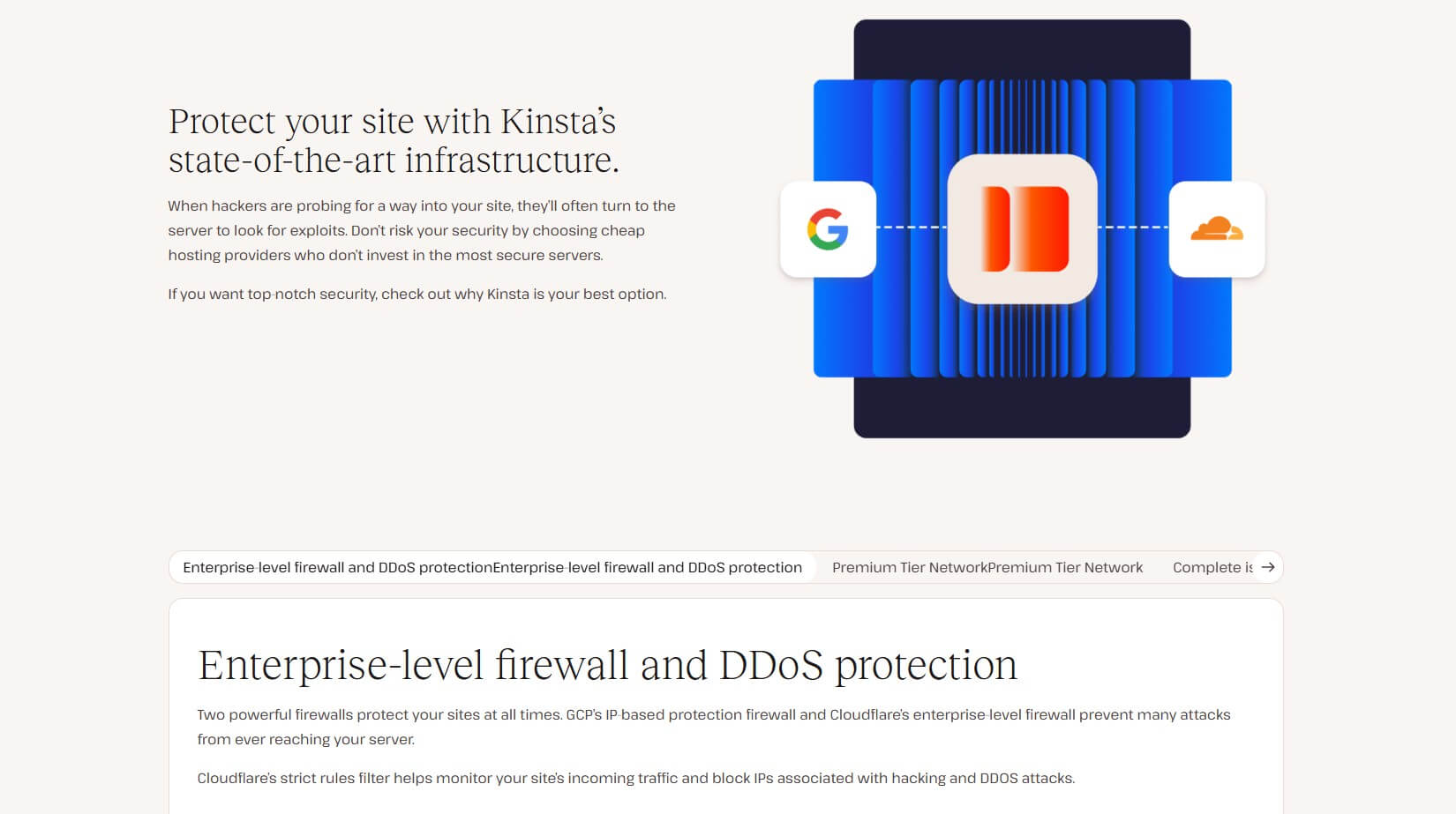
SiteGround offers these features:
- Free Let’s Encrypt SSL
- Malware protection
- WordPress Security Optimizer
- Automatic daily backups
- AI anti-bot system
- DDoS protection

Pretty similar setups, but SiteGround includes one novelty: an AI anti-bot system. It’s an AI-based, self-learning algorithm that adapts to new threats to eliminate them swiftly. Best of all, it scans your website every 0.5 seconds to ensure nothing gets past its impenetrable defenses.
You’ll notice that they use different SSL certificates, but in practice, that makes no difference. Wildcard is more expensive and used for securing multiple sites and online stores with a single certificate. Let’s Encrypt is a more typical solution with bank-grade encryption that does its job equally well.
With that said, both are safe and secure, but we’d give SiteGround a slight advantage due to its AI anti-bot system that adapts to new online threats and removes them efficiently.
Winner: SiteGround 🏆
Customer Support
Their support teams are more than helpful if you get stuck. However, that’s unlikely to happen because of their easy onboarding processes and hosting management. If you still need help, you can use live chat, phone, and email support from SiteGround. A knowledge base is also there.
SiteGround’s response times are brief, but you’ll first be redirected to the knowledge base to seek answers. If you fail, a support agent will pick you up and solve the issue. Opting for a phone call is also viable if you’re talkative and want to find a resolution quickly. Overall, SiteGround’s support is satisfying.
Kinsta’s primary contact methods are email and live chat. While SiteGround’s support works 24/7, Kinsta’s live chat support works Monday through Friday from 5 am to 10 pm UTC. On the flip side, email support is always there, but expect slower response times. When live chat works, it’s blazing fast.
But so is looking through the knowledge base for answers. It’s comprehensive and filled with tutorials and answers to frequently asked questions. Whichever provider you choose, you’ll be satisfied with the level of support and confidence in fixing even the most pressing issues you have with your hosting.
Winner: Tie 🟰
SiteGround vs Kinsta: The Final Verdict
This marks the end of our Kinsta vs SiteGround comparison and a definitive win for SiteGround. Kinsta is a fantastic option and one of the best managed WordPress hosting services you can buy. Its performance, features, security, and ease of use are undeniable, but only if you’re willing to spend more.
On the other hand, SiteGround provides a similar experience, being only marginally slower, but with the same impressive security, ease of use, overall features, and customer support. The difference? It’s the price. Unfortunately for Kinsta, SiteGround is a few times less expensive, and that’s the main issue.
SiteGround has a better value for money and lacks nothing compared to Kinsta, while simultaneously not charging you extra. Pick SiteGround’s GrowBig plan at $6.69 monthly and enjoy the world’s leading managed WordPress hosting with all the essentials and advanced features. That’s our final advice.
