If you’re looking to get a VPN to safeguard your privacy, you’ve most likely heard that a more expensive provider is always better. Truth be told, there are amazing cheap VPNs that will cost you merely a few dollars a month, yet they’ll give you excellent performance and security.
One of them is undoubtedly Surfshark, a provider that we want to compare with ExpressVPN, which is a more expensive solution. Conversely, ExpressVPN is, for us, among the best providers you can currently get, and despite its less affordable price, it’s still more than worth getting.
The goal of today’s Surfshark vs ExpressVPN comparison is to see if a more expensive VPN is drastically better. Also, if you’re thinking about getting any of these two providers, we want to tell you which one is more reliable so that you can make an easier choice.
Our ExpressVPN vs Surfshark VPN comparison consists of numerous tests where we’ll cover each aspect of both providers, leaving no stone unturned. Therefore, if you’re in doubt about which provider to get, believe us – this is the best comparison you’re gonna find online, so stay with us to find out more!
Surfshark vs ExpressVPN: Key Features Compared
| Surfshark VPN | ExpressVPN | |
| 💰 Starting price | $1.99 monthly | $3.49 monthly |
| 💸 Money-back guarantee | 30 days | 30 days |
| 🆓 Free version | No ❌ | No ❌ |
| 📺 Working with Netflix | Yes ✅ | Yes ✅ |
| 🔽 Torrenting allowance | Yes ✅ | Yes ✅ |
| 🔟 10 Gbps servers | Yes ✅ | Yes ✅ |
| 🥸 No-logging policy | Yes ✅ | Yes ✅ |
| 🌐 Jurisdiction | Netherlands | British Virgin Islands |
| 📱 Simultaneous connections | Unlimited | 10 to 14 |
| 🛜 Protocols | WireGuard, IKEv2, OpenVPN | OpenVPN, Lightway Turbo |
| 💾 Servers | 3,200+ in 100+ countries | 3,000+ in 105+ countries |
| 💯 Best for | Streaming and unlimited device protection | Ease of use and connection speeds |
| ☎️ Customer support | 24/7 live chat, email, knowledge base, FAQs | 24/7 live chat, email, knowledge base, FAQs |
Surfshark vs ExpressVPN: Apps & Ease of Use
Let’s start this Surfshark vs ExpressVPN duel with the applications and ease of use. It’s vital to mention that both providers offer top-grade device support and work on all major and less popular platforms. To be precise, they have native clients for iOS, Android, Windows, macOS, Linux, and Smart TV.
In addition, they can connect to Fire TV, Android TV, Apple TV, routers, gaming consoles, and other non-typical devices. ExpressVPN’s device compatibility is a bit better, though, given its better router support and more in-depth guides related to connection with different platforms.
Now, what about simultaneous connections? Well, Surfshark is at a huge advantage here as it offers unlimited simultaneous connections on a single subscription. As you can guess, this means that you can protect as many devices as you want at no additional cost, which is truly fascinating.
ExpressVPN gives you 10 to 14 connections, depending on the subscription plan, which is in the realm of an industry standard. Just a while ago, ExpressVPN’s limit was eight, but its new tiered plans introduced variable simultaneous connections. At the very least, you get ten, which is plenty!
Surfshark
When it comes to their applications, I’ll start with Surfshark first. In our Surfshark review, you’ve seen that we really liked how this provider looks and feels. Its app supports a certain level of customization where you can switch between dark and light themes.

Moreover, it’s fairly simple to use because the server list is right there on the home screen, and it takes a single click to connect to a server location. You can also find Static IP and MultiHop servers from the home screen, so you don’t have to wander around searching for them.
The Settings menu also tells a compelling story. You have all settings in two sub-menus – VPN settings and App settings. In the latter menu, you can customize the behavior of the app, while the main features are stationed in the first menu.
If you get Surfshark One, which is a more expensive subscription plan, additional features will appear on the left side of the app, where you can use them with a single click. The good thing about this provider is that the mobile apps feel the same as the desktop apps.

Whether you’re on iOS or Android, the app is pretty much identical, with almost the same settings and options. Thus, if you’re often switching between your desktop PC and mobile phone, the learning curve will be eliminated and you won’t have to accommodate for the differences.
Do we dislike anything about Surfshark’s apps? To be honest, no. It’s very functional, it looks good, and it shows you everything you want to know. Is it the simplest VPN client we’ve ever used? Well, definitely not – that title goes to ExpressVPN.
ExpressVPN
Speaking of which, ExpressVPN takes minimalism and simplicity to another level. What’s more, its desktop and mobile clients are 100% identical in both the interface and color scheme, which switches from orange to green upon establishing a connection to a server.

To connect to a server, you need to open the server list, double-click on the location you want, and ExpressVPN will connect in two seconds. You can also find your recent location on the home screen, as well as the smart location that boasts the fastest speeds.
The server list is well organized, and all locations are divided by their respective continents – unlike Surfshark. Also, the Settings menu can be opened in the top-left corner of the screen, where all “main” features are located in the General and Protocol sub-menus.
From here, you can change your protocol with a single click, enable or disable the kill switch, or do whatever you want. I also like this Shortcuts menu, where you can add shortcuts to your favorite sites and access them from there safely and securely.

ExpressVPN also lets you search for different locations instead of looking for them on the list. Just use the search bar above the server list, type in the country or city you want, and you can connect right away. All in all, we can say that ExpressVPN is pretty simple to use, while the system behind it is relatively complex.
That is exactly the point. To make a complex VPN with cutting-edge technology and bring it to a user-friendly level accessible to all users. Did it succeed? Once again, YES!
Who Wins?
In this part of my Surfshark vs ExpressVPN comparison, we found ExpressVPN to be easy to use and to support more devices. Surfshark does offer unlimited simultaneous connections to balance things out, which makes this round a TIE.
Security & Privacy: Which One Is Safer to Use?
The staple of every VPN service is privacy and security. After all, there’s a good reason why the name Virtual Private Network is applied. In this part of the comparison, we’ll analyze both providers regarding their security and privacy to see how well they compare.
Security Features
Since all premium providers promise and offer similar features, it’s important to talk about the features that they share. In this case, we’re talking about 256-bit AES encryption, an automatic kill switch, split tunneling, and OpenVPN support.
Of course, both providers give you IPv6 and DNS leak protection, which is crucial for preventing unwanted leaks. Another similarity is that both providers offer a no-logs policy, but we’ll discuss that right after we talk about their differences.
Finally, we should mention that both providers base their servers on RAM. This means that every bit of information is wiped after the server is reset, which does wonders for users’ privacy.
What Are the Differences?
Are there any notable differences in this Surfshark VPN vs ExpressVPN duel?
Surfshark
Sure. Surfshark is more feature-rich, giving you some bonus features that will enhance and complement your privacy and security. For example, it offers an ad blocker, which is a very handy addition.
It’s called CleanWeb and works relatively well, although not better than NordVPN’s ad-blocker. Next, there is the NoBorders mode for bypassing censorship, as well as something called Rotating IP. This feature will rotate your IP periodically to make sure you’re untraceable online.

Surfshark also offers a speed test within the app, letting you determine the fastest server for your needs. Of course, there’s the aforementioned Surfshark One plan with antivirus, true incognito mode, and Alerts, where the latter works like the Dark Web Monitor of NordVPN.
ExpressVPN
This plan is a bit more expensive than the Starter plan, which we’ll discuss later. ExpressVPN, on the other hand, offers its proprietary Lightway Turbo protocol, which is much better than WireGuard in Surfshark. In my tests, it showed much better security and way better speeds and performance.
In ExpressVPN, you’ll also find a comprehensive speed test, which tests the entire network for overall performance, ping, and speeds. Whereas Surfshark gives you its NoBorders mode for bypassing censorship, its rival offers nothing similar.
Instead, it just works without enabling those special features, which is delightful. You don’t have to enable anything – just connect to a server and the provider does everything for you. Of course, this doesn’t apply to ExpressVPN’s newest ad blocker, which you must enable manually.
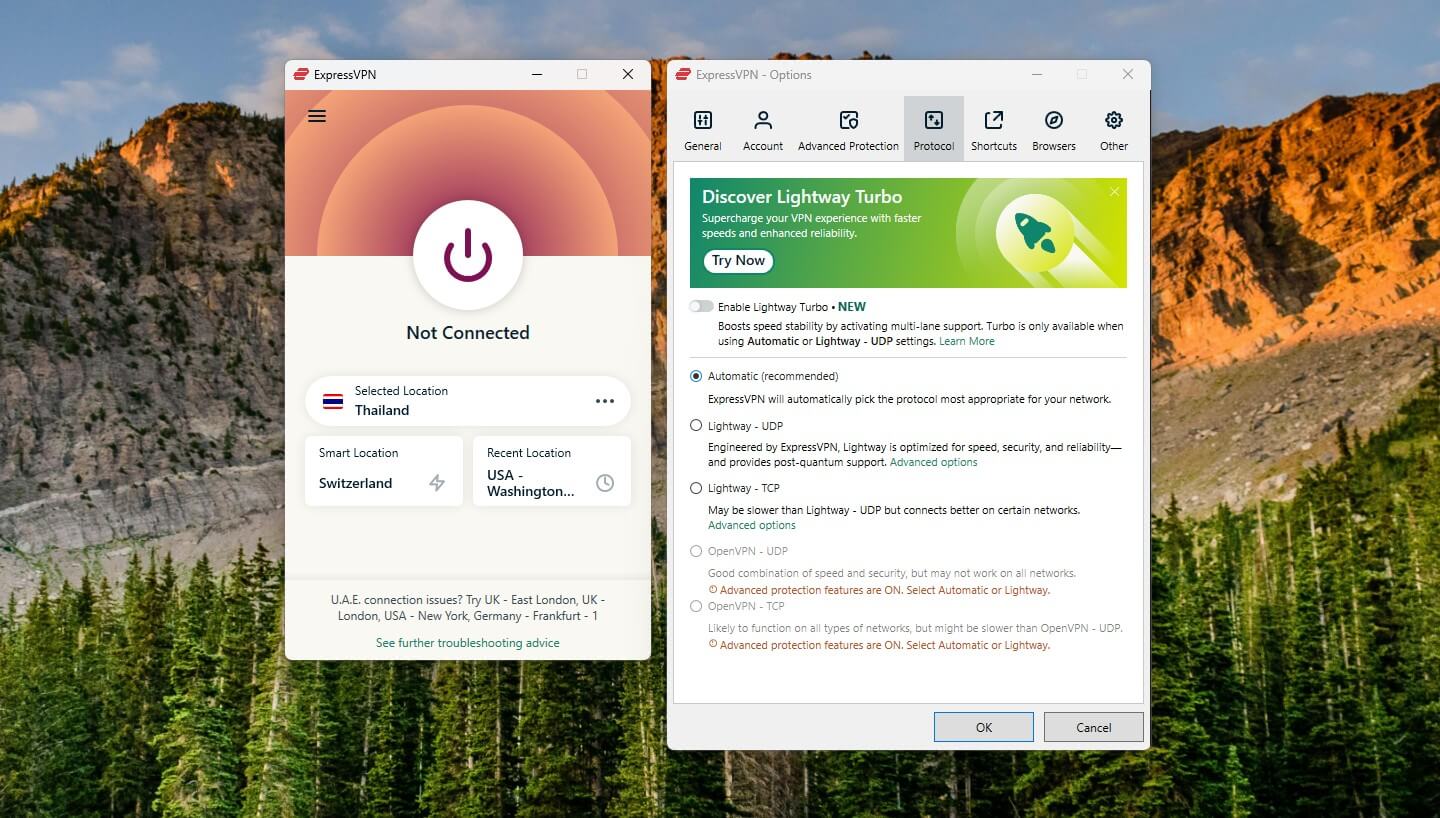
By default, this ad blocker is ON, though. It will block ads, malicious sites, and trackers, with the option to enable Parental Control for blocking porn sites. The same feature is available for iOS and Android under the name of Threat Manager.
Finally, ExpressVPN offers a free password manager called ExpressVPN Keys. It comes with every plan and is a nifty addition to keeping your passwords safe and helping you generate new secure passwords. For example, you won’t find this feature in Surfshark.
We haven’t mentioned ExpressVPN’s Identity Defender, which consists of ID theft insurance and a few other privacy-focused tools. Surfshark offers similar features, but only in the most expensive plans. Both providers have them available primarily in the United States.
Is There a No-Logs Policy?
Both Surfshark and ExpressVPN come with certified no-logging policies, which is highly commendable. Also, ExpressVPN is based in the British Virgin Islands, and if you know a thing or two about this jurisdiction, you know how privacy-friendly it is.
Besides, it’s an offshore location, so the provider isn’t obligated to store any logs of your IP address, online activities, etc. Surfshark has an external audit from Cure53 and Deloitte, while ExpressVPN went for PricewaterhouseCoopers, KPMG, and Cure53, some of the world’s largest auditing firms.

Keep in mind that Surfshark isn’t in the BVI anymore; instead, its new jurisdiction is the Netherlands.
Neither of the providers will store info related to your traffic destination, browsing history, metadata, IP/DNS address, DNS queries, or anything similar. ExpressVPN collects information for troubleshooting and maintenance purposes.
This information is in an anonymized form and cannot be traced to you. It includes your app version, the amount of data transferred in a day, dates of connection, and the choice of server location.

Surfshark, on the other hand, stores your billing information, anonymous performance data, crash reports, unsuccessful connection attempts, and a few more irrelevant bits of information. This is all needed for maintaining and improving the service, so every provider must have this info.
All in all, you can be sure that none of the providers will ever compromise your privacy by leaking your personal info to the public eye. In fact, no such thing happened with either of them, although, in terms of security, Surfshark is known for seldom having connection issues, but if that happens, its kill switch springs into action.
Who Wins?
In this part of our ExpressVPN vs Surfshark duel, both providers showed security prowess on the highest possible level. They offer certified zero-logging policies in conjunction with useful security features. It’s pretty hard to decide on the winner, and when that happens, it’s a TIE.
ExpressVPN vs Surfshark Streaming Test
If you care less about security and you just want to watch Netflix or other streaming platforms, which provider will be a better choice? Well, that’s exactly what you’re going to find out in this part of the comparison.
Netflix Test
Starting with the most important streaming platform, Netflix, we felt obligated to give you comprehensive test results. We know you love binge-watching their shows and movies, which comes as no surprise given their overwhelming number on this platform.

For this test, we included the three most popular libraries that include Netflix US, Japan, and Australia. Keep in mind that we’re located in Eastern Europe, so we have no access to any of them natively.

The good news is that both providers managed to unblock all three of them.
Other Streaming Platforms
We know that not all of you are fans of Netflix, and some of you can’t afford its subscription, which varies in price in different countries. That’s okay. There are still tons of great streaming platforms such as BBC iPlayer, Hotstar, and many others.

For this comparison, we tested BBC iPlayer and Hotstar, and we’re happy to report that both providers work flawlessly, even with their virtual servers in India.

Who Wins?
With our test results in place, we can see that both ExpressVPN and Surfshark perform exceptionally well, providing an amazing streaming experience. As both of these VPNs work with Netflix and other streaming platforms, this round is a TIE.







 4500 servers
 100 covered countries
 30 days money-back guarantee
 Unlimited connections

3000 servers
105 covered countries
30 days money-back guarantee
10 simultaneous connections
ExpressVPN vs Surfshark Speed Tests: Which One Is Faster?
Since we touched on streaming, we think it’s vital for this Surfshark vs ExpressVPN comparison to talk about these VPNs’ performance. However, to talk about that, we first need to clarify how we performed our tests and discuss different parameters.
We test every provider three times a day, three days in a row, using four server locations.
Once again, we’re located in Eastern Europe, and to test VPNs in different scenarios, we use servers in the US, the UK, Australia, and Japan, with the protocol selection on “Automatic” for realistic results.
Granted, our native internet speeds aren’t the fastest, but when you see the results, it’ll be easy to see how fast or slow these providers are. So, here’s our native internet speeds first:
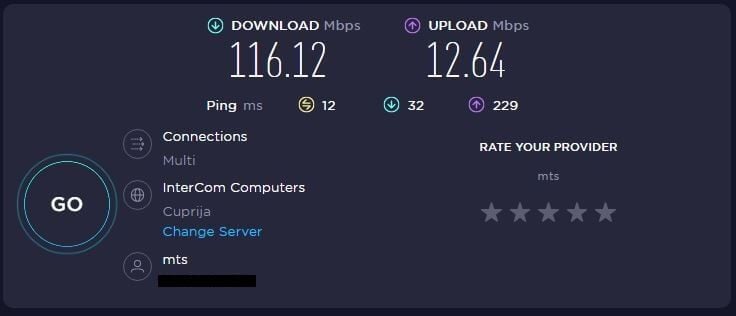
And with that in place, let’s check how well these providers perform, starting with ExpressVPN.
ExpressVPN
UK:
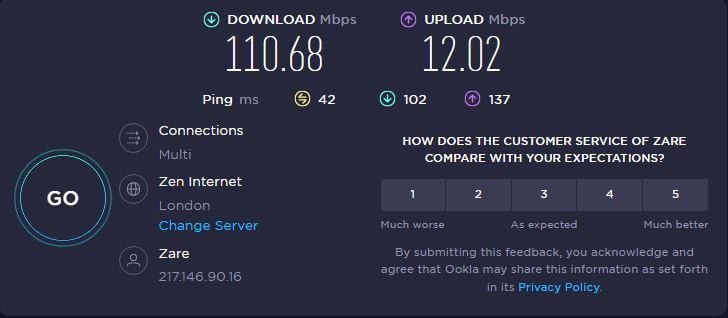
US:
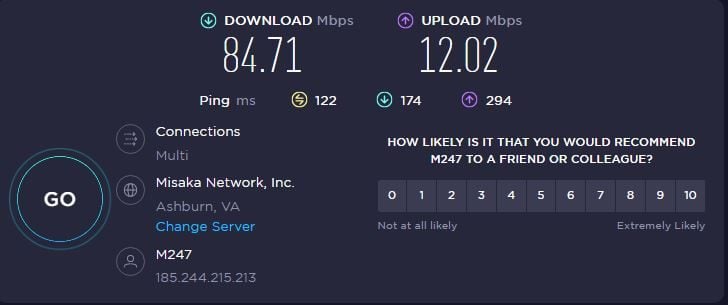
Australia:
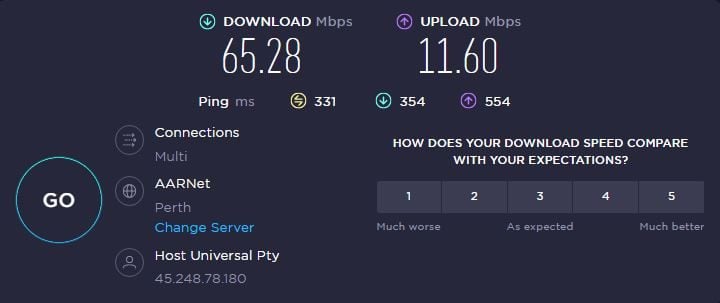
Japan:
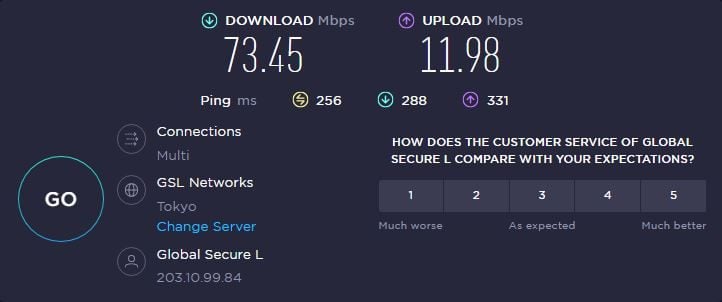
Surfshark
UK:
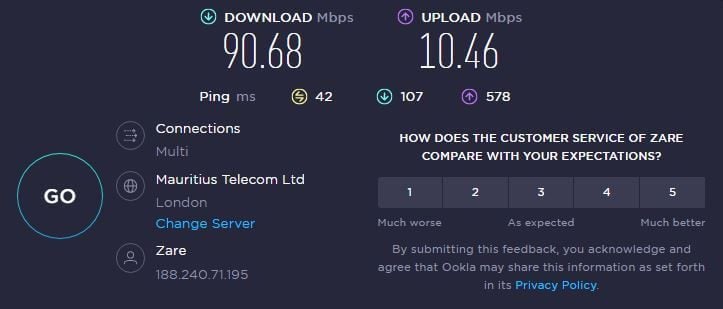
US:
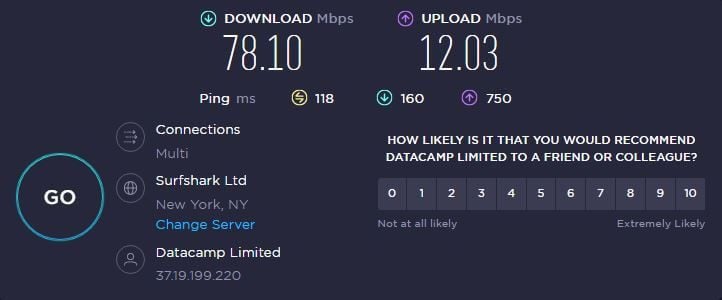
Australia:
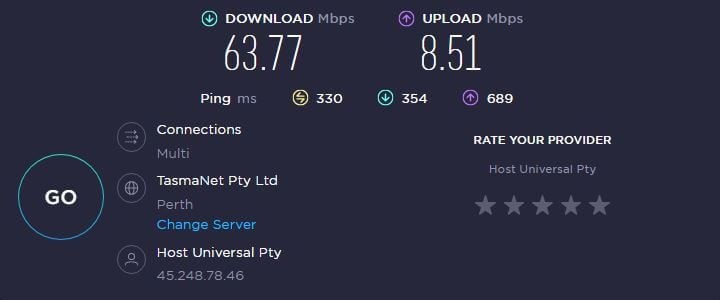
Japan:
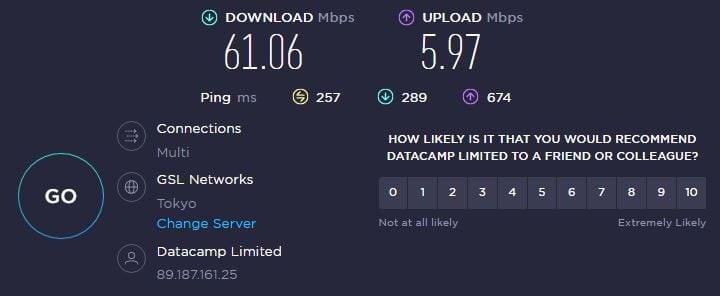
Who Wins?
Checking out the results, we can see that ExpressVPN is a lot faster than Surfshark in pretty much every server location. That said, it’s easy to conclude that ExpressVPN WINS this round by a considerable margin. Better speed retention and lower latency, things are clearer than ever!
Torrenting: Are Surfshark and ExpressVPN P2P-Friendly?
Downloading torrents is often frowned upon in many countries, with countless torrent sites blocked and torrent users punished for downloading copyrighted content. Just to make it clear, we don’t support downloading copyrighted torrents, but even in this case, torrenting isn’t safe.
While torrenting, your IP is exposed to other users and torrent sites that are often held by unknown people and companies. That’s why a safe and secure VPN for torrenting is mandatory, and luckily, Surfshark and ExpressVPN are very good choices.
Providers like NordVPN and CyberGhost offer dedicated P2P servers that are optimized for this activity. These two, however, offer nothing similar, as their server fleets are P2P-friendly in general. Simply put, all of their servers are optimized for torrenting.
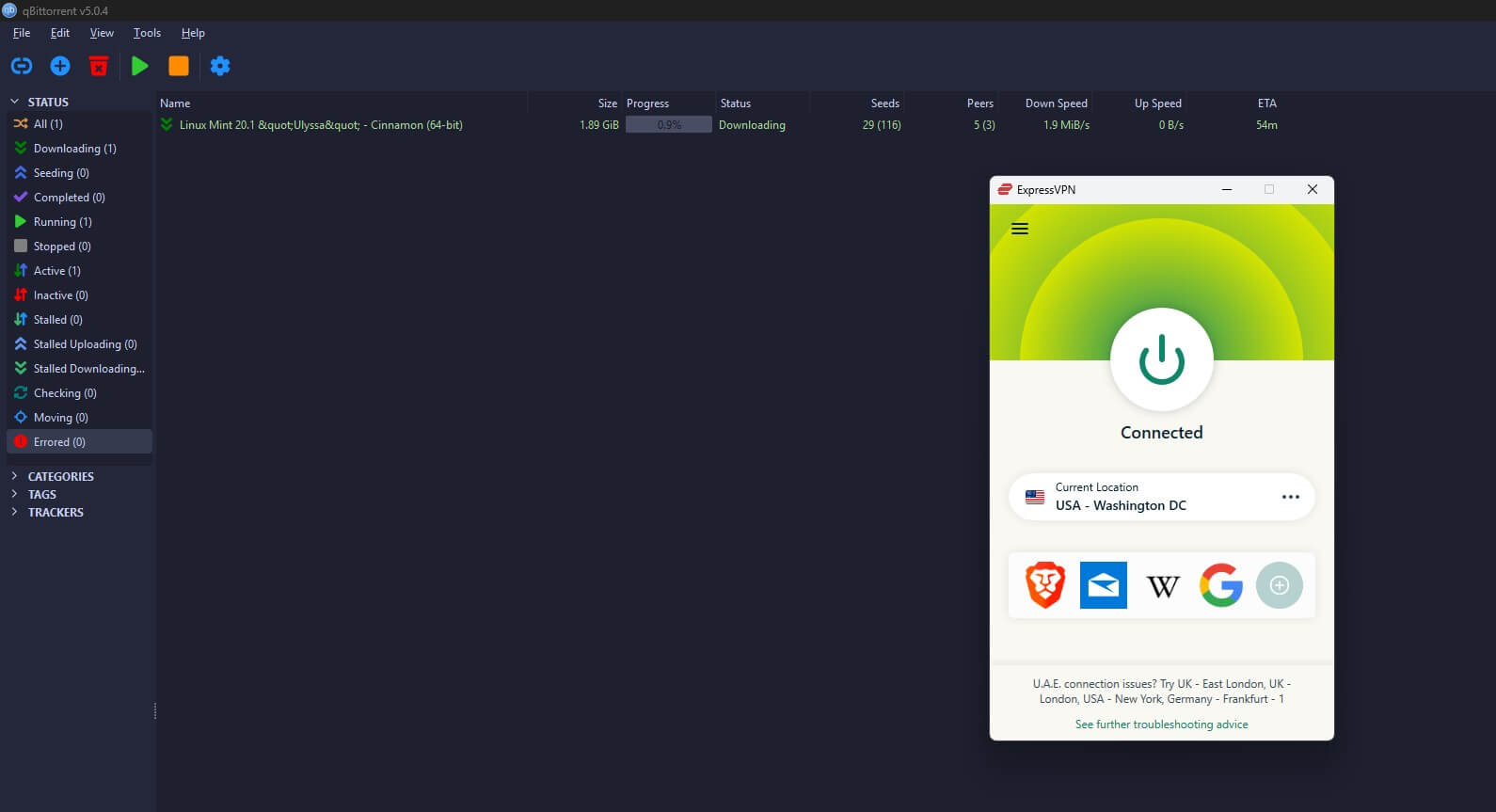
That said, all you need to do is connect to the server of your choice and start downloading right away. We recommend connecting to the closest one to minimize speed losses and maximize your performance. In doing so, we managed to download torrents quickly with both providers. Check the screenshots below:
ExpressVPN
Surfshark
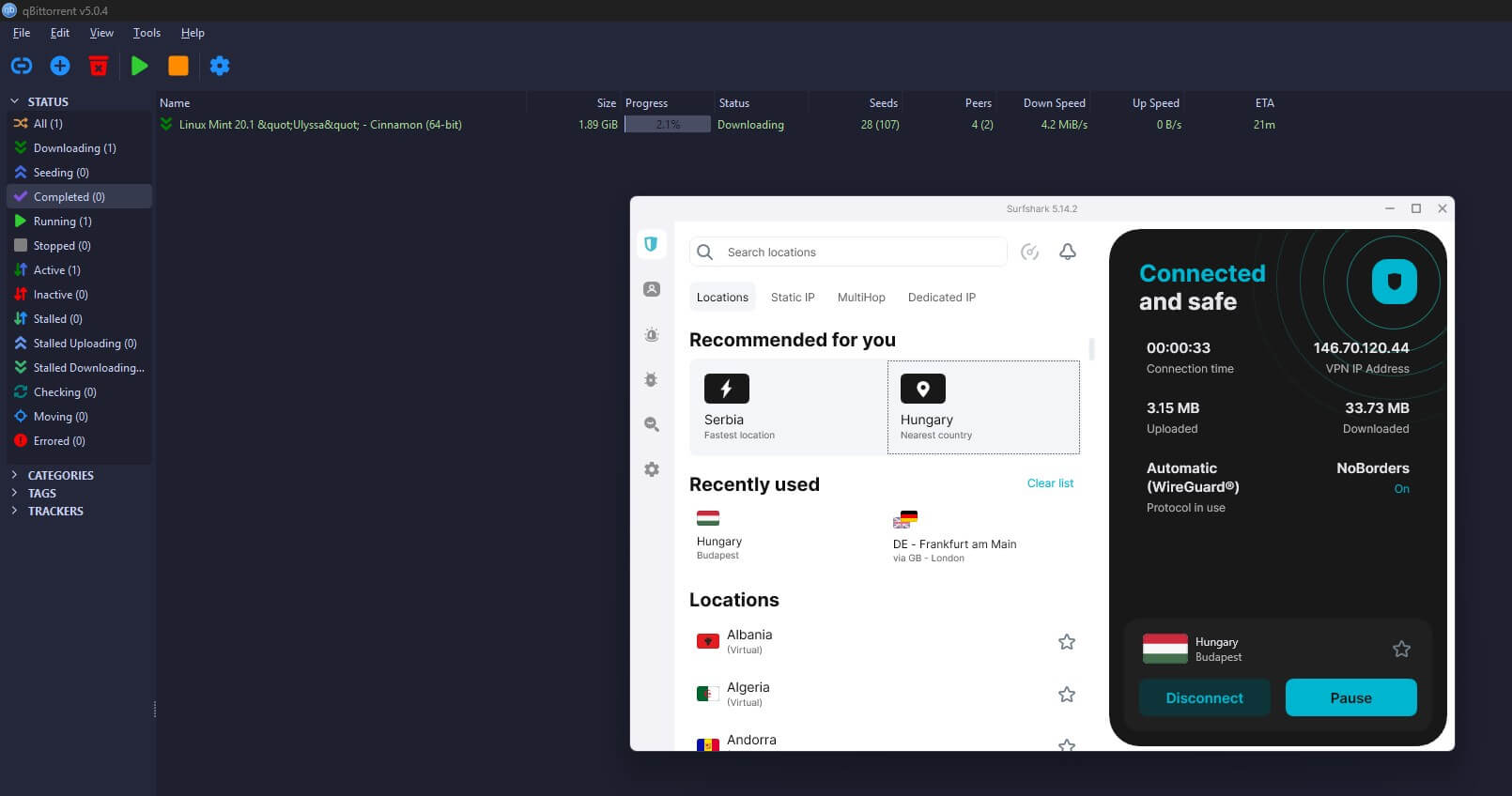
However, we must admit that ExpressVPN was a bit faster overall, which resulted in faster downloads and made it a better choice, generally speaking.
Who Wins?
Both providers are P2P-friendly, and you can use them to download torrents safely with no issues. However, since ExpressVPN offers faster torrenting speeds and has no issues with larger speed reductions, we can say that ExpressVPN WINS this round.
Are ExpressVPN and Surfshark Working in China?
Users in China have to deal with daily censorship and website blocks that ruin the overall internet experience in the country. The Great Firewall of China is notorious not only for harsh censorship measures but also for blocking VPN websites and apps.
This means that it’s tricky to find a VPN that’s working in China, whether we’re talking about free or paid providers. As some of the best providers around, ExpressVPN and Surfshark promise a lot when it comes to bypassing censorship in a country like this.
But are these promises delivered?
The good news is that the answer is positive in both cases! Surfshark has the aforementioned NoBorders mode, which, when enabled, masks your VPN traffic to make it appear like regular traffic. As such, it lets you bypass deep-packet inspection in China and use it in the country normally.
Our acquaintances in this country tested Surfshark on numerous occasions with above-average success and very few issues in certain regions. On average, let’s say that the providers work in the country 6/10 times, which is an impressive result for a cheap VPN provider.
ExpressVPN, on the other hand, has no special modes for bypassing censorship. Once again, connecting to a server using the Automatic protocol selection seems to do the job. Our testers had very few issues with it, regardless of the server they used.
The tests showed that ExpressVPN worked 7/10 times in the country, even providing decent performance despite all the obfuscation needed to make it work. Surfshark and its average performance won’t provide an equally smooth experience in China, so keep that in mind before using it.
Who Wins?
Since both providers in our Surfshark vs ExpressVPN duel work in China, we can say it’s a draw here. However, one provider that is more consistent and offers better performance in this country is ExpressVPN, which WINS this round of comparison.
Surfshark vs ExpressVPN Server Fleets: Which One Is Bigger?
If you’re looking to bypass geo-restrictions and find servers close to you for fast downloads, having a big and well-distributed server fleet is a must. Do these providers fulfill these criteria? Let’s find out.
Surfshark (3,200 servers in 100 countries)

Surfshark used to be a small provider back in the day, with just above 1,500 servers in 60 or so countries. Nowadays, we’re talking about a highly developed company with servers branching in 100 countries globally, which is surely an impressive number.
Not to mention that you get 3,200+ servers around the globe, which, although a lot less than CyberGhost, is still more than enough. Surfshark also offers Multihop servers and more than a dozen dedicated IP locations, which help sidestep CAPTCHA puzzles and ensure better privacy.
MultiHop servers are pairs of two servers through which your connection is routed. As a result, you double your encryption and make your online activities completely untraceable by your ISP, snoopers, or hackers. In addition, you get Static IP servers in Germany, Japan, the Netherlands, the UK, and the US.
Aside from that, the provider’s server distribution is excellent. It uses mostly physical servers, but you get virtual servers in less popular countries like Bolivia, Ecuador, and the Isle of Man.
ExpressVPN (3,000+ servers in 105 countries)

ExpressVPN’s server fleet is almost identical to that of its rival. I mean, you get 3,000+ servers in 105 countries, which is a bit less than Surfshark, although you get servers in five more countries. On top of that, the provider doesn’t have any specialty servers, which, once again, isn’t a problem, as it’s equally functional.
The server distribution of this provider is excellent, as you can guess. After all, it has servers in 160+ worldwide locations, so the most popular locations are covered with fast-speed servers. The server network comprises 10 Gbps servers, too. These are the fastest servers you can currently use.
We’re sure they’ll upgrade to 20 Gbps in the near future. Most of ExpressVPN’s servers are based in the US and Europe, although its coverage in Canada, Japan, Germany, and France is great. Moreover, it has servers in Africa too. Both VPNs are great for the UAE, Qatar, Saudi Arabia, and similar countries.
Who Wins?
Despite being a close call, Surfshark has 200 additional servers (but ExpressVPN has five more countries), with MultiHop and Static IP servers that ExpressVPN doesn’t have, which makes Surfshark a WINNER of this round.
Customer Support: Surfshark or ExpressVPN?
Customer support of premium VPNs tends to have this premium status as well. Except for Proton VPN, which has lukewarm customer support, ExpressVPN and Surfshark are the polar opposite.
Both providers give you 24/7 support through live chat, as well as email support if you’re not in a hurry. Furthermore, both providers offer FAQ sections and help centers that will let you fix certain issues without having to contact support.
In practice, we found ExpressVPN’s support to be a bit faster to respond, and when using live chat, you’ll get a response in less than 20 seconds on average. Surfshark is a tad slower but equally helpful, so I’m sure you won’t mind a few-second difference in this regard.
Another thing to mention is activity on social media. Both providers are very active, with Surfshark offering three YouTube channels that focus on education and useful tutorials. ExpressVPN has one channel with more than 48k subscribers and useful tutorials and short videos, too.
Who Wins?
The conclusion is rather simple, as the two providers have top-grade customer support that’s both responsive and helpful. Therefore, this round is a TIE.
Pricing Comparison: Which VPN Is More Affordable?
Before concluding this Surfshark vs ExpressVPN comparison, let’s quickly glance over their prices. After all, this is a deciding factor for users who have a limited budget, especially when we’re talking about two very different providers in terms of their pricing structure.
ExpressVPN
Let’s start with ExpressVPN this time. Here’s how much it costs:

Its cheapest deal is the 24-month plan with four free months that comes with a 73% discount compared to the monthly plan. In total, it’s $97.72 paid upfront, which is pretty affordable. The best-value offer is the Advanced plan at 67% off and $4.49 monthly for 28 months.

ExpressVPN’s annual plans are a tad pricier, but definitely not the most expensive, especially compared to Astrill VPN. Still, you’re looking at an introductory price of at least $4.99 monthly and up to $8.99 monthly for the Pro plan. We won’t examine monthly plans because they’re the priciest.
Surfshark
Surfshark’s subscription plans are equally numerous and structured similarly. It offers 2-year, 1-year, and monthly plans with three variants in total. Let’s start with the 2-year plans.

We can see three plans here. The cheapest is Starter, with a price of $1.99 a month. Then, there’s Surfshark One in the middle, costing slightly under $2.50. Finally, the costliest option is Surfshark One + at $3.99 a month. As said, the middle plan offers antivirus, email scanners, and a few other advanced tidbits.
One + offers the option to wipe your personal info from the databases of third-party companies, but only in a few selected countries. So far, Surfshark is cheaper, but here are its annual plans.

Prices are a bit higher now, as expected. However, they’re still way lower than ExpressVPN. For instance, the most expensive plan on the right is nearly $6.10, whereas ExpressVPN’s most expensive annual plan is around $8.99 a month.
The Starter plan is surprisingly affordable at just around $3.20 a month, but the best deal for the annual variant is the One plan at a tad above $3.30 a month. Monthly plans are here as well, but we won’t give them too much attention because they’re extremely expensive.
They’re priced from around $15 a month for the cheapest plan, all the way to $20 or so a month for the Surfshark One + deal. Paying monthly will surely make ExpressVPN a better VPN. But hey, who the hell would pay that much?! It’s better to get a long-term plan and save 60-80+ percent.
We haven’t mentioned it, but Surfshark also offers a 30-day refund policy. This applies to all nine plans, so even monthly plans are fully refundable. ExpressVPN has the same 30-day refund policy for all plans, making it risk-free to try if you’re so keen.
Who Wins?
If we’re talking solely about price and affordability, it’s easy to conclude that Surfshark WINS this round, as it offers much cheaper annual plans, plus 2-year plans that end up costing you way less in the long run. Simply put, if you’re looking to save more money, Surfshark is a no-brainer.
Conclusion: ExpressVPN Wins!
After an intense Surfshark vs ExpressVPN battle, there can only be one winner, and that’s ExpressVPN. ExpressVPN won with an overall score of 7:6, beating its rival in performance, torrenting, and bypassing censorship.
Surfshark held its ground in device compatibility, ease of use, customer support, security, privacy, and streaming. Also, it’s cheaper than ExpressVPN and offers slightly more servers, which some users will find more valuable.
Generally speaking, ExpressVPN is a better provider, and we recommend it if you’re not on a limited budget. However, if you’re looking to save money and you still want a high-quality provider, Surfshark is also a great option – even better than some more expensive providers like Proton VPN or Windscribe.
